
Framer · Launch Video Breakdown: Hook, Pacing & Motion Design
Ask the Framer Agent to add a chromatic aberration shader to any video for glass-like curvature and colorful dispersion.
Scene-by-scene timeline & spoken transcript
The Hook
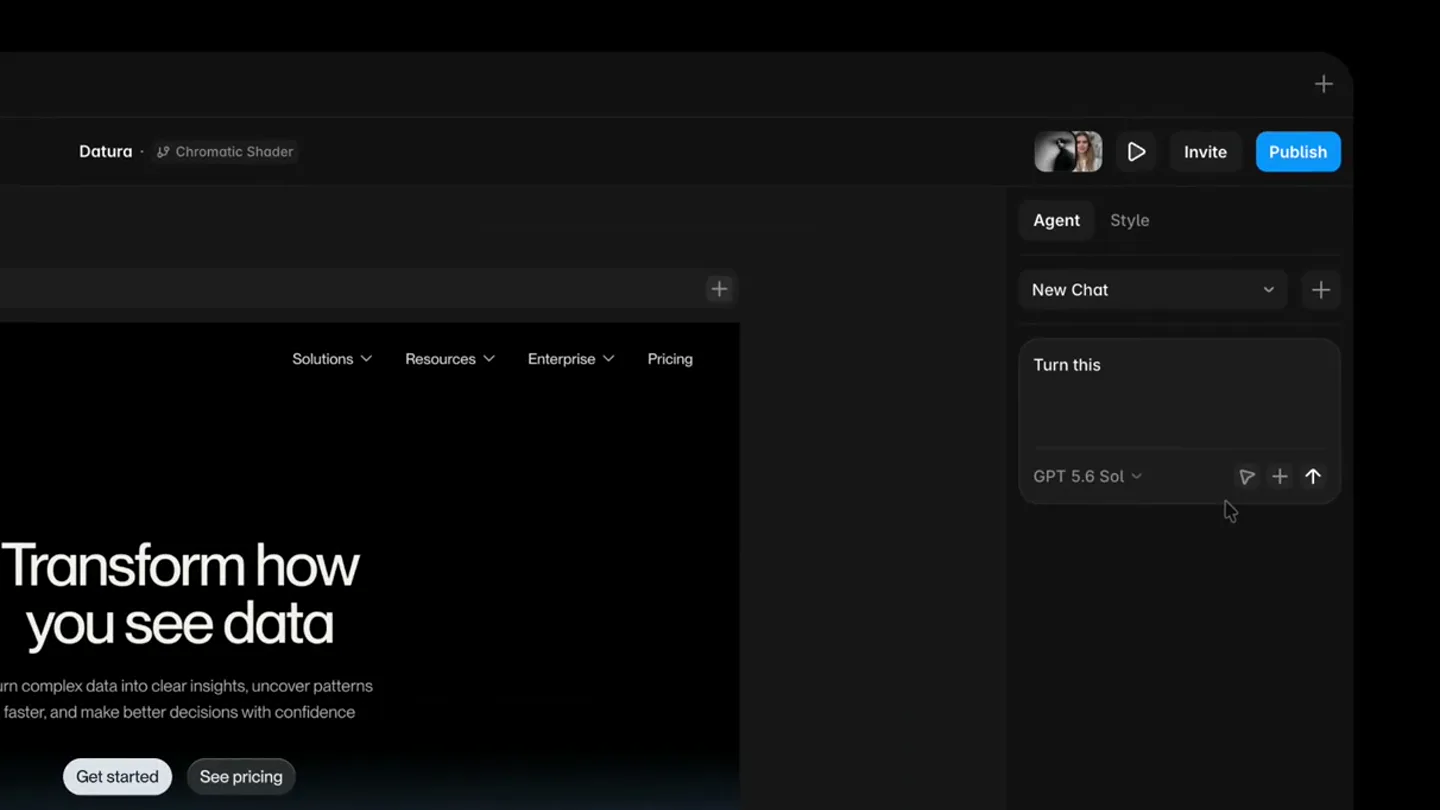
AI Agent Introduction & Interface Reveal
“(No spoken dialogue — High-energy audio transition with riser and sweep leading into the main theme.)”
- On screen
- Framer Datura Chromatic Shader Agent Style New Chat Ask Framer... GPT 5.6 Sol Pages Layers Assets Home Search... Desktop Navbar Hero Section Texts Buttons Video Our Story Desktop 1200 Datura Solutions Resources Enterprise Pricing Transform how you see data Turn complex data into clear insights, uncover patterns faster, and make better decisions with confidence Get started See pricing 69%
- Camera
- Initial wide shot of the Framer UI, then a subtle zoom and pan to focus on the AI chat input.
- Motion
- Seamless UI animation, text typing simulation, subtle camera push-in.
Problem Agitation
User Prompt & AI Processing
“(No spoken dialogue — Ethereal and slightly mysterious pads build anticipation.)”
- On screen
- Turn this Video into a radial chromatic shader, with mouse interactivity and pulse animation Thinking
- Camera
- Camera remains focused on the AI chat input and the main canvas area.
- Motion
- Typing animation, 'Thinking' text reveal, subtle UI element shifts.
Product Reveal
Shader Application & Real-time Feedback
“(No spoken dialogue — Sub-bass drop/impact at 0:08, followed by the main theme with pizzicato synths and sub-bass.)”
- On screen
- Create Chromatic Shader Thought: 2.1s I'll convert the selected visual into an interactive radial chromatic treatment and verify it on the page. Applying the chromatic shader... Thought: 1.1s Reviewing changes Thought: 0.5s Converted the selected video into a radial chromatic shader with mouse interactivity and pulse animation. The original placement, dimensions, and gradient mask were preserved. Changes Home 2 layers Interactive Chromatic...
- Camera
- The camera subtly zooms out to reveal the full canvas as the shader is applied.
- Motion
- Real-time visual effect application, UI feedback animations, smooth transition from 'Thinking' to 'Applying' states.
Feature Teaser
Interactive Chromatic Shader Demonstration
“(No spoken dialogue — Main theme continues with pizzicato synths, sub-bass, and atmospheric pads.)”
- On screen
- Framer Datura Desktop 1200 822 Solutions Resources Enterprise Pricing Transform how you see data Turn complex data into clear insights, uncover patterns faster, and make better decisions with confidence Get started See pricing Invite Publish
- Camera
- The camera focuses on the interactive canvas, following the mouse cursor's movement.
- Motion
- Mouse-driven interactive shader effect, subtle pulse animation on the visual elements, dynamic chromatic aberration.
Call to Action
Brand Logo Reveal
“(No spoken dialogue — Audio fades out with a lingering pad.)”
- On screen
- (No on-screen text)
- Camera
- Quick cut to a static shot of the Framer logo on a black background.
- Motion
- Hard cut, static logo display.
Motion design primitives
Synthesizable in Remotion · key components of the ai-code-refactor-flow template.
AIChatTypingReveal
Simulates real-time typing in a chat interface, with text appearing character by character, followed by a 'Thinking' state and subsequent AI response generation.
+ Code construction recipe
Use `Sequence` and `spring` for character-by-character text reveal. Implement `interpolate` for opacity and scale transitions for the 'Thinking' and response blocks. Utilize `delay` for realistic typing pauses.
InteractiveChromaticShader
Applies a dynamic chromatic aberration effect to a visual element, which responds to mouse movement with glass-like curvature and colorful dispersion, accompanied by a subtle pulsing animation.
+ Code construction recipe
Implement a custom WebGL shader or SVG filter for chromatic aberration. Use `useCurrentFrame` and `map` to link mouse coordinates (or simulated coordinates) to shader parameters. Apply `spring` or `interpolate` for the pulse animation on the affected element's scale or opacity.
UIContextualZoom
A subtle camera zoom and pan that guides the viewer's attention to specific interactive elements within a larger UI, enhancing focus on key actions or results.
+ Code construction recipe
Animate `transform: scale` and `transform: translate` on the root UI component. Use `spring` for smooth, organic camera movements. Define keyframes for different focus points (e.g., chat input, canvas area).
Style DNA & aesthetic system
Visual aesthetic
Typography
Motion
Special effects
Pacing & rhythm
Conceptual story rhythm
- 1
The AI Prompt
Purpose. Introduce the core interaction model: natural language commands for complex creative tasks.
Execution. Show a user typing a detailed prompt into an AI chat interface, highlighting the ease of use.
- 2
The Transformation
Purpose. Demonstrate the AI's ability to instantly convert abstract commands into tangible visual effects.
Execution. A 'Thinking' state followed by a dramatic, real-time application of the chromatic shader to a pre-existing visual.
- 3
The Interaction
Purpose. Showcase the dynamic and interactive nature of the generated effect, emphasizing control and responsiveness.
Execution. Mouse cursor interacting with the newly applied shader, revealing its responsive, glass-like properties and pulse.
- 4
The Brand Mark
Purpose. Conclude with strong brand recognition and a sense of innovation.
Execution. A clean, impactful reveal of the Framer logo, reinforcing the company behind the technology.
Remix in Animatiq Studio
Master remix prompt · agent-ready
Sample remix
Objective
A user wants to refactor a complex JavaScript function into a more optimized, readable version using an AI agent.How the recipe adapts
The AI chat interface remains, but the prompt now describes code refactoring. Instead of a chromatic shader, a 'code flow' visualization appears on the canvas, showing lines of code dynamically reorganizing, simplifying, and highlighting optimized sections with a subtle, glowing effect. Mouse interaction could reveal different refactoring suggestions or highlight performance gains. The overall dark UI and smooth transitions are preserved, focusing on the elegance of code transformation.Remix blueprint · ai-code-refactor-flow
Scene durations (5 scenes, 22s)
Key Remotion components
Related Creative Tools Product Launches
Explore all Creative Tools launches →
A vibe design partner with an AI-native canvas for turning ideas into UI.

We heard you wanted to use Codex rate limit resets on your own time. Starting today, we’re rolling out the ability to save rate limit resets to use later. We’re starting Go, Plus, Pro, and Business
There's a hidden tax on every knowledge worker in the world, and nobody talks about it: The design tax. You're a strategist, a sales lead, a marketer. You were hired for what you know. But every me…