
Framer · Launch Video Breakdown: Hook, Pacing & Motion Design
A Framer Agent walkthrough from first prompt to a published site: give it context, generate the page, refine on the canvas, then review and publish.
Scene-by-scene timeline & spoken transcript
The Hook
Framer Agent Intro & Brand Reveal
“(No spoken dialogue — A quick, high-energy synth riser and sweep culminates in a sub-bass drop, followed by a modern electronic beat.)”
- On screen
- (No on-screen text)
- Camera
- Extreme close-up on UI element, then a quick cut to a glowing abstract logo, followed by a medium shot of the presenter.
- Motion
- Rapid cuts, glowing line animation, quick zoom out.
Product Reveal
AI-Powered Site Generation
“Hey everyone, today I'm going to show you how to build a complete website from a blank project using Framer Agents. We'll start by giving it some context, then generate the page, refine it on the canvas, and finally review and publish. Let's dive in.”
- On screen
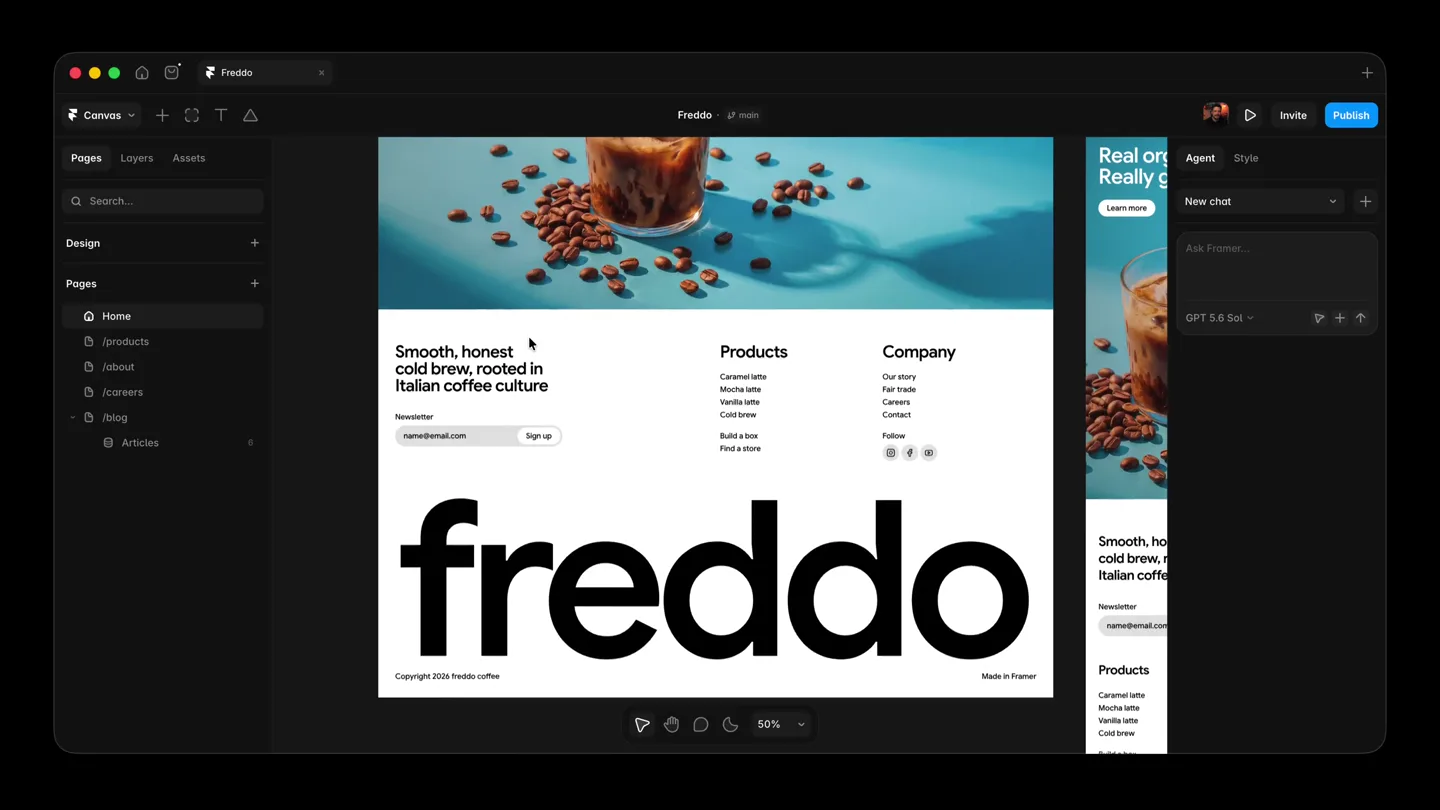
- freddo mocha latte
- Camera
- Alternates between a medium shot of the presenter and a full-screen view of the Framer UI, with occasional close-ups on specific UI elements.
- Motion
- Seamless transitions between presenter and screen, UI elements highlight with subtle glows and zooms, content generation animated with text appearing dynamically.
Feature Teaser
Refinement & Responsiveness
“Once the initial site is generated, we can easily refine it. Notice how the agent automatically creates responsive layouts for desktop, tablet, and phone. We can then make visual edits directly on the canvas, like adjusting text gradients or swapping images. The agent understands context and applies changes intelligently across all breakpoints.”
- On screen
- freddo Cold brew, warm feelings Mocha latte joins the lineup Born from a love of coffee Four flavors, endless chill Cold brew Vanilla latte Mocha latte Caramel latte Organical Learn more
- Camera
- Primarily screen capture, with dynamic panning and zooming within the Framer UI to showcase responsive design and editing features. Occasional cuts back to the presenter for emphasis.
- Motion
- Smooth camera moves within the UI, animated UI interactions (clicks, drags), content updates with subtle fades and shifts, multi-device preview animation.
Call to Action
Review, Publish & Beyond
“After refining the design, the agent helps us audit the site for any inconsistencies or broken links. Once everything looks perfect, publishing is just a click away. You can choose a Framer subdomain or connect your own. Framer Agents make the entire web creation process incredibly efficient and enjoyable.”
- On screen
- freddo Desktop Tablet Phone Cold brew, warm feelings The fan favorites, best served cold Organically grown. Exceptionally brewed. Base URL https://gorgeous-turtle-187691.framer.app Status READY Version Latest Updated 1m ago by Justin Jones Custom Get a free Framer subdomain Instantly connect a customized domain for free Connect an existing domain Connect a domain purchased through a web hosting service Canonical Set up a Canonical URL when using a Reverse Proxy for your site to specify the URL for search engines to index and avoid serving duplicate content. Learn more Default https://gorgeous-turtle-187691.framer.app Advanced Provide a custom URL to host the site behind a proxy
- Camera
- Focus on the Framer UI, demonstrating the audit and publishing flow. Close-ups on specific buttons and text fields. Final shot returns to the presenter for a concluding statement.
- Motion
- Guided UI walkthrough with animated clicks and text input, progress bar animations, subtle glow effects on interactive elements, smooth transition to publishing confirmation.
Motion design primitives
Synthesizable in Remotion · key components of the ai-design-tool-launch template.
DynamicUIHighlight
Interactive UI elements (buttons, text fields, selected layers) are highlighted with a subtle, pulsing glow or a quick, smooth border animation to draw attention to user actions or AI-generated changes.
+ Code construction recipe
Use `interpolate` for opacity and scale changes on a pseudo-element or border. Employ `spring` for a natural, bouncy feel on hover or click events. SVG filters can add a soft glow effect.
ResponsiveCanvasShift
The design canvas smoothly transitions between desktop, tablet, and phone views, often with a slight 3D rotation or a fluid resizing animation, showcasing the responsive capabilities.
+ Code construction recipe
Implement `interpolate` for `transform` properties (scale, rotateY, translateX) and `opacity` to create a seamless device-switching effect. Utilize `spring` for the final position and size to give it a natural feel.
ContentGenerationFlow
AI-generated text and images appear dynamically on the canvas, often with a subtle fade-in and scale-up effect, or a 'typing' animation for text, emphasizing the speed of content creation.
+ Code construction recipe
Combine `interpolate` for `opacity` and `scale` for images and blocks of content. For text, use a `sequence` of `Character` components with individual `spring` animations for a typewriter effect, or a `FadeIn` component for entire text blocks.
Style DNA & aesthetic system
Visual aesthetic
Typography
Motion
Special effects
Pacing & rhythm
Conceptual story rhythm
- 1
Introduction & Problem
Purpose. Hook the viewer and introduce the core challenge of website creation.
Execution. Rapid cuts, abstract logo reveal, then presenter introduces the problem and solution.
- 2
AI-Powered Creation
Purpose. Demonstrate the ease and speed of initial site generation using AI.
Execution. Full-screen UI walkthrough showing prompt input and instant content generation, with dynamic text and image appearance.
- 3
Refinement & Control
Purpose. Showcase the flexibility and detailed control users have over the AI-generated content.
Execution. Detailed UI interactions, responsive canvas shifts, and manual editing demonstrations with dynamic UI highlights.
- 4
Publishing & Impact
Purpose. Conclude by showing the final steps of publishing and the overall efficiency of the product.
Execution. Guided walkthrough of audit and publishing features, ending with a confident presenter statement.
Remix in Animatiq Studio
Master remix prompt · agent-ready
Sample remix
Objective
Launch a new AI-powered graphic design tool, 'CanvasFlow', that generates marketing assets from text prompts.How the recipe adapts
The CanvasFlow launch video would adapt the Framer Agent style by showcasing a dark mode interface with vibrant teal accents. The DynamicUIHighlight primitive would be used to emphasize AI prompt input fields and generated asset selection. The ResponsiveCanvasShift would demonstrate how CanvasFlow automatically adapts designs for social media, web banners, and print. The ContentGenerationFlow primitive would animate the rapid creation of various marketing assets like Instagram posts and ad creatives from a single text prompt. The presenter would guide viewers through the process, similar to the Framer video, with a modern electronic soundtrack.Remix blueprint · ai-design-tool-launch
Scene durations (5 scenes, 356s)
Key Remotion components
Related Creative Tools Product Launches
Explore all Creative Tools launches →
AI is already smart enough. Real-world tasks are still slow, expensive and unreliable, because we hand AI a computer built for humans, then wrap it in a heavy harness. AI doesn’t need to get smarter

Big day 🔥 🚀 Introducing Dolphin AI - an agentic AI studio for complete video production. The story of Dolphin is very interesting. It didn’t start as a product. It started as an internal tool. W

A vibe design partner with an AI-native canvas for turning ideas into UI.