
Chris Tate · Launch Video Breakdown: Hook, Pacing & Motion Design
Introducing Generative UI for Claude Code, Codex and Pi Charts, forms, 3D, anything Your agent renders real UI for users while it works in a sandbox Powered by AI SDK's experimental HarnessAgent +…
Scene-by-scene timeline & spoken transcript
The Hook
AI Agent UI Generation & Interaction
“(No spoken dialogue — ambient UI clicks and typing sounds)”
- On screen
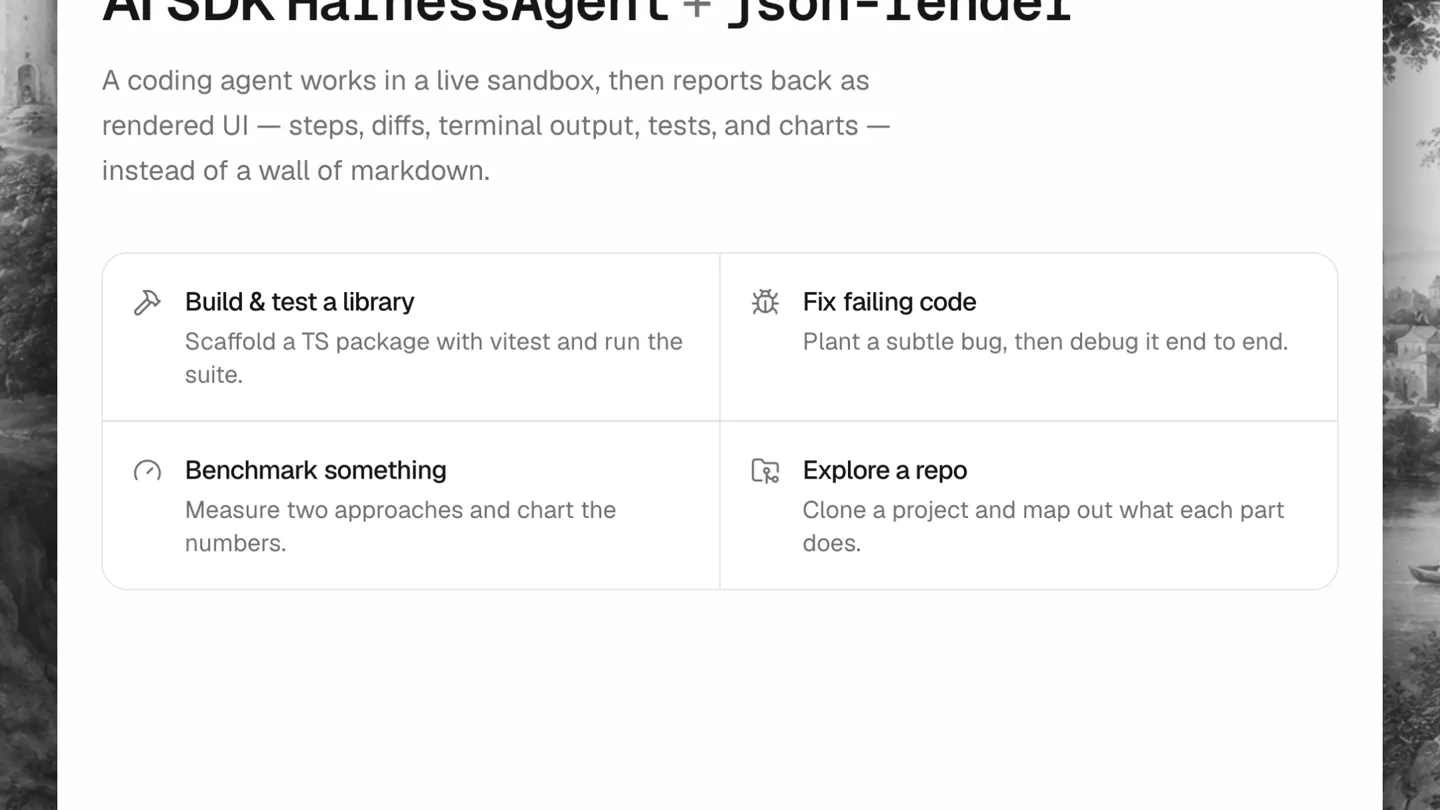
- AI SDK HarnessAgent + json-render A coding agent works in a live sandbox, then reports back as rendered UI — steps, diffs, terminal output, tests, and charts — instead of a wall of markdown. Build & test a library Scaffold a TS package with vitest and run the suite. Fix failing code Plant a subtle bug, then debug it end to end. Benchmark something Measure two approaches and chart the numbers. Explore a repo Clone a project and map out what each part does. Agent Claude Code Codex Pi Scaffold a TypeScript library and run its tests... extensive comparison
- Camera
- Static overhead view of a desktop application window, with a mouse cursor interacting with UI elements.
- Motion
- Simulated mouse clicks and typing animation, followed by a rapid UI transition/page load.
Product Reveal
Dynamic UI Generation for Code Comparison
“(No spoken dialogue — ambient UI loading sounds)”
- On screen
- Pi AI SDK HarnessAgent + json-render Start over extensive comparison of zig vs rust vs go Here is a detailed side-by-side comparison of Zig, Rust, and Go across key dimensions including performance, safety, ergonomics, ecosystem, and use cases. Ask a follow-up...
- Camera
- Static overhead view of the application, with the UI content dynamically populating.
- Motion
- Content reveal via a smooth scroll-down and fade-in effect, simulating an AI agent generating a detailed report.
Feature Teaser
In-depth Technical Comparison with Visualizations
“(No spoken dialogue — ambient UI scrolling and content loading)”
- On screen
- Pi AI SDK HarnessAgent + json-render Start over extensive comparison of zig vs rust vs go Here is a detailed side-by-side comparison of Zig, Rust, and Go across key dimensions including performance, safety, ergonomics, ecosystem, and use cases. Zig vs Rust vs Go — Language Comparison A deep technical comparison of three modern systems and general-purpose languages. Zig v0.13 — Maturing A low-level systems language focused on simplicity, explicitness, and C interoperability. No hidden control flow, no macros, no runtime. Rust v1.78 — Stable A deep technical comparison of three modern systems and general-purpose languages. Performance Relative CPU Performance Score (higher is better, out of 100) 98pts 97pts 82pts Zig Rust Go Zig: Direct control over memory layout, SIMD, and allocators. Comptime optimizations happen at compile time. No GC pauses, no hidden allocations. Benchmarks closely match hand-written C. Rust: Zero-cost abstractions and LLVM backend deliver C-comparable throughput. Ownership eliminates GC. Iterator chains and async futures compile to tight machine code. Go: GC pauses (typically sub-millisecond) and a simpler escape analysis can cost CPU cycles. Still fast for I/O-bound and networked workloads. Not ideal for hard real-time constraints. Memory and Type Safety Zig No Undefined Behavior (explicit) Manual memory management Safety is opt-in via debug/safe build modes. In ReleaseFast, bounds checks are off. Zig makes all unsafe operations visible and explicit — no hidden UB from language constructs. Rust Memory safe by default unsafe blocks required for raw ops The borrow checker enforces ownership at compile time. Use-after-free, data races, and dangling pointers are compile errors. 'unsafe' blocks are explicit and auditable. Go GC-managed memory Race detector (runtime) Developer Ergonomics and Learning Curve Learning Curve Difficulty (higher = harder, out of 10) 7/10 9/10 3/10 Zig Rust Go Zig Small spec, no macros, no generics syntax sugar — just comptime. Fewer concepts to learn but requires understanding of manual memory, allocators, and low-level data layout. Error handling with error unions is explicit but verbose. Rust Steepest learning curve of the three. Lifetimes, traits, the borrow checker, async/await complexity, and a large standard library all add cognitive load. Extremely expressive once mastered. Excellent tooling (rustfmt, clippy, cargo). Go Intentionally minimal. Most developers are productive within days. Opinionated formatting (gofmt), simple interfaces, and built-in toolchain. Lack of generics (until 1.18) historically limited reuse; generics now exist but are limited. Ecosystem and Tooling Zig Package manager: zig build (built-in) Ecosystem: small but growing Rust Package manager: Cargo + crates.io Ecosystem: large and mature Cargo is widely regarded as one of the best package managers in any language. crates.io hosts 150k+ crates. Strong presence in WebAssembly, embedded, CLI, and increasingly web backends (Axum, Actix). Go Package manager: Go modules Ecosystem: very large Dominant in cloud infrastructure and DevOps tooling (Docker, Kubernetes, Terraform, etc.). Extensive standard library covers HTTP, crypto, JSON, and more. Go modules are simple and reproducible. Concurrency Model Zig async/await (rewrite in progress) Zig 0.12 removed the original async/await system. The new model (Zig 0.14+) uses explicit event loops via the standard library. Threading is manual via std::Thread. No built-in scheduler — intentional for embedded use cases. Rust async/await + OS threads Fearless concurrency: the ownership system prevents data races at compile time. Async is stackless and runtime-agnostic (Tokio, async-std). OS threads via std::Thread. The async ecosystem is mature but complex. Go Goroutines + channels (CSP)
- Camera
- Continuous smooth vertical scrolling within the application window, revealing more detailed comparison sections.
- Motion
- Smooth scroll animation with content appearing progressively, using subtle fade-ins for new sections and bar chart fills.
Call to Action
Summarized Recommendations and Next Steps
“(No spoken dialogue — ambient UI scrolling and content loading)”
- On screen
- Pi AI SDK HarnessAgent + json-render Start over Goroutines + channels (CSP) Typical Hello World Binary Size (KB, smaller is better) 4KB 300KB 1900KB Zig (ReleaseSmall) Rust (release) Go (default) Primary Use Cases Zig Embedded / bare metal OS / kernel development Replacing C/C++ codebases Cross-compilation toolchain WebAssembly (tiny binaries) Rust Systems programming WebAssembly High-perf web backends CLI tools Embedded (no_std) Go Cloud-native services Microservices / APIs DevOps / infrastructure tools Network proxies Data pipelines When to Choose Each Choose Zig when... You need C-level control with a cleaner language design. You are targeting embedded or bare-metal platforms. You want to cross-compile effortlessly or integrate tightly with an existing C/C++ codebase. You prefer explicit over implicit at every level. Choose Rust when... Memory safety is non-negotiable and a GC is unacceptable. You are building high-concurrency services, security-critical software, or browser/OS components. You value a mature ecosystem and are willing to invest in the learning curve. Choose Go when... Developer velocity and team onboarding matter most. You are building networked services, APIs, or internal tooling. Your bottleneck is I/O, not raw CPU. You want a large standard library, fast builds, and a straightforward deployment story. Not mutually exclusive: Many production systems combine these: Go for orchestration Ask a follow-up...
- Camera
- Continued smooth vertical scrolling, revealing final sections of the report.
- Motion
- Smooth scroll animation, with a final green checkmark animation indicating a successful completion or summary.
Motion design primitives
Synthesizable in Remotion · key components of the ai-generative-ui-report template.
DynamicTypewriterInput
Simulates a user typing text into an input field, with a blinking cursor, followed by a rapid submission and UI transition.
+ Code construction recipe
Use `interpolate` for cursor opacity (blink effect) and `Sequence` for character-by-character text reveal. Trigger a `spring` animation for the subsequent UI element's scale/opacity on submission.
ProgressiveContentScroll
Smoothly scrolls a long document or report vertically, revealing new sections and data visualizations as it moves.
+ Code construction recipe
Implement a `scrollPosition` state and use `interpolate` to map it to `translateY` for the main content container. Use `spring` for individual section fade-ins and bar chart fills as they enter the viewport.
DataBarChartFill
Bar charts dynamically fill from bottom to top, often accompanied by a numerical value reveal.
+ Code construction recipe
Animate the `height` property of SVG rectangles or `div` elements using `spring` or `interpolate` with an `easeOutCubic` curve. Coordinate with `Sequence` to reveal associated text labels.
Style DNA & aesthetic system
Visual aesthetic
Typography
Motion
Special effects
Pacing & rhythm
Conceptual story rhythm
- 1
Interactive Prompt
Purpose. To immediately demonstrate the AI's interactive capability and ease of use.
Execution. Mouse cursor interaction with UI elements, typing animation, and selection of AI agents.
- 2
AI Generation
Purpose. To showcase the AI's ability to generate complex, structured UI content from a simple prompt.
Execution. Rapid transition from input to a fully rendered, detailed report UI.
- 3
Deep Dive & Analysis
Purpose. To highlight the depth and quality of the AI-generated content, including data visualizations.
Execution. Smooth, continuous scrolling through various sections of the report, revealing bar charts and detailed text comparisons.
- 4
Actionable Insights
Purpose. To emphasize the practical utility and decision-making support provided by the AI.
Execution. Scrolling to the 'When to Choose Each' section, with a final green checkmark confirming the comprehensive analysis.
Remix in Animatiq Studio
Master remix prompt · agent-ready
Sample remix
Objective
Launch a new AI-powered financial analysis platform called 'QuantIQ'.How the recipe adapts
The DynamicTypewriterInput primitive will be used for a user typing a financial query. The ProgressiveContentScroll will reveal a detailed financial report with stock performance charts and market trend summaries. The DataBarChartFill primitive will animate revenue and profit growth bars. The overall aesthetic will be adapted with a slightly more corporate color palette, but retaining the clean UI and fast-paced motion language.Remix blueprint · ai-generative-ui-report
Scene durations (4 scenes, 15s)
Key Remotion components
Related Creative Tools Product Launches
Explore all Creative Tools launches →
Anthropic Labs launches Claude Design, which turns conversation into prototypes, slides and one-pagers, powered by Claude Opus 4.7.

A vibe design partner with an AI-native canvas for turning ideas into UI.

Your work tools in Claude are now available on mobile. Explore Figma designs, create Canva slides, check Amplitude dashboards, all from your phone. Give it a try: