
GitHub · Launch Video Breakdown: Hook, Pacing & Motion Design
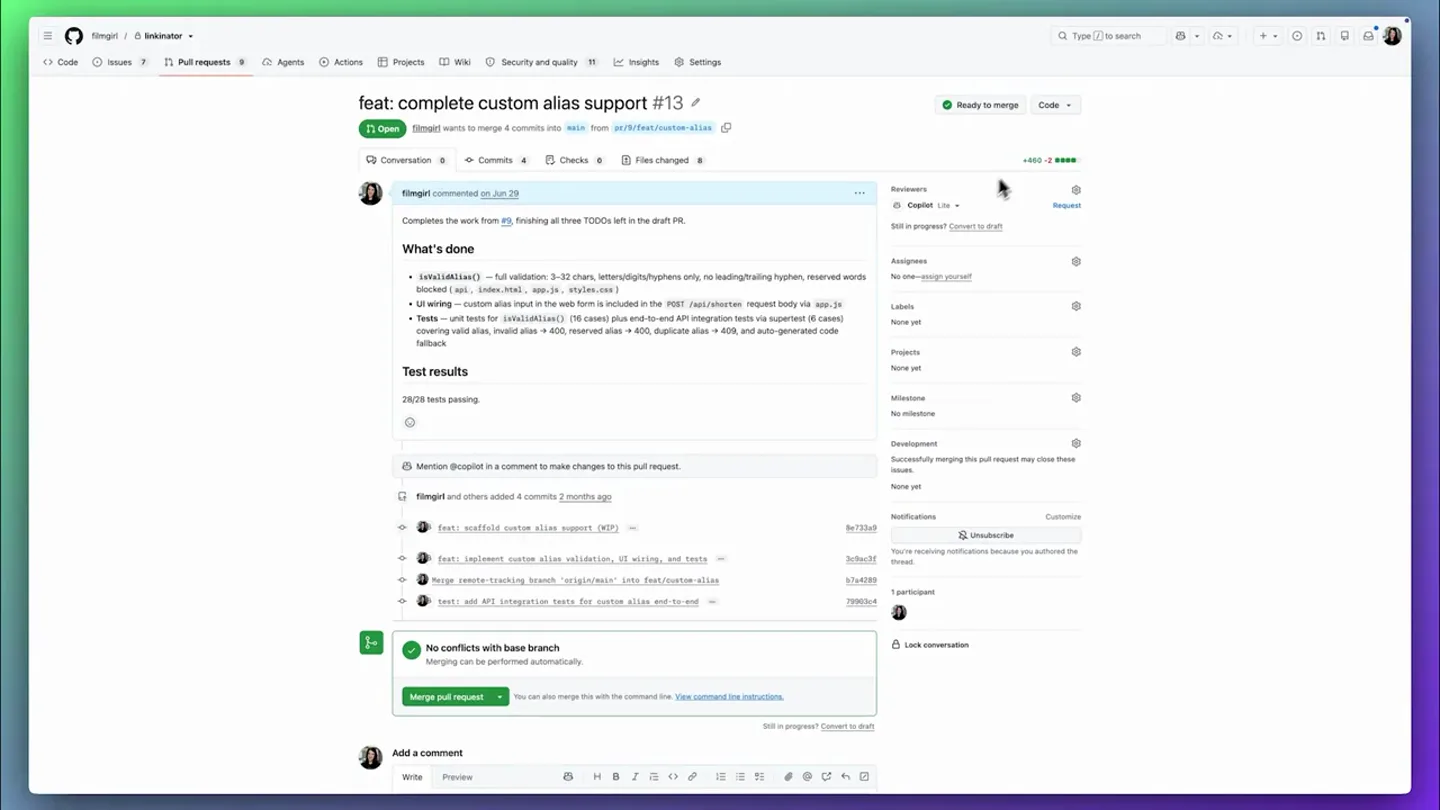
Copilot code review depth is now yours to choose. Balanced is generally available for deeper PR analysis; Lite stays for simple changes. Set the default at org or repo level.
Scene-by-scene timeline & spoken transcript
The Hook
Introducing Copilot Code Review Effort Levels
“Copilot code review depth is now yours to choose. Balanced is generally available for deeper PR analysis. Lite stays for simple changes.”
- On screen
- Copilot Lite, Copilot Balanced, Review requested, Merge pull request
- Camera
- Static screen capture of GitHub UI, with subtle mouse cursor movements highlighting UI elements.
- Motion
- UI element highlighting via mouse cursor, subtle pop-up animations for dropdown menus.
Product Reveal
Setting Effort Levels for Pull Requests
“You can set the effort level for a specific pull request by selecting the Copilot dropdown in the reviewers section. You can choose between Lite for efficient review and low cost, or Balanced for deep analysis and moderate cost. Max is coming soon for most thorough and high cost.”
- On screen
- Reviewers, Copilot Lite, Copilot Balanced, Lite: Efficient review, low cost, Balanced: Deep analysis, moderate cost, Max: Coming soon, Applies to this pull request for everyone.
- Camera
- Zoom-in on specific UI elements, followed by a pan to reveal dropdown options. Static screen capture with mouse interaction.
- Motion
- Smooth zoom and pan, dropdown menu reveal animation, mouse hover and click interactions.
Feature Teaser
Configuring Default Effort Levels
“You can also set the default effort level at the repository level. Navigate to your repository settings, then Copilot, and then code review. Here you can set the default review effort level for all pull requests in this repository. You can also set the default at the organization level.”
- On screen
- Settings, Copilot, Code review, Default review effort level, Default (Lite), Lite, Balanced, Max, Automate Copilot code reviews, Create ruleset for default branch
- Camera
- Sequential navigation through GitHub UI, with camera following the mouse cursor's path. Smooth transitions between different settings pages.
- Motion
- Sequential UI navigation, smooth page transitions, dropdown menu interaction, toggle switch animation.
Call to Action
Availability and Conclusion
“This feature is available for Copilot Pro, Pro+, Max, Business, and Enterprise plans. Try it out today.”
- On screen
- (No on-screen text)
- Camera
- Abstract graphic animation with a subtle camera push-in, followed by a fade to the GitHub logo.
- Motion
- Abstract shape animation, color transition, logo reveal with subtle glow.
Motion design primitives
Synthesizable in Remotion · key components of the github-copilot-review-breakdown template.
UIDropdownReveal
A UI dropdown menu smoothly expands from a clicked element, revealing a list of options with a subtle fade-in and slide-down effect.
+ Code construction recipe
Use `spring()` for the height and opacity of the dropdown container. Animate individual list items with `interpolate()` for `translateY` and `opacity` with a slight delay for a staggered effect.
MouseGuidedPanZoom
The camera smoothly zooms into a specific UI element and then pans across the screen, following the path of a mouse cursor as it navigates the interface.
+ Code construction recipe
Utilize `interpolate()` for `scale` and `translateX`/`translateY` properties of the main screen capture. Keyframe the mouse cursor's position and use `spring()` for its movement, ensuring it leads the camera's focus.
AbstractShapeTransition
Large, rounded rectangular shapes with varying shades of green and yellow slide across the screen, creating a dynamic wipe effect before transitioning to a solid background.
+ Code construction recipe
Employ `interpolate()` for `translateX` and `scale` of SVG or `div` elements with `borderRadius`. Use `stagger()` for multiple shapes to create a layered, sequential movement. Color changes can be animated with `interpolateColor()`.
Style DNA & aesthetic system
Visual aesthetic
Typography
Motion
Special effects
Pacing & rhythm
Conceptual story rhythm
- 1
Feature Introduction
Purpose. Introduce the core new functionality and its immediate benefit.
Execution. Direct UI demonstration of selecting 'Lite' vs 'Balanced' for a pull request, highlighting the immediate choice.
- 2
Detailed Explanation
Purpose. Elaborate on the options and their implications.
Execution. Zoom-in on the dropdown menu, showing the descriptions for 'Lite', 'Balanced', and 'Max' options.
- 3
Advanced Configuration
Purpose. Show how to set defaults and integrate the feature into workflows.
Execution. Guided navigation through repository and organization settings to configure default effort levels.
- 4
Availability & Brand Reinforcement
Purpose. Conclude with accessibility information and brand identity.
Execution. Abstract graphic transition leading to the GitHub logo, reinforcing brand presence.
Remix in Animatiq Studio
Master remix prompt · agent-ready
Sample remix
Objective
Launch a new 'Automated Testing Suite' feature for a CI/CD platform.How the recipe adapts
The video would start by demonstrating how to enable the 'Automated Testing Suite' for a specific pipeline. It would then zoom into the configuration options, explaining 'Fast Scan' versus 'Deep Analysis' modes. Next, it would show how to set these defaults at the project or organization level within the CI/CD platform's settings. Abstract transitions using the platform's brand colors would separate these sections, culminating in the platform's logo reveal.Remix blueprint · github-copilot-review-breakdown
Scene durations (4 scenes, 105.9s)
Key Remotion components
Related Developer Tools Product Launches
Explore all Developer Tools launches →
xAI opens voice cloning on its API: build a custom voice in about two minutes or pick from 80+ voices in 28 languages.

Claude can now operate your Mac, opening apps, browsing and filling spreadsheets, as a research preview in Cowork and Claude Code.

Agentic CLI for coding, building apps, and automating workflows.