
Google for Developers · Launch Video Breakdown: Hook, Pacing & Motion Design
Unlock local, agentic workflows with Gemma 4 12B and Google AI Edge, directly on your laptop. Experience 100% on-device AI: • Generate code in AI Edge Gallery (new to Mac) • Dictate and edit text v…
Scene-by-scene timeline & spoken transcript
The Hook
Offline Transcription & Voice Edit Intro
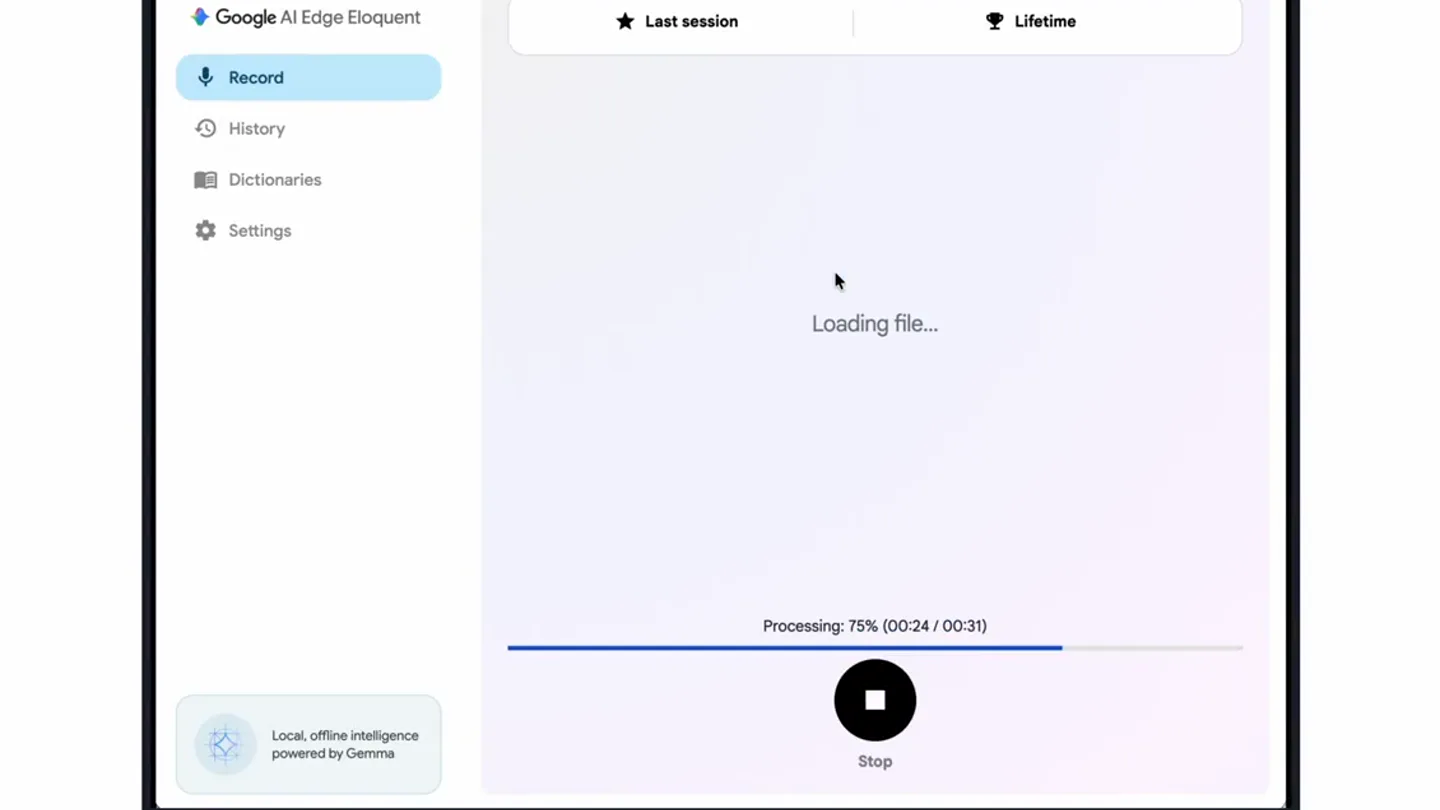
“I'm going to drop in a recording and use the voice edit feature. This is powered by the Gemma 4 12B model and works fully offline.”
- On screen
- Google AI Edge Eloquent Record History Dictionaries Settings Last session Lifetime Loading file... Processing: 69% (00:22 / 00:31) Stop Local, offline intelligence powered by Gemma Text copied to clipboard! 81 words 158 wpm 2232 words 144 wpm Cleaned up text We are excited to showcase the new Gemma 4 12B unified model in Google AI Edge eloquent. Gemma 4 12B delivers performance nearing our larger 26B A4B model on standard benchmarks, but is small enough to run locally on consumer laptops with 16 GB of RAM. If you meet the minimum system requirements, you can download this model in your eloquent app on Mac OS to supercharge your experience. The model really shines for the new voice edit feature, now in beta. Is this what you meant to say? Original text Polish Key points Formal Short Long + Transcribe File Record Voice Edit Beta Edit Text With Voice Beta Powered by Gemma 4 12B Unified Initializing... Try: "Turn into bullet points"; "Remove the sentence about..."; "Translate to Hindi" Cancel Save Edit Beta Works fully offline Mic Turn on mic to dictate editing command (e.g. "make it shorter")
- Camera
- Static overhead shot of a laptop screen, with UI elements animating within the screen.
- Motion
- UI element reveals, text typing simulation, progress bar animation, and modal pop-ups.
Feature Teaser
Dynamic Text Editing with Voice Commands
“Make it more exciting. I tone it down and turn it into bullet points.”
- On screen
- Edit Text With Voice Beta Powered by Gemma 4 12B Unified Get ready to experience the power of the new Gemma 4 12B unified model, now live in Google AI Edge eloquent! Gemma 4 12B punches way above its weight, delivering performance that rivals our massive 26B A4B model on standard benchmarks—all while remaining lean enough to run locally on consumer laptops with just 16 GB of RAM. If you have the hardware, grab the model for your eloquent app on Mac OS and supercharge your workflow instantly. It's a game-changer for the new voice edit feature, currently in beta! Make it more exciting. Mic Turn on mic to dictate editing command (e.g. "make it shorter") Try: "Turn into bullet points"; "Remove the sentence about..."; "Translate to Hindi" Cancel Save Edit Beta I tone it down and turn it into bullet points. * Gemma 4 12B is now available in Google AI Edge. * The model offers high performance comparable to the 26B A4B model while remaining efficient enough to run locally on laptops with 16 GB of RAM. * The model is available for Mac OS to enhance your workflow. * It is currently being used to power the new voice edit feature, which is now in beta.
- Camera
- Static overhead shot of a laptop screen, with UI elements animating within the screen.
- Motion
- Real-time text generation, voice input visualization (waveform), and dynamic text reformatting.
Feature Teaser
Email Drafting & Multi-language Translation
“Draft an email to our Google Developers community with this content. Translate this to Hindi.”
- On screen
- Edit Text With Voice Beta Powered by Gemma 4 12B Unified * Gemma 4 12B is now available in Google AI Edge. * The model offers high performance comparable to the 26B A4B model while remaining efficient enough to run locally on laptops with 16 GB of RAM. * The model is available for Mac OS to enhance your workflow. * It is currently being used to power the new voice edit feature, which is now in beta. Make it more exciting. I tone it down and turn it into bullet points. Draft an email to our Google developers community with this content. Mic Turn on mic to dictate editing command (e.g. "make it shorter") Try: "Turn into bullet points"; "Remove the sentence about..."; "Translate to Hindi" Cancel Save Edit Beta Subject: Announcing Gemma 4 12B: High-Performance AI for Local Development Dear Developer Community, We are thrilled to announce that Gemma 4 12B is now available in Google AI Edge! This release marks a significant milestone in balancing power and Gemma 4 12B delivers high performance comparable to the 26B A4B model, yet it is optimized to run locally on laptops with 16 GB of RAM. To further support your development workflow, the model is now available for Mac OS. Thinking Process Translate this to Hindi. विषय: Gemma 4 12B की घोषणा: स्थानीय विकास के लिए उच्च-प्रदर्शन वाला AI प्रिय डेवलपर समुदाय, हमें यह घोषणा करते हुए बेहद खुशी हो रही है कि Gemma 4 12B अब Google AI Edge में उपलब्ध है। यह रिलीज़ शक्ति और दक्षता के बीच संतुलन बनाने में एक महत्वपूर्ण मील का पत्थर है। Gemma 4 12B, 26B A4B मॉडल के बराबर उच्च प्रदर्शन प्रदान करता है, फिर भी इसे 16 GB RAM वाले लैपटॉप पर स्थानीय रूप से चलाने के लिए अनुकूलित किया गया है। आपके विकास वर्कफ़्लो को और अधिक सहायता देने के लिए, यह मॉडल अब Mac OS के लिए भी उपलब्ध है। अपनी स्थानीय सुगमता के अलावा, Gemma 4 12B पहले से ही इसमें नवीनतम नवाचार को शक्ति प्रदान कर रहा है, नई वॉइस एडिट सुविधा, जो वर्तमान में बीटा में है।
- Camera
- Static overhead shot of a laptop screen, with UI elements animating within the screen.
- Motion
- Real-time email generation, text highlighting for edits, and seamless language translation.
Motion design primitives
Synthesizable in Remotion · key components of the ai-edge-eloquent-ui-showcase template.
UIMockupTyping
Simulates real-time text input and editing within a UI, including character-by-character typing, deletions, and reformatting based on voice commands. Highlights text sections for modifications.
+ Code construction recipe
Use Remotion's `Sequence` and `AbsoluteFill` for UI layout. Implement text typing with `useCurrentFrame` and `interpolate` to reveal characters over time. For edits, use `spring` for smooth transitions between text states and `measureText` for dynamic text layout. Highlighted text can be achieved with `LinearGradient` or `BoxShadow` on `Text` components.
VoiceCommandWaveform
A subtle, responsive waveform visualization appears when voice commands are being processed, indicating active listening or processing. It's integrated directly into the UI.
+ Code construction recipe
Create a custom `Canvas` component or use `Path` elements within an `Svg` to draw the waveform. Animate the waveform's amplitude and frequency using `useCurrentFrame` and `noise` functions to simulate organic audio input. Use `interpolate` for smooth fade-in/out.
ModalContextualReveal
New UI elements or modals smoothly slide in or fade in from the top or bottom, often with a slight bounce, to introduce new features or contextual information without abrupt cuts.
+ Code construction recipe
Utilize `AbsoluteFill` for the modal container. Animate its `transform` (translateY) and `opacity` properties using `spring` for a natural, bouncy feel. Ensure z-index management for proper layering. `OffthreadVideo` can be used for background UI elements if needed.
Style DNA & aesthetic system
Visual aesthetic
Typography
Motion
Special effects
Pacing & rhythm
Conceptual story rhythm
- 1
Initial Setup & Processing
Purpose. Introduces the core functionality of transcribing and processing audio locally.
Execution. Laptop screen showing file loading, progress bar, and initial transcription output.
- 2
Voice-Activated Editing
Purpose. Demonstrates the product's unique voice-driven text manipulation capabilities.
Execution. Voice commands being spoken, text dynamically reformatting, and content being made 'more exciting' or 'toned down'.
- 3
Structured Content Generation
Purpose. Highlights the ability to transform unstructured text into structured formats like bullet points.
Execution. Text instantly converting into a bulleted list based on a voice command.
- 4
Advanced AI Workflows
Purpose. Showcases complex, multi-step AI tasks like drafting emails and translating languages.
Execution. Email being drafted in real-time, followed by a full translation of the content into Hindi.
Remix in Animatiq Studio
Master remix prompt · agent-ready
Sample remix
Objective
A new AI-powered code refactoring and documentation tool for Python developers.How the recipe adapts
The video would open with a Python script loading into an IDE on a laptop. The UIMockupTyping primitive would show the AI analyzing the code, suggesting refactors, and then automatically applying them. The VoiceCommandWaveform would appear as the developer dictates 'add docstrings to all functions' or 'optimize this loop'. The ModalContextualReveal would introduce a new feature showing a generated README.md file based on the codebase, all within the same static laptop view, maintaining the clean UI and smooth transitions.Remix blueprint · ai-edge-eloquent-ui-showcase
Scene durations (4 scenes, 100s)
Key Remotion components
Related Developer Tools Product Launches
Explore all Developer Tools launches →
xAI opens voice cloning on its API: build a custom voice in about two minutes or pick from 80+ voices in 28 languages.

Claude can now operate your Mac, opening apps, browsing and filling spreadsheets, as a research preview in Cowork and Claude Code.

Agentic CLI for coding, building apps, and automating workflows.