
Chetaslua · Launch Video Breakdown: Hook, Pacing & Motion Design
HOLLLLY SHIIIIIT GPT 5.5 xhigh in codex made this paper physics website with wind effect one shot check the physics , ui and interaction @sama you guys cooked and this is my first time i can sugges…
Scene-by-scene timeline & spoken transcript
The Hook
Interactive Cloth Lab Introduction
“(No spoken dialogue — The audio track features an ambient electronic score with a strong emphasis on sound design. It begins with a sustained, ethereal pad, gradually introducing a rhythmic, pulsing synth bass and a subtle, high-frequency arpeggiated synth. At [0:07], a distinct sub-bass drop/impact occurs, followed by a build-up with a rising synth sweep and a percussive hit at [0:10].)”
- On screen
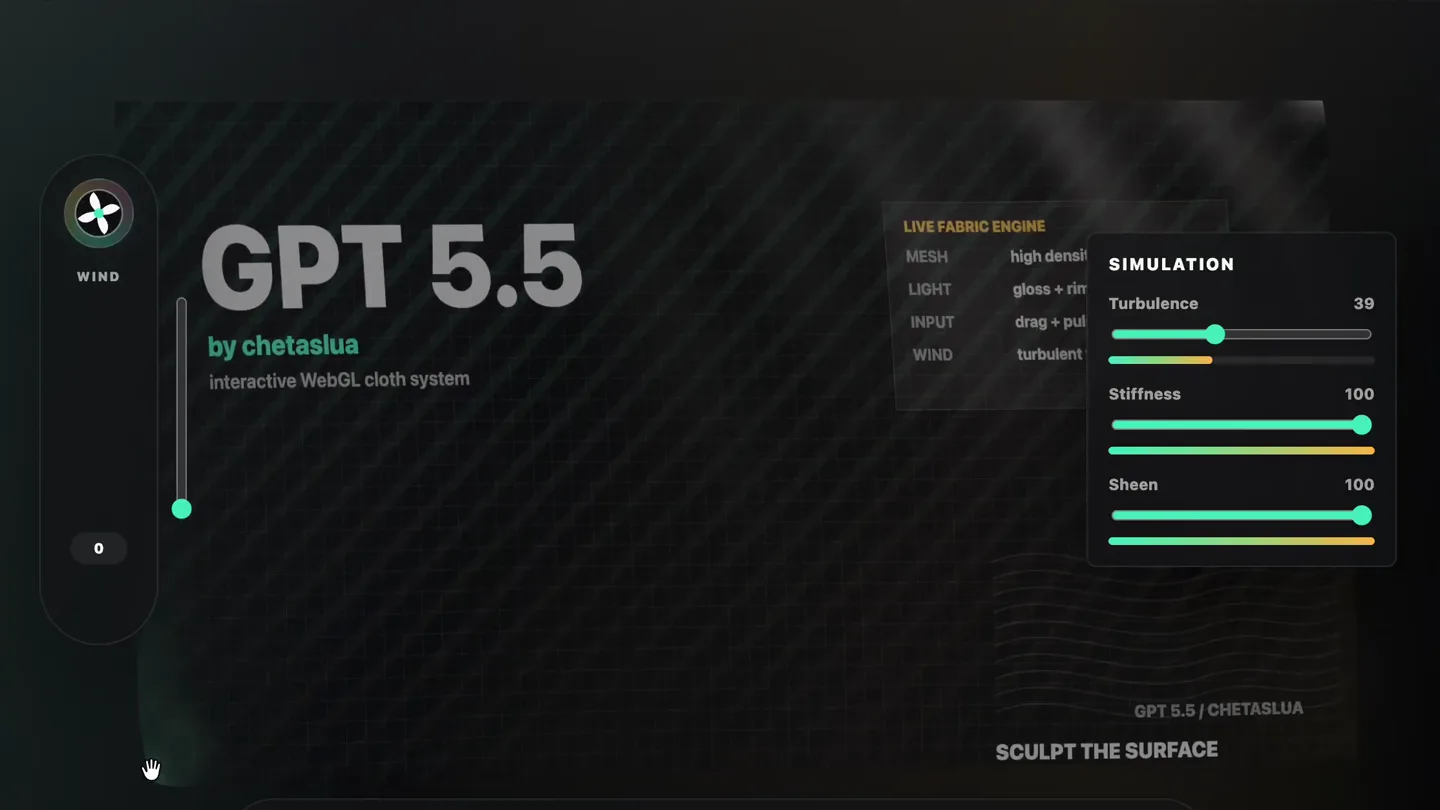
- INTERACTIVE CLOTH LAB GPT 5.5 by chetaslua SHOWCASE PHYSICS TEXTURE CONTROLS 60 FPS 2304 PTS WIND GPT 5.5 by chetaslua interactive WebGL cloth system LIVE FABRIC ENGINE MESH high densi LIGHT gloss + rim INPUT drag + pul WIND turbulent SIMULATION Turbulence 39 Stiffness 100 Sheen 100 GPT 5.5 | CHETASLUA SCULPT THE SURFACE GPT 5.5 KINETIC BANNER Grab any fold, tune the wind field, or send a pressure pulse through the cloth. PULSE
- Camera
- Static, wide shot of the interactive UI. The camera subtly zooms in and out, and pans slightly to follow cursor interactions.
- Motion
- UI element highlighting, slider manipulation, and real-time cloth simulation response. Cursor interaction is emphasized with a glowing ring.
Product Reveal
Dynamic Cloth Physics Demonstration
“(No spoken dialogue — The track continues with a driving, rhythmic synth pattern, layered with atmospheric pads and occasional metallic percussive elements. Another significant sub-bass drop/impact is heard at [0:20], leading into a more intense section with a faster rhythmic pulse and a high-energy synth riser culminating in a powerful impact at [0:22].)”
- On screen
- INTERACTIVE CLOTH LAB GPT 5.5 by chetaslua SHOWCASE PHYSICS TEXTURE CONTROLS 60 FPS 2304 PTS WIND GPT 5.5 by chetaslua interactive WebGL cloth system LIVE FABRIC ENGINE MESH high densi LIGHT gloss + rim INPUT drag + pul WIND turbulent SIMULATION Turbulence 0 Stiffness 48 Sheen 55 GPT 5.5 | CHETASLUA SCULPT THE SURFACE GPT 5.5 KINETIC BANNER Grab any fold, tune the wind field, or send a pressure pulse through the cloth. PULSE
- Camera
- The camera remains largely static, focusing on the interactive canvas. Subtle shifts in perspective occur as the cloth simulation reacts to user input.
- Motion
- Real-time physics simulation of cloth, responsive UI sliders, and interactive 'pulse' effect. The cloth deforms and reacts dynamically to simulated wind and user input.
Feature Teaser
Advanced Texture and Control Options
“(No spoken dialogue — The intensity then subsides slightly, maintaining a rhythmic synth bed. A final, pronounced sub-bass drop/impact occurs at [0:30], followed by a sustained, evolving synth texture that gradually fades out.)”
- On screen
- INTERACTIVE CLOTH LAB GPT 5.5 by chetaslua SHOWCASE PHYSICS TEXTURE CONTROLS 60 FPS 2304 PTS WIND GPT 5.5 by chetaslua interactive WebGL cloth system LIVE FABRIC ENGINE MESH high densi LIGHT gloss + rim INPUT drag + pul WIND turbulent SIMULATION Turbulence 0 Stiffness 100 Sheen 0 GPT 5.5 | CHETASLUA SCULPT THE SURFACE GPT 5.5 KINETIC BANNER Grab any fold, tune the wind field, or send a pressure pulse through the cloth. PULSE
- Camera
- The camera maintains a consistent, slightly elevated perspective, allowing a clear view of the cloth and UI elements. Minor camera shakes emphasize impacts.
- Motion
- Interactive UI elements are manipulated, demonstrating texture changes and control adjustments. The cloth simulation continues to react in real-time, showcasing different material properties.
Call to Action
Full Interactive Experience Showcase
“(No spoken dialogue — The intensity then subsides slightly, maintaining a rhythmic synth bed. A final, pronounced sub-bass drop/impact occurs at [0:30], followed by a sustained, evolving synth texture that gradually fades out.)”
- On screen
- INTERACTIVE CLOTH LAB GPT 5.5 by chetaslua SHOWCASE PHYSICS TEXTURE CONTROLS 60 FPS 2304 PTS WIND GPT 5.5 by chetaslua interactive WebGL cloth system LIVE FABRIC ENGINE MESH high densi LIGHT gloss + rim INPUT drag + pul WIND turbulent SIMULATION Turbulence 0 Stiffness 100 Sheen 0 GPT 5.5 | CHETASLUA SCULPT THE SURFACE GPT 5.5 KINETIC BANNER Grab any fold, tune the wind field, or send a pressure pulse through the cloth. PULSE
- Camera
- The camera remains static, providing a stable view of the entire interactive canvas. The focus is on the dynamic cloth simulation and UI responsiveness.
- Motion
- Continuous real-time interaction with the cloth simulation, demonstrating various physics parameters and user inputs. The 'pulse' button is activated, showing a ripple effect.
Motion design primitives
Synthesizable in Remotion · key components of the interactive-3d-lab-showcase template.
InteractiveClothSim
A large, dynamic cloth surface reacts to simulated wind, user input (like 'grabbing' or 'pulsing'), and adjustable physics parameters. The cloth exhibits realistic folds, ripples, and material sheen.
+ Code construction recipe
Utilize a WebGL canvas for rendering a 3D cloth simulation. Implement physics engine (e.g., Verlet integration) for cloth dynamics. Use shaders for realistic lighting, texture mapping, and sheen effects. Integrate mouse/touch events for interactive manipulation.
DynamicUISlider
UI sliders with a distinct track and a circular thumb that moves smoothly, updating a numerical value in real-time. The slider track changes color (e.g., from grey to green/orange gradient) to indicate progress.
+ Code construction recipe
Implement using React state for slider value. Animate thumb movement and track color changes using `interpolate` or `spring` functions. Ensure accessibility for keyboard navigation. SVG gradients can be used for the track fill.
PulsingActionButton
A prominent button with an icon and text that emits a subtle, expanding glow or ripple effect when activated. The button's background color might briefly shift or brighten.
+ Code construction recipe
Create a button component with an SVG icon and text. On click, trigger a CSS animation for a radial gradient or box-shadow expansion. Use `spring` for a subtle bounce effect on activation. Ensure hover states are also animated.
Style DNA & aesthetic system
Visual aesthetic
Typography
Motion
Special effects
Pacing & rhythm
Conceptual story rhythm
- 1
Initial Engagement & Overview
Purpose. Introduce the product's core functionality and interactive nature immediately.
Execution. Display the full UI with the cloth simulation active, showing initial adjustments to wind and physics parameters.
- 2
Deep Dive into Physics
Purpose. Demonstrate the granular control and realistic physics engine.
Execution. Focus on manipulating 'Stiffness' and 'Turbulence' sliders, showing the dramatic visual impact on the cloth's behavior.
- 3
Texture & Interaction Showcase
Purpose. Highlight advanced customization and direct user interaction capabilities.
Execution. Adjust 'Sheen' to change material appearance and activate the 'Pulse' button to show a dynamic ripple effect on the cloth.
- 4
Comprehensive Feature Tour
Purpose. Provide a holistic view of the product's interactive potential.
Execution. Combine various slider adjustments and interactive inputs to demonstrate the full range of the cloth lab's capabilities in a continuous flow.
Remix in Animatiq Studio
Master remix prompt · agent-ready
Sample remix
Objective
Launch a new interactive 3D modeling and animation tool for generative art.How the recipe adapts
The 'InteractiveClothSim' primitive adapts to 'InteractiveGenerativeMesh' where users sculpt and animate complex 3D forms in real-time. 'DynamicUISlider' controls parameters like 'Complexity', 'Deformation', and 'Material Sheen' for the generative mesh. The 'PulsingActionButton' becomes a 'Generate Variation' button, triggering a new algorithmic iteration of the 3D art. The dark UI with vibrant accents and Grotesque Sans-serif typography is retained, providing a familiar yet fresh aesthetic for a generative art tool.Remix blueprint · interactive-3d-lab-showcase
Scene durations (4 scenes, 52s)
Key Remotion components
Related Creative Tools Product Launches
Explore all Creative Tools launches →
Anthropic Labs launches Claude Design, which turns conversation into prototypes, slides and one-pagers, powered by Claude Opus 4.7.

A vibe design partner with an AI-native canvas for turning ideas into UI.

Your work tools in Claude are now available on mobile. Explore Figma designs, create Canva slides, check Amplitude dashboards, all from your phone. Give it a try: