
X Freeze · Launch Video Breakdown: Hook, Pacing & Motion Design
xAI just released Grok Build CLI and it’s a game changer for developers Grok Build is a powerful AI coding agent and CLI built for professional software engineering and complex coding workflows run…
Scene-by-scene timeline & spoken transcript
The Hook
Introducing Grok Build CLI
“(No spoken dialogue — silent video with ambient visual sound design)”
- On screen
- Fast and flicker-free CLI Coordinate multiple agents in a powerful CLI built for plans, subagents, and parallel work. curl -fsSL https://x.ai/cli/install.sh | bash Skills Plan Plugins Q&A Subagents Grok Build adapts to your workflows and preferences with skills.
- Camera
- Static, wide shot of a terminal interface, with a subtle background blur.
- Motion
- Text typing animation within the terminal, with a smooth, rapid reveal of code and commands.
Product Reveal
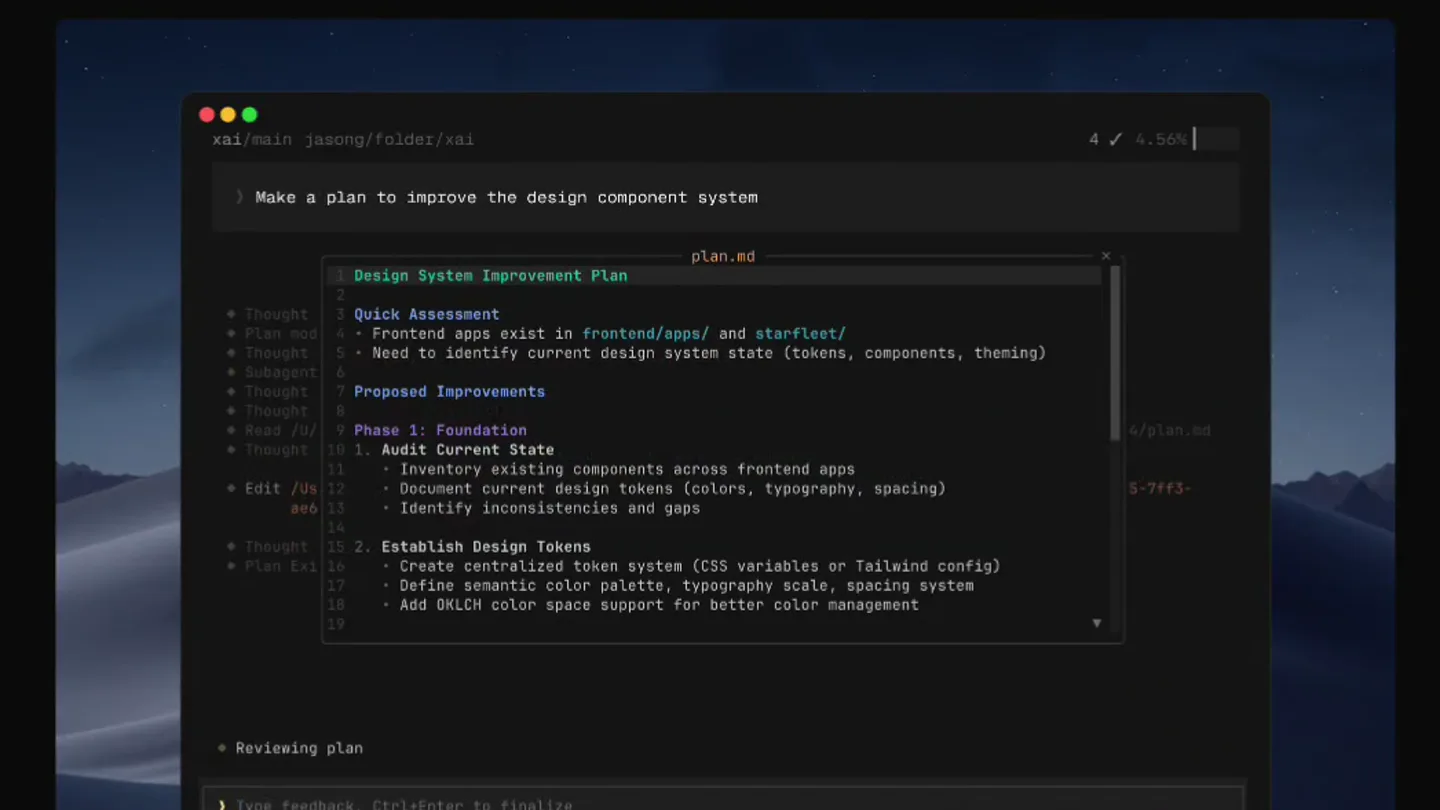
Architecting Complex Projects with Plans
“(No spoken dialogue — silent video with ambient visual sound design)”
- On screen
- Fast and flicker-free CLI Coordinate multiple agents in a powerful CLI built for plans, subagents, and parallel work. curl -fsSL https://x.ai/cli/install.sh | bash Skills Plan Plugins Q&A Subagents The plan viewer makes it easy to architect complex projects.
- Camera
- Static, wide shot of the terminal, maintaining the same framing.
- Motion
- Content within the terminal rapidly transitions to a 'plan.md' file, showcasing a structured design system improvement plan. The 'Plan' tab below the terminal highlights.
Feature Teaser
Expanding Capabilities with Plugins
“(No spoken dialogue — silent video with ambient visual sound design)”
- On screen
- Fast and flicker-free CLI Coordinate multiple agents in a powerful CLI built for plans, subagents, and parallel work. curl -fsSL https://x.ai/cli/install.sh | bash Skills Plan Plugins Q&A Subagents Marketplaces help you share capabilities across your team.
- Camera
- Static, wide shot of the terminal.
- Motion
- The terminal content shifts to display a list of plugins and marketplace options. The 'Plugins' tab below the terminal highlights.
Feature Teaser
Nailing Details with Q&A
“(No spoken dialogue — silent video with ambient visual sound design)”
- On screen
- Fast and flicker-free CLI Coordinate multiple agents in a powerful CLI built for plans, subagents, and parallel work. curl -fsSL https://x.ai/cli/install.sh | bash Skills Plan Plugins Q&A Subagents Grok Build asks the right questions to nail the details.
- Camera
- Static, wide shot of the terminal.
- Motion
- The terminal content transitions to an interactive Q&A interface, demonstrating how Grok Build prompts for design principles. The 'Q&A' tab below the terminal highlights.
Call to Action
Parallel Execution with Subagents
“(No spoken dialogue — silent video with ambient visual sound design)”
- On screen
- Fast and flicker-free CLI Coordinate multiple agents in a powerful CLI built for plans, subagents, and parallel work. curl -fsSL https://x.ai/cli/install.sh | bash Skills Plan Plugins Q&A Subagents Subagents run in parallel to research, build, and review at once.
- Camera
- Static, wide shot of the terminal.
- Motion
- The terminal content displays multiple agents running in parallel, showcasing the subagent functionality. The 'Subagents' tab below the terminal highlights.
Motion design primitives
Synthesizable in Remotion · key components of the cli-feature-showcase template.
TerminalContentSwap
The main content area of the terminal rapidly and smoothly transitions between different views (e.g., code editor, markdown plan, plugin list, Q&A interface). This is often accompanied by a subtle fade or slide effect.
+ Code construction recipe
Utilize Remotion's <Sequence> and <AbsoluteFill> components. Implement a cross-fade or slide transition using `interpolate` for opacity and `translateX` or `translateY` on the `frame` prop, ensuring a quick duration (e.g., 10-15 frames) for a snappy feel.
TabHighlightPulse
When a new feature is introduced, the corresponding tab below the terminal (e.g., 'Plan', 'Plugins') illuminates or changes color briefly to draw attention, then returns to its default state.
+ Code construction recipe
Use Remotion's `spring` function for a subtle scale or color change animation on the tab element. Animate the `backgroundColor` or `scale` property from its default to a highlighted state and back, with a short duration and slight overshoot for a 'pulse' effect.
DynamicTypingReveal
Text within the terminal appears as if being typed in real-time, character by character, or entire lines are revealed quickly, simulating command-line output or code generation.
+ Code construction recipe
For character-by-character, use `interpolate` on the `substring` of the text content based on the current frame. For line-by-line, animate the `height` or `opacity` of individual text lines, or use a `clipPath` animation to reveal text from top to bottom.
Style DNA & aesthetic system
Visual aesthetic
Typography
Motion
Special effects
Pacing & rhythm
Conceptual story rhythm
- 1
Problem/Solution Setup
Purpose. Immediately establish the product's core value proposition: a fast, flicker-free CLI for complex developer workflows.
Execution. Opening with the main headline and a live terminal showing initial code/commands, setting the technical tone.
- 2
Feature Showcase 1 (Planning)
Purpose. Demonstrate the product's ability to handle structured, multi-step tasks.
Execution. Transitioning to the 'Plan' view within the terminal, highlighting its organizational capabilities.
- 3
Feature Showcase 2 (Extensibility & Collaboration)
Purpose. Highlight the product's ecosystem and collaborative potential.
Execution. Showing 'Plugins' and 'Q&A' interfaces, emphasizing integration and detailed interaction.
- 4
Feature Showcase 3 (Parallelism & Efficiency)
Purpose. Conclude by illustrating the product's advanced capabilities for concurrent operations.
Execution. Displaying 'Subagents' running in parallel, reinforcing the 'coordinate multiple agents' tagline.
Remix in Animatiq Studio
Master remix prompt · agent-ready
Sample remix
Objective
Launch video for a new real-time data orchestration platform called 'QuantumSync'.How the recipe adapts
The TerminalContentSwap primitive would show different data streams being orchestrated, real-time dashboards, and configuration files. The TabHighlightPulse would draw attention to features like 'Streams', 'Analytics', 'Integrations', and 'Monitoring'. DynamicTypingReveal would simulate real-time data flowing into the terminal or commands being executed to manage data pipelines. The overall dark theme and fast cuts would be retained to convey efficiency and power.Remix blueprint · cli-feature-showcase
Scene durations (5 scenes, 9.7s)
Key Remotion components
Related Developer Tools Product Launches
Explore all Developer Tools launches →
xAI opens voice cloning on its API: build a custom voice in about two minutes or pick from 80+ voices in 28 languages.

Claude can now operate your Mac, opening apps, browsing and filling spreadsheets, as a research preview in Cowork and Claude Code.

Agentic CLI for coding, building apps, and automating workflows.