
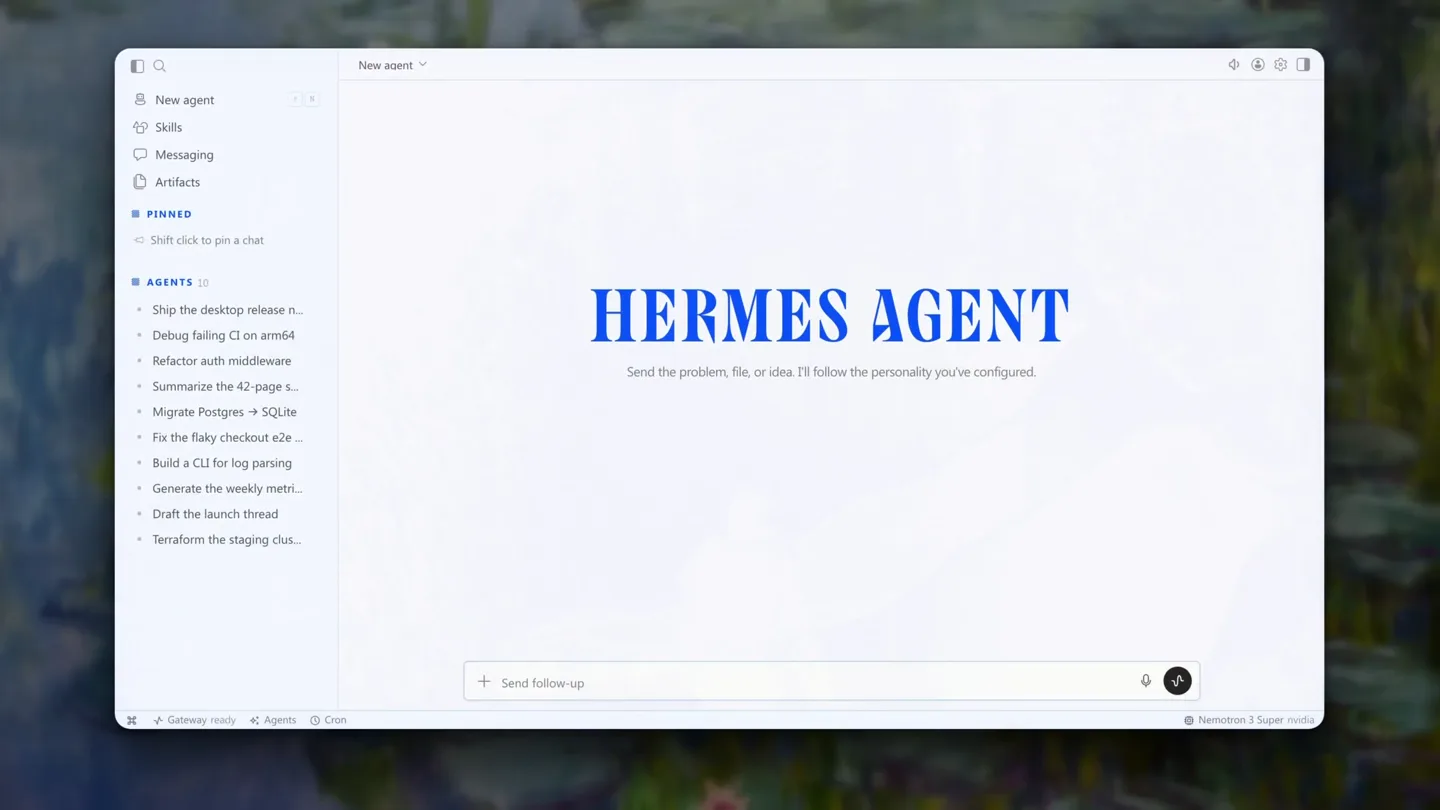
Nous Research · Launch Video Breakdown: Hook, Pacing & Motion Design
The next evolution of Hermes Agent is here! Introducing Hermes Desktop: everything you love about Hermes, now native on your machine. First demoed in Jensen's GTC keynote, it's now in public preview.
Scene-by-scene timeline & spoken transcript
The Hook
Hermes Desktop: Native Agent Introduction
“(No spoken dialogue — The track begins with a sustained, ethereal pad and a plucked synth melody. A sub-bass drop/impact occurs at [00:00], followed by a subtle riser at [00:01]. A prominent riser and sweep build from [00:20] to [00:22], culminating in a sub-bass drop/impact at [00:22].)”
- On screen
- HERMES AGENT Every conversation, one place LIVE TOOLS Streaming chat, live tool calls
- Camera
- Static overhead shot of a desktop application interface. The camera remains fixed, focusing on the central chat window.
- Motion
- Text reveals via subtle fade-ins and scale-ups. UI elements animate in response to simulated user input (typing, clicking). Content within the application window dynamically updates.
Feature Teaser
Inline Image Generation & Chat Management
“(No spoken dialogue — A prominent riser and sweep build from [00:20] to [00:22], culminating in a sub-bass drop/impact at [00:22].)”
- On screen
- GENERATE Images, generated inline ORGANIZE Pin & export any chat WORKSPACES Group sessions by project
- Camera
- Continues with a static overhead shot of the desktop application. Focus remains on the central content area, with occasional shifts to the left sidebar for navigation.
- Motion
- Simulated typing and command execution. Image generation is shown as a quick render. UI elements like context menus and sidebar navigation animate with quick, clean transitions (fades, slides).
Feature Teaser
Advanced Customization & Theming
“(No spoken dialogue — Another riser and sweep are present from [00:41] to [00:43], leading to a sub-bass drop/impact at [00:43]. The track maintains a slow, evolving tempo with sustained synth chords and a melancholic, plucked melody.)”
- On screen
- Skills Artifacts PROFILES A profile for every persona THEMES Six themes, light or dark Nous Midnight Ember Mono Cyberpunk Slate
- Camera
- The camera remains static, observing the desktop application. Navigation through different sections (Skills, Artifacts, Profiles, Appearance) is simulated, with the UI updating accordingly.
- Motion
- Smooth transitions between different application views. Toggle switches animate with a subtle bounce. Theme changes are demonstrated with a quick, full-UI color shift.
Call to Action
Download Today & Brand Reveal
“(No spoken dialogue — A final sub-bass drop/impact occurs at [01:04].)”
- On screen
- HERMES DESKTOP DOWNLOAD TODAY NOUS
- Camera
- The desktop application fades out, revealing a blurred background. Text animates into view. The final shot is a static, centered brand logo on a black background.
- Motion
- Text appears with a subtle scale and fade. The brand logo animates with a glowing, chromatic aberration effect, then fades to black.
Motion design primitives
Synthesizable in Remotion · key components of the ai-desktop-ide-launch template.
DynamicUITextReveal
Text elements appear on screen with a subtle upward slide and fade-in, often accompanied by a slight scale-up for emphasis. This is used for headlines and key feature descriptions.
+ Code construction recipe
Utilize `interpolate` for `opacity`, `translateY`, and `scale` properties. Employ `spring` for a subtle bounce effect on the final scale. Keyframe timing should align with audio cues for impact.
SimulatedTypingAndResponse
Text appears character by character, mimicking real-time typing, followed by a quick 'thinking' animation and then the generated response text appearing. UI elements like input fields and buttons react to simulated clicks.
+ Code construction recipe
Implement `Sequence` and `Series` for character-by-character text reveal. Use `spring` for button presses and `interpolate` for opacity/scale changes on generated content. Leverage `useCurrentFrame` for precise timing.
SeamlessAppViewTransition
Transitions between different application views (e.g., chat to skills, skills to profiles) are achieved through quick, clean fades or subtle horizontal slides of content blocks, maintaining the overall UI frame.
+ Code construction recipe
Wrap different UI states in `AbsoluteFill` components. Animate `opacity` and `translateX` or `translateY` using `interpolate` with `ease-in-out` curves for smooth, fast transitions. Ensure consistent background elements.
Style DNA & aesthetic system
Visual aesthetic
Typography
Motion
Special effects
Pacing & rhythm
Conceptual story rhythm
- 1
The Desktop Unveiling
Purpose. Introduce the core product and its primary benefit: a native desktop experience.
Execution. Opening with a blurred background, then revealing the clean desktop UI, showcasing the main chat interface and initial feature headlines.
- 2
Intelligent Workflow Integration
Purpose. Demonstrate key AI-powered features that streamline developer workflows.
Execution. Showcasing inline image generation, chat pinning/exporting, and project-based session grouping within the application.
- 3
Personalization & Power
Purpose. Highlight the customization options and underlying power of the agent.
Execution. Navigating through 'Skills', 'Artifacts', 'Profiles', and 'Appearance' settings, demonstrating theme changes and persona customization.
- 4
The Call to Action
Purpose. Encourage immediate adoption and reinforce brand identity.
Execution. A clean transition to a full-screen call to action ('DOWNLOAD TODAY') followed by the animated Nous Research brand logo.
Remix in Animatiq Studio
Master remix prompt · agent-ready
Sample remix
Objective
Launch a new AI-powered code editor called 'SyntaxFlow' that offers intelligent code completion, debugging, and project management.How the recipe adapts
The video would open with a blurred background, then reveal the SyntaxFlow IDE. Dynamic text reveals would introduce features like 'Intelligent Code Completion' and 'Integrated Debugging'. Simulated typing would demonstrate the AI generating code snippets. Seamless app view transitions would show switching between the code editor, a built-in terminal, and a project file explorer. The color palette would adapt to the SyntaxFlow brand, likely using cool blues and grays. The final call to action would be 'START CODING TODAY' with the SyntaxFlow logo animating with a similar chromatic glow.Remix blueprint · ai-desktop-ide-launch
Scene durations (4 scenes, 78.5s)
Key Remotion components
Related Developer Tools Product Launches
Explore all Developer Tools launches →
xAI opens voice cloning on its API: build a custom voice in about two minutes or pick from 80+ voices in 28 languages.

Claude can now operate your Mac, opening apps, browsing and filling spreadsheets, as a research preview in Cowork and Claude Code.

Agentic CLI for coding, building apps, and automating workflows.