
Prime Intellect · Launch Video Breakdown: Hook, Pacing & Motion Design
Today, we are launching Hosted Evaluations on the platform. Running evals is an infra problem: harnesses, sandboxes, hours of compute, hundreds of parallel runs. Running evals is hard. Until now.
Scene-by-scene timeline & spoken transcript
The Hook
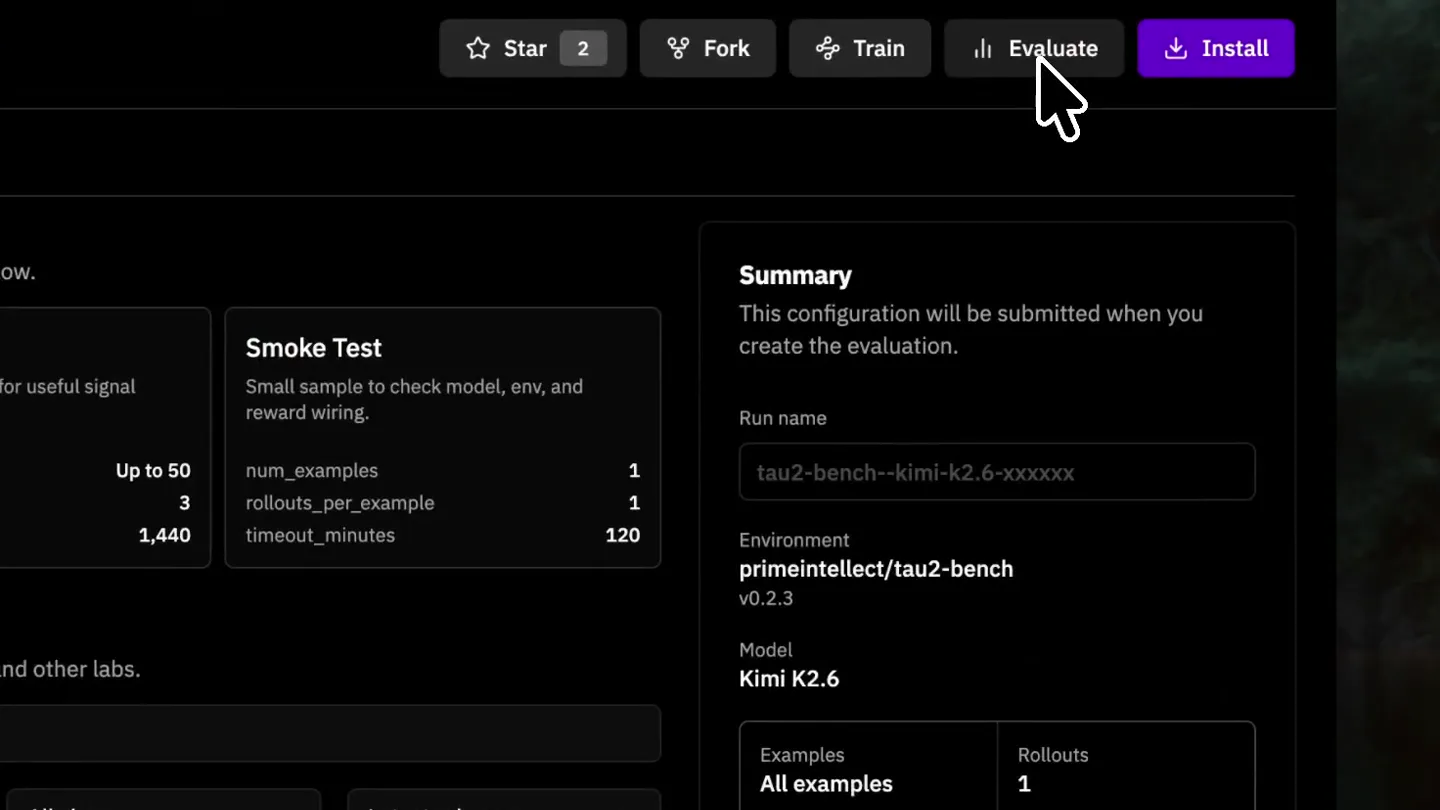
Seamless Evaluation Setup
“(No spoken dialogue — ambient visual, silent video)”
- On screen
- PRIME Intellect tau2-bench < Back primeintellect Code Evaluations Actions 0.2.3 (latest) Mika Senghaas Updated tau2-bench to version 0.2.3 pyproject.toml README.md tau2_bench.py tau2-bench Overview Environment ID: tau2-bench Short description: T-bench evaluation environment. Tags: tool-use, customer-service, multi-domain, user-simulation Datasets Primary dataset(s): T-bench tasks for retail, airline, and telecom domains Source links: https://github.com/sierra-research/tau2-bench Split sizes: retail: 114 tasks, airline: 50 tasks, telecom: 114 tasks Task Type: Multi-turn tool use with user simulation Parser: Custom T-message parsing Rollout overview: Official T-bench evaluation checking task completion, database state changes, and communication patterns GitHub Star 2 Fork Train Evaluate Install About T-bench evaluation environment tool-agent-user tool-use multi-turn user-sim sierra-research Last Modified 15 Days ago Version 0.2.3 Python Required >=3.11 Dependencies remotion@0.1.15-dev.1 tau2 @ git@github.com/sierra- research/tau2-bench.git#3f37326e Home Lab Environments Hub Evaluations Training Inference Compute On-Demand GPUs Reserved Clusters Instances Account Settings Inbox Billing Keys & Secrets Support Chat Documentation Admin Terms of Service Privacy Policy Florian Brand Personal Summary This configuration will be submitted when you create the evaluation. Run name tau2-bench--kimi-k2.6-xxxxxx Environment primeintellect/tau2-bench v0.2.3 Model Kimi K2.6 Examples All examples Rollouts 1 Timeout 1440m Advanced 0 Run Evaluation
- Camera
- Initial wide shot of the UI, followed by a rapid zoom and pan to highlight the 'Evaluate' button and subsequent form fields.
- Motion
- Fast zoom-in with a smooth ease-out, combined with a subtle camera pan to guide focus. UI elements animate in response to user interaction (typing, dropdowns).
Product Reveal
Configuring Evaluation Parameters
“(No spoken dialogue — ambient visual, silent video)”
- On screen
- PRIME Intellect tau2-bench < Back primeintellect Code Evaluations Actions Evaluation recipe Select a run shape, then adjust examples, rollouts, and timeout below. Full Run Evaluate every available example once. num_examples 1 rollouts_per_example 1 timeout_minutes 1440 Partial Evaluate a proposed sample for useful signal without full cost. num_examples Up to 50 rollouts_per_example 3 timeout_minutes 120 Smoke Test Small sample to check model, env, and reward wiring. num_examples 1 rollouts_per_example 1 timeout_minutes 120 Model Choose an inference model from NVIDIA, Alibaba, OpenAI, Meta, and other labs. Q search models... All labs All models Latest releases GPT 5.5 OpenAI / GPT-5.5 Input $5/MTok Output $10/MTok Kimi K2.6 Moonshot AI / Kimi Input $0.95/MTok Output $4/MTok Claude Opus 4.7 Anthropic / Claude Input $5/MTok Output $25/MTok Minimax M2.7 Minimax / Minimax Input $0.60/MTok Output $2.4/MTok Mistral Small 2603 Mistral AI / Mistral Small Input $0.18/MTok Output $0.75/MTok Show more models Parameters Examples, rollout count, and timeout. NUM_EXAMPLES All examples ROLLOUTS_PER_EXAMPLE 1 TIMEOUT_MINUTES 1440 Advanced Environment-specific settings for this evaluation. Permissions and Secrets Resources Star 2 Fork Train Evaluate Install Summary This configuration will be submitted when you create the evaluation. Run name tau2-bench--gpt-oss-120b-xxxxxx Environment primeintellect/tau2-bench v0.2.3 Model GPT OSS 120B Examples All examples Rollouts 1 Timeout 1440m Advanced 1 Run Evaluation Run via CLI Docs Use the CLI workflow to run evaluations from your terminal. Home Lab Environments Hub Evaluations Training Inference Compute On-Demand GPUs Reserved Clusters Instances Account Settings Inbox Billing Keys & Secrets Support Chat Documentation Admin Terms of Service Privacy Policy Florian Brand Personal Domain "airline" USER MODEL "custom_openai/gpt-4-1" USER PROMPT DEFAULT_LLM_ARGS_USER USER BASE URL USER API KEY VAR 1 set
- Camera
- Smooth, controlled pans and zooms to follow user interaction, focusing on dropdown selections and text input fields. The camera subtly shifts perspective to maintain a dynamic feel.
- Motion
- Subtle camera movements with soft easing. UI elements animate with quick, responsive transitions (e.g., dropdown expansion, text input highlight) to simulate real-time interaction.
Feature Teaser
Evaluation Initiated & Monitored
“(No spoken dialogue — ambient visual, silent video)”
- On screen
- PRIME Intellect Evaluations View and manage your evaluations. ACTIVE EVALS 1 Pending, running, or processing FAILED EVALS 0 Failed or timed out evaluations TOTAL EVALS 1 All evaluations in this account Q Search by name or model... Name Environment Model Status Avg Reward Samples Created tau2-bench--gpt-oss-120b-7... primeintellect/tau2-bench openai/gpt-oss-120b Running less than a minut ago Hosted evaluation run started successfully Run your first evaluation Measure how models perform across environments, using our hosted infrastructure for inference, sandbox, and more. New Evaluation Home Lab Environments Hub Evaluations Training Inference Compute On-Demand GPUs Reserved Clusters Instances Account Settings Inbox Billing Keys & Secrets Support Chat Documentation Admin Terms of Service Privacy Policy Florian Brand Personal
- Camera
- A quick cut to the 'Evaluations' dashboard, followed by a slight zoom out to reveal the newly initiated evaluation entry.
- Motion
- Instant scene cut. UI elements (like the 'Running' status badge) use subtle pulsing or color changes to indicate activity. A success toast notification slides in from the top right.
Call to Action
Detailed Evaluation Results
“(No spoken dialogue — ambient visual, silent video)”
- On screen
- PRIME Intellect tau2-bench < Back primeintellect Code Evaluations Actions Q Search... # Model Status Samples Reasoning Effort Avg Reward Published By Created moonshotai/kimi-k2.6 Completed All examples + 4 rollouts 0.870 primeintellect 13 days ago z-alg/gm-5.1 Completed All examples + 4 rollouts 0.860 primeintellect 13 days ago deepseek/deepseek-vf-flash Completed All examples + 4 rollouts 0.840 primeintellect 13 days ago qwen/qwen-3.5-397b-a17b Completed All examples + 4 rollouts 0.835 primeintellect 13 days ago xiaomi/momo-v2.5-pro Completed All examples + 4 rollouts 0.825 primeintellect 13 days ago openai/gpt-5.5 Completed All examples + 4 rollouts high 0.825 primeintellect 13 days ago google/gemini-3.1-pro-preview Completed All examples + 4 rollouts 0.800 primeintellect 13 days ago Items per page: 50 All Rollouts Grouped by Example < Previous 1 2 Next > Evaluation details example_id prompt reward # STATUS Completed <instruction> You are a customer service agent that helps the 1.00 MODEL moonshotai/kimi-k2.6 <instruction> You are a customer service agent that helps the 1.00 ENVIRONMENT primeintellect/tau22-bench <instruction> You are a customer service agent that helps the 1.00 CREATED May 18, 2024, 6:25 PM <instruction> You are a customer service agent that helps the 1.00 Parameters <instruction> You are a customer service agent that helps the 1.00 Example: 4x4 rollouts Temperature Top P: 0.9 <instruction> You are a customer service agent that helps the 1.00 Start command <instruction> You are a customer service agent that helps the 1.00 Command executed for this hosted evaluation. Sensitive headers and custom secrets are not displayed. <instruction> You are a customer service agent that helps the 1.00 prim eval run tau2-bench \ --function \ --num-examples 1 \ --rollouts-per-example 4 \ --model moonshotai/kimi-k2.6 \ --env-args '{"domain": "airline"}' \ --sampling-args '{"temperature": 1.0, "top_p": 0.9}' \ --max-concurrent 100 \ --max-option 5 Sampling args Generation settings passed through --sampling-args. "temperature": 1, "top_p": 0.9 Rollouts Conversation History Display options Overview 1/200 Collapse All Expand All reward Q Search... system <instruction> You are a customer service agent that helps the user according to the <quality> provided below... 1.000 assistant Hi! How can I help you today? 1.000 user Hi, I'd like to cancel a reservation I made. Can you help me with that? 1.000 assistant I can help you cancel your reservation. To get started, I'll need a few details from you: 1. What is your user ID? 2. What is your reservation ID? If you don't know your reservation ID, I can help you locate it once you provide your user ID. 1.000 user Sure! My user ID is emma_kim_9937, and the reservation ID I want to cancel is EHGLP3. 1.000 assistant get_reservation_details {"reservation_id": "EHGLP3", "user_id": "emma_kim_9937"} Tool Output tool {"reservation_id": "EHGLP3", "user_id": "emma_kim_9937", "origin": "PHX", "destination": "NYK", "date": "2024-05-17", "flight_type": "one_way", "cabin": "basic_economy", "flights": [{"flight_number": "NAF712", "origin": "PHX", "destination": "NYK", "date": "2024-05-17", "price": 50}], "passengers": [{"first_name": "Evelyn", "last_name": "Taylor", "dob": "1993-01-14"}, {"first_name": "Ryan", "last_name": "Lee", "dob": "1971-11-22"}]} assistant Thank you for providing your details. I can see your reservation for the one-way trip from Phoenix to New York (JFK) on May 17, 2024, with 2 passengers in basic economy. Before I proceed, I need to know the reason for your cancellation. Please let me know if this is due to: Change of plan Airline cancelled flight Other reasons This will help me determine if your reservation is eligible for cancellation. 1.000 user It's a change of plans-I won't be able to make the trip anymore. Can you let me know if I'm eligible for a refund before you cancel? I don't want to cancel if I won't get my money back. 1.000 assistant Based on the details of your reservation I need to let you know that this reservation is not eligible for cancellation with a 1.000 evaluate_tau2_task num_turns 0.000 num_errors 0.000 num_steps 15.000 num_assistant_tool_calls 2.000 num_user_tool_calls 0.000 Total 2m 26s setup 32.8s generation 2m 23s model 1m 34s scoring 16.6s tooling 2.4s overhead 0.5s usage input tokens 31.7K output tokens 2.6K final input tokens 2.6K final output tokens 2.6K status is_completed true custom_stats numSteps 65 totalTime 146.76299999999994
- Camera
- A series of rapid, precise zooms and pans to highlight specific data points and conversational flow within the evaluation results. The camera follows the user's simulated scrolling and clicking.
- Motion
- Fast, precise camera movements with sharp ease-in/ease-out curves. UI elements (like expanding conversation history, tool output pop-ups) use quick, impactful transitions to convey information density and interaction.
Motion design primitives
Synthesizable in Remotion · key components of the prime-intellect-ui-flow template.
FocusedUIZoomPan
A rapid, targeted zoom into a specific UI element (e.g., button, input field) followed by a smooth pan to another interactive area, simulating user focus and interaction flow.
+ Code construction recipe
Utilize `interpolate` for `scale` and `translate` properties, with `easing.easeOutCubic` for a quick start and smooth finish. Implement `AbsoluteFill` for the base UI and `Sequence` for timed camera movements.
DynamicDropdownReveal
Dropdown menus expand and collapse with a quick, fluid animation, often accompanied by a subtle background blur or dimming to emphasize the active selection.
+ Code construction recipe
Animate `height` and `opacity` using `spring` for a natural, bouncy feel. Apply a `blur` filter to the background using `AbsoluteFill` and `interpolate` its `opacity` for a focus effect.
DataPointHighlight
Specific data points or text segments are highlighted through color changes, underlines, or subtle glow effects, often in conjunction with a camera zoom to draw attention.
+ Code construction recipe
Use `interpolate` for `color` or `boxShadow` properties on `Text` or `Rect` components. Combine with `spring` for a quick, responsive zoom on the highlighted element. SVG filters can be used for glow effects.
Style DNA & aesthetic system
Visual aesthetic
Typography
Motion
Special effects
Pacing & rhythm
Conceptual story rhythm
- 1
Setup & Selection
Purpose. Introduce the platform and guide the user through the initial steps of setting up an evaluation.
Execution. Rapid UI navigation, highlighting key buttons and dropdowns with quick zooms and pans.
- 2
Configuration & Customization
Purpose. Demonstrate the flexibility and depth of evaluation parameters, showing how users can tailor their runs.
Execution. Focused interaction with input fields, model selection, and advanced settings, using precise camera movements.
- 3
Execution & Monitoring
Purpose. Showcase the initiation of an evaluation and its immediate status tracking.
Execution. Quick cut to a dashboard, with a success notification and a 'Running' status indicator.
- 4
Results & Insights
Purpose. Illustrate the detailed output and analytical capabilities of the platform post-evaluation.
Execution. Dynamic scrolling and highlighting within detailed results, emphasizing conversational flow and data points.
Remix in Animatiq Studio
Master remix prompt · agent-ready
Sample remix
Objective
Showcasing a new CI/CD pipeline configuration tool.How the recipe adapts
Remix blueprint · prime-intellect-ui-flow
Scene durations (4 scenes, 26.5s)
Key Remotion components
Related Developer Tools Product Launches
Explore all Developer Tools launches →
xAI opens voice cloning on its API: build a custom voice in about two minutes or pick from 80+ voices in 28 languages.

Claude can now operate your Mac, opening apps, browsing and filling spreadsheets, as a research preview in Cowork and Claude Code.

Agentic CLI for coding, building apps, and automating workflows.