
Tom Huang · Launch Video Breakdown: Hook, Pacing & Motion Design
html-anything's templates are too popular Just moments ago, html-anything's templates have all gone live in Open Design @nexudotio Open Design now integrates nearly 400 ready-to-use templates/Skill…
Scene-by-scene timeline & spoken transcript
The Hook
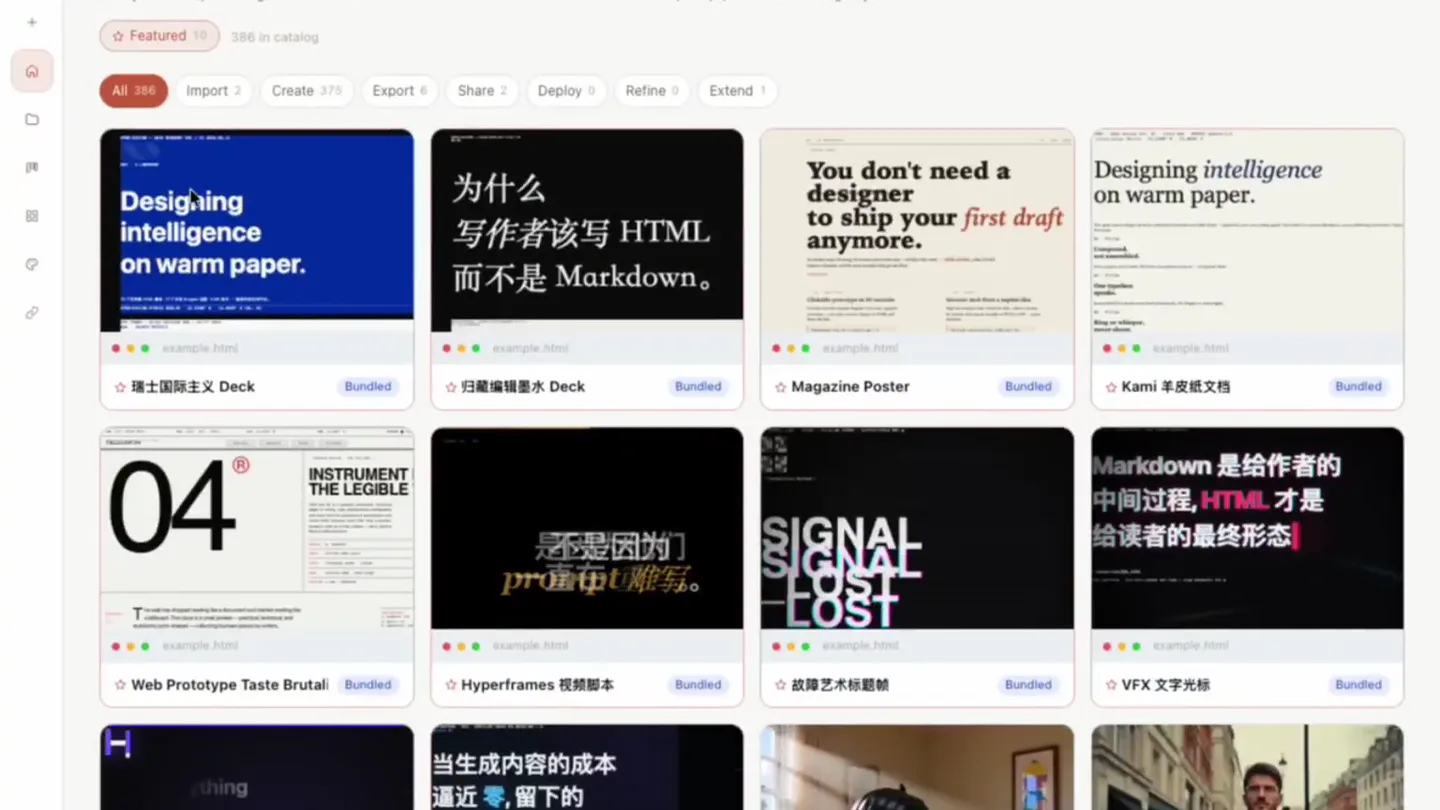
Rapid Template Showcase
“(No spoken dialogue — Ambient electronic score with evolving pad and sub-bass drone.)”
- On screen
- Star 43.9K Local CLI Claude Code Default Use everywhere Home Recent projects No projects yet -- type a prompt to start one. Official starters Ready-to-use Open Design workflows bundled with this runtime. Pick one to load a starter prompt, or browse the registry for more. Browse registry Q Search plugins... 386 of 386 Featured 19 386 in catalog All 386 Import Create 376 Export 8 Share 7 Deploy 8 Refine 0 Extend 1 Designing intelligence on warm paper. Bundled 瑞士国际主义 Deck Bundled 为什么 写作者该写 HTML 而不是 Markdown. Bundled You don't need a designer to ship your first draft anymore. Bundled Magazine Poster Bundled Designing intelligence on warm paper. Bundled Kami 羊皮纸文档 04 INSTRUMENT THE LEGIBLE Bundled Web Prototype Taste Brutal Bundled 不是因为 prompt 难写。 Bundled SIGNAL LOST Bundled 战神艺术标签 Bundled Markdown 是给作者的 中间过程, HTML 才是 给读者的最终形态! Bundled VFX 文字光标 当生成内容的成本 逼近 0, 留下的 只有 品味。 Bundled
- Camera
- Static wide shot of a web application interface, showcasing a grid of templates. Subtle mouse cursor movements.
- Motion
- Rapid, almost subliminal, highlighting and opening of template details, creating a sense of abundant, high-quality options.
Product Reveal
Deep Dive: Designing Intelligence
“(No spoken dialogue — Ambient electronic score with evolving pad and sub-bass drone.)”
- On screen
- Use plugin Plugin info Fullscreen Share Share 瑞士国际主义 Deck 16 列网格 + 单一饱和 accent + 22 个锁死版面 (Klein Blue / Lemon / Mint / Safety Orange) v0.1.0-bundled-bundled AUTHOR By Open Design nexu-isopen-design Homepage EXAMPLE QUERY Inserted into the prompt textarea when you apply this plugin. 用「瑞士国际主义 Deck」模板把我的内容做成一份「瑞士国际主义 Deck」模板把我的内容做成一份「16 列网格 + 单一饱和 accent + 22 个锁死版面 (Klein Blue / Lemon / Mint / Safety Orange)」, 保持模板的视觉签名, 使用真实内容和数据, 避免 lorem ipsum 和占位图片。 CONTEXT BUNDLES Skills, design systems, MCP servers and other refs the plugin will pull in at apply time. /SKILL.md DESIGN SYSTEM primary ASSETS 1 /example.html WORKFLOW 1 Pipeline stages run in order. Atoms inside a stage run sequentially unless the stage repeats. OPEN DESIGN STUDIO ROADMAP 591 / 22 2024.05.11 PRE. A LANDMARK Designing intelligence on warm paper. 75 个世界级 HTML 模板, 17 个生成 Agent 适配 Open Design 开放平台。 OPEN DESIGN STUDIO BERLIN 52.5187 N 13.4049 E VOL. 01 KPI TIMER 01-04 OUTLOOK 48% GROWTH METRICS 四根柱子, 一个目标 — 做最被信任的 HTML 生产线。 200 25K 80K OPEN DESIGN STUDIO 44 / 22
- Camera
- Zoom-in and pan to a specific template's detail view, revealing extensive information and a data visualization.
- Motion
- Smooth UI transition, revealing nested information panels with a subtle parallax effect on background elements.
Feature Teaser
Designer-Free Publishing
“(No spoken dialogue — Ambient electronic score with evolving pad and sub-bass drone.)”
- On screen
- Use plugin Plugin info Fullscreen Share Share Magazine Poster An editorial-style poster - newsprint paper, dataline, oversized serif headline with a struck-through word and italic accent, a 2-column body block, and 6 numbered sections with annotated pull-quote captions. Reads like a Sunday-paper full-page essay or a thoughtful launch poster. Use when the brief asks for "magazine poster", "editorial poster", "newsprint", "essay layout", or "manifesto". v0.1.0-bundled-bundled AUTHOR By Open Design nexu-isopen-design Homepage EXAMPLE QUERY Inserted into the prompt textarea when you apply this plugin. Design an editorial magazine-style poster - "You don't need a designer to ship your first draft anymore." Newsprint paper, six numbered sections. CONTEXT BUNDLES Skills, design systems, MCP servers and other refs the plugin will pull in at apply time. /SKILL.md DESIGN SYSTEM primary ASSETS 1 /example.html WORKFLOW 1 Pipeline stages run in order. Atoms inside a stage run sequentially unless the stage repeats. You don't need a designer to ship your first draft anymore. Six honest ways I'm using AI to move faster from idea - artifact this week - what works, what I'd still hand to a human, and the exact prompts that get me there. Clickable prototype in 90 seconds Describe the flow in plain English. Get a real, tappable prototype - and static screens. Export to HTML and share the link. Investor deck from a napkin idea Skip the template hunt. Draft the deck, refine in sections-by-sections, then export straight to PPTX or PDF - across the team. Your design system, auto-applied From the model to your tokens, components - a spectrum. Every new asset supports your type, color, and spacing scale. Landing pages & launch collateral One-pager, email headers, feature comparison grids - editable, on-call, and ready to hand off to investors, marketing. Design engineering bundle Ten directions in ten minutes
- Camera
- Quick pan and zoom to another template's detail view, focusing on a key benefit statement.
- Motion
- Fast-cut UI navigation, emphasizing speed and ease of use with a subtle highlight on the 'first draft' text.
Call to Action
HTML is the Final Form
“(No spoken dialogue — Ambient electronic score with evolving pad and sub-bass drone.)”
- On screen
- Use plugin Plugin info Fullscreen Share Share VFX 文字光标 光标颜色 + 彩色像素散射 + 定向光斑, 适合视频片头文字或数字展示 v0.1.0-bundled-bundled AUTHOR By Open Design nexu-isopen-design Homepage EXAMPLE QUERY Inserted into the prompt textarea when you apply this plugin. 用「VFX 文字光标」模板把我的内容做成一份「光标颜色 + 彩色像素散射 + 定向光斑」, 适合视频片头文字或数字展示, 保持模板的视觉签名, 使用真实内容和数据, 避免 lorem ipsum 和占位图片。 CONTEXT BUNDLES Skills, design systems, MCP servers and other refs the plugin will pull in at apply time. /SKILL.md DESIGN SYSTEM primary ASSETS 1 /example.html WORKFLOW 1 Pipeline stages run in order. Atoms inside a stage run sequentially unless the stage repeats. Markdown 是给作者的 中间过程, HTML 才是 给读者的最终形态! - Claude Code IRL 2026
- Camera
- Rapid sequence of pans and zooms across various templates, culminating in a full-screen view of a template with a strong declarative statement.
- Motion
- Dynamic, almost frenetic, UI exploration, using quick cuts and focused zooms to highlight diverse template capabilities and a powerful concluding message.
Motion design primitives
Synthesizable in Remotion · key components of the ai-code-gen-showcase template.
TemplateCardHoverReveal
When a template card is hovered or selected, a 'Details' and 'Use' button appear with a subtle fade-in and slide-up animation, while the card itself might slightly scale or glow.
+ Code construction recipe
Use `interpolate` for opacity and `translateY` on button elements. Apply a `spring` animation for a smooth, responsive feel on card scale/glow. Implement `onMouseEnter` and `onMouseLeave` event handlers.
PanelSlideInZoom
Upon clicking a template card, a detailed information panel slides in from the right or bottom, simultaneously zooming slightly into the main content area of the selected template.
+ Code construction recipe
Utilize `interpolate` for `translateX` or `translateY` for the panel, and `scale` for the main content. Orchestrate with `sequence` to ensure the slide and zoom happen concurrently or in a staggered fashion. Consider `cubic-bezier` for custom easing.
RapidUIHighlightCut
A rapid succession of cuts between different UI elements or template previews, often accompanied by a quick zoom or pan to emphasize specific text or visual features.
+ Code construction recipe
Employ `AbsoluteFill` for each scene, using `OffthreadVideo` or `Img` components. Control timing precisely with `durationInFrames` and `Sequence` to achieve the high cuts-per-minute. Use `interpolate` for quick `scale` and `translate` values for the zoom/pan effects.
Style DNA & aesthetic system
Visual aesthetic
Typography
Motion
Special effects
Pacing & rhythm
Conceptual story rhythm
- 1
The Template Gallery
Purpose. Introduce the breadth and variety of available templates, establishing the product's core offering.
Execution. A wide shot of the application's template gallery, with quick, subtle highlights on different cards.
- 2
Deep Dive & Data
Purpose. Showcase the depth of information and analytical capabilities associated with a single template.
Execution. Zoom into a specific template's detail panel, revealing charts, metrics, and extensive documentation.
- 3
Benefit Highlight
Purpose. Emphasize a key user benefit or problem solved by the product.
Execution. Focus on a template with a bold, declarative statement like 'You don't need a designer to ship your first draft anymore.', with a quick pan to highlight the text.
- 4
The Core Philosophy
Purpose. Conclude with the overarching vision or technological breakthrough.
Execution. A full-screen, impactful text-based template stating 'Markdown is an intermediate step for writers, HTML is the final form for readers!', reinforcing the product's value proposition.
Remix in Animatiq Studio
Master remix prompt · agent-ready
Sample remix
Objective
Demonstrate a new AI code generation tool that instantly creates boilerplate code for various web frameworks.How the recipe adapts
The 'Rapid UI Highlight Cut' would be used to quickly cycle through different framework icons (React, Vue, Angular) and then instantly display generated code snippets. The 'Panel Slide In Zoom' would be adapted to show a full-screen code editor with the AI-generated code, highlighting specific sections as if the AI is 'typing' them. The color palette would shift to a dark theme with neon green or electric blue accents for code syntax highlighting. The fast cuts would emphasize the instantaneous nature of the AI's output.Remix blueprint · ai-code-gen-showcase
Scene durations (4 scenes, 16s)
Key Remotion components
Related Creative Tools Product Launches
Explore all Creative Tools launches →
Anthropic Labs launches Claude Design, which turns conversation into prototypes, slides and one-pagers, powered by Claude Opus 4.7.

A vibe design partner with an AI-native canvas for turning ideas into UI.

Your work tools in Claude are now available on mobile. Explore Figma designs, create Canva slides, check Amplitude dashboards, all from your phone. Give it a try: