
Imagio · Launch Video Breakdown: Hook, Pacing & Motion Design
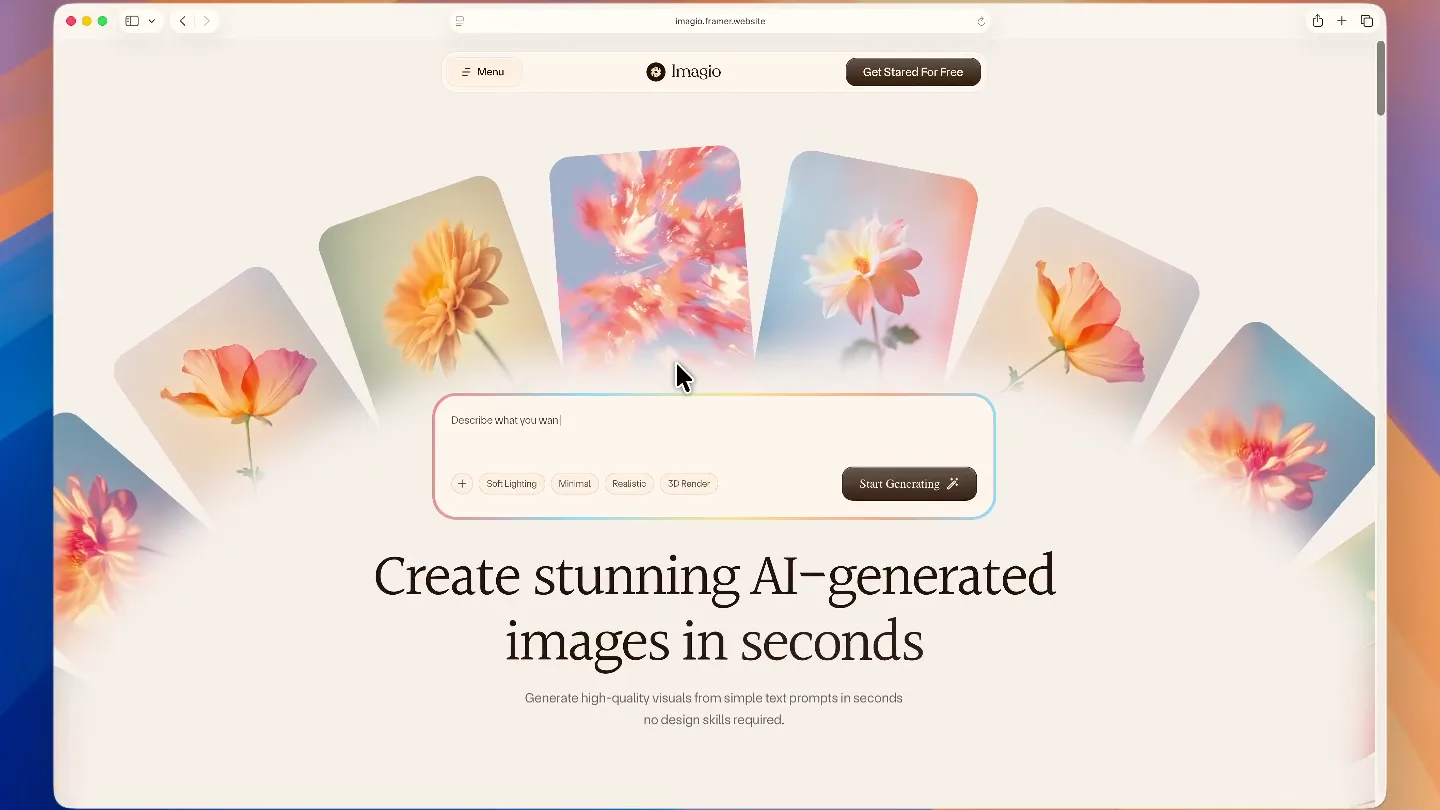
Imagio is a Framer site for an AI tool that is not just a product screenshot with a gradient behind it.
Scene-by-scene timeline & spoken transcript
The Hook
Dynamic Product Showcase & Core Value Proposition
“(No spoken dialogue — The audio begins with a sustained, evolving synth pad, creating an atmospheric and slightly mysterious tone. At [00:06], a subtle, high-frequency riser begins to build, culminating in a soft, ethereal impact at [00:08].)”
- On screen
- imagio.framer.website Menu Imagio Get Started For Free Describe what you want to generate. + Soft Lighting Minimal Realistic 3D Render Start Generating Create stunning AI-generated images in seconds Generate high-quality visuals from simple text prompts in seconds no design skills required. Made in Framer
- Camera
- The camera smoothly pans and zooms across the Imagio website, highlighting key UI elements and the hero image gallery. It maintains a top-down, slightly angled perspective, simulating a user browsing the site.
- Motion
- Seamless UI scrolling and element reveals, combined with subtle parallax effects on background images. The cursor interaction is animated to draw attention to key features.
Product Reveal
Feature Deep Dive & Workflow Demonstration
“(No spoken dialogue — A rhythmic, pulsing synth bass line establishes a steady, driving energy. At [00:15], a new layer of bright, arpeggiated synth melodies enters, adding complexity and a sense of forward momentum.)”
- On screen
- HOW IT WORKS How Imagio works Turn text prompts into high-quality visuals using our fast, scalable AI image generation platform. STEP #1 Enter your prompt... Write a prompt Describe what you want to create using simple text. STEP #2 Soft Lighting Neon Glow Minimal Abstract 3D Render Realistic Choose style & generate Select visualization, color style, and image format types. STEP #3 Start Downloading Download & use Use images for marketing, social media, or products. FEATURES Core Features Create stunning visuals from simple prompts, then refine and export them in high resolution for any creative need. Text-to-image generation Generate visuals from natural language prompts. Generating image (75%) Describe what you want to create: soft lighting, flower images... Soft Lighting Minimal Realistic 3D Render High-resolution output Download images ready for web & print. BEFORE AFTER Multiple image styles Realistic, anime, 3D, illustration & more. 3D Model Painting 2D Model Anime Illustration Prompt history Reuse and refine previous generations. Faster Image Generation Optimized AI models for instant results. Commercial usage rights Use images freely for business projects. Imagio
- Camera
- The camera continues its smooth, guided tour, focusing on specific sections of the website. It employs subtle zooms and pans to highlight feature cards and interactive elements, maintaining a consistent 'browsing' perspective.
- Motion
- Content cards animate into view with soft fades and subtle scaling. Interactive elements like dropdowns and sliders are shown in action, demonstrating functionality. A 'before/after' image comparison uses a horizontal wipe.
Feature Teaser
Impactful Value Proposition & Audience Targeting
“(No spoken dialogue — A significant high-energy transition occurs at [00:23], marked by a pronounced riser and a powerful sub-bass drop/impact, leading into a more intense and layered section of the track.)”
- On screen
- Engaging Whether you're creating ads, content, or product visuals our AI image engine generates unique, production-ready artwork from nothing but your words Powerful Perfectly OUR SOLUTIONS Solutions for every type of creator No matter what type of company you are startups, content creators, or designers our AI adapts to your creative workflow. For Designers Create concepts, mockups, and inspiration faster. For Marketers Generate ad creatives and social visuals instantly. 95% Faster visual creation for campaigns For Content Creators Create distinctive visuals for your designs and videos. For E-commerce Create product visuals without photoshoots.
- Camera
- The camera shifts to a more dynamic, slightly elevated perspective, showcasing a stack of generated images. It then smoothly scrolls down to reveal solution categories, with a subtle zoom on highlighted sections.
- Motion
- Image cards fan out with a gentle rotation and depth effect. Text elements animate in with a subtle bounce and opacity transition. Highlighted solution categories use a background fill animation.
Call to Action
Pricing, Testimonials & Engagement
“(No spoken dialogue — Another impactful sub-bass drop is heard at [00:31], followed by a brief, almost percussive synth flourish. The track continues to build with additional synth layers and subtle rhythmic elements, maintaining a high-energy feel.)”
- On screen
- OUR PRICING Flexible plans for solo creator and teams Start with a yearly subscription or unlock lifetime access with a one-time payment - built to scale with your creative needs. Free plan Get started with Al image generation. What's included: Single user access 50 Al image generations per month Standard resolution output Limited art styles Basic prompt editor Community support Personal usage license Free No credit card required Get Started For Free Creator plan Designed for teams, agencies, and growing businesses. What's included: 5 team members access 2,000 Al image generations per month High-resolution downloads 20+ art styles available Prompt history for 1 year Commercial usage license Regular feature updates Lifetime Deal Save over with lifetime access $399 One-Time Payment Get Started For Free Studio plan Designed for teams, agencies, and growing startups. What's included: 10 team members access 5,000 Al image generations per month High-resolution downloads Shared prompt library Team workspace Commercial usage license Priority support Lifetime Deal Save even more with lifetime access $149 Billed Yearly Get Started For Free TESTIMONIALS Loved by creators and teams worldwide See how people are using Al to create faster, better, and more impactful visuals. Imagio helped me create consistent visuals for my brand without hiring a designer. It's a huge time and cost saver. - Ethan Walker, UX Designer at CreatiPost Daniel Brooks, CEO at InnoVate Tech With Imagio, I can test my thoughts instantly. I use it for concepts, mockups, and inspiration. Imagio makes it easy to create consistent visuals for my brand without hiring a designer. It saves time and cost. - Sophie Carter, Marketing Lead at Effici & Co OUR BLOGS Insights, tips & AI inspiration See how people are using Al to create faster, better, and more impactful visuals. How to write better prompts for Al image generation Read More Use Al-generated images to grow your business Read More
- Camera
- The camera scrolls through pricing tiers, testimonials, and blog sections, maintaining a smooth, continuous vertical movement. It briefly pauses and zooms on specific elements like pricing details and testimonial cards.
- Motion
- Pricing cards highlight with a subtle glow and scale. Testimonial cards slide in from the sides. Blog post previews animate with a gentle hover effect. The overall scrolling is fluid and responsive.
Call to Action
Final Call to Action & Footer
“(No spoken dialogue — A final, prominent sub-bass impact and sweep occurs at [00:47], leading into a sustained, resonant synth chord that gradually fades out, concluding the piece.)”
- On screen
- FAQ Frequently asked questions Everything you need to know about Imagio, from setup to customization and usage. What is Imagio? Imagio is a wonderful platform that helps you easily transform text prompts into digital artwork in seconds and create unique visuals. How does digital marketing improve efficiency? How fast can I generate images? You can generate stunning images rapidly, usually taking just 2 to 30 seconds depending on your chosen settings. Is Imagio available on mobile devices? Is there a free version available? Start creating AI images today Turn your ideas into stunning visuals in seconds. No design skills required. Get Started For Free Imagio Create high-quality Al images from simple prompts. Fast and powerful for creators. Quick Links Home About Us Features Pricing Utility Pages Blog Contact Us 404 Error Stay In Touch Stay Updated Get updates, tips, and Al insights in your inbox. Enter your email... Subscribe Terms & Conditions Privacy Policy Copyright Imagio Designed by Uxtinity Studio Made in Framer
- Camera
- The camera smoothly scrolls through the FAQ section and concludes on the final call to action and footer, maintaining a consistent, elegant vertical scroll.
- Motion
- FAQ accordion elements expand and collapse with a smooth height transition. The final call-to-action button pulses subtly. Footer elements fade in gracefully.
Motion design primitives
Synthesizable in Remotion · key components of the imagio-web-showcase template.
SmoothScrollReveal
Elements appear as the camera scrolls, often with a subtle fade-in and upward or downward translation, mimicking a natural web browsing experience.
+ Code construction recipe
Utilize `interpolate` for `opacity` and `translateY` based on scroll position. Employ `spring` for a natural, eased animation on element entry.
InteractiveCardStack
A group of cards fans out or stacks with slight rotations and depth, revealing individual items or a collective visual.
+ Code construction recipe
Implement `map` over an array of card data, applying `rotateZ`, `translateX`, `translateY`, and `scale` with `spring` animations for each card, offset by index for a staggered effect.
DynamicUIHighlight
Specific UI elements, like buttons or input fields, animate with a subtle glow, background fill, or cursor interaction to draw attention.
+ Code construction recipe
Use `interpolate` for `backgroundColor` or `boxShadow` on hover/focus states. Animate cursor movement with `spring` to simulate user interaction.
Style DNA & aesthetic system
Visual aesthetic
Typography
Motion
Special effects
Pacing & rhythm
Conceptual story rhythm
- 1
Initial Immersion
Purpose. Introduce the product's core functionality and aesthetic in an engaging, non-verbal manner.
Execution. Smooth camera pan over the hero section of the website, showcasing AI-generated images and the main value proposition.
- 2
Feature Exploration
Purpose. Detail key features and demonstrate the product's workflow through guided UI interaction.
Execution. Scrolling through 'How it Works' and 'Core Features' sections, with animated UI elements and a 'before/after' comparison.
- 3
Audience Connection
Purpose. Highlight the product's benefits for different user types and reinforce its value proposition.
Execution. Dynamic display of image cards, followed by a breakdown of solutions for designers, marketers, and content creators.
- 4
Conversion & Trust
Purpose. Present pricing, build social proof, and provide clear calls to action.
Execution. Scrolling through pricing plans, testimonials, blog insights, FAQs, and a final call-to-action with footer details.
Remix in Animatiq Studio
Master remix prompt · agent-ready
Sample remix
Objective
A project management SaaS called 'FlowState' that uses AI to optimize team workflows.How the recipe adapts
The SmoothScrollReveal primitive would showcase FlowState's dashboard, revealing task cards and progress graphs as the camera pans. The InteractiveCardStack primitive could be adapted to display different AI-powered workflow templates. DynamicUIHighlight would draw attention to the 'AI Optimize' button and real-time collaboration features. The overall video would maintain the continuous browsing feel, guiding viewers through setting up a project, assigning tasks, and seeing AI recommendations, all with the same elegant motion language and ambient electronic score.Remix blueprint · imagio-web-showcase
Scene durations (5 scenes, 55s)
Key Remotion components
Related Creative Tools Product Launches
Explore all Creative Tools launches →
A vibe design partner with an AI-native canvas for turning ideas into UI.

We heard you wanted to use Codex rate limit resets on your own time. Starting today, we’re rolling out the ability to save rate limit resets to use later. We’re starting Go, Plus, Pro, and Business
Introducing Framer 3.0 with Agents, Branching, Community, and an all-new design.