
KANA|東京AI映像 · Launch Video Breakdown: Hook, Pacing & Motion Design
Free Release: Local Tool "KANA Layer Lab" Feature 1: Layer Separation You can separate simple elements like people or UI from images and export them as editable layers in PNG / PSD format. Feature…
Scene-by-scene timeline & spoken transcript
The Hook
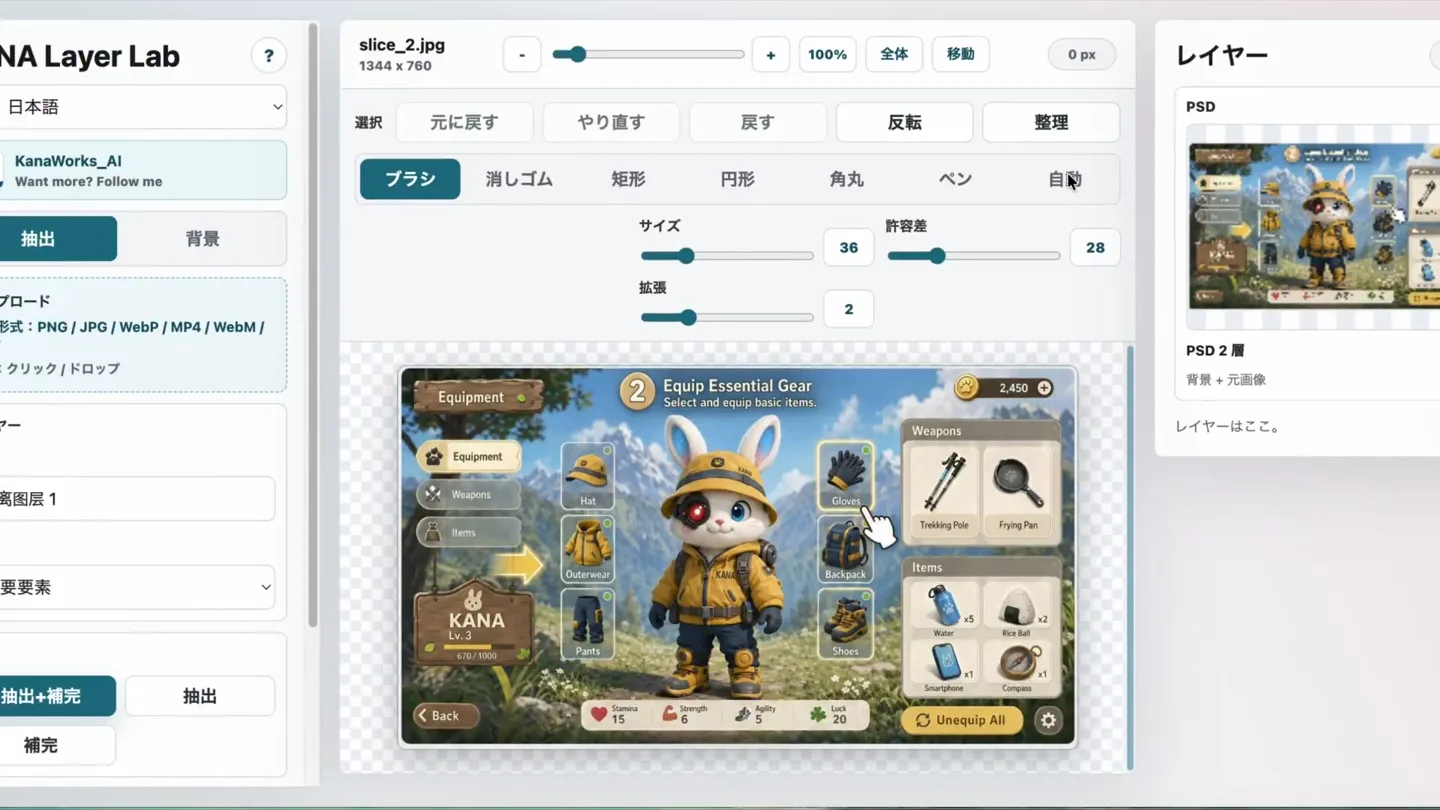
UI Layer Separation Demo
“(No spoken dialogue — A melancholic, ethereal soundscape with a pizzicato synth melody and soft synth pad. Subtle sub-bass and light, airy drum machine beat.)”
- On screen
- KANA Layer Lab, slice_2.jpg, 1344 x 780, レイヤー, PSD, PSD 2層, レイヤーはここ。, 選択, 元に戻す, やり直す, 戻す, 反転, 整理, ブラシ, 消しゴム, 矩形, 円形, 角丸, ペン, 自動, モード, サイズ, 許容差, 拡張, 置き換え, 追加, 削除, 画像をドロップ, 範囲を選択, KANA|東京AI映像, 日本語, KANAWorks_AI, Want more? Follow me, 抽出, 背景, アップロード, 対応形式: PNG / JPG / WebP / MP4 / WebM / MOV, 方法: クリック / ドロップ, レイヤー, 名前, 剥離層 1, 種類, 不要要素, 抽出+補完, 補完, Equip Essential Gear, Select and equip basic items., Weapons, Hat, Outerwear, Pants, Items, Gloves, Backpack, Shoes, Trekking Pole, Frying Pan, Water, Rice Ball, Smartphone, Compass, Unequip All, KANA Lv.3, Stamina, Strength, Agility, Luck, 剥離層 11, 不要要素: 15,831 px - 最上部, 非表示, 上へ, 下へ, PNG, 削除, 剥離層 10, 不要要素: 215 px - 2番目, 剥離層 9, 不要要素: 14,352 px - 3番目, 剥離層 12, 剥離層 17, 剥離層 18
- Camera
- Static, wide shot of the KANA Layer Lab UI. The camera occasionally zooms in slightly to highlight specific UI elements.
- Motion
- UI element highlighting via red overlay, cursor interaction, and subtle zoom-ins. Layer separation is demonstrated by blurring and isolating parts of the image.
Product Reveal
Photoshop Integration & Layer Export
“Born in the dust, raised in the dark”
- On screen
- Adobe Photoshop 2026, slice_1_layers.psd @ 100% (Original reference, RGB/8#), Color, Swatches, Gradients, Patterns, Properties, Adjustments, Libraries, Pixel Layer, Transform, W 1244 px, H 780 px, X 0 px, Y 0 px, 0.00°, Align and Distribute, Layers, Channels, Paths, Kind, Normal, Lock, Original reference, Filled background, Distractor-剥離層 1, Distractor-剥離層 2, Distractor-剥離層 3, Distractor-剥離層 4, Distractor-剥離層 5, Distractor-剥離層 6, Distractor-剥離層 7, Distractor-剥離層 8, 100%, 1244 px x 780 px (72 ppi), slice_1_layers.psd @ 100% (Image8G, RGB/8#), X: 672.00 px, Y: 380.00 px, W: 80.58%, H: 80.58%, 0.00°, Rotate object, Cancel, Done, image8G, Opacity: 100%, Fill: 100%, slice_1_layers.psd @ 100% (Distractor-剥離層 1, RGB/8#), Select Subject, Remove background, Adjust colors, W 73 px, H 95 px, Y 278 px, X -698 px, Y -101 px, Distractor-剥離層 9, Distractor-剥離層 10, Distractor-剥離層 11, Distractor-剥離層 12, Distractor-剥離層 13, Distractor-剥離層 14, Distractor-剥離層 15, Distractor-剥離層 16, ライブラリ, Document, Canvas, Resolution 72 pixels/inch, Mode
- Camera
- Static, wide shot of the Adobe Photoshop interface. The camera pans and zooms to show layer manipulation.
- Motion
- Seamless transition from KANA Layer Lab to Photoshop. Layer visibility toggling, object scaling, and repositioning demonstrate export functionality.
Feature Teaser
Video Background Removal
“Building my reputation, without hesitation”
- On screen
- gif02.mp4, 1076 x 1926 - 6.0s, 単色, 元, 白, 黒, 緑, 任意, 比率, 余白, 自動, 6%, 許容差, 36, ぼかし, 1, 色追加, 色消去, プレビュー, やり直す, 一時停止, WebM保存, MOV保存, プレビューを生成しました。_px の背景を削除します。問題なければ保存または適用してください。, キャンバスを 150% に拡大しました。, キャンバスを 110% に拡大しました。
- Camera
- Static, wide shot of the KANA Layer Lab UI, focusing on video processing. The camera zooms in and out to show detail.
- Motion
- Real-time video background removal demonstrated with a mermaid animation. UI sliders and buttons are interacted with, showing parameter adjustments and preview updates.
Motion design primitives
Synthesizable in Remotion · key components of the ai-code-refactor-demo template.
UILayerHighlight
A red translucent overlay briefly appears over a UI element, followed by a cursor click animation, indicating user interaction and focus.
+ Code construction recipe
Use `interpolate` for opacity and scale of a red `div` element. Trigger on click or specific timeline markers. Implement a `spring` animation for the cursor movement.
ImageLayerSplit
An image is shown, then specific elements within it are blurred or masked, and subsequently revealed as separate, editable layers, often with a subtle displacement effect.
+ Code construction recipe
Utilize `SVG filters` for blur and masking effects. Implement `transform` properties (translate, scale) with `spring` or `cubic-bezier` interpolation for layer separation and movement. Manage layer visibility with `opacity` and `display` properties.
VideoChromaKey
A video plays within a UI, and a specific color (e.g., green screen) is removed in real-time, revealing a transparent background. UI sliders animate to show parameter changes.
+ Code construction recipe
Render a `Video` component. Apply a `shader` or `canvas` filter for chroma keying. Animate UI slider values using `interpolate` to demonstrate real-time adjustments to parameters like '許容差' (tolerance) and 'ぼかし' (blur).
Style DNA & aesthetic system
Visual aesthetic
Typography
Motion
Special effects
Pacing & rhythm
Conceptual story rhythm
- 1
Feature Introduction
Purpose. Introduce the core capability of layer separation from images.
Execution. Demonstrate UI interaction for selecting and separating elements, showing the output as distinct layers.
- 2
Workflow Integration
Purpose. Show how the separated layers can be used in professional tools like Photoshop.
Execution. Transition to Photoshop, manipulate the exported layers, and showcase the flexibility of the output.
- 3
Advanced Capability
Purpose. Highlight the tool's ability to handle more complex media, such as video background removal.
Execution. Display real-time video processing within the UI, adjusting parameters to achieve the desired effect.
- 4
Call to Action (Implied)
Purpose. Encourage users to explore the tool's potential for creative projects.
Execution. The video ends with a clear demonstration of a powerful feature, implicitly inviting users to try it.
Remix in Animatiq Studio
Master remix prompt · agent-ready
Sample remix
Objective
Demonstrate an AI code refactoring tool's ability to optimize a complex function.How the recipe adapts
The UILayerHighlight primitive would be adapted to highlight specific lines of code or UI buttons for refactoring actions. The ImageLayerSplit primitive would be re-imagined as CodeBlockSplit, showing a complex function breaking down into optimized, modular components. The VideoChromaKey primitive would be adapted to a RealtimeCodeTransform, where code visually 'transforms' or 'cleans up' in real-time as parameters are adjusted in the tool's UI, demonstrating the AI's processing.Remix blueprint · ai-code-refactor-demo
Scene durations (5 scenes, 71s)
Key Remotion components
Related Creative Tools Product Launches
Explore all Creative Tools launches →
Anthropic Labs launches Claude Design, which turns conversation into prototypes, slides and one-pagers, powered by Claude Opus 4.7.

A vibe design partner with an AI-native canvas for turning ideas into UI.

Your work tools in Claude are now available on mobile. Explore Figma designs, create Canva slides, check Amplitude dashboards, all from your phone. Give it a try: