
Kilo (acq. by Anaconda) · Launch Video Breakdown: Hook, Pacing & Motion Design
Kilo Code for JetBrains isn't just a single agent. It's a TEAM of agents that work together to get something done. How? Via "Orchestrator Mode": P.S. We're launching Kilo Code for JetBrains today on Product Hunt: https://t.co/TZBT5Npkd3
Scene-by-scene timeline & spoken transcript
The Hook
Initiating Orchestrator Mode
“(No spoken dialogue — silent video with ambient UI sounds implied by cursor interaction.)”
- On screen
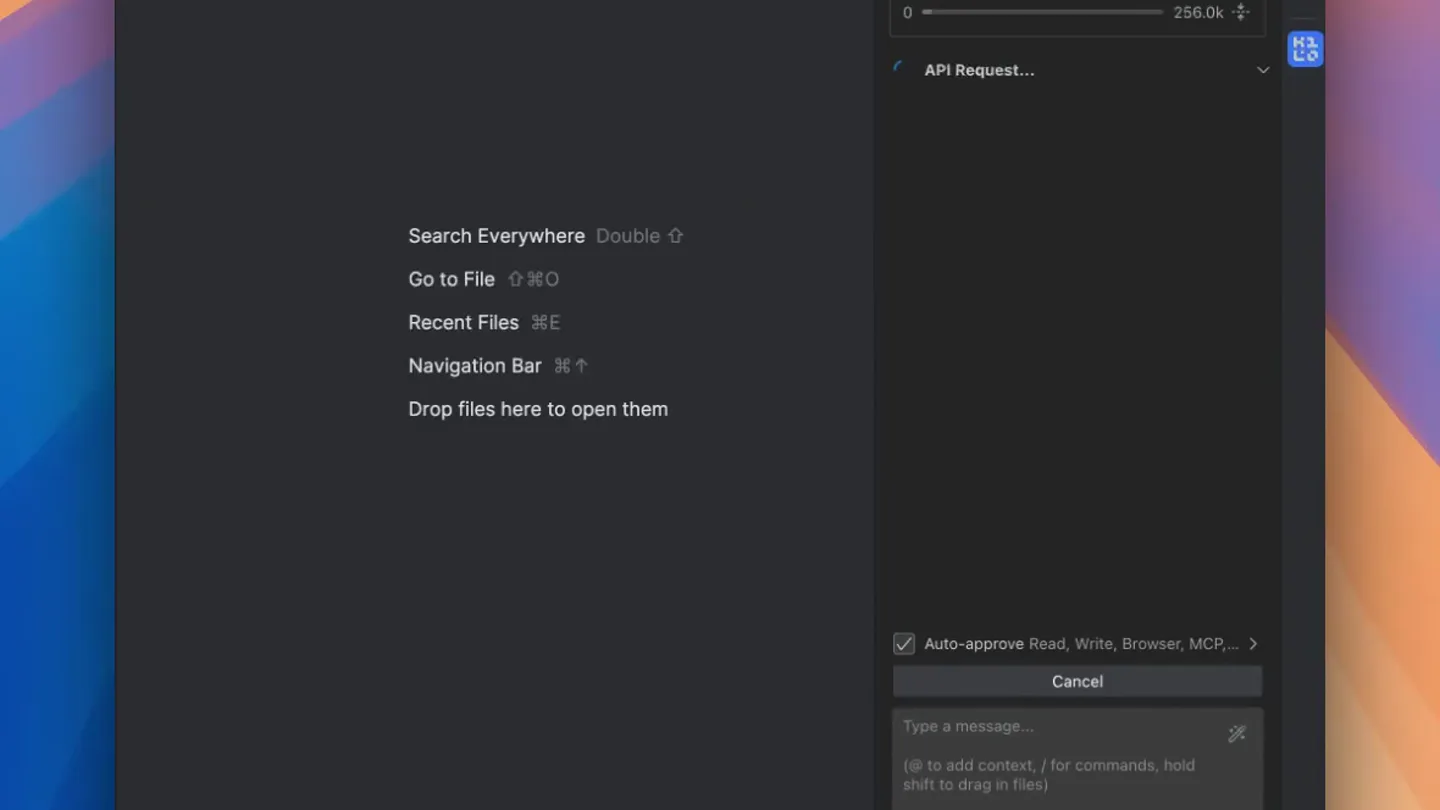
- Kilo Code Personal Search Everywhere Double Go to File ⌘O Recent Files ⌘E Navigation Bar ⌘↑ Drop files here to open them Generate, refactor, and debug code with AI assistance. Check out our documentation to learn more. New here? Click here for a cool idea, then tap on ▷ and watch me do magic! Auto-approve Read, Write, Browser, MCP... Create a social network in Next.js. Design the specs, create the DB schema and generate the code. > Orchestrator xAI: Grok Code Fast 1 Trial
- Camera
- Static, wide shot of the Kilo Code IDE interface.
- Motion
- Cursor interaction with UI elements, revealing a task input field and initiating a process.
Problem Agitation
Task Breakdown and Planning
“(No spoken dialogue — silent video with ambient UI sounds implied by text generation.)”
- On screen
- Kilo Code Personal > Task: Create a social network in Next.js. 0 256.0k API Request... Thinking 0s The task is: "Create a social network in Next.js. Design the specs, create the DB schema and generate the code" Breaking down the task • The task involves creating a social network using Next.js, with three main components: designing specifications, creating a database schema, and generating code. • This is a multifaceted project requiring careful planning to ensure each part integrates seamlessly. • Designing specs will outline features like user profiles, posts, and interactions, setting the foundation for development. • Creating a DB schema will define how data like users, posts, and connections are stored and related, ensuring scalability and efficiency. • Generating code will involve implementing the frontend with Next.js, focusing on UI components and API routes for social features. • Each step builds on the previous, starting with specs to guide schema design, then coding to bring the network to life. • The system will handle real-time updates, with advanced features like user profiles, posts, and connections, ensuring a smooth user experience. Planning development steps • Generating code will involve implementing the frontend with Next.js, focusing on UI components and API routes for social features. • Each step builds on the previous, starting with specs to guide schema design, then coding to bring the network to life. • Creating a new social network project requires organizing files in a dedicated directory, separate from the existing Tetris game workspace. Auto-approve Read, Write, Browser, MCP... Cancel Type a message... @ to add context, / for commands, hold shift to drag in files! > Orchestrator xAI: Grok Code Fast 1 Trial
- Camera
- Static, wide shot of the Kilo Code IDE interface.
- Motion
- Rapid text generation and scrolling within the IDE's AI assistant panel, simulating thought process and planning.
Product Reveal
Project Organization and Subtask Creation
“(No spoken dialogue — silent video with ambient UI sounds implied by text generation and UI interaction.)”
- On screen
- Kilo Code Personal > Task: Create a social network in Next.js. 7.4k 256.0k Create dedicated directory for soci... 0/4 Organizing the project • Initializing a Next. Todo List Updated Create dedicated directory for social network project Initialize Next.js project in the new directory Design specs and DB schema using Architect mode Generate code using Code mode based on design API Request... Thinking 0s The todo list is created. Now, proceed with the first task: Create dedicated directory for social network project. Setting Up Project Structure • A todo list is ready, starting with creating a dedicated directory for the social network project. • The workspace is currently set for tetris_game, so a new 'social_network' directory will be created within it. Kilo Code wants to create a new subtask in code mode. → Subtask Instructions Create a new directory named 'social_network' in the current workspace (/Users/darko/WebstormProjects/tetris_game). Then, initialize a new Next.js project inside the 'social_network' directory using 'npx create-next-app@latest social_network' and use default settings. Ensure the project is set up Auto-approve Read, Write, Browser, MCP... Cancel Type a message... @ to add context, / for commands, hold shift to drag in files! > Orchestrator xAI: Grok Code Fast 1 Trial
- Camera
- Static, wide shot of the Kilo Code IDE interface.
- Motion
- Dynamic UI updates, including a 'Todo List Updated' notification and the generation of detailed subtask instructions, highlighting the AI's proactive capabilities.
Feature Teaser
Automated Project Setup
“(No spoken dialogue — silent video with ambient UI sounds implied by text generation.)”
- On screen
- Kilo Code Personal > Task: Create a new directory named ... 0 256.0k API Request... Thinking 0s First, the task is: Create a new directory named 'social_network' in the current workspace (/Users/darko/WebstormProjects/tetris_game). Then, initialize a new Next.js project inside the 'social_network' directory using 'npx create-next-app@latest social_network' and use default settings. Ensure the project is set up Setting up the project • The task involves creating a directory named 'social_network' in the current workspace at /Users/darko/WebstormProjects/tetris_game. Next, initialize a new Next.js project inside the 'social_network' directory using 'npx create-next-app@latest social_network' with default settings. Ensure the Next.js project is set up correctly by performing the specified commands. Auto-approve Read, Write, Browser, MCP... Cancel Type a message... @ to add context, / for commands, hold shift to drag in files! > Orchestrator xAI: Grok Code Fast 1 Trial
- Camera
- Static, wide shot of the Kilo Code IDE interface.
- Motion
- Continued rapid text generation, demonstrating the AI's ability to automatically set up project structures and generate commands.
Motion design primitives
Synthesizable in Remotion · key components of the ai-ide-workflow-showcase template.
AITextStream
Text appears rapidly, character by character or line by line, simulating real-time AI generation within a terminal or chat interface. Content often scrolls up as new text is added.
+ Code construction recipe
Use Remotion's `Sequence` and `spring` or `interpolate` for character/line opacity and position. Implement a `typewriter` effect for character reveal. Manage scroll position with `useCurrentFrame` and `interpolate` for `translateY` on a container.
UIDisplayUpdate
Specific UI elements, like checkboxes, buttons, or status indicators, dynamically change state or appear/disappear with subtle transitions, reflecting user or system actions.
+ Code construction recipe
Utilize `spring` or `tween` for opacity and scale changes on UI components. For checkboxes, animate a `path` or `SVG` stroke. Use `AbsoluteFill` with `z-index` for overlay notifications.
CursorInteraction
A mouse cursor moves across the screen, hovers over elements, and clicks, guiding the viewer's attention and demonstrating user interaction with the software.
+ Code construction recipe
Animate the `transform` (translate) property of a cursor SVG or image using `interpolate` across keyframes. Add a subtle `scale` or `opacity` change on click events.
Style DNA & aesthetic system
Visual aesthetic
Typography
Motion
Special effects
Pacing & rhythm
Conceptual story rhythm
- 1
Initiate Task
Purpose. Introduce the core problem and the AI's role in solving it.
Execution. Cursor clicks to input a complex task, setting the stage for AI intervention.
- 2
AI Brainstorm
Purpose. Showcase the AI's ability to understand, break down, and plan complex tasks.
Execution. Rapid text generation detailing task breakdown, planning steps, and requirements.
- 3
Automated Workflow
Purpose. Demonstrate the AI's capability to generate actionable steps and manage project structure.
Execution. Dynamic UI updates with a 'Todo List' and detailed subtask instructions appearing.
- 4
Execution Preview
Purpose. Tease the AI's ability to execute on the planned steps, setting up the project.
Execution. Further text generation outlining the commands and processes for project setup.
Remix in Animatiq Studio
Master remix prompt · agent-ready
Sample remix
Objective
A new AI-powered data analysis tool that automates report generation.How the recipe adapts
The dark IDE theme would be adapted to a dark data dashboard. Rapid text generation would show the AI processing data queries and generating report summaries. UI updates would highlight progress bars, filter selections, and 'export report' button animations. The cursor would navigate through data visualizations and click on analysis options, all within a continuous, single-scene view of the dashboard.Remix blueprint · ai-ide-workflow-showcase
Scene durations (4 scenes, 19.5s)
Key Remotion components
Related Developer Tools Product Launches
Explore all Developer Tools launches →
xAI opens voice cloning on its API: build a custom voice in about two minutes or pick from 80+ voices in 28 languages.

Claude can now operate your Mac, opening apps, browsing and filling spreadsheets, as a research preview in Cowork and Claude Code.

Agentic CLI for coding, building apps, and automating workflows.