
Licht · Launch Video Breakdown: Hook, Pacing & Motion Design
Licht is a cinema camera built around two essentials: the camera you hold, and the image pipeline inside it. One is how it feels, one is how it sees.
Scene-by-scene timeline & spoken transcript
The Hook
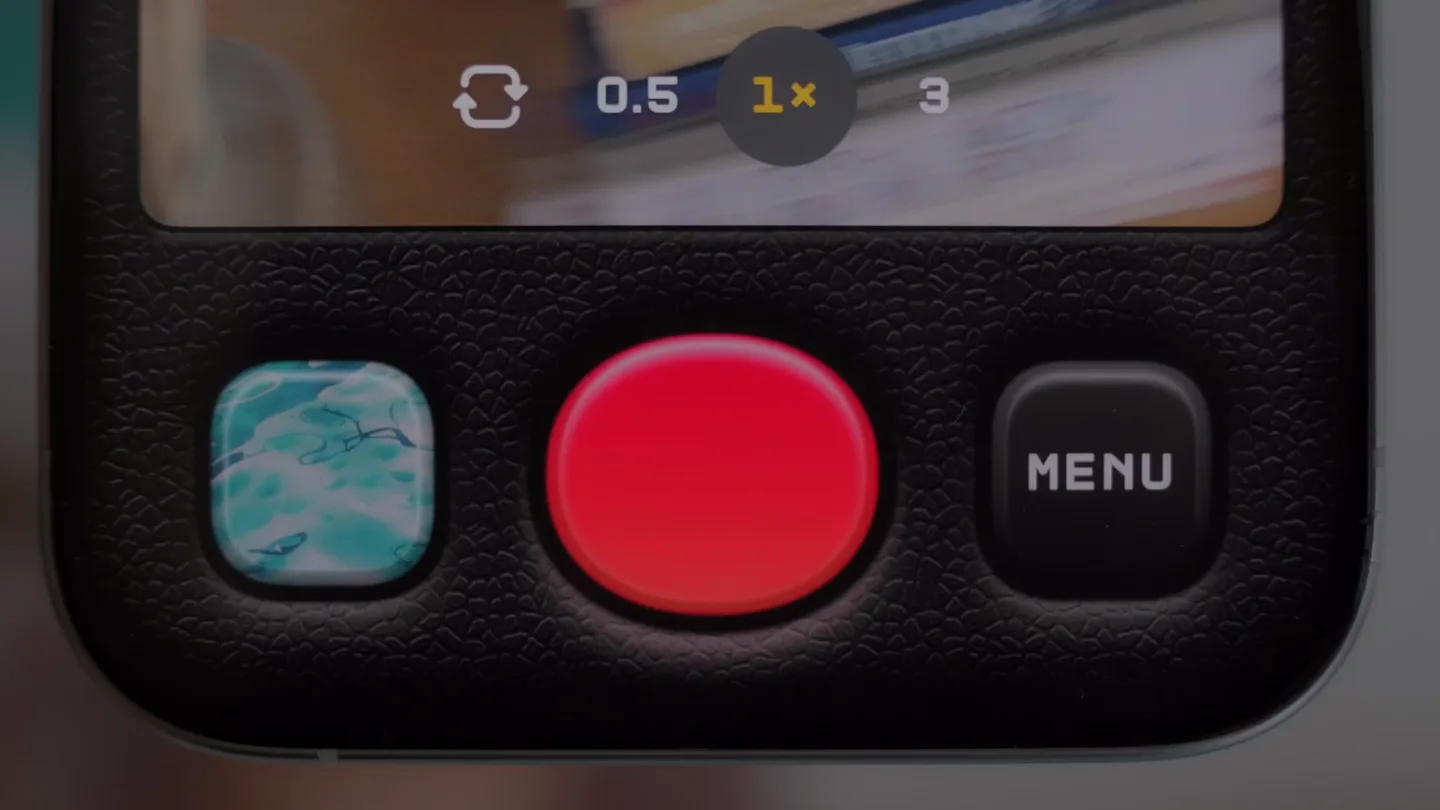
Intuitive Camera UI Interaction
“(No spoken dialogue — Ambient electronic score with pizzicato synths and sub-bass establishes an energetic feel.)”
- On screen
- 0.5 1x 3 MENU 00:00 00:03 -1.0 -0.3 3x 1 0.5 4K 24 FPS
- Camera
- Close-up shots of hands interacting with a smartphone camera interface, showcasing button presses and screen adjustments. The camera subtly pans and tilts to follow the interaction.
- Motion
- UI element highlights, subtle haptic feedback simulation, and responsive screen updates. Smooth, deliberate camera movements emphasize user interaction.
Product Reveal
Cinematic Visual Showcase
“(No spoken dialogue — The electronic score continues, with a subtle riser at 0:11 building anticipation.)”
- On screen
- (No on-screen text)
- Camera
- Wide and medium shots of various scenic locations (boats on water, sunset beach, rural house, colorful buildings, fruit market). Camera movements include slow pans, gentle tilts, and static shots, focusing on the beauty of the scenes.
- Motion
- Rapid, dynamic cuts between diverse, high-quality cinematic footage. The quick transitions are synchronized with the rhythmic pulse of the audio, creating a montage effect.
Feature Teaser
Seamless UI Integration & Control
“(No spoken dialogue — A noticeable sweep and sub-bass drop at 0:23 mark a significant audio transition, maintaining high energy.)”
- On screen
- 0.5 1 3x MENU
- Camera
- Close-up on the smartphone camera interface, similar to the hook, but with more emphasis on the visual output. The camera focuses on the screen and the glowing record button.
- Motion
- Interactive UI animations, including button glows and dynamic feedback. The camera zooms slightly to highlight specific UI elements, reinforcing the product's responsiveness.
Call to Action
Brand Identity & Call to Action
“(No spoken dialogue — Another impactful sub-bass drop at 0:35 leads into the final segment, with the energetic score continuing to the end.)”
- On screen
- Licht Cinema Camera for iPhone www.licht.camera
- Camera
- Static shot of the Licht logo and text on a black background. The camera remains still, allowing the focus to be entirely on the brand message.
- Motion
- Clean, minimalist text animation with a subtle fade-in/fade-out. The logo appears first, followed by the product name and then the website, creating a clear hierarchy.
Motion design primitives
Synthesizable in Remotion · key components of the intuitive-tech-cinematic-montage template.
InteractiveButtonGlow
A button on the UI illuminates with a soft, pulsating glow when pressed, indicating activation or selection. The glow subtly fades out after the interaction.
+ Code construction recipe
Use `interpolate` for opacity and scale of a radial gradient overlay on the button. Apply a `spring` animation for the initial press down and release, creating a tactile feel. SVG filters can be used for the glow effect.
DynamicExposureSlider
A vertical slider with numerical values and a yellow indicator bar dynamically adjusts, showing real-time changes in exposure settings. The numbers and bar animate smoothly.
+ Code construction recipe
Implement with `interpolate` for the position and height of the indicator bar and the opacity/position of the numerical text. Use `spring` for smooth transitions between exposure values, simulating a natural user drag.
FastCutMontage
A rapid sequence of diverse, high-quality video clips, cut together quickly and rhythmically, often synchronized with audio beats. Each clip is short, creating a dynamic visual flow.
+ Code construction recipe
Utilize `Sequence` components with precise `durationInFrames` for each clip. Synchronize `AbsoluteFill` video components with `Audio` track markers. Apply subtle `Fade` transitions between clips for seamless flow, avoiding harsh cuts.
Style DNA & aesthetic system
Visual aesthetic
Typography
Motion
Special effects
Pacing & rhythm
Conceptual story rhythm
- 1
Engage & Interact
Purpose. Immediately hook the viewer by demonstrating intuitive product interaction and control.
Execution. Close-ups of hands operating the camera UI, highlighting responsive buttons and dynamic settings adjustments.
- 2
Inspire & Showcase
Purpose. Illustrate the high-quality visual output and creative potential of the camera.
Execution. A rapid montage of diverse, beautifully shot cinematic scenes, showcasing various environments and subjects.
- 3
Refine & Control
Purpose. Reiterate the ease and precision of the camera's controls, reinforcing user empowerment.
Execution. Return to UI close-ups, emphasizing specific features like zoom and recording, with clear visual feedback.
- 4
Brand & Connect
Purpose. Conclude with strong brand identity and a clear call to action.
Execution. Clean display of the brand logo, product name, and website on a minimalist black background.
Remix in Animatiq Studio
Master remix prompt · agent-ready
Sample remix
Objective
Launch video for 'Aura', a smart lighting system.How the recipe adapts
The video would open with close-ups of a hand interacting with the Aura app on a tablet, demonstrating color and brightness adjustments with InteractiveButtonGlow and DynamicExposureSlider primitives. This would transition into a FastCutMontage of various home scenes (living room, bedroom, kitchen) beautifully lit by Aura, showcasing different moods and times of day. The camera would pan across rooms, highlighting the subtle glow and ambiance created. The final scenes would feature the Aura logo and website, maintaining the clean sans-serif typography and energetic electronic score.Remix blueprint · intuitive-tech-cinematic-montage
Scene durations (4 scenes, 52s)
Key Remotion components
Related Hardware & Devices Product Launches
Explore all Hardware & Devices launches →
Waves launches camera glasses built for creators, with stealth recording and all-day livestreaming, now on pre-order.
Friend's launch film for its wearable AI companion, with orders opening alongside the post.
Official trailer for iPhone Duo.