
CopyRebeldia · Launch Video Breakdown: Hook, Pacing & Motion Design
A Chinese lab has just humiliated half the video industry. You upload a photo and an audio, and out comes an avatar speaking in sync. Open source. What used to be agency, camera, and editing now lo…
Scene-by-scene timeline & spoken transcript
The Hook
Real Human Avatar Generation
“You upload a photo and an audio, and out comes an avatar speaking in sync.”
- On screen
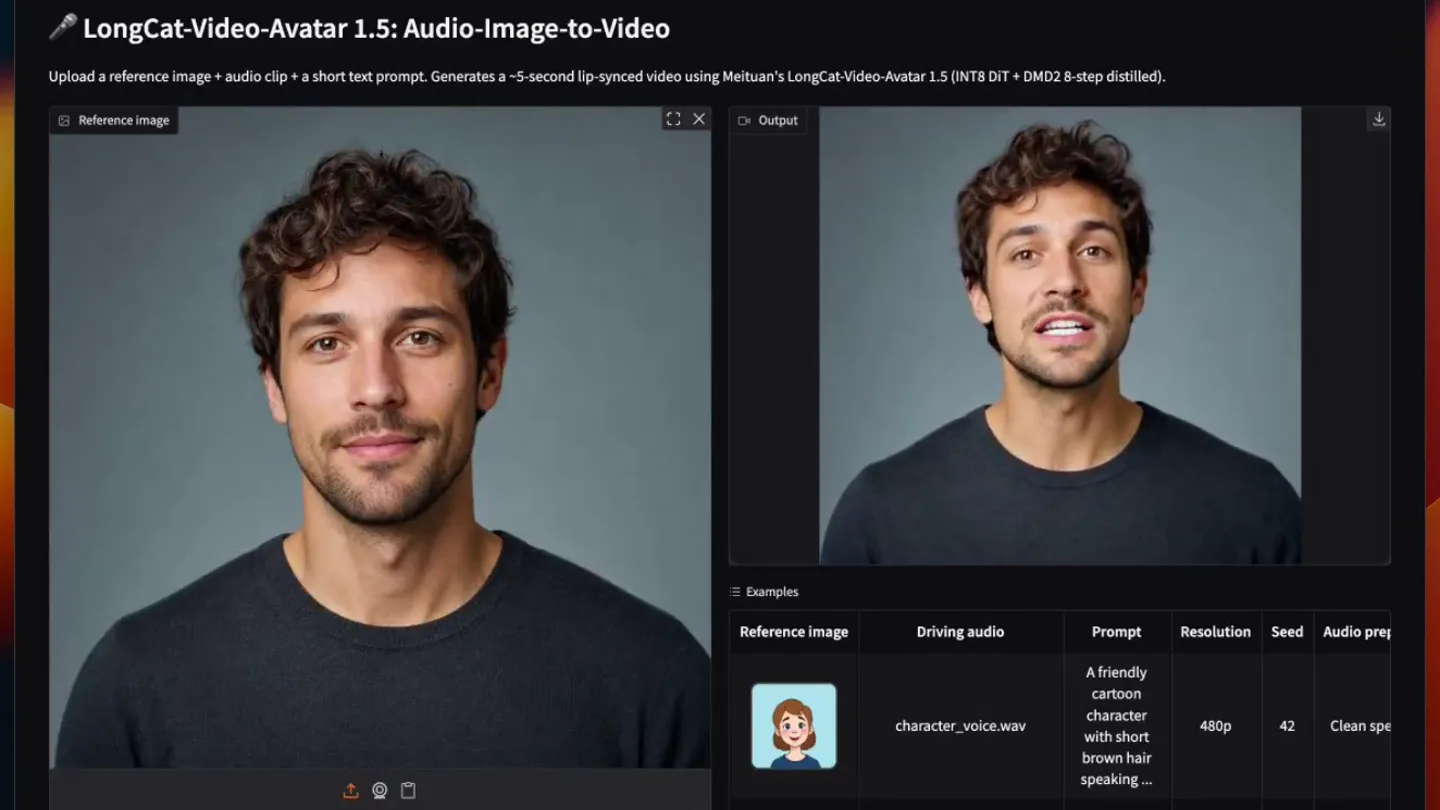
- LongCat-Video-Avatar 1.5: Audio-Image-to-Video Upload a reference image + audio clip + a short text prompt. Generates a ~5-second lip-synced video using Meituan's LongCat-Video-Avatar 1.5 (INT8 DIT + DMG2 8-step distilled). Reference image Drop Image Here - or - Click to Upload Driving audio Drop Audio Here - or - Click to Upload Prompt A person is speaking expressively, looking at the camera. Resolution 480p 720p Seed Output Examples Reference image Driving audio Prompt A friendly cartoon character with short brown hair speaking... orc_warrior_voice.wav A fantasy orc warrior portrait speaking directly to the came... Resolution 480p 480p Seed 42 77 Audio pre Clean spe Clean spe
- Camera
- Static, wide shot of a browser window displaying the product UI. A cursor hovers and clicks elements.
- Motion
- UI demonstration with cursor interaction, showcasing real-time avatar generation and lip-syncing.
Product Reveal
Cartoon Avatar Generation
“What used to be agency, camera, and editing now looks like this.”
- On screen
- LongCat-Video-Avatar 1.5: Audio-Image-to-Video Upload a reference image + audio clip + a short text prompt. Generates a ~5-second lip-synced video using Meituan's LongCat-Video-Avatar 1.5 (INT8 DIT + DMG2 8-step distilled). Reference image Drop Image Here - or - Click to Upload Driving audio Drop Audio Here - or - Click to Upload Prompt A person is speaking expressively, looking at the camera. Resolution 480p 720p Seed Output Examples Reference image Driving audio Prompt A friendly cartoon character with short brown hair speaking... orc_warrior_voice.wav A fantasy orc warrior portrait speaking directly to the came... Resolution 480p 480p Seed 42 77 Audio pre Clean spe Clean spe
- Camera
- Static, wide shot of the browser UI. The cursor selects a cartoon avatar example.
- Motion
- UI demonstration, highlighting the versatility of avatar styles from realistic to cartoon.
Feature Teaser
Fantasy Avatar Generation
“Open source.”
- On screen
- LongCat-Video-Avatar 1.5: Audio-Image-to-Video Upload a reference image + audio clip + a short text prompt. Generates a ~5-second lip-synced video using Meituan's LongCat-Video-Avatar 1.5 (INT8 DIT + DMG2 8-step distilled). Reference image Drop Image Here - or - Click to Upload Driving audio Drop Audio Here - or - Click to Upload Prompt A person is speaking expressively, looking at the camera. Resolution 480p 720p Seed Output Examples Reference image Driving audio Prompt A friendly cartoon character with short brown hair speaking... orc_warrior_voice.wav A fantasy orc warrior portrait speaking directly to the came... Resolution 480p 480p Seed 42 77 Audio pre Clean spe Clean spe
- Camera
- Static, wide shot of the browser UI. The cursor selects a fantasy avatar example.
- Motion
- UI demonstration, emphasizing the broad range of character types the tool can animate.
Motion design primitives
Synthesizable in Remotion · key components of the ui-avatar-lip-sync-demo template.
UIAvatarLipSync
A static image of a human or character avatar is displayed within a UI element. Upon audio input, the avatar's mouth animates to perfectly synchronize with the spoken dialogue, creating a realistic talking effect.
+ Code construction recipe
Utilize Remotion's Audio component to analyze speech patterns. Map audio amplitude and frequency data to a series of pre-defined mouth shapes (visemes) for the avatar image. Use `interpolate` or `spring` functions to smoothly transition between visemes, ensuring natural lip movements. The avatar image itself remains static, only the mouth region animates.
CursorClickHighlight
A white hand cursor moves across the screen, hovers over a specific UI element, and then performs a click action, indicated by a subtle visual feedback like a brief highlight or ripple effect on the clicked element.
+ Code construction recipe
Animate the cursor's `transform` (translate) property along a predefined path using `interpolate`. Implement a `scale` or `opacity` animation on the target UI element for a brief duration upon cursor 'click' to simulate interaction feedback. Use `delay` to synchronize the click animation with the cursor's arrival.
DynamicAvatarSwitch
Within a consistent UI layout, different avatar images are rapidly swapped in and out, each immediately demonstrating the lip-syncing capability with new audio inputs.
+ Code construction recipe
Manage the `src` prop of an `Image` component based on the current scene or audio segment. Implement a quick `opacity` fade-in/fade-out transition or a `scale` pop effect for the new avatar image to make the switch feel dynamic and responsive. Ensure the lip-syncing primitive is re-initialized for each new avatar and audio.
Style DNA & aesthetic system
Visual aesthetic
Typography
Motion
Special effects
Pacing & rhythm
Conceptual story rhythm
- 1
The 'Wow' Moment
Purpose. Immediately demonstrate the core, impressive capability of the product: generating a talking avatar from a single image and audio.
Execution. A realistic human avatar instantly lip-syncs to dialogue within the product UI, showcasing the 'before and after' of input to output.
- 2
Problem/Solution Bridge
Purpose. Highlight the traditional complexity of video production and position the product as a revolutionary, simplified alternative.
Execution. The spoken script directly contrasts 'agency, camera, and editing' with the simple UI, while the UI continues to demonstrate ease of use.
- 3
Versatility Showcase
Purpose. Illustrate the product's flexibility by applying it to different visual styles (cartoon, fantasy).
Execution. Rapid switching between diverse avatar types (human, cartoon, orc) all performing lip-sync within the same UI framework.
- 4
Key Differentiator
Purpose. Emphasize a crucial aspect of the product's availability or philosophy.
Execution. The word 'Open source' is spoken, reinforcing the product's accessibility and community-driven nature, while the UI continues to function seamlessly.
Remix in Animatiq Studio
Master remix prompt · agent-ready
Sample remix
Objective
Demonstrate a new AI code generation tool that takes natural language prompts and outputs functional code snippets.How the recipe adapts
The browser UI will show an input field for natural language prompts and an output panel for generated code. Instead of avatars, the 'UIAvatarLipSync' primitive adapts to 'UICodeGeneration' where code appears dynamically in the output panel. The 'CursorClickHighlight' primitive will show the cursor typing in the prompt field and clicking a 'Generate' button. The 'DynamicAvatarSwitch' becomes 'DynamicCodeSnippetSwitch', rapidly showcasing different code outputs for various prompts.Remix blueprint · ui-avatar-lip-sync-demo
Scene durations (3 scenes, 19.8s)
Key Remotion components
Related Developer Tools Product Launches
Explore all Developer Tools launches →
xAI opens voice cloning on its API: build a custom voice in about two minutes or pick from 80+ voices in 28 languages.

Claude can now operate your Mac, opening apps, browsing and filling spreadsheets, as a research preview in Cowork and Claude Code.

Agentic CLI for coding, building apps, and automating workflows.