
Luma · Launch Video Breakdown: Hook, Pacing & Motion Design
A new shadcn/ui style with rounded geometry and soft elevation.
Scene-by-scene timeline & spoken transcript
The Hook
Dynamic UI Interaction Showcase
“(No spoken dialogue — Gradual build-up with synth pad, percussive elements, rhythmic synth pulse, low-frequency drone, and a distinct riser effect.)”
- On screen
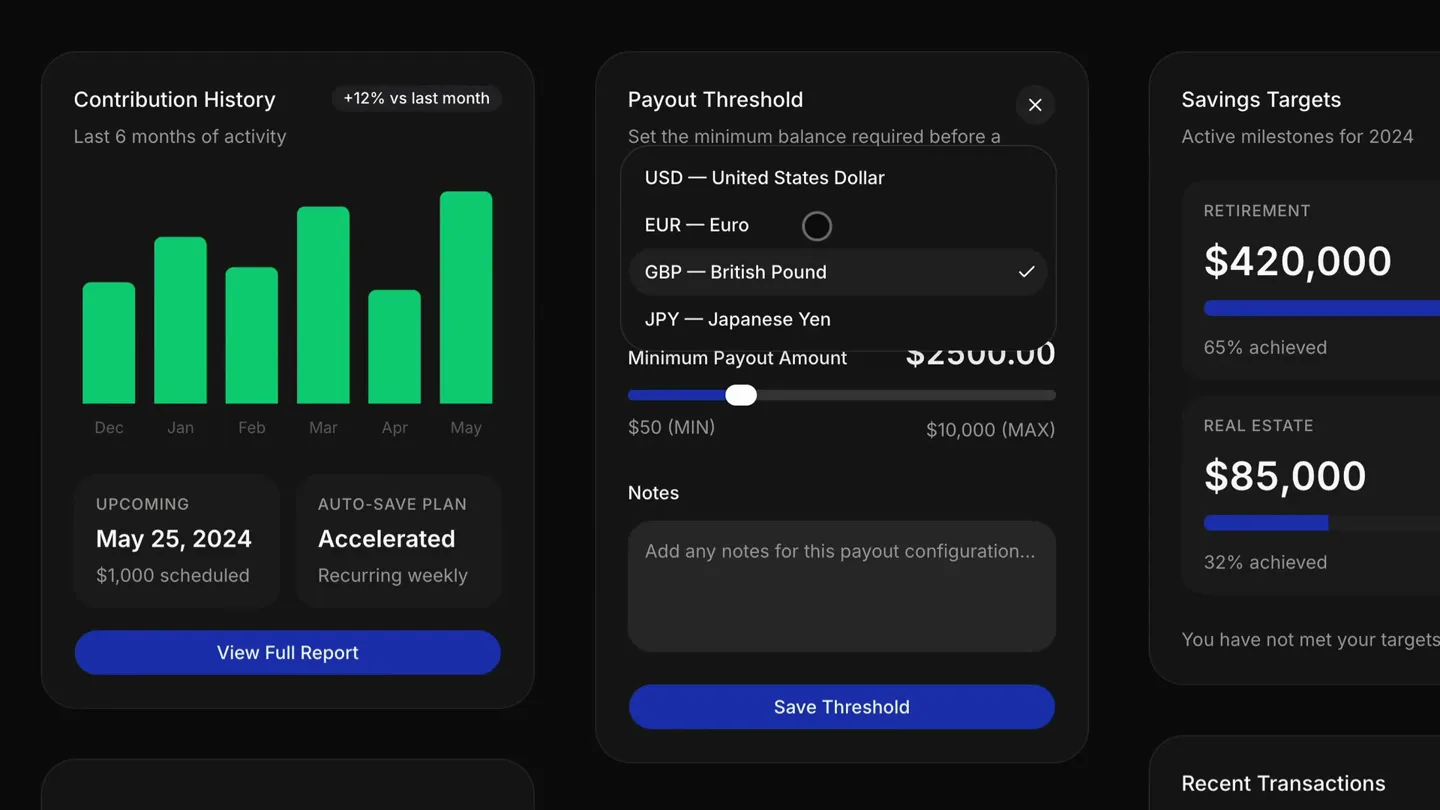
- Contribution History, +12% vs last month, Last 6 months of activity, Dec, Jan, Feb, Mar, Apr, May, UPCOMING, May 25, 2024, $1,000 scheduled, AUTO-SAVE PLAN, Accelerated, Recurring weekly, View Full Report, Payout Threshold, Set the minimum balance required before a payout is triggered., Preferred Currency, USD — United States Dollar, GBP — British Pound, JPY — Japanese Yen, EUR — Euro, Minimum Payout Amount, $2500.00, $50 (MIN), $10,000 (MAX), Notes, Add any notes for this payout configuration..., Save Threshold, Savings Targets, Active milestones for 2024, New Goal, RETIREMENT, $420,000, 65% achieved, $273,000, REAL ESTATE, $85,000, 32% achieved, $27,200, You have not met your targets for this year., Buy Investment, Amount to Invest, $ 1,000.00, Order Type, Market Order, Market orders ex, Estimated Shares, Buying Power, Recent Transactions, Your latest account activity., Blue Bottle Coffee, Food & Drink, Today, 10:24 AM, Whole Foods Market, Groceries, Yesterday, Distribute Track, Upload your first master to start reaching listeners on Spotify, Apple Music, and more., Claimable Balance, $0.00, Pending Setup, Net Royalties, $0.00, Processing Fee, -$0.00, Total Ready to Claim, $0.00 USD
- Camera
- The camera slowly pans across a dark-themed dashboard, revealing various UI elements and interactions.
- Motion
- Smooth, continuous camera pan with subtle UI element animations like dropdowns opening and sliders adjusting, emphasizing the interactive nature of the interface.
Product Reveal
Feature Exploration & Settings
“(No spoken dialogue — Sub-bass drop/impact with a driving synth melody, continuation of rhythmic synth and sub-bass, building energy, followed by a more pronounced riser.)”
- On screen
- Scan to connect your mobile device, Open the Ledger mobile app and scan this code to link your device., Got it, Preferences, Manage your account settings and notifications., Default Currency, USD — United States Dollar, Public Statistics, Allow others to see your total stream count and listening activity, Email Notifications, Monthly royalty reports and distribution updates, Reset, Save Preferences, Overview, Dashboard, Transactions, Investments, Planning, Goals, Budget, Reports, Documents, Account, Profile, Billing, Notifications, Security, Support, Help Center, Contact Us, Status, Q2 Dividend Income, Quarterly dividend payouts across your portfolio holdings., Vanguard VIG, 450 Shares, $1,842.10, S&P 500 VOO, 112 Shares, $928.40, General, Billing, Goals, What is the difference between Basic and Pro pricing tiers?, Basic includes budgeting, goal tracking, and up to 3 linked accounts. Pro adds unlimited accounts, dividend tracking, portfolio analysis, and priority support., How do I cancel my subscription?, Do you offer a free trial?, How do I set up a custom financial goal?, Click New Goal from the Savings Targets card. Choose a category, set a target amount and date, and we'll calculate the monthly contribution needed., Can I track multiple goals at once?, How are monthly contributions calculated?, Direct Debits, Set up and manage regular payments., Recurring card payments, Manage your repeated card transactions., Front Door, Smart Lock Pro
- Camera
- The camera continues its slow, deliberate pan, focusing on different sections of the dashboard, including settings and FAQ sections.
- Motion
- Interactive UI elements like toggles and accordions are animated, demonstrating functionality. The camera movement is smooth, guiding the viewer's eye through the interface.
Feature Teaser
Advanced Financial Management
“(No spoken dialogue — Significant sub-bass drop/impact with a powerful, sustained synth chord, high-energy synth arpeggios and a driving beat, followed by a sweeping transition with a filter effect.)”
- On screen
- Overview, Dashboard, Transactions, Investments, Planning, Goals, Budget, Reports, Documents, Account, Profile, Billing, Notifications, Security, Support, Help Center, Contact Us, Status, General, Billing, Goals, Home, ..., Payments, Change transfer limit, Adjust how much you can send from your balance., Scheduled transfers, Set up a transfer to send at a later date., Direct Debits, Set up and manage regular payments., Recurring card payments, Manage your repeated card transactions., Buy Investment, Amount to Invest, $ 1,000.00, Order Type, Market Order, Market orders execute at the current price., Estimated Shares, 1.95, Buying Power, $12,450.00, Review Order, Trades are typically executed within minutes during market hours., Payout Threshold, Set the minimum balance required before a payout is triggered., Preferred Currency, USD — United States Dollar, Minimum Payout Amount, $2500.00, $50 (MIN), $10,000 (MAX), Notes, Add any notes for this payout configuration..., Save Threshold, Savings Targets, Active milestones for 2024, New Goal, RETIREMENT, $420,000, 65% achieved, $273,000, REAL ESTATE, $85,000, 32% achieved, $27,200, You have not met your targets for this year., Recent Transactions, Your latest account activity., Blue Bottle Coffee, Food & Drink, Today, 10:24 AM, -$6.50, Whole Foods Market, Groceries, Yesterday, -$142.30, Stripe Payout, Income, Oct 12, +$4,200.00, Uber Technologies, Transport, Oct 11, -$24.10, Netflix Subscription, Entertainment, Oct 10, -$19.99, Account Access, Update your credentials or re-authenticate., Email Address, artist@studio.inc, Current Password, FORGOT?, Update Security, Danger Zone, Archive account and remove., Card Balance, US$12.94, US$11,337.06, Available, Payment Due, 1 Apr, Pay Early, Yearly Activity, +US$0.25 Daily Cash, Solar Gen, 3.4 KW, +1.2 KW, Battery Level, 85%
- Camera
- The camera continues its slow pan, highlighting payment settings, investment options, and transaction history, with a slight zoom into specific interactive elements.
- Motion
- Subtle hover effects and button presses are animated, demonstrating user interaction. The camera movement maintains a smooth, exploratory feel, revealing the depth of the application.
Call to Action
Comprehensive Dashboard Overview
“(No spoken dialogue — Reintroduction of the driving rhythm and sub-bass, building again, final intense riser leading to a climactic moment, powerful sub-bass impact and a sustained, resonant synth chord, fading out.)”
- On screen
- Card Balance, US$12.94, US$11,337.06, Available, Payment Due, 1 Apr, Pay Early, Yearly Activity, +US$0.25 Daily Cash, Solar Gen, 3.4 KW, +1.2 KW, Battery Level, 85%, Transfer Funds, Move money between your connected accounts., Amount to Transfer, $ 1,200.00, From Account, Main Checking | (8402) — $12,450.00, To Account, High Yield Savings | (1192) — $42,100.00, Estimated arrival, Today, Apr 14, Transaction fee, $0.00, Total amount, $1,200.00, Confirm Transfer, Connect Bank, Link your payout method to receive monthly royalty distributions automatically., Set Up Payouts, Upcoming Payments, Select a date to view scheduled payments., March 2026, Su, Mo, Tu, We, Th, Fr, Sa, 1, 2, 3, 4, 5, 6, 7, 8, 9, 10, 11, 12, 13, 14, 15, 16, 17, 18, 19, 20, 21, 22, 23, 24, 25, 26, 27, 28, 29, 30, 31, Social Links, Spotify Artist URL, spotify.com/artist/, Instagram Handle, @julian.davis.music, SoundCloud URL, soundcloud.com/julian.davis, Website, https://julian.davis, COVER ART, Scan to connect your mobile device, Open the Ledger mobile app and scan this code to link your device., Got it, Preferences, Manage your account settings and notifications., Default Currency, USD — United States Dollar, Public Statistics, Allow others to see your total stream count and listening activity, Email Notifications, Monthly royalty reports and distribution updates, Reset, Save Preferences, Overview, Dashboard, Transactions, Investments, Planning, Goals, Budget, Reports, Documents, Account, Profile, Billing, Notifications, Security, Support, Help Center, Contact Us, Status, Q2 Dividend Income, Quarterly dividend payouts across your portfolio holdings., Vanguard VIG, 450 Shares, $1,842.10, S&P 500 VOO, 112 Shares, $928.40, Distribute Track, Upload your first master to start reaching listeners on Spotify, Apple Music, and more., Create Release, Claimable Balance, $0.00, Pending Setup, Net Royalties, $0.00, Processing Fee, -$0.00, Total Ready to Claim, $0.00 USD, Once your bank is connected, balances over $10.00 are automatically eligible for monthly distribution on the 15th of each month., Payout Preferences, Receiving Method, Account Holder Name, Synthetic Horizons Music LLC, Ticker, VOO, Receiving Method, Bank Transfer, SWIFT/IBAN, Instant Payout, IBAN / Account Number, DE88 3704 0044..., Save Payout Settings, Stock Performance, 6-month price history, Power Usage, Whole Home, Currently Using, Solar Gen, 3.4 KW, +1.2 KW, Battery Level, 85%, Explore Catalog, Check your SRC music, video and visual assets., View Catalog, Set a new milestone, Define your financial target and plan your savings., Goal Name, e.g. New Car, Home Downpayment, Target Amount, $15,000, Create Goal, Cancel
- Camera
- The camera completes its panoramic sweep, showcasing various interactive elements like fund transfers, payment schedules, and social links, before a final wide shot of the entire dashboard.
- Motion
- Complex UI interactions are demonstrated, such as form submissions and calendar selections. The camera movement culminates in a broad view, emphasizing the comprehensive nature of the product.
Motion design primitives
Synthesizable in Remotion · key components of the dark-mode-ui-pan-reveal template.
DashboardPan
A continuous, slow, and smooth camera pan across a large, multi-panel dashboard interface, revealing different sections and their content sequentially.
+ Code construction recipe
Utilize Remotion's `AbsoluteFill` for the entire dashboard composition. Implement `interpolate` for `translateX` and `translateY` properties of the main dashboard container, mapping the animation progress to a smooth easing function (e.g., `easeOutCubic`) to control the pan speed and direction. Ensure the dashboard content is significantly larger than the viewport to allow for extensive panning.
InteractiveUIReveal
Individual UI elements (dropdowns, toggles, sliders, accordions) animate into an active state with subtle, quick transitions upon camera focus or implied user interaction.
+ Code construction recipe
For each interactive element, use Remotion's `spring` or `interpolate` with a short duration (e.g., 10-15 frames) to animate properties like `opacity`, `scale`, `rotateX`, or `translateY`. For dropdowns, animate `height` from 0 to auto. For toggles, animate `translateX` of the thumb. Coordinate these micro-animations with the `DashboardPan` primitive's timeline.
DataVisualizationPulse
Bar charts and progress rings subtly animate their values or fill states, often accompanied by a slight glow or scale effect, to highlight data updates.
+ Code construction recipe
For bar charts, animate the `height` of individual bars using `interpolate` from 0 to their final value. For progress rings, animate the `stroke-dasharray` property of an SVG circle. Apply a subtle `scale` or `opacity` animation to the entire data visualization component using `spring` to give it a 'pulse' effect when it comes into focus.
Style DNA & aesthetic system
Visual aesthetic
Typography
Motion
Special effects
Pacing & rhythm
Conceptual story rhythm
- 1
Initial Immersion
Purpose. To immediately draw the viewer into the product's interface and establish its aesthetic.
Execution. Slow, continuous camera pan across the dashboard, revealing key sections and the overall dark-mode design.
- 2
Feature Discovery
Purpose. To highlight specific interactive elements and demonstrate core functionalities.
Execution. Camera focuses on dropdowns, toggles, and sliders, showing their smooth animations and responsiveness.
- 3
Comprehensive Overview
Purpose. To showcase the breadth and depth of the application's capabilities.
Execution. The pan continues, revealing more complex sections like payment settings, investment dashboards, and data visualizations.
- 4
Climactic Reveal
Purpose. To leave a lasting impression of the product's power and elegance.
Execution. A final, broader view of the dashboard, with multiple interactive elements animating simultaneously, culminating in a sustained visual.
Remix in Animatiq Studio
Master remix prompt · agent-ready
Sample remix
Objective
Create a launch video for 'QuantumFlow', a new AI-powered project management tool.How the recipe adapts
The QuantumFlow video would feature a continuous pan across its dark-themed project dashboard, showcasing AI-driven task automation and predictive analytics. Interactive elements like drag-and-drop task cards and AI suggestion pop-ups would animate with quick spring effects. Progress bars for project milestones would subtly pulse. The camera would slowly zoom into specific AI insights, maintaining the unhurried, exploratory feel, all synchronized with a high-energy electronic soundtrack.Remix blueprint · dark-mode-ui-pan-reveal
Scene durations (4 scenes, 24s)
Key Remotion components
Related Developer Tools Product Launches
Explore all Developer Tools launches →
xAI opens voice cloning on its API: build a custom voice in about two minutes or pick from 80+ voices in 28 languages.

Claude can now operate your Mac, opening apps, browsing and filling spreadsheets, as a research preview in Cowork and Claude Code.

Agentic CLI for coding, building apps, and automating workflows.