
Luminary · Launch Video Breakdown: Hook, Pacing & Motion Design
Just launched: Luminary MCP Server The first AI agent interface built specifically for Physics AI workflows. ✅ Works with VSCode, Cursor, Claude ✅ Automates training, post-processing & optimization ✅ Runs locally, talks to your code + data ✅ Connects directly to Luminary https://t.co/KRffbOEh3k
Scene-by-scene timeline & spoken transcript
The Hook
Introducing Luminary MCP: AI for Physics Workflows
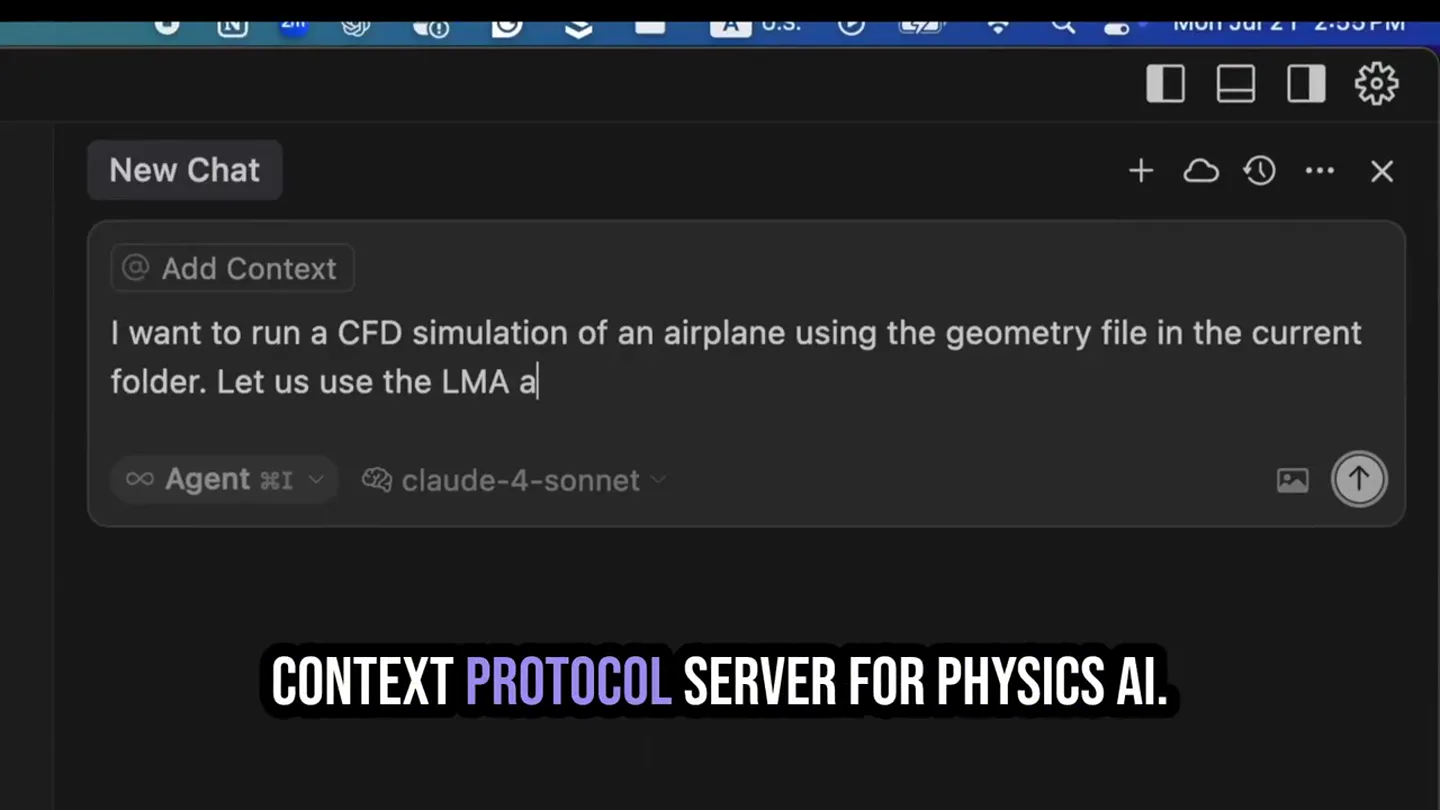
“Introducing the Luminary Model Context Protocol Server, the first AI agent interface built specifically for Physics AI workflows. MCP connects your favorite agents like VSCode, Cursor, and even Claude or Gemini directly to Luminary's platform.”
- On screen
- New Chat @ Add Context I want to run a CFD simulation of an airplane using the ge Agent claude-4-sonnet INTRODUCING THE LUMINARY MODEL A POWERFUL NEW WAY TO AUTOMATE TRAINING WORKFLOWS WITH LUMINARY MCP CONNECTS YOUR FAVORITE AGE CODE CURSOR, AND EVEN CLAUDE OR GEMINI DIRECTLY TO LUMINARY'S PLATFORM.
- Camera
- Static screen capture of a VSCode-like IDE with a chat interface. The camera remains fixed, focusing on the code and chat windows.
- Motion
- Text reveal animation (word by word), UI element highlighting (e.g., file explorer navigation, code selection), and simulated typing in the chat window.
Product Reveal
Automate, Refactor, Debug Luminary SDK Scripts
“This allows you to automate, refactor, and debug Luminary SDK scripts using natural language. You can instantly create scripts to generate large training data sets, standardize post-processing, and build sophisticated optimization loops.”
- On screen
- airplane_cfd_simulation.py README.md requirements.txt REFRACTOR AND DEBUG LUMINARY SDK SCRIPTS USING INSIDER TEAM AUTOMATE REPETITIVE TASKS AND SCALE UP WITH EASE. INSTANTLY CREATE SCRIPTS TO GENERATE LARGE TRAINING DATA SETS, STANDARDIZE BUILD SOPHISTICATED OPTIMIZATION LOOPS.
- Camera
- Static screen capture of the Luminary Cloud platform UI, showcasing 3D model visualization and simulation results. The camera remains fixed.
- Motion
- UI element highlighting (e.g., selecting tabs, expanding menus), 3D model rotation/transformation, and data visualization updates (e.g., color mapping on the airplane model).
Feature Teaser
Local Data Interface & Personalized Toolchain
“Because MCP runs locally on your machine, you can interface directly with your own local data or resources, creating a personalized toolchain that seamlessly connects Luminary to your existing development environment, all with minimal setup. Along with our newly released notebook feature, it's now even easier to get started automating, optimizing and scaling your model development workflows.”
- On screen
- airplane_cfd_simulation.py README.md requirements.txt WITH YOUR OWN LOCAL DATA OR RESOURCES THAT SEAMLESSLY CONNECTS LUMINARY ENVIRONMENT, ALL WITH MINIMAL ALONG WITH OUR NEWLY RELEASED EASIER TO GET STARTED AUTOMATING, OPTIMIZING AND SCALING YOUR MODEL
- Camera
- Static screen capture of a VSCode-like IDE, transitioning to a split view with code and a markdown report. The camera remains fixed.
- Motion
- Code scrolling, file explorer navigation, and simulated text generation in the markdown report.
Motion design primitives
Synthesizable in Remotion · key components of the developer-tool-launch-dark-mode template.
CodeTypewriterReveal
Text appears character by character in a code editor or chat window, simulating real-time typing. Simultaneously, relevant UI elements like file names or chat bubbles are highlighted.
+ Code construction recipe
Use Remotion's `Sequence` and `AbsoluteFill` for screen capture. Implement `spring` or `interpolate` for character opacity and position. Use `measureText` for precise character placement. Highlight UI elements with `AbsoluteFill` and `spring` for opacity/scale.
UIMenuHighlight
Specific UI elements such as tabs, menu items, or buttons are briefly highlighted with a subtle glow or color change, drawing attention to the presenter's focus.
+ Code construction recipe
Overlay transparent `AbsoluteFill` components with `background-color` and `opacity` animated using `spring` or `interpolate`. Position these overlays precisely over the target UI elements. Use `z-index` to ensure visibility.
DataViz3DModel
A 3D model (e.g., an airplane) is displayed within a UI, rotating or changing its visual representation (e.g., color mapping for pressure data) to illustrate simulation results.
+ Code construction recipe
Integrate a 3D library like `three.js` or `react-three-fiber` within a Remotion `AbsoluteFill`. Animate the model's `rotation` property using `interpolate` or `spring`. Apply material changes (e.g., color, texture) based on data using `interpolate` for color values.
Style DNA & aesthetic system
Visual aesthetic
Typography
Motion
Special effects
Pacing & rhythm
Conceptual story rhythm
- 1
The AI Agent Introduction
Purpose. Introduce the core product (Luminary MCP) and its primary function: an AI agent interface for Physics AI workflows.
Execution. Opening with a simulated chat interface in an IDE, showing a user prompt and the AI agent's response, immediately demonstrating the product's interactive nature.
- 2
Platform Integration & Automation
Purpose. Explain how MCP connects to popular coding environments and automates complex tasks like script creation, post-processing, and optimization.
Execution. Transitioning between IDE views showing code generation and the Luminary Cloud platform displaying 3D models and simulation results, illustrating the end-to-end workflow.
- 3
Local Control & Customization
Purpose. Highlight the benefits of local execution, data interfacing, and the creation of personalized toolchains.
Execution. Returning to the IDE view, emphasizing code and file structures, then showing a split view with a generated report, reinforcing the local control and output.
- 4
Ease of Use & Scaling
Purpose. Conclude by emphasizing the product's ease of use for automating, optimizing, and scaling model development.
Execution. Showcasing the final results and insights within the IDE, with a focus on clear data visualizations and a summary of engineering insights, reinforcing the value proposition.
Remix in Animatiq Studio
Master remix prompt · agent-ready
Sample remix
Objective
Launch a new API management platform called 'Nexus Gateway' that simplifies microservice orchestration.How the recipe adapts
The video would open with a simulated terminal or IDE showing a user typing a command to deploy a microservice, followed by the Nexus Gateway UI highlighting how it automatically discovers and configures services. UI elements like API endpoints and traffic graphs would be subtly animated and highlighted. The voiceover would explain the benefits of automated orchestration and simplified API versioning, maintaining the same calm, informative tone. The background music would be a similar ambient electronic track. On-screen text would introduce features like 'Automated Service Discovery' and 'Intelligent Traffic Routing' in the same Grotesque Sans-serif style.Remix blueprint · developer-tool-launch-dark-mode
Scene durations (10 scenes, 62s)
Key Remotion components
Related Developer Tools Product Launches
Explore all Developer Tools launches →
xAI opens voice cloning on its API: build a custom voice in about two minutes or pick from 80+ voices in 28 languages.

Claude can now operate your Mac, opening apps, browsing and filling spreadsheets, as a research preview in Cowork and Claude Code.

Agentic CLI for coding, building apps, and automating workflows.