
AmirMušić · Launch Video Breakdown: Hook, Pacing & Motion Design
Machine Vision is an open-source experiment that turns machine perception into a design system — frame analysis, tracking data, and a visual language for interfaces and branding.
Scene-by-scene timeline & spoken transcript
The Hook
Machine Vision Intro
“(No spoken dialogue — Synth riser followed by a sub-bass drop/impact.)”
- On screen
- (No on-screen text)
- Camera
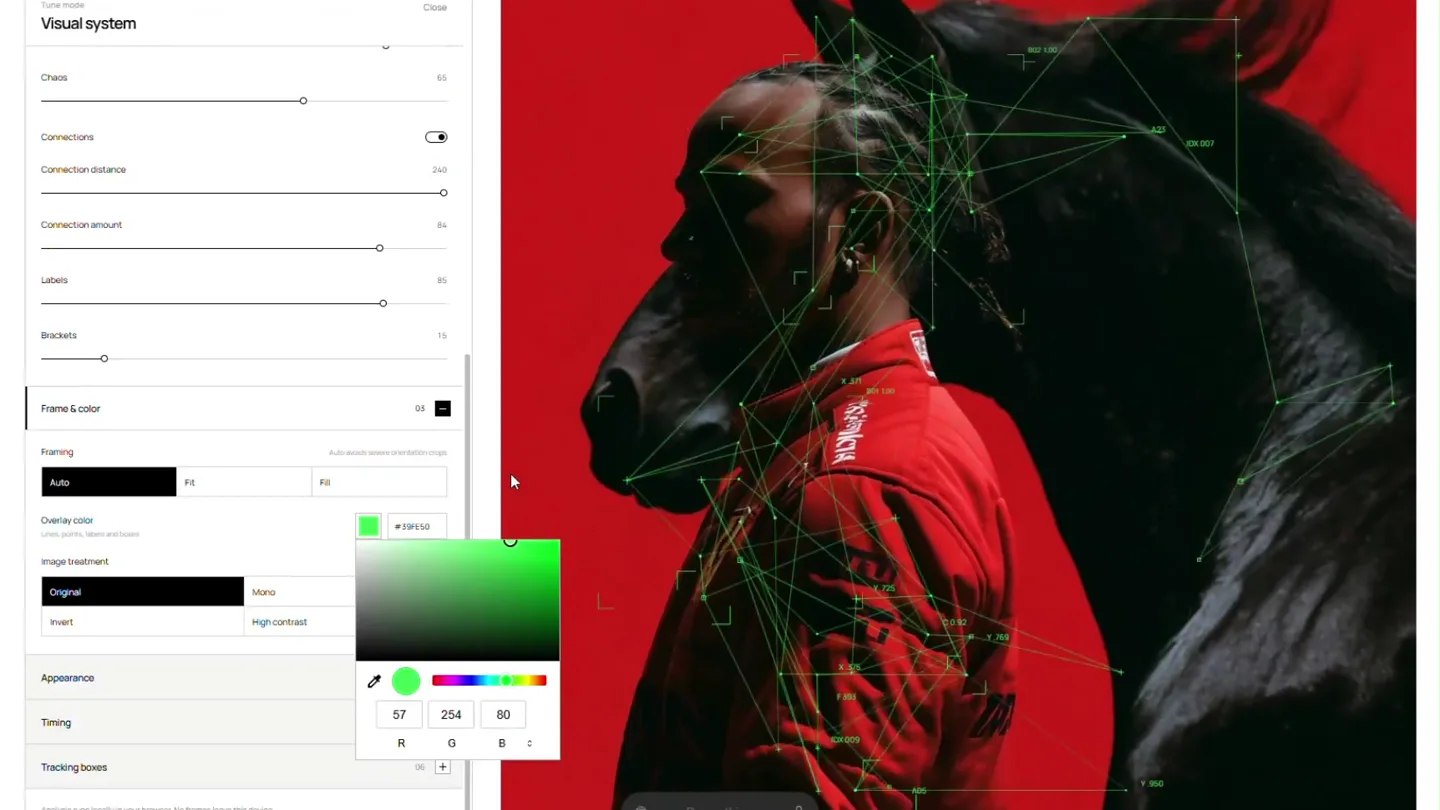
- Static shot of a UI panel on the left, with a dynamic image on the right.
- Motion
- Rapid visual system parameter changes, creating a glitch-like effect on the image overlay.
Product Reveal
Interactive Machine Perception
“(No spoken dialogue — Sustained evolving pad with sub-bass and electronic percussive elements.)”
- On screen
- Visual system, Threshold, Detail, Max points, Min distance, Motion bias, Composition, Density, Chaos, Connections, Connection distance, Connection amount, Labels, Brackets, Frame & color, Framing, Auto, Fill, Overlay color, Image treatment, Original, Mono, Invert, High-contrast, Appearance, Overlay opacity, Line weight, Point size, Label size, Contrast assist, Boxes, Timing, Tracking boxes, Do anything, MV / 001
- Camera
- Static shot, focusing on the interactive UI and its real-time effect on the image.
- Motion
- Sliders and toggles in the UI are animated, dynamically changing the visual overlay (color, line weight, point size, connections) on the image, demonstrating real-time machine vision adjustments.
Feature Teaser
Dynamic Visual System Controls
“(No spoken dialogue — Synth riser builds to a powerful sub-bass impact.)”
- On screen
- Visual system, Brackets, Frame & color, Framing, Auto, Fill, Overlay color, Image treatment, Original, Mono, Invert, High-contrast, Appearance, Overlay opacity, Line weight, Point size, Label size, Contrast assist, Boxes, Timing, Tracking boxes, Do anything, MV / 001
- Camera
- Static shot, with subtle shifts in the UI panel's scroll position.
- Motion
- Rapid, precise adjustments of multiple UI parameters (line weight, point size, label size, overlay opacity) in quick succession, showcasing the granular control and responsiveness of the system.
Call to Action
Product & Creator Reveal
“(No spoken dialogue — Ambient electronic score with rhythmic pulses fades out.)”
- On screen
- Machine Vision, Free open-sourced motion tool, Created by @AmirMusich
- Camera
- Static, black background with centered text.
- Motion
- Simple text fade-in and fade-out, with a subtle glow effect on the 'Machine Vision' title, emphasizing clarity and brand identity.
Motion design primitives
Synthesizable in Remotion · key components of the machine-vision-interactive-showcase template.
RealtimeParameterTweak
UI sliders and toggles animate rapidly, causing immediate and visible changes to an overlaid graphic on a background image. This demonstrates interactive control over visual parameters.
+ Code construction recipe
Use `interpolate` for slider values mapped to visual properties (e.g., `line-width`, `opacity`, `color`). Implement `spring` for toggle transitions. Utilize SVG filters or Canvas API for dynamic graphic rendering based on UI inputs.
DataOverlayNetwork
A complex network of lines and points, often with numerical labels, overlays a subject in an image. This network dynamically changes its density, color, and connection patterns.
+ Code construction recipe
Render an SVG overlay with dynamically generated `<line>` and `<circle>` elements. Points and connections can be calculated based on a simulated 'tracking data' array. Animate `stroke`, `stroke-width`, `fill`, and `opacity` using `interpolate` or `spring` based on input parameters.
HighContrastImageTreatment
The background image rapidly shifts between original, monochrome, inverted, and high-contrast states, often with a color overlay, creating a stark, analytical visual effect.
+ Code construction recipe
Apply CSS `filter` properties (e.g., `grayscale()`, `invert()`, `contrast()`) to the background image. Use `interpolate` for smooth transitions between filter values and `background-color` for overlay effects.
Style DNA & aesthetic system
Visual aesthetic
Typography
Motion
Special effects
Pacing & rhythm
Conceptual story rhythm
- 1
The Algorithmic Glimpse
Purpose. Immediately captivate with a hint of the product's core capability: transforming visual data.
Execution. A quick flash of the machine vision overlay on a striking image, setting an intriguing, high-tech tone.
- 2
Purpose.
Execution.
- 3
Interactive Control Showcase
Purpose. Demonstrate the user's direct and granular control over the machine vision parameters.
Execution. Animated UI sliders and toggles manipulate the data overlay in real-time, showing immediate visual feedback and customization options.
- 4
Visual Transformation Mastery
Purpose. Highlight the breadth and depth of visual transformations possible, from subtle to dramatic.
Execution. Rapid-fire adjustments of multiple visual parameters (color, contrast, line weight) showcasing the system's versatility and power.
- 5
Brand & Creator Affirmation
Purpose. Conclude with clear product identification and credit to the creator, reinforcing brand and open-source nature.
Execution. Clean, minimalist text screens revealing the product name, its open-source status, and the creator's handle.
Remix in Animatiq Studio
Master remix prompt · agent-ready
Sample remix
Objective
Launch a new AI-powered audio mastering tool that visualizes sound waves and applies real-time effects.How the recipe adapts
The UI panel on the left will control audio parameters like EQ, compression, and reverb. The right side will display a dynamic, data-driven visualization of a sound wave, reacting in real-time to the UI adjustments. Instead of lines and points, the overlay will be a complex, evolving waveform graphic. High-contrast treatments will be applied to the waveform visualization, shifting colors and intensity based on audio processing. The final screen will display 'Sonic Sculptor: AI Audio Mastering' and a link to download.Remix blueprint · machine-vision-interactive-showcase
Scene durations (4 scenes, 26.1s)
Key Remotion components
Related Creative Tools Product Launches
Explore all Creative Tools launches →
A vibe design partner with an AI-native canvas for turning ideas into UI.

We heard you wanted to use Codex rate limit resets on your own time. Starting today, we’re rolling out the ability to save rate limit resets to use later. We’re starting Go, Plus, Pro, and Business
There's a hidden tax on every knowledge worker in the world, and nobody talks about it: The design tax. You're a strategist, a sales lead, a marketer. You were hired for what you know. But every me…