
Pietro Schirano · Launch Video Breakdown: Hook, Pacing & Motion Design
You can now run MagicPath as a native canvas inside Codex to design and build functional apps. It's pretty incredible. Here's how to do it
Scene-by-scene timeline & spoken transcript
The Hook
AI-Powered App Generation
“(No spoken dialogue — ambient typing and UI interaction sounds)”
- On screen
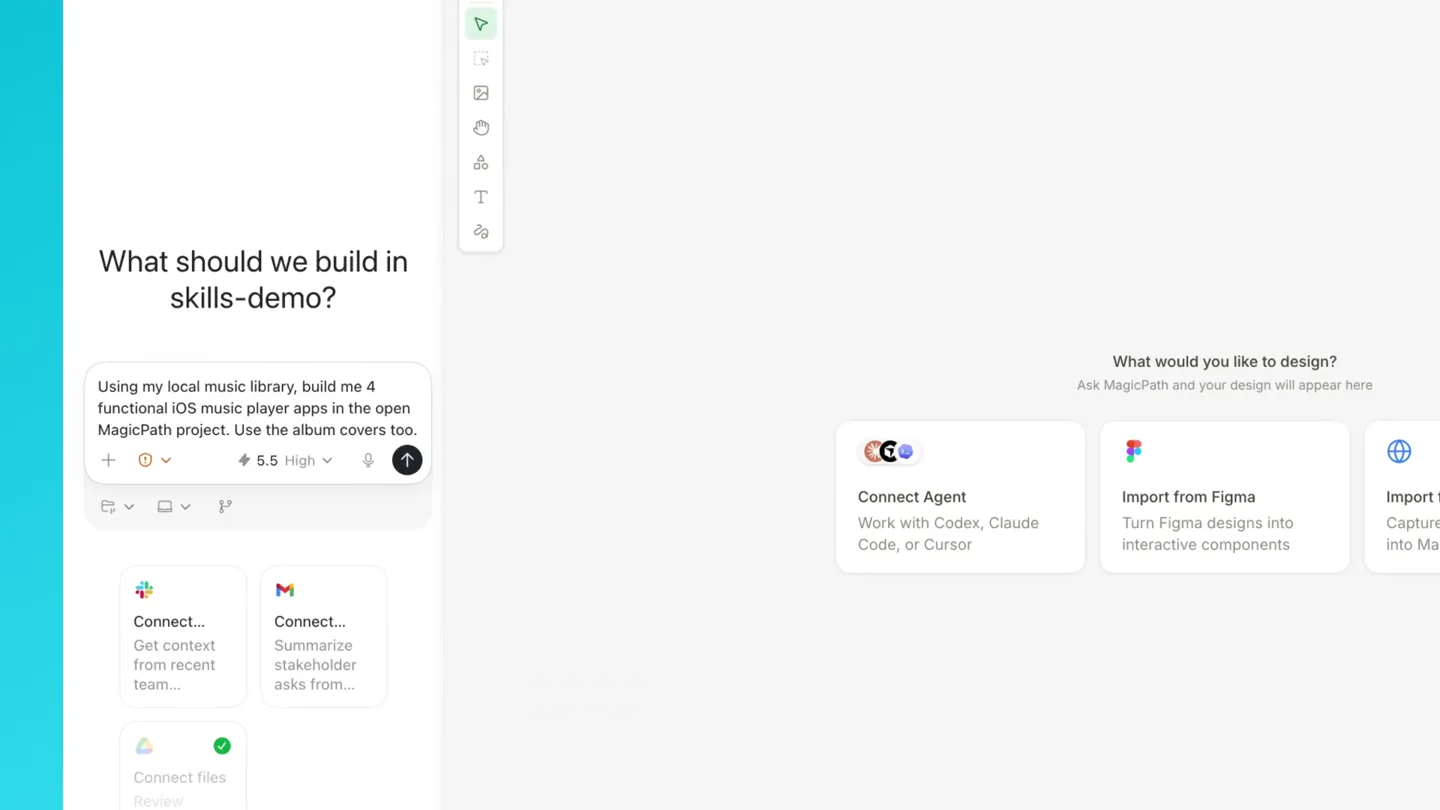
- What should we build in skills-demo? Ask Codex anything. @ to use plugins or m... Connect... Get context from recent team... Connect... Summarize stakeholder asks from... Connect files Review results, research, an Using my local music library, build me 4 functional iOS music player apps in the open MagicPath project. Use the album covers too. Working for 3s I'll use the MagicPath and music-library workflows here. first I'm going to identify the Thinking Ask for follow-up changes What would you like to design? Ask MagicPath and your design will appear here Connect Agent Work with Codex, Claude Code, or Cursor Import from Figma Turn Figma designs into interactive components Import from Web Capture website into MagicPath
- Camera
- Static wide shot of a desktop application interface, slightly zoomed out to show the full canvas.
- Motion
- Rapid text generation (typing animation) in a chat interface, followed by a quick reveal of placeholder UI elements.
Product Reveal
Instant UI Component Generation
“(No spoken dialogue — ambient typing and UI interaction sounds)”
- On screen
- What should we build in skills-demo? Ask Codex anything. @ to use plugins or m... Connect... Get context from recent team... Connect... Summarize stakeholder asks from... Connect files Review results, research, an Using my local music library, build me 4 functional iOS music player apps in the open MagicPath project. Use the album covers too. Working for 3s I'll use the MagicPath and music-library workflows here. first I'm going to identify the Thinking Ask for follow-up changes What would you like to design? Ask MagicPath and your design will appear here Connect Agent Work with Codex, Claude Code, or Cursor Import from Figma Turn Figma designs into interactive components Import from Web Capture website into MagicPath Soundtrack Focus Player Blonde Queue Player Neon Library Player Coverflow Radio Player Codex Codex Codex Codex Score room Rain on NOW SCORING Can You Hear the Music Ludwig Göransson Oppenheimer Deep Draft Walk SESSION 37:00 45 minute deep mix - 150 cue Source Full Can You Hear the Music Ludwig Göransson - Oppenheimer Altrap-rive Frank Ocean - Blonde White Ferrari Frank Ocean - Blonde Champagne Coast Blood Orange - Coastal Grooves 12 6dB Idle ALBUM QUEUE Frank Ocean blond Pink + White Blonde - 2016 - R&B/Soul Queue Lyrics Nikes energy 42% Ivy energy 48% Pink + White energy 95% LOCAL LIBRARY Neon shelf Sunset The Midnight - Endless Summer Synthwave - 2016 Endless Summer Odyssey Dreamrider COVERFLOW RADIO Local FM Hi-Fi Night Drive - 93 BPM Cruise Lazerhawk - Dreamrider Night Drive Arcade Slow Burn Vocal Instrumental Cruise Lazerhawk Live Resonance HOME | Odyssey Sunset The Midnight Live
- Camera
- Static wide shot, with a slight zoom and pan to highlight specific UI elements as they are generated and interacted with.
- Motion
- Progressive UI reveal: wireframe placeholders animate into fully rendered, interactive app components. Subtle cursor interactions (clicks, drags) are shown.
Feature Teaser
Interactive App Previews
“(No spoken dialogue — ambient UI interaction sounds)”
- On screen
- Soundtrack Focus Player Blonde Queue Player Neon Library Player Coverflow Radio Player Score room Rain on NOW SCORING Can You Hear the Music Ludwig Göransson Oppenheimer Deep Draft Walk SESSION 37:00 45 minute deep mix - 150 cue Source Full Can You Hear The Music Ludwig Göransson - Oppenheimer Altrap-rive Frank Ocean - Blonde White Ferrari Frank Ocean - Blonde Champagne Coast Blood Orange - Coastal Grooves 12 6dB Idle ALBUM QUEUE Frank Ocean blond Pink + White Blonde - 2016 - R&B/Soul Queue Lyrics Nikes energy 42% Ivy energy 48% Pink + White energy 95% LOCAL LIBRARY Neon shelf Sunset The Midnight - Endless Summer Synthwave - 2016 Endless Summer Odyssey Dreamrider COVERFLOW RADIO Local FM Hi-Fi Night Drive - 93 BPM Cruise Lazerhawk - Dreamrider Night Drive Arcade Slow Burn Vocal Instrumental Cruise Lazerhawk Live Resonance HOME | Odyssey Sunset The Midnight Live
- Camera
- Dynamic camera cuts and zooms, focusing on individual app components and their interactive elements (buttons, sliders, album art).
- Motion
- Rapid-fire demonstrations of UI interactions: playing music, changing modes, scrolling through libraries. Each interaction is highlighted with a subtle zoom or focus effect.
Call to Action
Seamless Integration & Design
“(No spoken dialogue — ambient UI interaction sounds)”
- On screen
- Soundtrack Focus Player Blonde Queue Player Neon Library Player Coverflow Radio Player Score room Rain on NOW SCORING Can You Hear The Music Ludwig Göransson Oppenheimer Deep Draft Walk SESSION 37:00 45 minute deep mix - 150 cue Source Full Can You Hear The Music Ludwig Göransson - Oppenheimer Altrap-rive Frank Ocean - Blonde White Ferrari Frank Ocean - Blonde Champagne Coast Blood Orange - Coastal Grooves 12 6dB Idle ALBUM QUEUE Frank Ocean blond Pink + White Blonde - 2016 - R&B/Soul Queue Lyrics Nikes energy 42% Ivy energy 48% Pink + White energy 95% LOCAL LIBRARY Neon shelf Sunset The Midnight - Endless Summer Synthwave - 2016 Endless Summer Odyssey Dreamrider COVERFLOW RADIO Local FM Hi-Fi Night Drive - 93 BPM Cruise Lazerhawk - Dreamrider Night Drive Arcade Slow Burn Vocal Instrumental Cruise Lazerhawk Live Resonance HOME | Odyssey Sunset The Midnight Live
- Camera
- A final wide shot of the entire canvas, showcasing all four generated apps, followed by a subtle zoom out to reveal the full desktop environment.
- Motion
- Smooth, continuous camera movement across the generated apps, emphasizing the cohesive design and functionality. A final, subtle 'hero shot' of the complete work.
Motion design primitives
Synthesizable in Remotion · key components of the ai-canvas-ui-reveal template.
ProgressiveTextReveal
Text appears character by character, simulating real-time typing, often accompanied by a blinking cursor. This creates a sense of live interaction and content generation.
+ Code construction recipe
Use Remotion's `Sequence` and `interpolate` functions to control the `opacity` and `clipPath` of text layers based on time. A `spring` animation can be applied to the cursor's blink.
WireframeToFullUI
Abstract wireframe outlines of UI components rapidly transform into fully rendered, detailed, and interactive user interfaces. This visually communicates the speed and power of the design tool.
+ Code construction recipe
Employ `interpolate` for scaling and opacity transitions. Use SVG path morphing or `clipPath` animations to reveal details. `Spring` animations can add a satisfying bounce to the final UI elements.
InteractiveElementHighlight
Specific UI elements (buttons, sliders, album art) are highlighted through subtle zooms, glows, or cursor interactions, drawing attention to their functionality.
+ Code construction recipe
Utilize `spring` for subtle scale changes on hover/click. Apply `filter: drop-shadow()` or `box-shadow` with `interpolate` for glow effects. Cursor movement can be animated with `Path` or `Keyframes`.
Style DNA & aesthetic system
Visual aesthetic
Typography
Motion
Special effects
Pacing & rhythm
Conceptual story rhythm
- 1
The Prompt
Purpose. Introduce the user's objective and the AI's understanding of the task.
Execution. A chat interface with a user typing a complex request, followed by the AI's rapid text response.
- 2
The Generation
Purpose. Showcase the core technological breakthrough: instant UI creation.
Execution. Wireframe placeholders quickly morph into fully designed and populated app interfaces.
- 3
The Interaction
Purpose. Demonstrate the functionality and interactivity of the generated apps.
Execution. Cursor clicks and drags on various app elements, showing playback, mode changes, and content browsing.
- 4
The Result
Purpose. Present the final, polished outcome and the product's overall capability.
Execution. A wide shot of all four distinct, functional apps displayed together on the canvas.
Remix in Animatiq Studio
Master remix prompt · agent-ready
Sample remix
Objective
A new AI-powered data visualization tool that generates interactive dashboards from natural language queries.How the recipe adapts
The ProgressiveTextReveal primitive would show a user typing a query like 'Show me sales trends by region for Q3'. The WireframeToFullUI primitive would then animate a blank canvas into a complex, interactive dashboard with charts and graphs. InteractiveElementHighlight would be used to demonstrate filtering data by region or drilling down into specific sales figures, with subtle zooms and glows on the interactive chart elements.Remix blueprint · ai-canvas-ui-reveal
Scene durations (4 scenes, 43s)
Key Remotion components
Related Creative Tools Product Launches
Explore all Creative Tools launches →
Anthropic Labs launches Claude Design, which turns conversation into prototypes, slides and one-pagers, powered by Claude Opus 4.7.

A vibe design partner with an AI-native canvas for turning ideas into UI.

Your work tools in Claude are now available on mobile. Explore Figma designs, create Canva slides, check Amplitude dashboards, all from your phone. Give it a try: