
Y Combinator · Launch Video Breakdown: Hook, Pacing & Motion Design
Manicule (@manicule) owns docs and developer content for @Greptile, @Skyvern, @Supermemory, and others. Half the cost of a DevRel, twice as fast, written for agents. Comment 'AUDIT' for a free audit of your docs. Congrats on the launch, @NamanBansal0611 and @shreyansj!
Scene-by-scene timeline & spoken transcript
The Hook
Introducing Manicule: Docs for AI Agents
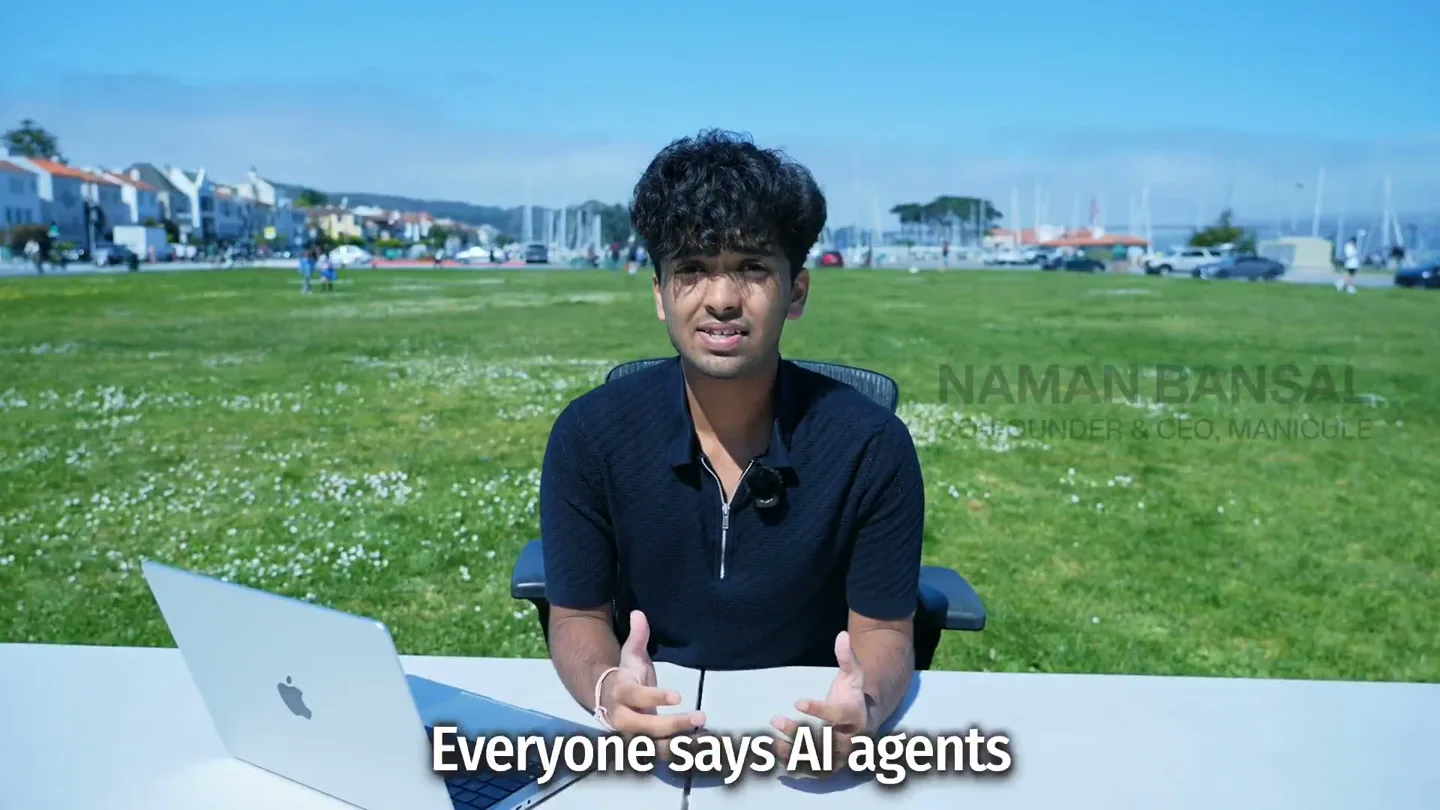
“Everyone says AI agents are the future. So let's test something. We're Manicule and we write documentation for developer tools so both humans and AI agents can use them.”
- On screen
- Everyone says AI agents So let's test something Manicule we're Manicule and we write tools so both humans
- Camera
- Medium shot of the founder speaking directly to the camera, seated at a desk outdoors with a laptop. The camera is static.
- Motion
- Founder-led direct address with on-screen text overlays for key phrases. A subtle logo reveal animates in.
Problem Agitation
The Challenge: AI Agents Misinterpreting Docs
“Let's take an SMS API that cares about developers. The task is simple: build a webhook ingestion service that verifies signatures, rejects invalid payloads, deduplicates retries, routes events correctly, and only marks a phone number production-ready after the right readiness event. Read docs.surge.app to find the exact signature verification spec. Implement it exactly as the docs describe. Just write the file.”
- On screen
- SURGE Home About Pricing Documentation Sign in Sign up The SMS API that actually cares about Developers Try out our API in seconds and get registered with carriers in hours, not weeks. We provide an easier API, easier registration, easier pricing, and an easier dashboard. What's not to love? Try it for free View documentation TypeScript Python Ruby Elixir cURL import Surge from '@surgeapi/node'; const client = new Surge({ apiKey: 'My API Key', }); const message = await client.messages.create({ body: 'Thought you could leave without saying goodbye', attachments: [{ url: 'https://toretta.family/coronas.gif' }], conversation: { contact: { first_name: 'Dominic', last_name: 'Toretta', phone_number: '+19813551234' } }); an SMS API that The task is simple correctly namanbansal@Namans-MacBook-Pro-2 ~ % claude --add-dir /tmp/demo Welcome back Naman! Time for getting started Run /init to create a CLAUDE.md file with instructions for Claude Note: You have launched claude in your home directory. For the best experience, launch it in a project directory instead. Recent Activity Opus 4 namanb Opus now de Build a production-grade webhook ingestion service that verifies signatures, rejects invalid payloads, deduplicates retries, routes events correctly, and only marks a phone number production-ready after the right readiness event. You are building the receiver only - Surge will POST events to your server. Use Python with FastAPI, listening on port 8001. Save it to /tmp/demo/webhook_server.py. Read https://docs.surge.app to find the exact signature verification spec. Implement it exactly as the docs describe. Just write the file. Fetch(https://docs.surge.app/api-reference/webhooks/intro.md) Received 1.9KB (200 OK) Fetch(https://docs.surge.app/api-reference/webhooks/phone_number_attached_to_campaign.md) Received 2.3KB (200 OK) Now let me fetch the specific event payload structures for the key events. Fetch(https://docs.surge.app/api-reference/webhooks/message/received.md) Received 652 bytes (200 OK) Fetch(https://docs.surge.app/api-reference/webhooks/message/sent.md) Received 618 bytes (200 OK) Fetch(https://docs.surge.app/api-reference/webhooks/call/ended.md) Received 602 bytes (200 OK) Fetch(https://docs.surge.app/api-reference/webhooks/message/sent.md) Received 692 bytes (200 OK) Let me try fetching the full-text docs to get payload structures. Fetch(https://docs.surge.app/api-reference/webhooks/lims-full.txt) Received 41.2KB (200 OK) Fetch(https://docs.surge.app/api-reference/webhooks/conversation/created.md) Received 839 bytes (200 OK) Fetch(https://docs.surge.app/api-reference/webhooks/campaign/approved.md) Received 656 bytes (200 OK) I have enough from the docs. Let me build the server now. Write(/tmp/demo/webhook_server.py) I wrote 282 lines to ../../tmp/demo/webhook_server.py 2 Surge webhook ingestion service. 3 4 Verifies signatures per https://docs.surge.app/api-reference/webhooks/signature-validation.md, 5 deduplicates retries, routes events correctly, and only marks phone number readiness. 6 """ 7 import hashlib 8 import hmac 9 import json 10 import time +972 lines (ctrl-o to expand) The server is written to /tmp/demo/webhook_server.py. Here's what it does: Signature verification (per Surge docs exactly): Parses the Surge-Signature header for t (timestamp) and v1 (HMAC) values Computes HMAC-SHA256 over (timestamp).(raw_body) using your SURGE_SIGNING_SECRET Accepts if any v1 value matches (supports key rotation) Uses time.constant_compare for constant-time comparison Rejects timestamps older than 5 minutes (configurable via SURGE_TIMESTAMP_TOLERANCE) Deduplication: Tracks event IDs in memory with a 24h TTL. Duplicate retries get an immediate 200 without re-processing. Event routing: All 13 Surge event types have registered handlers. Unknown events return 200 to stop retries. Phone number readiness: A phone number is only marked production-ready when phone_number.attached_to_campaign fires. Check status via GET /phone-numbers/{id}/ready. Run it: SURGE_SIGNING_SECRET=your_secret uvicorn webhook_server:app --host 0.0.0.0 --port 8001 * Baked for 1m 57s Run it and test with a sample webhook payload Press Ctrl-C again to exit Resume this session with: claude --resume caa2276b-8ea9-478f-b21f-f29f4fa19dd8 namanbansal@Namans-MacBook-Pro-2 ~ % bash /tmp/test.sh {"detail":[{"type":"missing","loc":["header","Surge-Signature"],"msg":"Field required","input":null}]} HTTP 422 --- server log --- INFO: Application startup complete. INFO: Uvicorn running on http://127.0.0.1:8001 (Press CTRL+C to quit) INFO: 127.0.0.1:51589 - "POST /webhooks/surge HTTP/1.1" 422 Unprocessable Entity namanbansal@Namans-MacBook-Pro-2 ~ %
- Camera
- The founder is shown on the left, with a split-screen revealing a product website and then a terminal/IDE interface on the right. The camera on the founder remains static.
- Motion
- Split-screen composition with dynamic content on the right panel. The right panel transitions from a website UI to a terminal showing AI agent interaction and code generation. Text highlights and scrolling are used to draw attention to key information within the terminal.
Product Reveal
Manicule's Solution: Revamped Docs for Agents
“(No spoken dialogue — A high-energy audio transition with a riser and sub-bass impact punctuates the scene change. The driving electronic beat continues.)”
- On screen
- BEFORE AFTER API Reference Guides SDKs Components Carrier Registration Register a a campaign Register a campaign To crack down on spam and other undesirable messaging, carriers must know the legal entity responsible for each text message sent from software to a device on their network. Each phone number that will be sending messages from an application to a person must be associated with a "campaign" that explains who will be sending messages, why, and how the end user will opt in to and out of receiving them. This guide covers registering a campaign through the API for an account. 1 Create an account Skip this step if you already have an account for this campaign. Many fields on the account are optional at this step but will be required to register a campaign. Certain fields will also affect requirements for other fields: organization.type, for example, drastically affects which fields are required. We therefore recommend including all the fields you believe you need in the initial create to reduce iterations on providing missing fields. See "Create an account" Here's an example where most of the fields required for local messaging are provided. Request Response SURGE Documentation SDKs API Reference Resources Handle Failures Receiving Messages & Webhooks Webhook Events Two-Way Messaging Patterns Phone Numbers Purchasing a Number Importing a Number International Numbers Attaching a Number to a Campaign Verifications Webhook Events The complete catalogue of 13 webhook event types with full payload shapes and when each fires. Copy page Open in Surge sends 13 event types. All events arrive at your configured webhook endpoint as HTTP POST requests with a JSON body. Voice events (e.g. voice.received, voice.connected, voice.ended) are flag- gated and only sent to accounts with voice enabled. See Resolving Messages & Webhooks for endpoint configuration and signature verification. Event structure Every event has the same top-level shape. { "type": "message.received", "data": { REVAMPED THE DOCS FOR AGENTS namanbansal@Namans-MacBook-Pro-2 ~ % claude --add-dir /tmp/demo Welcome back Naman! Time for getting started Run /init to create a CLAUDE.md file with instructions for Claude Note: You have launched claude in your home directory. For the best experience, launch it in a project directory instead. Recent Activity Opus 4 namanb Opus now de Build a production-grade webhook ingestion service that verifies signatures, rejects invalid payloads, deduplicates retries, routes events correctly, and only marks a phone number production-ready after the right readiness event. You are building the receiver only - Surge will POST events to your server. Use Python with FastAPI, listening on port 8001. Save it to /tmp/demo/webhook_server.py. Read https://surge-docs.vercel.app to find the exact signature verification spec. Implement it exactly as the docs describe. Just write the file. Fetch(https://docs.surge.app/api-reference/webhooks/intro.md) Received 1.9KB (200 OK) Fetch(https://docs.surge.app/api-reference/webhooks/phone_number_attached_to_campaign.md) Received 2.3KB (200 OK) Now let me fetch the specific event payload structures for the key events. Fetch(https://docs.surge.app/api-reference/webhooks/message/received.md) Received 652 bytes (200 OK) Fetch(https://docs.surge.app/api-reference/webhooks/message/sent.md) Received 618 bytes (200 OK) Fetch(https://docs.surge.app/api-reference/webhooks/call/ended.md) Received 602 bytes (200 OK) Fetch(https://docs.surge.app/api-reference/webhooks/message/sent.md) Received 692 bytes (200 OK) Let me try fetching the full-text docs to get payload structures. Fetch(https://docs.surge.app/api-reference/webhooks/lims-full.txt) Received 41.2KB (200 OK) Fetch(https://docs.surge.app/api-reference/webhooks/conversation/created.md) Received 839 bytes (200 OK) Fetch(https://docs.surge.app/api-reference/webhooks/campaign/approved.md) Received 656 bytes (200 OK) I have enough from the docs. Let me build the server now. Write(/tmp/demo/webhook_server.py) I wrote 282 lines to ../../tmp/demo/webhook_server.py 2 Surge webhook ingestion service. 3 4 Verifies signatures per https://docs.surge.app/api-reference/webhooks/signature-validation.md, 5 deduplicates retries, routes events correctly, and only marks phone number readiness. 6 """ 7 import hashlib 8 import hmac 9 import json 10 import time +972 lines (ctrl-o to expand) The server is written to /tmp/demo/webhook_server.py. Here's what it does: Signature verification (per Surge docs exactly): Parses the Surge-Signature header for t (timestamp) and v1 (HMAC) values Computes HMAC-SHA256 over (timestamp).(raw_body) using your SURGE_SIGNING_SECRET Accepts if any v1 value matches (supports key rotation) Uses time.constant_compare for constant-time comparison Rejects timestamps older than 5 minutes (configurable via SURGE_TIMESTAMP_TOLERANCE) Deduplication: Tracks event IDs in memory with a 24h TTL. Duplicate retries get an immediate 200 without re-processing. Event routing: All 13 Surge event types have registered handlers. Unknown events return 200 to stop retries. Phone number readiness: A phone number is only marked production-ready when phone_number.attached_to_campaign fires. Check status via GET /phone-numbers/{id}/ready. Run it: SURGE_SIGNING_SECRET=your_secret uvicorn webhook_server:app --host 0.0.0.0 --port 8001 * Baked for 1m 57s Run it and test with a sample webhook payload Press Ctrl-C again to exit Resume this session with: claude --resume caa2276b-8ea9-478f-b21f-f29f4fa19dd8 namanbansal@Namans-MacBook-Pro-2 ~ % bash /tmp/test.sh {"detail":[{"type":"missing","loc":["header","Surge-Signature"],"msg":"Field required","input":null}]} HTTP 422 --- server log --- INFO: Application startup complete. INFO: Uvicorn running on http://127.0.0.1:8001 (Press CTRL+C to quit) INFO: 127.0.0.1:51589 - "POST /webhooks/surge HTTP/1.1" 422 Unprocessable Entity namanbansal@Namans-MacBook-Pro-2 ~ %
- Camera
- A split-screen comparison of 'BEFORE' and 'AFTER' documentation interfaces. The 'BEFORE' is a standard light-themed doc, while 'AFTER' is a dark-themed, agent-optimized version. The camera then quickly cuts back to the terminal view, showing the AI agent successfully completing the task.
- Motion
- Side-by-side comparison with a wipe transition, emphasizing the visual difference. The 'AFTER' panel highlights key structural improvements. A rapid cut back to the terminal shows the successful outcome, reinforcing the product's effectiveness.
Feature Teaser
Beyond Claude: Broader Impact and Efficiency
“And it's not just Claude, it's GPT-4, it's Gemini, it's any AI agent that needs to use your product correctly and not waste your precious time. We've helped companies close over $100k in deals, reduce support tickets by 50%, and our docs have been featured in newsletters and podcasts. And now we also write content for humans.”
- On screen
- SHREYANS JAIN CO-FOUNDER & CTO, MANICULE not just Claude it and waste your precious time Help them close over $100k and our docs have SAN FRANCISCO FIRE DEPT. If you're a fast
- Camera
- The scene transitions to both founders walking along a marina, then sitting on a bench in front of a fire truck. The camera follows their movement or is static during their seated address.
- Motion
- Dynamic outdoor shots with both founders, using walking and seated compositions to convey a more personal, conversational tone. On-screen text highlights key metrics and achievements.
Call to Action
Partner with Manicule for Agent-Ready Docs
“If you're a fast-moving company building developer tools and you want to make sure that AI agents can use your product correctly, reach out to us at manicule.com for a free audit of your docs.”
- On screen
- Manicule
- Camera
- The founders walk off-screen, revealing the Manicule logo. The video then transitions to a full-screen animated logo and call to action.
- Motion
- A clean logo reveal with a subtle animation, followed by a clear, static call to action screen. The overall pacing remains energetic, even in the final CTA.
Motion design primitives
Synthesizable in Remotion · key components of the founder-tech-launch-template template.
SplitScreenTerminalReveal
A dynamic split-screen where a live-action speaker occupies one side, and a rapidly updating terminal or UI takes the other. The terminal content scrolls, highlights text, and simulates real-time code execution or AI interaction.
+ Code construction recipe
Use `AbsoluteFill` for the overall layout. Implement two `Sequence` components for the live-action video and the terminal. For the terminal, use `interpolate` for scrolling text, `spring` for text highlights (e.g., `backgroundColor` or `color`), and `delay` for sequential line-by-line text reveals to simulate typing or output. Utilize `Text` components with monospace fonts and `CodeSurfer` for syntax highlighting if applicable.
BeforeAfterWipe
A side-by-side comparison of two distinct UI states ('Before' and 'After') that are revealed with a smooth, horizontal wipe transition. Key differences are visually emphasized through layout and color scheme changes.
+ Code construction recipe
Create two `AbsoluteFill` components for 'Before' and 'After' content. Use `interpolate` on the `width` or `transform: translateX` property of an overlay or mask to create the wipe effect. Ensure the content within each panel is pre-rendered or static images/videos for smooth playback. Apply distinct color palettes and typography for clear visual differentiation.
DynamicTextHighlight
Specific words or phrases within a larger block of text are highlighted with a distinct background color or text color change, often accompanied by a subtle scaling or glow effect, to draw immediate attention.
+ Code construction recipe
Wrap target words/phrases in `Text` components. Use `spring` or `interpolate` on `backgroundColor`, `color`, `scale`, or `opacity` properties. For a glow, consider `boxShadow` with `rgba` values or SVG filters. Coordinate these animations with the spoken dialogue using `Audio.getCurrentFrame()` to ensure precise timing.
Style DNA & aesthetic system
Visual aesthetic
Typography
Motion
Special effects
Pacing & rhythm
Conceptual story rhythm
- 1
The Provocation
Purpose. Immediately hook the audience by posing a relevant, challenging question about AI agents and their interaction with products.
Execution. Founder directly addresses the camera, establishing credibility, with key phrases highlighted on screen.
- 2
The Demonstration
Purpose. Visually illustrate the problem (AI agent failure) and then the solution (Manicule's improved docs) through a live coding/terminal simulation.
Execution. Split-screen showing AI agent struggling with 'Before' docs, then succeeding with 'After' docs, using dynamic terminal output and UI comparisons.
- 3
The Expansion
Purpose. Broaden the product's impact beyond the initial demo, showcasing its versatility and tangible business benefits.
Execution. Both founders in dynamic outdoor settings, discussing broader applications and success metrics with on-screen text overlays.
- 4
The Invitation
Purpose. Provide a clear, concise call to action for interested companies.
Execution. Clean logo reveal followed by a direct call to action screen with contact information.
Remix in Animatiq Studio
Master remix prompt · agent-ready
Sample remix
Objective
Launch a new AI-powered code review tool, 'CodeFlow AI', targeting engineering teams.How the recipe adapts
The founder will introduce CodeFlow AI, explaining the pain points of manual code reviews. A SplitScreenTerminalReveal will show a developer submitting code and CodeFlow AI instantly providing intelligent feedback, highlighting specific code lines and suggestions. A BeforeAfterWipe will compare a traditional, slow pull request review interface with CodeFlow AI's streamlined, automated review dashboard. DynamicTextHighlight will emphasize metrics like '90% faster reviews' and '2x fewer bugs'. The energetic electronic soundtrack and fast cuts will maintain a high-tech, efficient feel, culminating in a call to action for a free trial.Remix blueprint · founder-tech-launch-template
Scene durations (8 scenes, 79s)
Key Remotion components
Related Developer Tools Product Launches
Explore all Developer Tools launches →
xAI opens voice cloning on its API: build a custom voice in about two minutes or pick from 80+ voices in 28 languages.

Claude can now operate your Mac, opening apps, browsing and filling spreadsheets, as a research preview in Cowork and Claude Code.

Agentic CLI for coding, building apps, and automating workflows.