
Metalterm · Launch Video Breakdown: Hook, Pacing & Motion Design
A GPU-rendered terminal for macOS, built from scratch with Rust + Metal. Fast, lightweight, and just getting started.
Scene-by-scene timeline & spoken transcript
The Hook
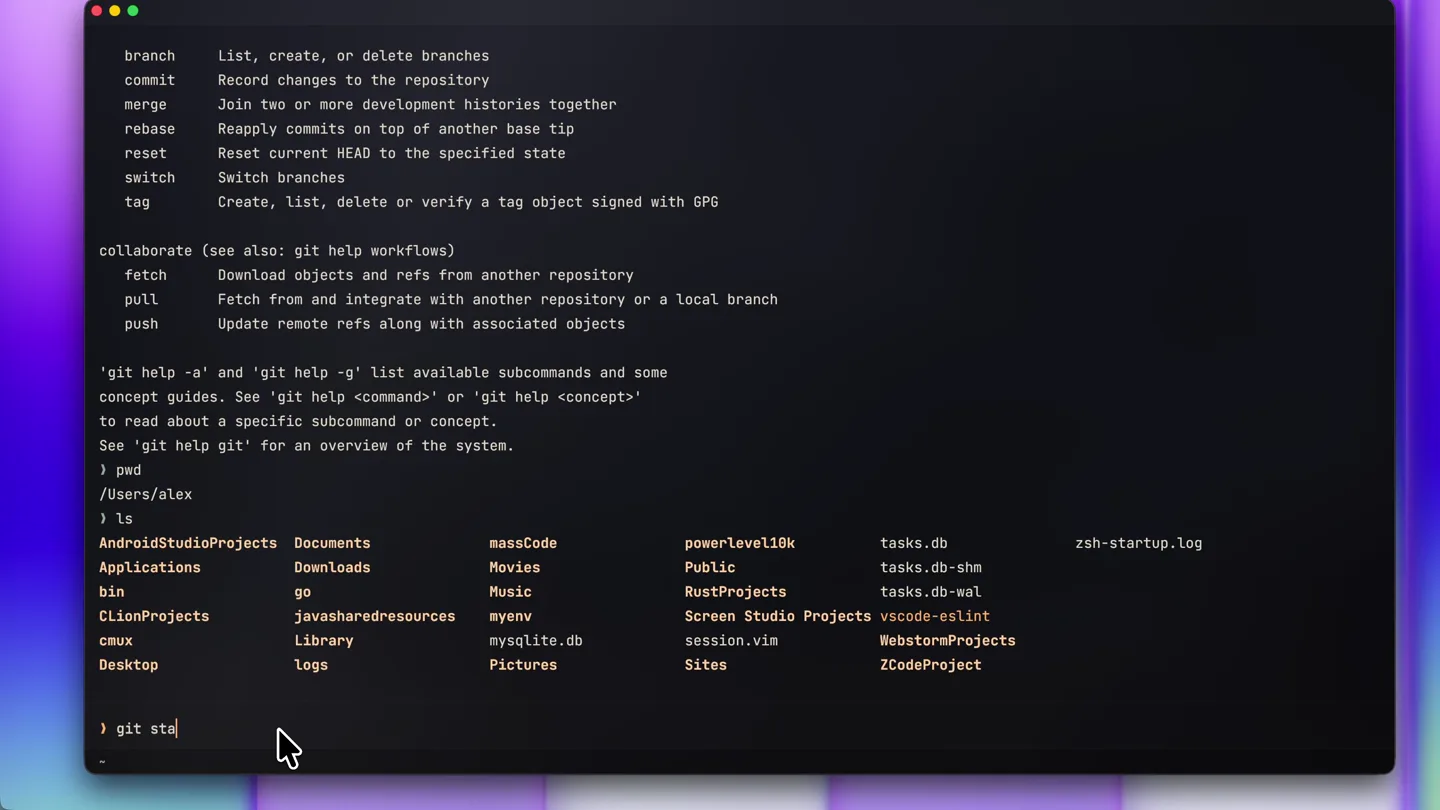
Dynamic Terminal Command Showcase
“(No spoken dialogue — ambient visual with rapid command typing and output display.)”
- On screen
- branch list, create, or delete branches commit Record changes to the repository merge Join two or more development histories together rebase Reapply commits on top of another base tip reset Reset current HEAD to the specified state switch Switch branches tag Create, list, delete or verify a tag object signed with GPG collaborate (see also: git help workflows) fetch Download objects and refs from another repository pull Fetch from and integrate with another repository or a local branch push Update remote refs along with associated objects 'git help -a' and 'git help -g' list available subcommands and some concept guides. See 'git help <command>' or 'git help <concept>' to read about a specific subcommand or concept. See 'git help git' for an overview of the system. ) pwd /Users/alex ) ls AndroidStudioProjects Documents massCode powerlevel10k tasks.db zsh-startup.log Applications Downloads Movies Music RustProjects tasks.db-shm bin go myenv Screen Studio Projects vscode-eslint cmux Library mysqlite.db session.vim WebstormProjects Desktop logs Pictures Sites ZCodeProject ) git stash stash -- stash away changes to dirty working directory status -- show working-tree status ) _
- Camera
- Static, eye-level view of a macOS terminal window, with a subtle background blur.
- Motion
- Rapid text typing animation, instant command execution, and smooth scrolling of terminal output.
Product Reveal
Theme Customization & Visual Fidelity
“(No spoken dialogue — ambient visual with interactive UI clicks and theme changes.)”
- On screen
- settings • Appearance Motion Shell Keys Renderer Other PALETTE 22 built in - 8 with a shader surface - 4 of those light Anodised Obsidian pulp brush, warm room Carbon Surface forged fibre, matte coat Bone China porcelain, warm white Sunlit Alabaster translucent stone, warm Metalterm soot, orange accent Ember amber on soot Orchid violet, magenta lift Nocturne slate blue, low glare Dark Ceramic dithered, one softbox Smoked Glass cover glass over graphite Cold-Pressed rag paper, neutral cool Brushed Aluminium silver, machined Graphite neutral warm grey Abyss cyan on ink Phosphor green CRT glass Slate graphite blue version 0.1.1 renderer metal 3 /Users/alex/config/metalterm/settings.toml mdR reset Appearance M. close ) Type a command - help
- Camera
- Static, slightly zoomed-out view revealing the terminal's settings panel, with a focus on interactive elements.
- Motion
- Smooth UI transitions, hover effects, and instant application of visual themes, demonstrating real-time rendering capabilities.
Feature Teaser
Light Theme Performance Demo
“(No spoken dialogue — ambient visual with rapid command typing and output display in a new theme.)”
- On screen
- ) ls AndroidStudioProjects Documents massCode powerlevel10k tasks.db zsh-startup.log Applications Downloads Movies Music RustProjects tasks.db-shm bin go myenv Screen Studio Projects vscode-eslint cmux Library mysqlite.db session.vim WebstormProjects Desktop logs Pictures Sites ZCodeProject ) pwd /Users/alex ) git stash log Show commit logs show Show various types of objects status Show the working tree status grow, mark and tweak your common history backfill Download missing objects in a partial clone branch List, create, or delete branches commit Record changes to the repository merge Join two or more development histories together rebase Reapply commits on top of another base tip reset Reset current HEAD to the specified state switch Switch branches tag Create, list, delete or verify a tag object signed with GPG collaborate (see also: git help workflows) fetch Download objects and refs from another repository pull Fetch from and integrate with another repository or a local branch push Update remote refs along with associated objects 'git help -a' and 'git help -g' list available subcommands and some concept guides. See 'git help <command>' or 'git help <concept>' to read about a specific subcommand or concept. See 'git help git' for an overview of the system. ) ls AndroidStudioProjects Documents massCode powerlevel10k tasks.db zsh-startup.log Applications Downloads Movies Music RustProjects tasks.db-shm bin go myenv Screen Studio Projects vscode-eslint cmux Library mysqlite.db session.vim WebstormProjects Desktop logs Pictures Sites ZCodeProject )
- Camera
- Static, eye-level view of the terminal, now in a light theme, maintaining the same framing as the opening.
- Motion
- Identical rapid text typing and scrolling animation, emphasizing consistent performance across different visual settings.
Call to Action
Feature Montage & Brand Reveal
“(No spoken dialogue — ambient visual with rapid feature cycling and brand text reveal.)”
- On screen
- Metalterm A GPU-rendered terminal for macOS, built from scratch with Rust + Metal. Fast, lightweight, and just getting started.
- Camera
- Dynamic camera work, including quick zooms, pans, and rotations around the terminal window, culminating in a full-screen brand reveal.
- Motion
- Fast cuts, screen wipes, text reveals with subtle parallax, and a final elegant fade-in of the product name and tagline.
Motion design primitives
Synthesizable in Remotion · key components of the metalterm-inspired-launch template.
RapidTerminalTypewriter
Text appears character by character at high speed, simulating real-time typing in a terminal, followed by instant display of command output.
+ Code construction recipe
Use `Sequence` and `spring` for character-by-character opacity and scale animation. For output, use `AbsoluteFill` with `interpolate` for instant text reveal on new lines, simulating a fast terminal response.
InteractiveThemeSwitcher
UI elements highlight on hover/click, and the entire terminal's color scheme and surface texture instantly transition to a new theme with a subtle, smooth fade.
+ Code construction recipe
Implement `useCurrentFrame` and `interpolate` for smooth `backgroundColor` and `textColor` transitions. Use `spring` for button hover effects and `Shader` components for dynamic surface texture changes (e.g., 'Smoked Glass').
DynamicFeatureMontage
Quick, energetic cuts between different terminal views, showcasing various features with subtle camera movements and text overlays, ending with a clean brand reveal.
+ Code construction recipe
Utilize `AbsoluteFill` with `TransitionSeries` for rapid scene changes. Employ `spring` for subtle `scale` and `translate` on the terminal window. Text overlays can use `Sequence` with `interpolate` for staggered fade-ins and `Blur` filters for depth.
Style DNA & aesthetic system
Visual aesthetic
Typography
Motion
Special effects
Pacing & rhythm
Conceptual story rhythm
- 1
Performance Introduction
Purpose. Immediately demonstrate the terminal's speed and responsiveness with common developer tasks.
Execution. Rapid-fire typing and command execution in a dark theme, showcasing fluid output scrolling.
- 2
Customization Showcase
Purpose. Highlight the product's unique visual customization capabilities and GPU rendering.
Execution. Interactive theme switching in the settings panel, demonstrating real-time material and color changes.
- 3
Versatility & Consistency
Purpose. Prove that performance and features are consistent across different visual themes.
Execution. Repeat of rapid command execution, but in a contrasting light theme, reinforcing speed.
- 4
Brand & Value Proposition
Purpose. Conclude with the product's core benefits and brand identity.
Execution. Dynamic montage of features, culminating in the product name and tagline reveal with a clean, modern aesthetic.
Remix in Animatiq Studio
Master remix prompt · agent-ready
Sample remix
Objective
Launch a new AI-powered design tool for macOS, 'PixelGenie', emphasizing its speed and intuitive UI.How the recipe adapts
The 'RapidTerminalTypewriter' primitive adapts to 'RapidCodeEditorTyping', showcasing AI-assisted code completion and instant rendering of design elements. The 'InteractiveThemeSwitcher' becomes 'InteractiveWorkspaceThemeSwitcher', demonstrating real-time UI theme changes and canvas material adjustments. The 'DynamicFeatureMontage' transforms into 'PixelGenieFeatureMontage', highlighting AI-powered layer generation, instant asset previews, and collaborative features with quick cuts and subtle camera moves, culminating in the 'PixelGenie' brand reveal.Remix blueprint · metalterm-inspired-launch
Scene durations (4 scenes, 37s)
Key Remotion components
Related Developer Tools Product Launches
Explore all Developer Tools launches →
xAI opens voice cloning on its API: build a custom voice in about two minutes or pick from 80+ voices in 28 languages.

Claude can now operate your Mac, opening apps, browsing and filling spreadsheets, as a research preview in Cowork and Claude Code.

Agentic CLI for coding, building apps, and automating workflows.