
Amicro · Launch Video Breakdown: Hook, Pacing & Motion Design
Motion Anime is a curated collection of springs, skids, and fluid micro-interactions for UI, including interactive charts via a single CLI command. Open source, part of Amicro.
Scene-by-scene timeline & spoken transcript
The Hook
Interactive Micro-Motion Showcase
“(No spoken dialogue — The audio track begins with a sustained, evolving pad sound, creating an ethereal and slightly mysterious atmosphere. At [00:07], a subtle, high-frequency riser begins, building tension. This leads into a significant sub-bass drop/impact at [00:09], accompanied by a percussive synth hit and a shimmering, high-frequency sweep.)”
- On screen
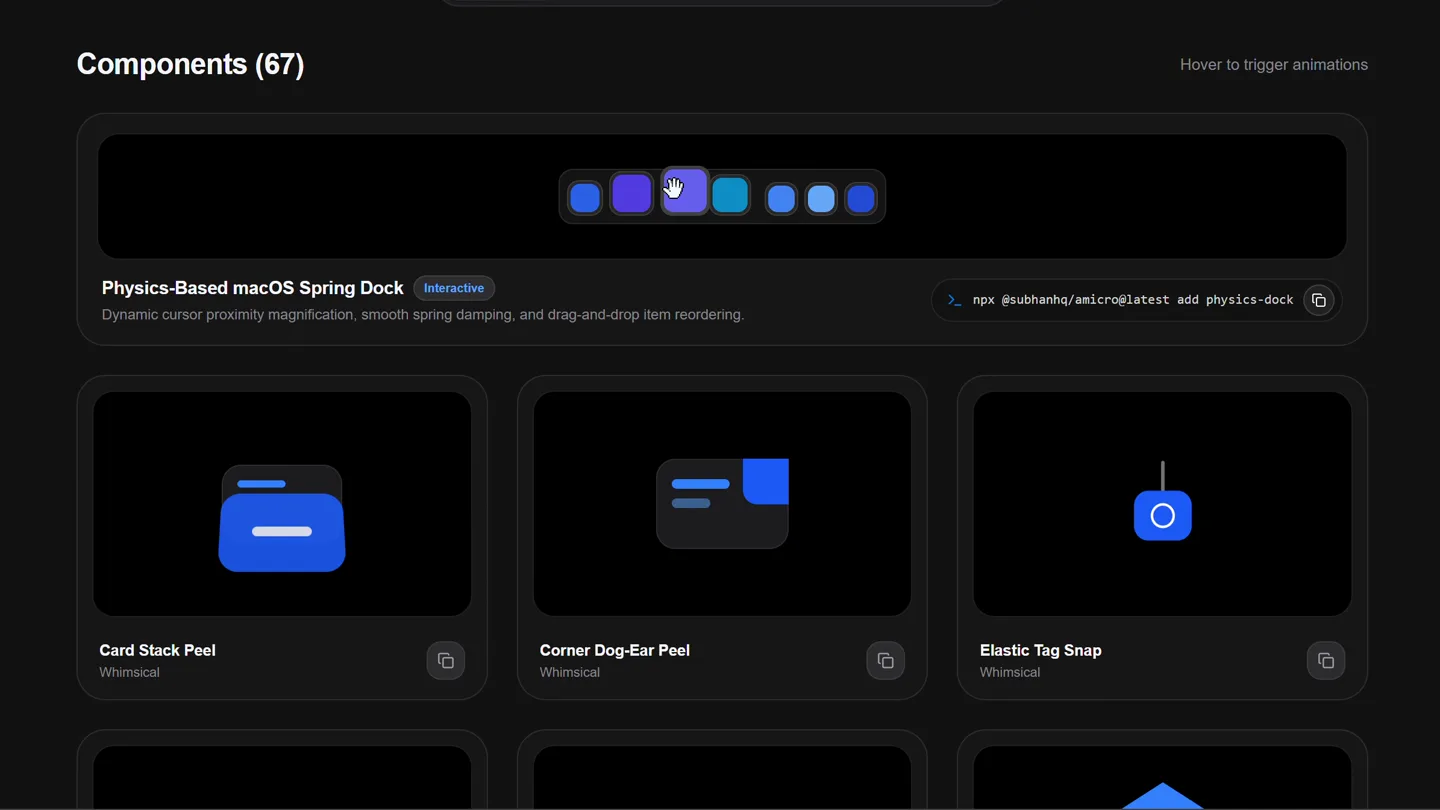
- Components (67) Hover to trigger animations Physics-Based macOS Spring Dock Interactive Dynamic cursor proximity magnification, smooth spring damping, and drag-and-drop item reordering. npx @subhanhq/amicro@latest add physics-dock Card Stack Peel Whimsical Corner Dog-Ear Peel Whimsical Elastic Tag Snap Whimsical AMICRO Split Gate Reveal Whimsical OPEN Horizontal Shutter Slide Whimsical Origami Envelope Unfold Whimsical Smart Card Dispenser Whimsical Sticky Note Peel Whimsical Receipt Ticker Print Whimsical Circuit Trace Draw Whimsical Hexagon Lattice Draw Whimsical Waveform Pulse Line Whimsical Prism Block Stack Whimsical Modular Tile Snap Whimsical Pyramid Block Build Whimsical Roller Blind Drop Whimsical Scroll Canvas Unroll Whimsical Ribbon Banner Slide Whimsical Kinetic Tension Capsule Whimsical Liquid Droplet Squish Whimsical Segmented Link Stretch Whimsical Accordion Blind Pull Whimsical Rotating Louver Slats Whimsical Geometric Iris Shutter Whimsical Pendulum Bubble Level Whimsical Kinetic Metronome Tick Whimsical Nested Orbital Gimbal Whimsical Gelatin Cube Wobble Whimsical Slinky Coil Spring Whimsical Squash & Stretch Sphere Whimsical Domino Cascade Fall Whimsical Card Deck Fan Cascade Whimsical Interlocking Gear Step Whimsical Magnetic Snap Disks Whimsical N S Dual Magnet Dipole Whimsical Compass Needle Deflect Whimsical Sudden Brake Skid Whimsical Rolling Tumble Physics Whimsical Inertia Skid Stop Whimsical Neon Sign Draw & Clear Whimsical Page Turn Curl Whimsical Shutter Step Slices Whimsical Matrix Grid Loader Loaders Radial System Spinner Loaders Pulse Orbit Dots Loaders Category 1 Category Dropdown UI Kit All Featured New Floating Filter Tag Pill UI Kit View Details > Submenu Flyout Panel UI Kit Portfolio Hover Link Card UI Kit Explore Docs Magnetic Slide Button UI Kit Action Morph Action Expand Pill UI Kit + - Plus / Minus Toggle UI Kit Light / Dark Mode Toggle UI Kit A B A / B Segmented Tabs UI Kit 1 2 3 STEP 2 of 3 Progress Stepper UI Kit 100% Segmented Arc Meter UI Kit Segmented Step Bar UI Kit Actions Menu Actions Context Menu UI Kit Card Glance Preview UI Kit Download Progress Icons UI Kit 5 Vertical Wheel Counter UI Kit Grid View Perspective Layout Switcher UI Kit Save Item Bookmark Save Pill UI Kit Created by Syed Subhan Terms & License Tab 1 Tab 2 x + Tab Bar with Close UI Kit 24th 25th 26th Date Position Selector UI Kit Segmented Stepper Dots UI Kit
- Camera
- The camera slowly pans and scrolls down a grid of interactive UI components, simulating a user browsing a library of animations. The perspective is a fixed, slightly elevated overhead view of a web interface.
- Motion
- The primary motion technique is a smooth, continuous vertical scroll combined with subtle cursor hovers that trigger individual micro-animations within each component card. The cursor interaction is key, demonstrating the responsiveness of each UI element.
Product Reveal
Amicro: Micro-Motion for Web UI
“(No spoken dialogue — The music settles into a rhythmic pattern with pizzicato synths and a driving sub-bass line. Another high-energy riser starts at [00:18], culminating in a powerful sub-bass drop/impact at [00:20], followed by a more complex rhythmic section with additional synth layers.)”
- On screen
- Amicro Buttons Components Anime CLI Skills More 1,968 ← Home Replay Animations Claim Micro-Motion for your Web UI Refined physics springs, skids, and fluid UI micro-interactions grouped in 3-variation suites. Built with vanilla CSS & zero bloated dependencies. Index Vault Kinetic Physics Tactile Interface Orbital Pulses Components (67) Hover to trigger animations Physics-Based macOS Spring Dock Interactive Dynamic cursor proximity magnification, smooth spring damping, and drag-and-drop item reordering. npx @subhanhq/amicro@latest add physics-dock Card Stack Peel Whimsical Corner Dog-Ear Peel Whimsical Elastic Tag Snap Whimsical AMICRO Split Gate Reveal Whimsical OPEN Horizontal Shutter Slide Whimsical Origami Envelope Unfold Whimsical
- Camera
- The camera quickly zooms out and pans up to reveal the full web page header and a prominent headline. The perspective shifts from a close-up of components to a broader view of the product's landing page.
- Motion
- A rapid zoom-out and pan motion, synchronized with the sub-bass drop, creates a dramatic reveal. Text elements animate in with a subtle fade and scale, emphasizing the product's core value proposition.
Feature Teaser
Physics-Based UI Interactions
“(No spoken dialogue — A prominent, sustained riser builds from [00:28] to [00:30], where another impactful sub-bass drop occurs, introducing a new, more intense rhythmic and melodic phrase.)”
- On screen
- Amicro Buttons Components Anime CLI Skills More 1,968 ← Home Replay Animations Claim Micro-Motion for your Web UI Refined physics springs, skids, and fluid UI micro-interactions grouped in 3-variation suites. Built with vanilla CSS & zero bloated dependencies. Index Vault Kinetic Physics Tactile Interface Orbital Pulses Components (67) Hover to trigger animations Physics-Based macOS Spring Dock Interactive Dynamic cursor proximity magnification, smooth spring damping, and drag-and-drop item reordering. npx @subhanhq/amicro@latest add physics-dock Card Stack Peel Whimsical Corner Dog-Ear Peel Whimsical Elastic Tag Snap Whimsical AMICRO Split Gate Reveal Whimsical OPEN Horizontal Shutter Slide Whimsical Origami Envelope Unfold Whimsical
- Camera
- The camera maintains a stable, wide shot of the product page, allowing the viewer to absorb the main headline and sub-text. The focus remains on the interactive components below.
- Motion
- Subtle, continuous cursor interactions highlight different component categories (e.g., 'Kinetic Physics', 'Tactile Interface') with a smooth hover effect. The overall motion is restrained, letting the UI animations speak for themselves.
Call to Action
Explore Amicro's Animation Library
“(No spoken dialogue — This pattern of risers and sub-bass impacts continues, with notable transitions at [00:39] (riser to impact), [00:49] (riser to impact), and [00:59] (riser to impact). The track maintains a dynamic energy throughout, utilizing these sound design elements to punctuate transitions and build excitement.)”
- On screen
- Amicro Buttons Components Anime CLI Skills More 1,968 ← Home Replay Animations Claim Micro-Motion for your Web UI Refined physics springs, skids, and fluid UI micro-interactions grouped in 3-variation suites. Built with vanilla CSS & zero bloated dependencies. Index Vault Kinetic Physics Tactile Interface Orbital Pulses Components (67) Hover to trigger animations Physics-Based macOS Spring Dock Interactive Dynamic cursor proximity magnification, smooth spring damping, and drag-and-drop item reordering. npx @subhanhq/amicro@latest add physics-dock Card Stack Peel Whimsical Corner Dog-Ear Peel Whimsical Elastic Tag Snap Whimsical AMICRO Split Gate Reveal Whimsical OPEN Horizontal Shutter Slide Whimsical Origami Envelope Unfold Whimsical
- Camera
- The camera continues to scroll down the page, revealing more categories and examples of micro-interactions. The motion is fluid and consistent, guiding the viewer through the extensive library.
- Motion
- The primary motion is a smooth, continuous vertical scroll, punctuated by cursor hovers that activate various UI animations. The consistent pacing and visual demonstration of each component reinforce the product's value. The video ends with a subtle fade out.
Motion design primitives
Synthesizable in Remotion · key components of the amicro-interactive-showcase template.
InteractiveGridScroll
A grid of UI component cards scrolls smoothly, while a simulated cursor hovers over individual cards, triggering their unique micro-animations. The scroll is continuous, revealing new content.
+ Code construction recipe
Implement a `ScrollView` component in Remotion. Use `useCurrentFrame()` and `interpolate()` to control the `translateY` property for the scrolling effect. Overlay a `Cursor` component whose position is animated using `sequence()` and `spring()` to simulate hover interactions over specific `Card` components. Each `Card` component should encapsulate its own micro-animation logic, triggered by a `hover` state passed down from the parent.
HeadlineZoomReveal
A wide shot of a web page quickly zooms out from a detailed section, revealing a prominent headline and sub-text that fade and scale into view.
+ Code construction recipe
Utilize `AbsoluteFill` for the main scene. Animate the `scale` and `opacity` properties of the main headline and sub-text using `spring()` or `interpolate()` with an `easeOutCubic` curve, synchronized with a rapid `scale` and `translate` animation on the background UI elements to create the zoom-out effect. Ensure the timing aligns with a significant audio cue.
CategoryTabHover
Interactive tabs or buttons representing categories highlight and trigger subtle visual feedback upon a simulated cursor hover, indicating selection or focus.
+ Code construction recipe
Create `Button` components for each category. Use `useCurrentFrame()` and `sequence()` to animate the `backgroundColor` or `boxShadow` of the buttons when the simulated `Cursor` component hovers over them. Apply a `spring()` animation for the hover state transition to achieve a fluid, responsive feel.
Style DNA & aesthetic system
Visual aesthetic
Typography
Motion
Special effects
Pacing & rhythm
Conceptual story rhythm
- 1
Interactive Discovery
Purpose. Immediately immerse the viewer in the product's core offering: a vast library of interactive UI animations.
Execution. A continuous scroll through a grid of animated UI components, with a cursor actively hovering and triggering each animation.
- 2
Product Value Proposition
Purpose. Clearly state what the product is and its key benefits.
Execution. A dramatic zoom-out revealing the product's landing page with a bold headline: 'Claim Micro-Motion for your Web UI' and supporting text.
- 3
Feature Deep Dive
Purpose. Showcase the breadth and depth of the animation library by categorizing and demonstrating various types of interactions.
Execution. Continued scrolling through the component library, highlighting different categories like 'Kinetic Physics' and 'Tactile Interface' through cursor interaction.
- 4
Empowerment & Exploration
Purpose. Encourage the viewer to explore the product further and understand its ease of use.
Execution. The video concludes with a sustained view of the interactive library, reinforcing the idea of a comprehensive, accessible tool for UI animation.
Remix in Animatiq Studio
Master remix prompt · agent-ready
Sample remix
Objective
Launch a new AI-powered code refactoring tool called 'RefactorFlow' that offers a library of automated refactoring patterns.How the recipe adapts
The video would open with a continuous scroll through a grid of 'RefactorFlow' cards, each demonstrating a different refactoring pattern (e.g., 'Extract Function', 'Rename Variable') with a simulated cursor hovering and showing the code transforming. A dramatic zoom-out would reveal the 'RefactorFlow' landing page with the headline 'Streamline Your Code with RefactorFlow AI'. The video would then continue to scroll through categorized refactoring patterns, highlighting their interactive previews.Remix blueprint · amicro-interactive-showcase
Scene durations (4 scenes, 71s)
Key Remotion components
Related Creative Tools Product Launches
Explore all Creative Tools launches →
Anthropic Labs launches Claude Design, which turns conversation into prototypes, slides and one-pagers, powered by Claude Opus 4.7.

A vibe design partner with an AI-native canvas for turning ideas into UI.

Your work tools in Claude are now available on mobile. Explore Figma designs, create Canva slides, check Amplitude dashboards, all from your phone. Give it a try: