
Motion · Launch Video Breakdown: Hook, Pacing & Motion Design
Motion Studio lets you edit animations directly on your site with a visual editor and Ultramotion, an animation editing agent powered by Jev.
Scene-by-scene timeline & spoken transcript
The Hook
Abstract Wave Intro
“(No spoken dialogue — Silent video with ambient visual rhythm.)”
- On screen
- (No on-screen text)
- Camera
- Static wide shot on an abstract, flowing wave pattern.
- Motion
- Generative art, smooth interpolation of color gradients and wave forms.
Product Reveal
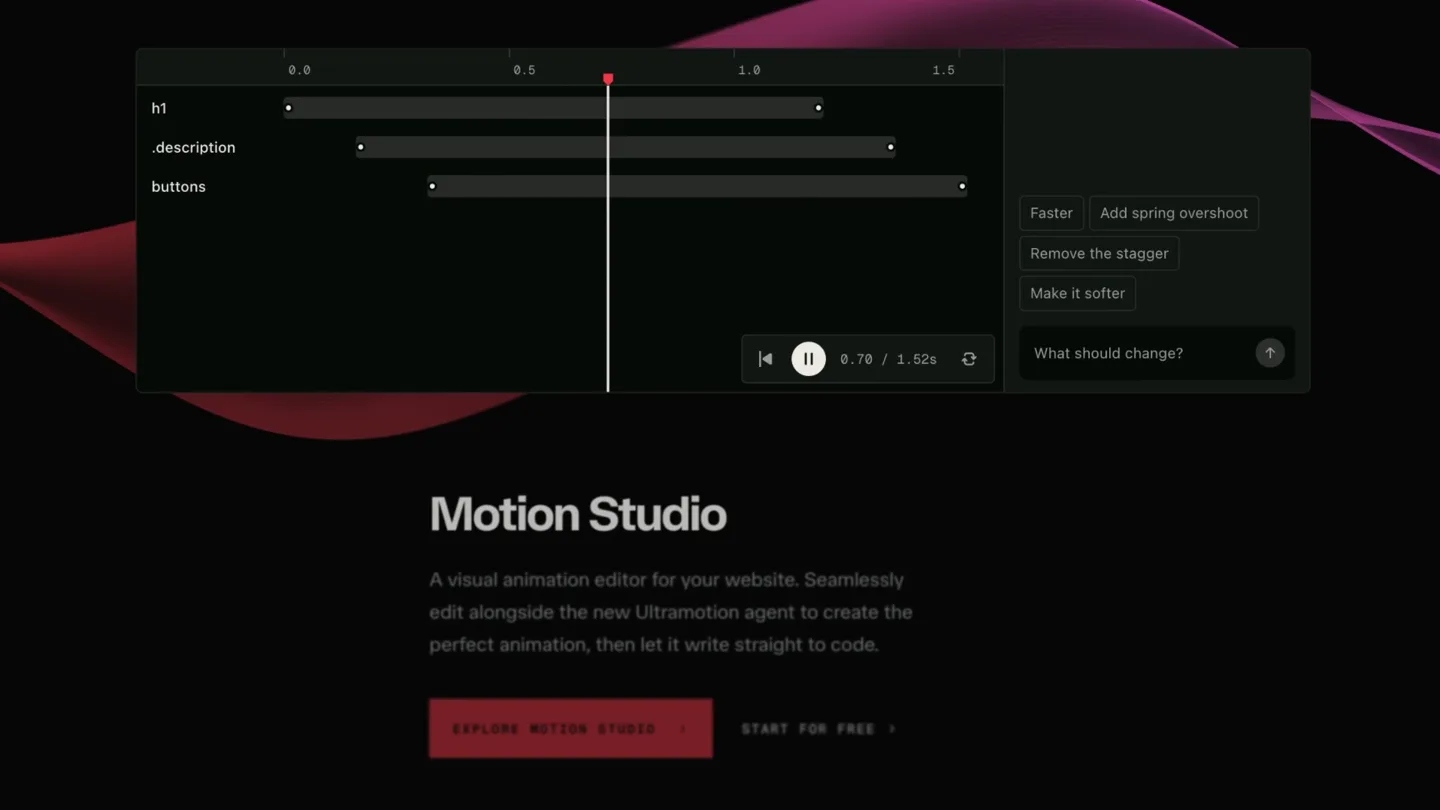
Motion Studio Interface Reveal
“(No spoken dialogue — Silent video with ambient visual rhythm.)”
- On screen
- 0.0, 0.5, 1.0, 1.5, h1, .description, buttons, Faster, Add spring overshoot, Remove the stagger, Make it softer, What should change?, Motion Studio, A visual animation editor for your website. Seamlessly edit alongside the new Ultramotion agent to create the perfect animation, then let it write straight to code., EXPLORE MOTION STUDIO, START FOR FREE
- Camera
- Zoom out and pan to reveal a full UI screen, then a slight camera shake to simulate interaction.
- Motion
- UI reveal with subtle camera shake, cursor interaction, and text fade-in.
Feature Teaser
Timeline Editing Interaction
“(No spoken dialogue — Silent video with ambient visual rhythm.)”
- On screen
- 0.0, 0.5, 1.0, 1.5, h1, .description, buttons, Faster, Add spring overshoot, Remove the stagger, Make it softer, What should change?, 1.38s, 0.78s, Motion Studio, A visual animation editor for your website. Seamlessly edit alongside the new Ultramotion agent to create the perfect animation, then let it write straight to code., EXPLORE MOTION STUDIO, START FOR FREE
- Camera
- Close-up on the timeline UI, following the cursor as it drags elements.
- Motion
- Interactive UI elements, drag-and-drop simulation, real-time value updates.
Call to Action
Ultramotion AI Integration
“(No spoken dialogue — Silent video with ambient visual rhythm.)”
- On screen
- 1.0, 1.5, Faster, Add spring overshoot, Remove the stagger, Make it softer, What should change?, remove, remove stagger, :: Ultramotion, ✓ Ultramotion edited, 0.0, 0.5, 1.0, 1.5, h1, .description, buttons, Motion Studio, A visual animation editor for your website. Seamlessly edit alongside the new Ultramotion agent to create the perfect animation, then let it write straight to code., EXPLORE MOTION STUDIO, START FOR FREE
- Camera
- Focus on the text input field, then a quick pan to show the 'Ultramotion edited' confirmation.
- Motion
- Typing animation, UI state changes, checkmark confirmation, and subtle background wave motion.
Motion design primitives
Synthesizable in Remotion · key components of the ai-code-assistant-reveal template.
CurvedHorizonWarp
A dynamic, flowing background element composed of multiple thin, curved lines that subtly shift in color and position, creating a sense of depth and motion.
+ Code construction recipe
Implement using Remotion's <AbsoluteFill> with multiple <Path> or <Line> SVG components. Animate 'd' attribute for path morphing and 'stroke' for color interpolation. Use a <Loop> component for continuous, subtle movement, applying a 'spring' or 'easeInOut' easing to position and color changes.
InteractiveTimelineDrag
Simulates a user dragging and resizing animation timeline bars within a UI, with real-time numerical feedback and a vertical playhead indicator.
+ Code construction recipe
Create a <Sequence> for the UI elements. Use 'interpolate' for the playhead's horizontal movement and 'spring' for the timeline bar's resize and repositioning. Implement a 'useCurrentFrame' hook to drive the cursor's position and the numerical display, simulating user input.
AITextInputConfirm
A text input field where text is typed out character by character, followed by a quick UI update showing an AI agent's confirmation or action.
+ Code construction recipe
Utilize Remotion's 'typewriter' effect for the text input. Animate the visibility and position of the confirmation message ('Ultramotion edited') using 'spring' with a slight delay after the typing completes. Use 'delay' and 'duration' props on <Sequence> components to orchestrate the timing.Style DNA & aesthetic system
Visual aesthetic
Typography
Motion
Special effects
Pacing & rhythm
Conceptual story rhythm
- 1
Abstract Immersion
Purpose. To immediately captivate the viewer with a visually rich, abstract motion graphic, setting a high-tech and creative tone.
Execution. Opening with a full-screen, continuously warping abstract wave pattern in deep purples and reds.
- 2
Product Contextualization
Purpose. To introduce the product's core interface and value proposition in a clear, engaging manner.
Execution. The abstract background recedes slightly as the Motion Studio UI fades in, showcasing the timeline editor and main headline.
- 3
Interactive Demonstration
Purpose. To visually explain the product's key features through simulated user interaction, highlighting ease of use.
Execution. A cursor interacts with the timeline, dragging and resizing elements, demonstrating the visual editing capabilities.
- 4
AI Power & Call to Action
Purpose. To showcase the unique AI integration and guide the user towards engagement.
Execution. The user types a command, Ultramotion processes it, and a confirmation appears, followed by the call-to-action buttons.
Remix in Animatiq Studio
Master remix prompt · agent-ready
Sample remix
Objective
Demonstrate an AI code assistant that generates React components from natural language prompts.How the recipe adapts
The CurvedHorizonWarp background would subtly pulse when the AI is processing. The InteractiveTimelineDrag primitive would be adapted to show code blocks being rearranged or refactored. The AITextInputConfirm primitive would show a user typing a prompt like 'create a responsive hero section' and then a generated code snippet appearing with a 'AI Code Generated' confirmation.Remix blueprint · ai-code-assistant-reveal
Scene durations (4 scenes, 18s)
Key Remotion components
Related Creative Tools Product Launches
Explore all Creative Tools launches →
A vibe design partner with an AI-native canvas for turning ideas into UI.

We heard you wanted to use Codex rate limit resets on your own time. Starting today, we’re rolling out the ability to save rate limit resets to use later. We’re starting Go, Plus, Pro, and Business
Introducing Framer 3.0 with Agents, Branching, Community, and an all-new design.