
mtioon · Launch Video Breakdown: Hook, Pacing & Motion Design
mtioon is a motion design editor you drive by talking to Claude. Every frame stays editable. This film was one prompt in Opus 5.5.
Scene-by-scene timeline & spoken transcript
The Hook
AI-Driven Creative Control
“This product builds videos. You own the content.”
- On screen
- README.md your-app app/globals.css public/logo.svg mtioon #F5C518 Aa Sunghyun Sans hero.png #FF5A1F "make the hook more aggressive" "adapt this to portrait" Say it. Watch it moove.
- Camera
- Static overhead shot of a desktop-like environment, then a slight zoom out and pan as text elements appear and animate.
- Motion
- Bouncy, spring-like animations for text and UI elements appearing and disappearing. Elements pop into view with slight overshoot.
Product Reveal
Natural Language Video Generation
“(No spoken dialogue — High-energy audio transition with a riser and sub-bass drop at 00:03. Modern and punchy sound design.)”
- On screen
- "make the hook more aggressive" "adapt this to portrait" Say it. Watch it moove. "orange, please" "slam it in" make our launch video Your repo is the brief. Claude reads your README, colours, fonts, logo and screenshots. Aa Sunghyun Sans #F5C518 your-app logo.svg app/globals.css Aa Inter README.md Open the demo components/ui/Card.js
- Camera
- Initial static shot, then a dynamic camera pan and zoom revealing a UI with code-like elements and a folder structure, followed by a smooth transition to a software interface.
- Motion
- Text elements animate in with a 'typewriter' effect or pop-in. UI elements slide and scale into position. The transition to the software interface is a smooth, almost seamless wipe/zoom.
Feature Teaser
Editable AI-Generated Content
“Every frame stays editable.”
- On screen
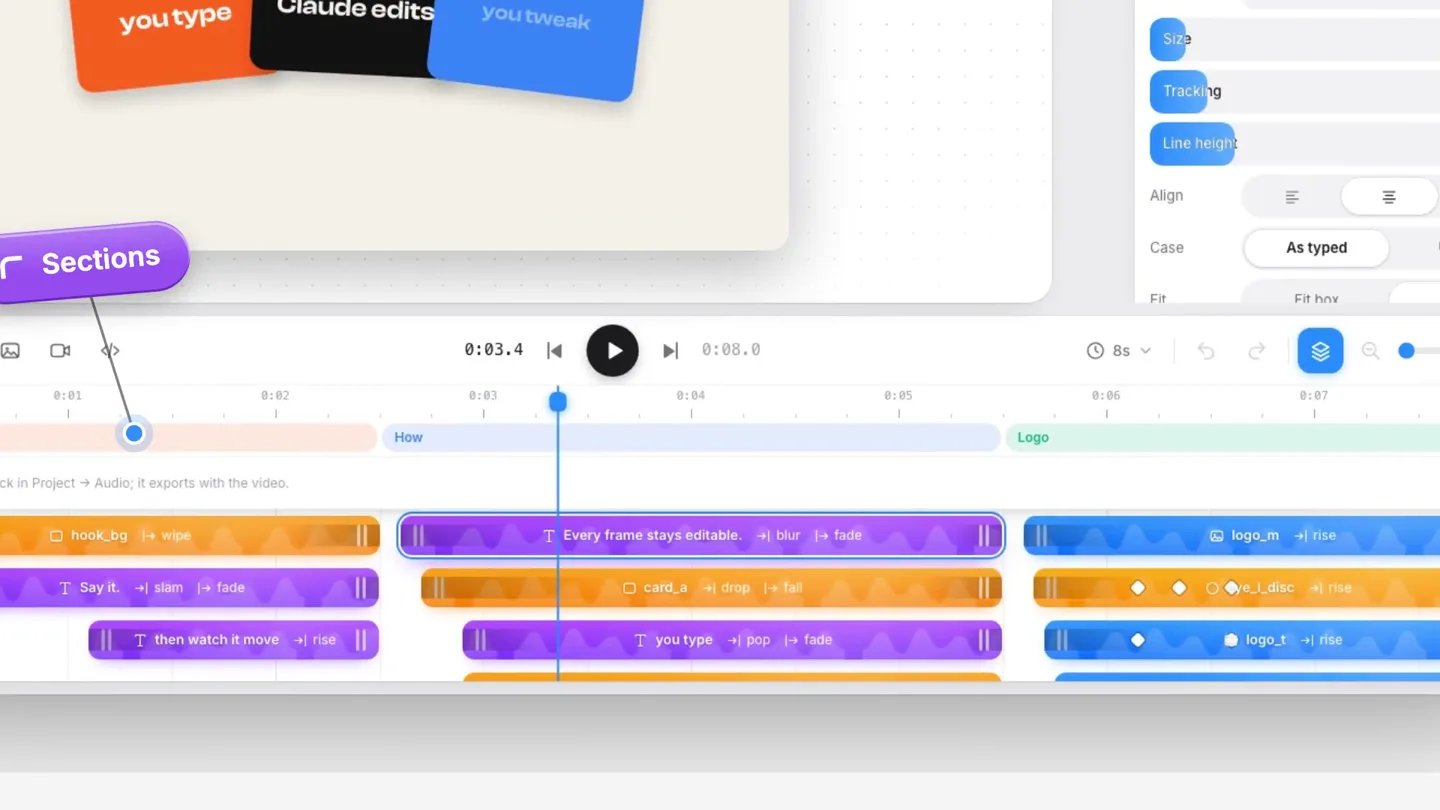
- Projects Hello mtioon Smooth Snappy Bouncy Editorial Export Done Text Every frame stays editable. Font Instrument Serif Weight 400 Size 96 px Tracking -2 % Line height 1.05 Align Case As typed UPPER Fit box Free SECTIONS Hook How Logo Music No music. Add a track in Project > Audio, it exports with the video. hook_bg |+ wipe Say it. |+ slam |+ fade I then watch it move |+ rise Every frame stays editable. |+ blur |+ fade card_a |+ drop |+ fall you type |+ pop |+ fade logo_m |+ rise logo_l_disc |+ rise logo_t |+ rise Say it. then watch it move Claude Opus 5.5 make our launch video Read project Add layers - 23 you type Claude edits you tweak Every layer is a clip You talk. Claude builds.
- Camera
- Close-up on a software timeline, then a slight zoom out to reveal a chat interface overlaying the timeline. The camera then pans across the timeline and zooms in on specific elements.
- Motion
- UI elements highlight and animate to draw attention. Text bubbles appear with a subtle bounce. The timeline elements expand and contract, simulating user interaction. A sub-bass drop at 00:06 emphasizes a key reveal.
Call to Action
Your Content, Your Control
“(No spoken dialogue — Modern and punchy sound design with a driving rhythm.)”
- On screen
- render_frames Inter import_asset editor.png hero.png get_catalog Sungyun Sans radius 28 replace_section add_layers apply_motion README.md compose_music update_layers set_camera #FF5A1F snap_to_beat retim logo.svg #2A8CFF Your copy. Your colours. AN MCP FOR CLAUDE CODE mtioon Say it. Watch it move. mtioon Try it at mtioon.com
- Camera
- Dynamic, fast-paced camera movements, zooming and panning across a dense field of text and UI elements. Ends with a static, centered shot of the brand logo and call to action.
- Motion
- Rapid text reveals and fades, creating a sense of information density and speed. Elements appear to 'fly' into place. The final call to action button animates in with a subtle bounce and glow.
Motion design primitives
Synthesizable in Remotion · key components of the ai-driven-editable-motion-launch template.
BouncyPopIn
Elements (text, UI bubbles) appear with a quick scale-up, slightly overshooting their final size before settling. This creates a lively, energetic feel.
+ Code construction recipe
Use `spring()` for scale and opacity. Set `damping` to a lower value (e.g., 10-15) and `stiffness` to a higher value (e.g., 150-200) to achieve the overshoot effect. Combine with `interpolate()` for initial opacity from 0 to 1.
DynamicTextReveal
Text appears character by character or word by word, often with a subtle slide or fade-in. Larger headlines might 'slam' into place with a slight bounce.
+ Code construction recipe
For character-by-character, map over characters and apply `spring()` or `interpolate()` for `y` position and `opacity` with staggered delays. For 'slam' effect, use `spring()` on `scale` and `y` position with a strong initial velocity.
UIFlowTransition
Seamless transitions between different UI states or screens, often involving a smooth pan, zoom, or wipe effect that carries elements from one scene to the next.
+ Code construction recipe
Utilize `AbsoluteFill` and `Sequence` components. Animate `transform` properties (translate, scale) of parent containers using `interpolate()` with `easeOutCubic` or `easeInOutQuad` for smooth transitions. Consider `clipPath` for wipe effects.
Style DNA & aesthetic system
Visual aesthetic
Typography
Motion
Special effects
Pacing & rhythm
Conceptual story rhythm
- 1
The Conversational Hook
Purpose. Immediately establish the core value proposition: natural language interaction for video creation.
Execution. Opening with a playful arrangement of UI elements and text bubbles representing commands, culminating in the bold 'Say it. Watch it moove.' headline.
- 2
The AI-Powered Workflow
Purpose. Demonstrate how the AI (Claude) integrates with existing developer assets to generate initial video drafts.
Execution. Transition from code/repo elements to a clean UI showing Claude processing a prompt and generating layers on a timeline, emphasizing 'Your repo is the brief.'
- 3
The Editable Advantage
Purpose. Highlight the key differentiator: AI-generated content remains fully editable, giving users control.
Execution. Focus on the software's timeline interface, showing individual layers as editable clips, reinforced by the 'Every frame stays editable' and 'You talk. Claude builds.' messages.
- 4
The Ownership & CTA
Purpose. Reiterate user ownership and provide a clear call to action.
Execution. A rapid montage of code/design elements with 'Your copy. Your colours.' text, leading to the brand logo and a prominent 'Try it at mtioon.com' button.
Remix in Animatiq Studio
Master remix prompt · agent-ready
Sample remix
Objective
Launch a new AI-powered web design builder that generates fully editable React components from text prompts.How the recipe adapts
The video would open with text bubbles representing design prompts like 'build a responsive hero section' and 'make it purple and green,' leading to a 'Say it. Watch it build.' headline. Instead of file icons, we'd see abstract React component blocks animating into a folder structure. The software interface would show a code editor and a visual builder side-by-side, with AI-generated code snippets appearing on the timeline. The 'Your copy. Your colours.' segment would become 'Your code. Your components.' The final call to action would be 'Try it at buildr.ai'.Remix blueprint · ai-driven-editable-motion-launch
Scene durations (4 scenes, 15s)
Key Remotion components
Related Creative Tools Product Launches
Explore all Creative Tools launches →
A vibe design partner with an AI-native canvas for turning ideas into UI.

We heard you wanted to use Codex rate limit resets on your own time. Starting today, we’re rolling out the ability to save rate limit resets to use later. We’re starting Go, Plus, Pro, and Business
Introducing Framer 3.0 with Agents, Branching, Community, and an all-new design.