
NoUpload · Launch Video Breakdown: Hook, Pacing & Motion Design
NoUpload is an open-source browser editor for any media. Files stay on your device and edits run locally at high speed.
Scene-by-scene timeline & spoken transcript
The Hook
The Privacy Problem
“(No spoken dialogue — A driving electronic beat with percussive synth elements and a sub-bass line establishes a high-energy tone.)”
- On screen
- ilove best site for multiple document tool
- Camera
- Static, centered view of a search bar, then a quick cut to a browser window corner.
- Motion
- Rapid text typing animation, quick scene cut, and a subtle browser window reveal.
Product Reveal
NoUpload: Privacy-First Browser Tools
“(No spoken dialogue — The electronic beat continues with a subtle riser leading into a sub-bass drop at the scene cut.)”
- On screen
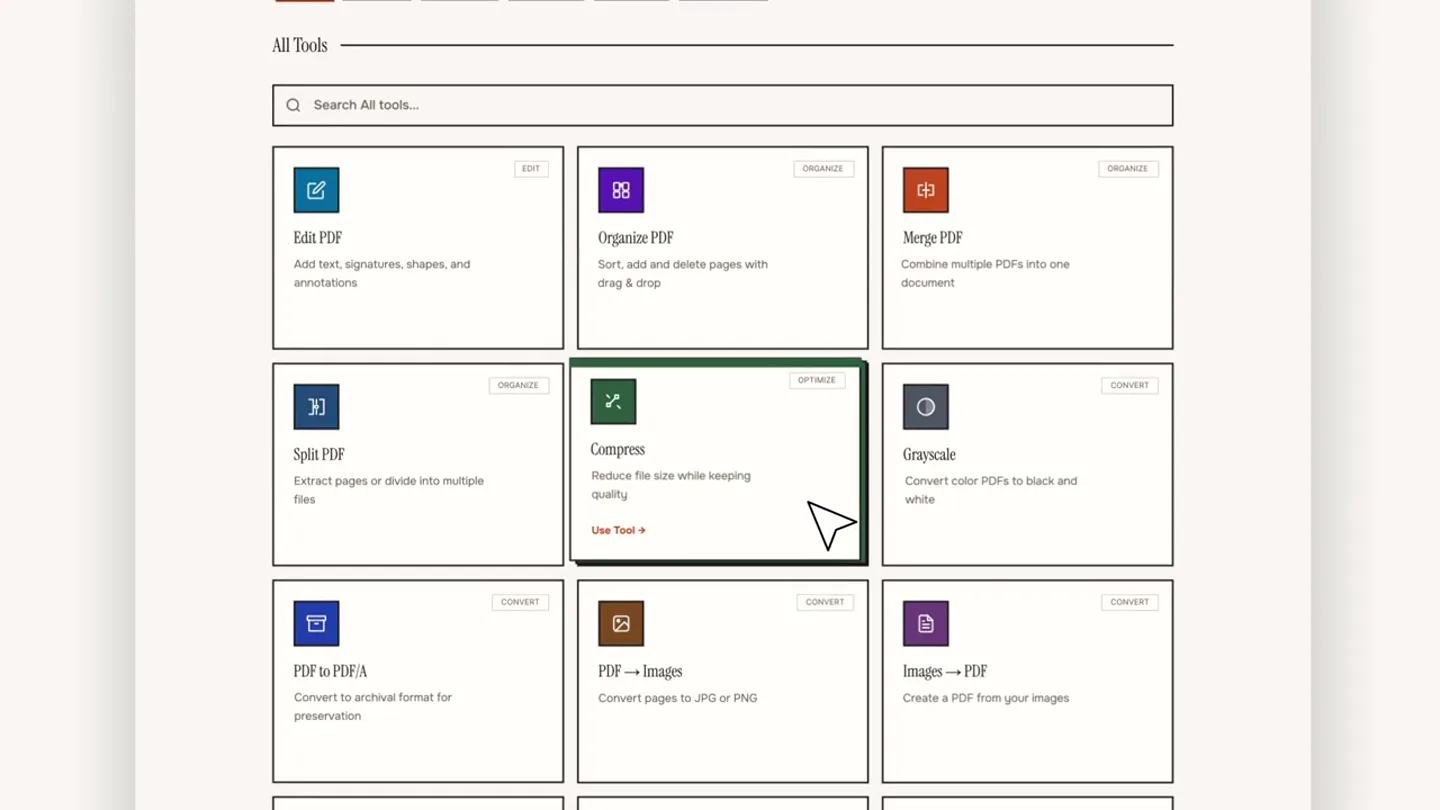
- noupload www.noupload.xyz Tools that respect your privacy Everything runs in your browser. Your files never touch our servers—because we don't have any. All 77 PDF 28 Image 19 Audio 14 Video 12 QR Code 4 All Tools Search All tools... Edit PDF Add text, signatures, shapes, and annotations. Organize PDF Sort, add and delete pages with drag & drop. Merge PDF Combine multiple PDFs into one document. Split PDF Extract pages or divide into multiple files. Compress Reduce file size while keeping quality. Grayscale Convert color PDFs to black and white. PDF to PDF/A Convert to archival format for preservation. PDF -> Images Convert pages to JPG or PNG. Images -> PDF Create a PDF from your images. Use Tool Back to tools Compress PDF Reduce file size while preserving quality Drop your PDF file here or click to browse from your device Select Files PDF files + Max 100MB Compression Level Light Best quality Balanced Recommended Maximum Smallest size Instant compression Drop a PDF and it will be compressed automatically. scanned_document.pdf 1.4 MB Change file Rebuilding PDF streams... Optimized PDF Compressed! ORIGINAL 1.4 MB COMPRESSED 994 KB 29% smaller Download PDF Compress Another
- Camera
- Zoom out from browser corner to full browser view, then a series of subtle pans and zooms to highlight UI elements and user interaction.
- Motion
- Smooth camera pan, UI element highlighting with subtle glows and cursor interactions, progress bar animation, and a checkmark reveal.
Feature Teaser
The Ultimate Browser Tool
“(No spoken dialogue — The electronic beat intensifies with a build-up and a strong sub-bass drop coinciding with the text reveals and icon animations.)”
- On screen
- noupload the fastest browser tool the most secure browser tool the ultimate browser tool 70+ Tools and more!
- Camera
- Static, centered view for text, then a dynamic camera pan and zoom across a field of 3D icons.
- Motion
- Text morphing and fading, 3D icon pop-in and rotation, cursor interaction, and a dynamic camera movement through the icon field.
Call to Action
Access NoUpload Now
“(No spoken dialogue — The electronic beat resolves with a final impactful sub-bass drop and a sustained synth pad.)”
- On screen
- Access now at noupload.xyz It's opensource btw :)
- Camera
- Static, centered view.
- Motion
- Text reveal with a subtle fade-in and color shift, followed by a secondary text reveal.
Motion design primitives
Synthesizable in Remotion · key components of the noupload-privacy-tool-launch template.
TypingCursorReveal
Text appears character by character as if being typed, often accompanied by a blinking cursor, then quickly disappears or morphs.
+ Code construction recipe
Use `interpolate` for `opacity` and `clipPath` or `width` to reveal text. A separate `Sequence` can manage the blinking cursor animation with `loop` and `duration`.
UIHighlightInteraction
Interactive UI elements (buttons, cards) respond to a cursor hover or click with subtle scaling, color changes, or a glowing outline.
+ Code construction recipe
Employ `spring` for `scale` and `boxShadow` or `backgroundColor` transitions on hover. Use `Sequence` and `AbsoluteFill` for cursor path animation and click events.
IsometricIconFieldPan
A dynamic camera pans and zooms across a field of isometric 3D icons, which may subtly rotate or pop into view.
+ Code construction recipe
Render 3D icons using `ThreeCanvas` or SVG transforms for isometric perspective. Animate camera `position` and `rotation` with `interpolate` or `spring` for smooth panning and zooming. Individual icons can use `spring` for `scale` and `rotation` on entry.
Style DNA & aesthetic system
Visual aesthetic
Typography
Motion
Special effects
Pacing & rhythm
Conceptual story rhythm
- 1
The Frustration
Purpose. Establish a common pain point related to online tools and privacy.
Execution. Typing a search query for a solution, implying a user's struggle.
- 2
The Solution Unveiled
Purpose. Introduce NoUpload as the direct answer to the problem, highlighting its core value proposition.
Execution. Revealing the NoUpload website and demonstrating its privacy features and tool selection.
- 3
Seamless Experience
Purpose. Showcase the product's ease of use and efficiency through a quick, practical demonstration.
Execution. A step-by-step walkthrough of compressing a PDF, emphasizing local processing and speed.
- 4
Broad Utility & Call to Action
Purpose. Reinforce the product's versatility and prompt users to engage.
Execution. Rapid text highlights of key benefits, a dynamic montage of 3D tool icons, and a clear call to visit the website.
Remix in Animatiq Studio
Master remix prompt · agent-ready
Sample remix
Objective
A developer seeking a fast, private, and versatile code editor.How the recipe adapts
The initial search bar scene transforms into a terminal window where a developer types 'slow cloud IDE alternatives'. The browser reveal becomes the CodeFlow editor UI, demonstrating features like real-time linting and local build processes with UIHighlightInteraction. The IsometricIconFieldPan will feature 3D icons of Python, JavaScript, and Rust logos, dynamically appearing and rotating as the camera sweeps across them, emphasizing CodeFlow's broad language support.Remix blueprint · noupload-privacy-tool-launch
Scene durations (4 scenes, 29s)
Key Remotion components
Related Creative Tools Product Launches
Explore all Creative Tools launches →
A vibe design partner with an AI-native canvas for turning ideas into UI.

We heard you wanted to use Codex rate limit resets on your own time. Starting today, we’re rolling out the ability to save rate limit resets to use later. We’re starting Go, Plus, Pro, and Business
Introducing Framer 3.0 with Agents, Branching, Community, and an all-new design.