
Omma AI · Launch Video Breakdown: Hook, Pacing & Motion Design
Introducing Omma Canvas. First-ever massive parallel agent generation. Trigger up to 100 agents in parallel on a canvas to build real sites, web apps, and more.
Scene-by-scene timeline & spoken transcript
The Hook
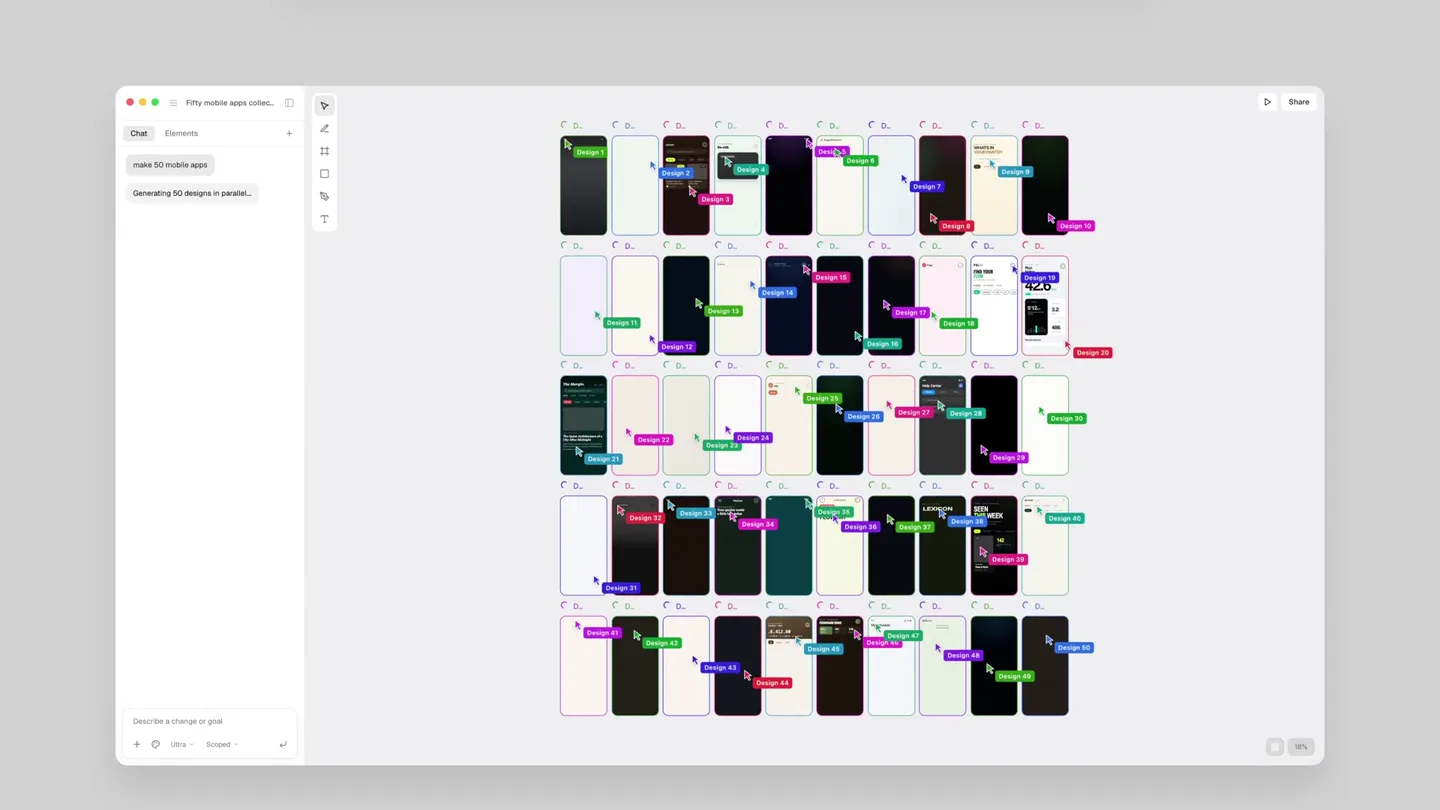
Massive Parallel Agent Generation for Mobile Apps
“(No spoken dialogue — The track begins with a sparse, percussive electronic beat, featuring pizzicato synths and a prominent sub-bass. High-energy audio transitions, including risers and sweeps, punctuate scene changes.)”
- On screen
- Make 50 mobile apps | Make 100 | Make 10 variation | Make a skeu |
- Camera
- Close-up on a text input field, then wide shot revealing a grid of mobile app designs. Camera pans and zooms across the grid, highlighting individual designs and their variations.
- Motion
- Rapid text input animation, grid expansion with staggered reveals, smooth camera pans and zooms, subtle highlight animations on generated designs.
Product Reveal
Introducing Omma Canvas: Web App Generation
“(No spoken dialogue — The electronic beat continues, building in intensity with layered synth melodies. Sound design includes sub-bass drops and impacts for key reveals.)”
- On screen
- Send to Omma Canvas | create the shop page | Omma AI | Introducing Omma Canvas. First-ever massive parallel agent generation. Trigger up to 100 agents in parallel on a canvas to build real sites, web apps, and more.
- Camera
- Close-up on UI elements, then a wide shot of the Omma Canvas interface. Camera tracks text input and the subsequent generation of web app designs, followed by a reveal of the Omma AI logo and tagline.
- Motion
- UI interaction animations (clicks, typing), rapid grid generation of web designs, text reveal animations with a subtle glow, logo animation with a clean, modern aesthetic.
Feature Teaser
Iterative Design and Real-time Editing
“(No spoken dialogue — The music maintains its dynamic energy, with rhythmic synth patterns and percussive accents. Sound effects emphasize UI interactions and rapid processing.)”
- On screen
- Make 10 variations of this design | Make it responsive | Add interactivity | Improve performance | Optimize the code | create the shop page |
- Camera
- Focus on a single design, then a split-screen view showing variations. Camera follows text input for modifications, then zooms into specific UI elements being edited in real-time.
- Motion
- Split-screen transitions, real-time text editing and UI updates, smooth scaling and repositioning of design elements, subtle cursor animations indicating user interaction.
Call to Action
Build Real Sites, Web Apps, and More
“(No spoken dialogue — The audio track builds to a crescendo, with a powerful sub-bass impact and a final, sustained synth chord, leaving a sense of completion and innovation.)”
- On screen
- Omma Canvas. First-ever massive parallel agent generation. Trigger up to 100 agents in parallel on a canvas to build real sites, web apps, and more. | omma.ai
- Camera
- Wide shot of the Omma Canvas interface, showcasing multiple generated projects. Camera slowly pulls back to reveal the full scope of the platform, ending on the Omma AI logo and website.
- Motion
- Smooth camera pull-back, subtle parallax scrolling of background elements, final logo reveal with a glow effect, website URL fade-in.
Motion design primitives
Synthesizable in Remotion · key components of the omma-ai-parallel-generation-template template.
ParallelGridReveal
A grid of UI elements (mobile apps, web pages) rapidly expands from a central point or off-screen, with each item appearing and settling into its position in a staggered, organized fashion.
+ Code construction recipe
Use `map` to render grid items. Animate `opacity` from 0 to 1 and `scale` from 0.8 to 1 using `interpolate` with a `spring` function for a bouncy feel. Apply a `delay` to each item based on its grid index for the staggered effect.
DynamicTextInput
Text appears to be typed into an input field in real-time, often followed by a cursor animation and then a rapid transformation or generation of content based on the input.
+ Code construction recipe
Utilize `Sequence` and `AbsoluteFill` for text layers. Animate `text` property character by character using `interpolate` and `delay`. Implement a blinking cursor with `opacity` animation. Trigger subsequent content generation animations based on the completion of text input.
CanvasZoomPan
The camera smoothly zooms into and pans across a large canvas displaying numerous generated designs, highlighting specific areas or transitions between different project views.
+ Code construction recipe
Apply `transform` properties (scale, translateX, translateY) to a parent `View` component containing the canvas content. Use `spring` or `ease-in-out` `interpolate` for smooth camera movements. Coordinate `delay` with scene changes to guide viewer attention.
Style DNA & aesthetic system
Visual aesthetic
Typography
Motion
Special effects
Pacing & rhythm
Conceptual story rhythm
- 1
The Prompt
Purpose. Introduce the core interaction: typing a command to generate content.
Execution. Close-up on a text input field, showing a command being typed, followed by a quick transition to the generated output.
- 2
The Swarm
Purpose. Demonstrate the massive parallel generation capability.
Execution. A rapid expansion of a grid of numerous mobile or web designs, filling the screen, showcasing quantity and speed.
- 3
The Canvas
Purpose. Showcase the Omma Canvas interface and its iterative design features.
Execution. Smooth camera pans and zooms across the canvas, highlighting specific designs, real-time editing, and variations being generated.
- 4
The Impact
Purpose. Conclude with the product's value proposition and call to action.
Execution. A wide shot of the Omma Canvas, emphasizing the breadth of possibilities, followed by the brand logo and website URL.
Remix in Animatiq Studio
Master remix prompt · agent-ready
Sample remix
Objective
A new AI tool that generates marketing campaign creatives.How the recipe adapts
The 'ParallelGridReveal' primitive would display a grid of diverse marketing creatives (banner ads, social media posts, email templates) instead of app designs. The 'DynamicTextInput' would show prompts like 'Generate 10 ad variations for product X' or 'Create a social media campaign for Y'. The 'CanvasZoomPan' would navigate through a canvas of generated campaign assets, highlighting real-time adjustments to copy or visuals. The color palette would shift to vibrant, energetic tones like orange, purple, and teal, maintaining the clean, modern aesthetic.Remix blueprint · omma-ai-parallel-generation-template
Scene durations (5 scenes, 69s)
Key Remotion components
Related Creative Tools Product Launches
Explore all Creative Tools launches →
Anthropic Labs launches Claude Design, which turns conversation into prototypes, slides and one-pagers, powered by Claude Opus 4.7.

A vibe design partner with an AI-native canvas for turning ideas into UI.

Your work tools in Claude are now available on mobile. Explore Figma designs, create Canva slides, check Amplitude dashboards, all from your phone. Give it a try: