
Indie OSS · Launch Video Breakdown: Hook, Pacing & Motion Design
A free MIT-licensed workflow for premium product demos: motion blur, zoom animations, cursor smoothing, timeline, and exports.
Scene-by-scene timeline & spoken transcript
The Hook
Instant Cinematic Screen Recordings
“(No spoken dialogue — The track begins with a sustained, evolving synth pad, creating an atmospheric and slightly mysterious tone. At [00:04], a subtle sub-bass layer is introduced, adding depth. A high-energy riser begins at [00:08], building tension, culminating in a significant sub-bass drop/impact at [00:09].)”
- On screen
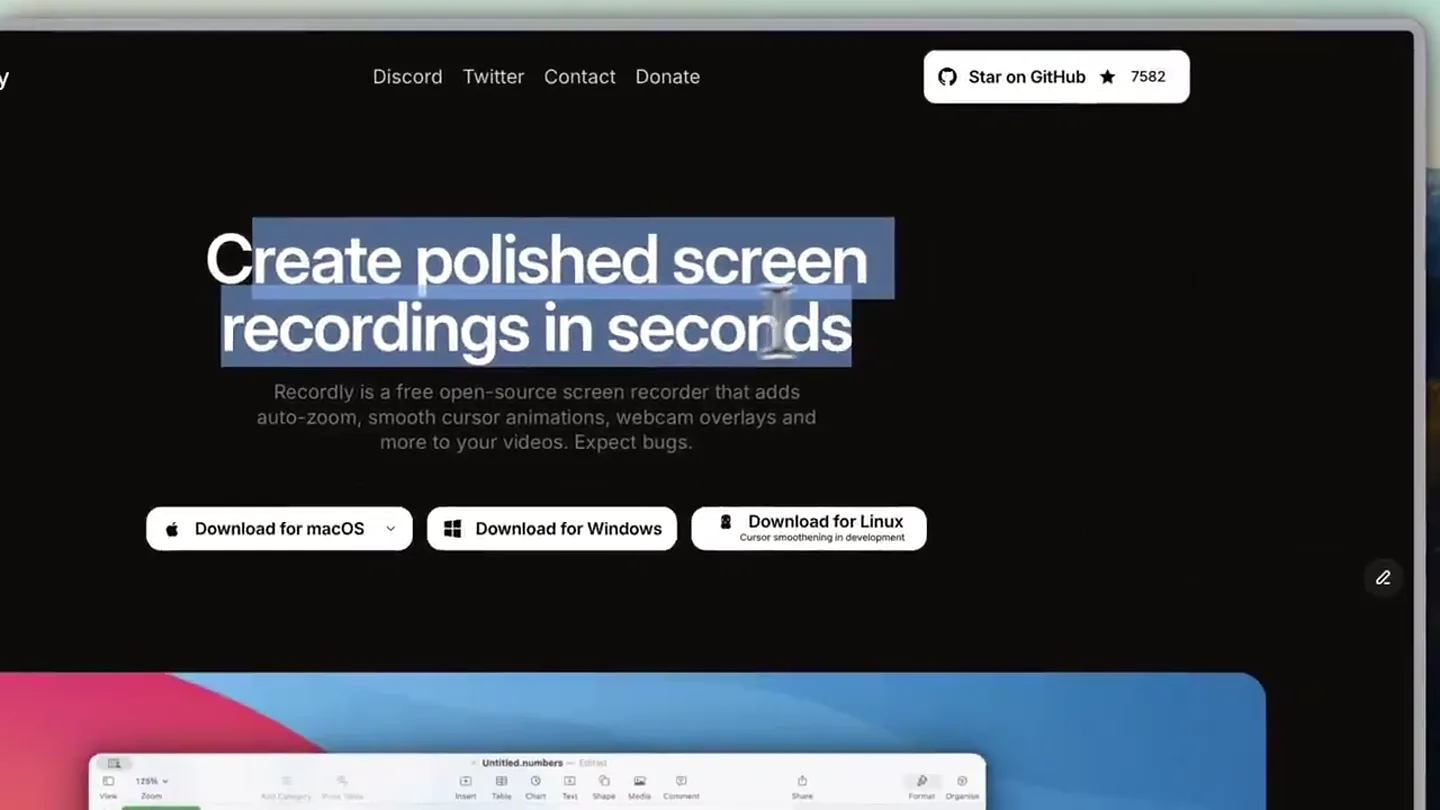
- Recordly Discord Twitter Contact Donate Star on GitHub Create polished screen recordings in seconds Recordly is a free open-source screen recorder that adds auto-zoom, smooth cursor animations, webcam overlays and more to your videos. Expect bugs. Download for macOS Download for Windows Download for Linux Cursor smoothing in development
- Camera
- Static wide shot of a desktop application, then a subtle zoom-in on the main headline.
- Motion
- Text highlight animation, subtle cursor interaction, and a gentle camera push-in.
Product Reveal
Core Features Showcase
“(No spoken dialogue — This is followed by a rhythmic, pulsing synth arpeggio and a driving electronic drum beat, giving the track a more dynamic feel. Another riser starts at [00:18], leading to a powerful sub-bass impact at [00:19].)”
- On screen
- Recordly Discord Twitter Contact Donate Star on GitHub 7582 Auto-zoom, silky cursor & beautiful backgrounds Recordly adds beautiful cursor animations and auto-zooming plus a background to your recordings so you can spend less time editing and more time shipping. Dynamic webcam bubble overlay Recordly uses smart webcam bubbles that expand and shrink to make sure you get the spotlight when you need to. Intuitive timeline editing interface Use drag-and-drop pieces to control video speed, zooms, annotations, audio tracks and video length, and save your projects as .recordly files so you can save your progress or edit other projects.
- Camera
- Smooth, continuous camera pan and zoom across different sections of the application UI.
- Motion
- Seamless UI navigation, text reveal animations, and dynamic content shifts within the application window.
Feature Teaser
Cinematic Recording Capabilities
“(No spoken dialogue — The music then transitions into a more melodic phase with a prominent synth lead and continued rhythmic elements.)”
- On screen
- Recordly Discord Twitter Contact Donate Star on GitHub 7582 Make your recordings look cinematic. Record microphone & system audio Dual-source audio capture with sample-accurate sync. Speak, demo, and showcase with flawless sound. Save and load projects Recordly remembers your workspace. Save projects with all your audio, video, and layout choices, then reopen them instantly to continue creating. Change export format and quality Turn your recording into a smooth MP4 or a looping GIF. Perfect for demos, tutorials, and quick social posts. Loop cursor path Loop your cursor path so GIFs and autoplay clips stay engaging. No jumps, no shutters; just clean, continuous motion. Import audio tracks & webcam footage Import audio files and webcam video with full timeline control. Layer, sync, and refine external media right inside your project. Free & open-source Recordly is fully free and open-source, with no paywalls or hidden limits. Transparent, community-driven, and built for creators who value control. // FAQ Questions? We've got answers. Is Recordly really free? Yes, Recordly is free and will be free forever. Does Recordly have auto-zoom? Yes, although it's still a WIP and is not perfect. You can help by contributing to the project! Can I use Recordly for commercial purposes? Yes, Recordly is licensed under AGPL-3 Are my recordings private? Absolutely. Recordly runs offline locally, which means your videos never leave your machine. What platforms does Recordly support? Recordly supports MacOS, Windows and Linux. What permissions do I need to give Recordly? Screen recording & Accessibility permissions. We do not collect any data. How can I help Recordly?
- Camera
- Smooth, deliberate pans and zooms highlighting specific feature cards and FAQ sections.
- Motion
- Card-based content reveals, interactive FAQ expansions, and continuous cursor path following.
Call to Action
Download and Contribute
“(No spoken dialogue — A final, intense riser builds from [00:30] to [00:31], concluding with a strong sub-bass impact and a sustained synth chord.)”
- On screen
- Recordly Discord Twitter Contact Donate Star on GitHub 7582 Create polished screen recordings in seconds Recordly is a free open-source screen recorder that adds auto-zoom, smooth cursor animations, webcam overlays and more to your videos. Expect bugs. Download for macOS Download for Windows Download for Linux Cursor smoothing in development
- Camera
- Returns to the initial wide shot of the landing page, focusing on download buttons.
- Motion
- Re-emphasizing the core value proposition and clear calls to action with a final cursor interaction.
Motion design primitives
Synthesizable in Remotion · key components of the cinematic-ui-showcase template.
SmoothCursorPath
A custom cursor icon moves fluidly across the screen, following a predefined or dynamically generated path, often with a subtle easing or spring effect, mimicking natural human interaction.
+ Code construction recipe
Use `interpolate` for cursor position along an SVG path or array of coordinates. Apply `spring` for a natural, bouncy feel on clicks and hovers. Implement a custom SVG for the cursor icon.
DynamicUIZoomPan
The camera smoothly pans and zooms across different sections of a desktop application UI, highlighting specific elements or content areas with a cinematic feel.
+ Code construction recipe
Utilize `interpolate` for camera `x`, `y`, and `scale` properties. Define keyframes for target UI elements. Apply `ease-in-out` or custom bezier curves for smooth transitions. Use `AbsoluteFill` for the application window and `OffthreadVideo` for screen content.
TextHighlightReveal
Key text elements are highlighted or revealed with a subtle, expanding background color or a soft glow, drawing attention to important information.
+ Code construction recipe
Wrap text in a `div` with an animated `background-color` or `box-shadow` property. Use `interpolate` to animate `width` or `opacity` of an overlay element behind the text. Apply `delay` for sequential reveals.
Style DNA & aesthetic system
Visual aesthetic
Typography
Motion
Special effects
Pacing & rhythm
Conceptual story rhythm
- 1
The Cinematic Promise
Purpose. Immediately hook the viewer by demonstrating the core benefit: creating polished screen recordings effortlessly.
Execution. Opening with the main headline and a subtle zoom, followed by a cursor interacting with download buttons, setting a professional tone.
- 2
Feature Deep Dive
Purpose. Showcase the key differentiating features of the product through direct UI interaction.
Execution. Smooth pans and zooms across the application, highlighting auto-zoom, webcam overlays, and the intuitive timeline editor with accompanying text reveals.
- 3
Comprehensive Capabilities
Purpose. Expand on the product's versatility and address potential user questions, building trust and demonstrating value.
Execution. Transition to a grid of feature cards and an interactive FAQ section, detailing audio recording, project management, export options, and the open-source nature.
- 4
Empowerment & Call to Action
Purpose. Reiterate the core value proposition and guide the user towards taking the next step.
Execution. Returning to the landing page, emphasizing the 'polished recordings' message and clearly presenting download options, reinforced by the final audio impact.
Remix in Animatiq Studio
Master remix prompt · agent-ready
Sample remix
Objective
Launch a new AI-powered code refactoring tool called 'SyntaxFlow'.How the recipe adapts
The 'SyntaxFlow' launch video would open with a wide shot of the IDE, then zoom into a code editor, highlighting the 'refactor' button with a TextHighlightReveal. A SmoothCursorPath would navigate through code suggestions, demonstrating the AI's intelligence. DynamicUIZoomPan would showcase different refactoring options and a split-screen view of before-and-after code. The background would be a blurred, abstract circuit board or data stream. The pacing would remain deliberate, emphasizing the precision and ease of the tool, with an electronic soundtrack building tension during complex refactoring demos.Remix blueprint · cinematic-ui-showcase
Scene durations (4 scenes, 35s)
Key Remotion components
Related Creative Tools Product Launches
Explore all Creative Tools launches →
Anthropic Labs launches Claude Design, which turns conversation into prototypes, slides and one-pagers, powered by Claude Opus 4.7.

A vibe design partner with an AI-native canvas for turning ideas into UI.

Your work tools in Claude are now available on mobile. Explore Figma designs, create Canva slides, check Amplitude dashboards, all from your phone. Give it a try: