
Paper · Launch Video Breakdown: Hook, Pacing & Motion Design
Lens Distortion shaders are live in Paper — fisheye, duotone, smoke and more.
Scene-by-scene timeline & spoken transcript
The Hook
Dynamic Shader Showcase
“(No spoken dialogue — A prominent riser leads into a sub-bass drop/impact at 0:01, setting an energetic tone with synth melody and 808 drums.)”
- On screen
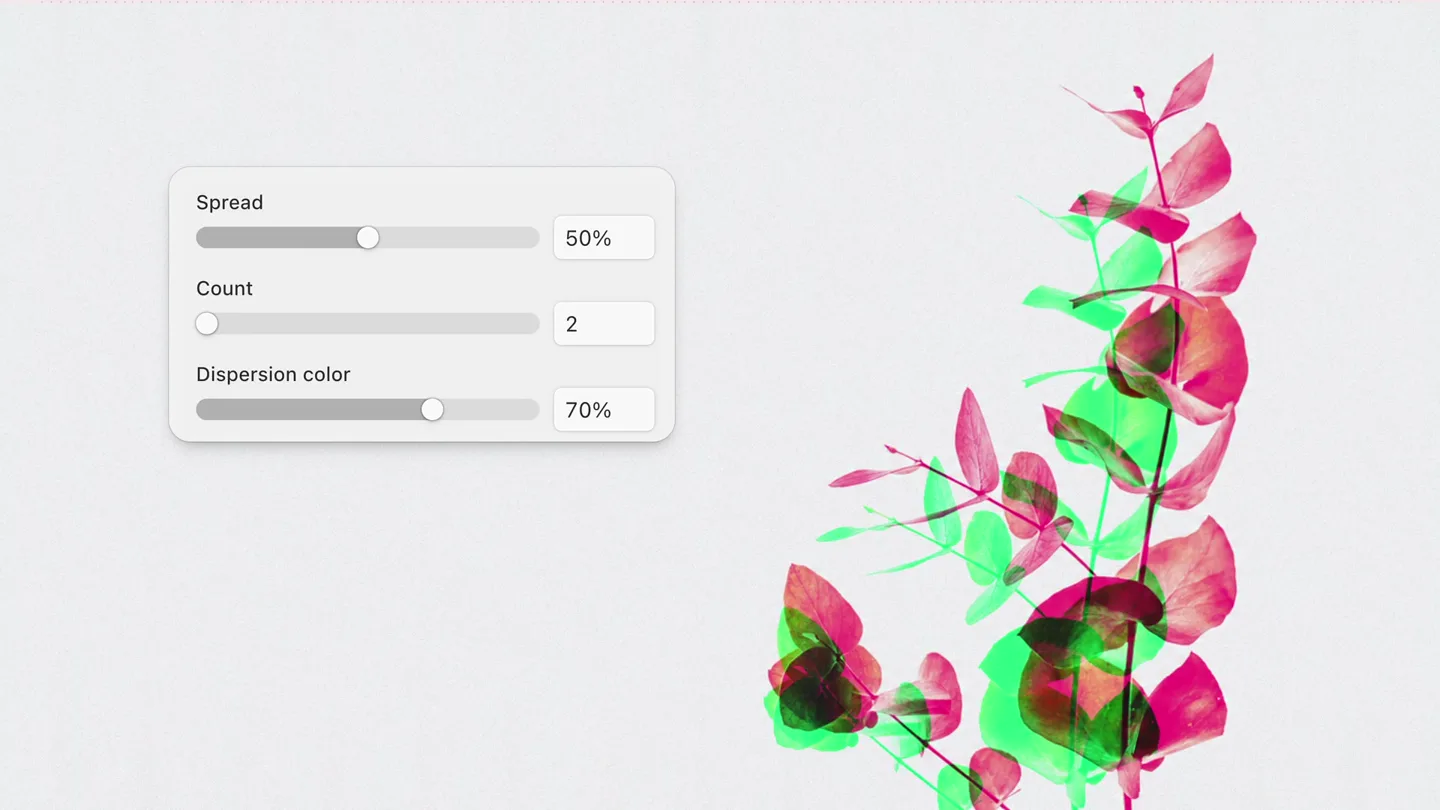
- Spread Count Dispersion color 36% 20 0% Spread Perspective 50% 5% Lens Distortion shader
- Camera
- Static camera, focusing on a split screen with UI controls on the left and a dynamically changing image on the right. The image itself appears to 'zoom' or 'warp' due to the shader effect.
- Motion
- Real-time UI manipulation of shader parameters, chromatic aberration, and radial blur effects applied to various images, creating a sense of dynamic visual transformation.
Product Reveal
Interactive Shader Exploration
“(No spoken dialogue — The driving synth melody continues with frequent percussive hits, maintaining high energy. A significant riser builds at 0:09, leading to a sub-bass drop/impact at 0:10.)”
- On screen
- Lens Distortion shader Spread Noise Noise offset 60% 100% 0 Spread Lens bulge Lens circle 0% 6% 6% Spread Lens bulge Lens circle 13% 100% 100% Spread Dispersion Lens bulge 31% 0% -55%
- Camera
- Primarily static, showcasing different images being affected by the 'Lens Distortion' shader. The UI panel remains consistent, demonstrating parameter adjustments.
- Motion
- Sequential application of various shader effects (chromatic aberration, noise, lens bulge, dispersion) to different photographic subjects, emphasizing the versatility of the tool. UI elements animate smoothly as sliders are adjusted.
Feature Teaser
Seamless Integration & Export
“(No spoken dialogue — The energetic electronic score continues, punctuated by crisp 808-style drum machine percussion and synth stabs, driving the pace.)”
- On screen
- Spread Dispersion Lens bulge 50% 100% -90% lensDistortion Copy link 57% Shaders Image filters Paper Texture Fluted Glass Water Image Dithering Halftone Dots Halftone CMYK Lens Distortion Logo animations Heatmap Liquid Metal Gemi Smoke Effects Layout X -8991 Y 3633 A 0° W 800 H 532 Wrap in flex Radius 0 Blending 100% Normal Fill Solid Gradient Image gary-bendig-WPrnPsxK2Sw-unsplash... 5184x3456 Outline Border Shadow Inner shadow Filters Export Presets Default Fisheye Duotone Smoke Image 0018.webp 1500x1124 Parameters Fit Contain Cover Spread 60% Bias 100% Angle 0° Perspective 10% Count 35 Dispersion 100% Dispersion shift 0% Dispersion color Focus center 800 x 536 Presets Default Fisheye Duotone Smoke Image Canadian geese in flight.w... 1600x1064 Parameters Fit Contain Cover Spread 60% Bias -100% Angle 0° Perspective 10% Count 35 Dispersion 100% Dispersion shift 0% Dispersion color 22% Focus center 800 x 536 Copy Copy link Copy as... Paste Paste on top Paste to replace Duplicate Copy styles Paste styles Frame selection C C V V D C V F
- Camera
- Zooming out to reveal the full UI of the 'Paper' application, then focusing on specific interactions like selecting shaders, adjusting parameters, and finally, a context menu for 'Copy as React CSS'.
- Motion
- Smooth camera zooms and pans across the application UI. Interactive elements like dropdowns and context menus animate with clear, responsive transitions. The shader effect is applied to an image within the UI, demonstrating its in-app functionality.
Call to Action
Code Integration & Brand Reveal
“(No spoken dialogue — The electronic track maintains its driving rhythm, leading to a final impactful beat as the logo appears.)”
- On screen
- export.jsx /** @paper-design/shaders-react@0.0.79 */ import { LensDistortion } from '@paper-design/shaders-react'; export default function () { LensDistortion { return <LensDistortion image="https://app.paper-staging.dev/file-assets/01KYJDCYY96B8F5XSBAGBNHCW7/01KYVNY379XX0TP95QTWHC4T9M.webp" spread={0.55} bias={0} angle={0} perspective={0} count={50} dispersion={1} dispersionShift={0} dispersionColor={0.3} focusCenter={1} focusEdges={0} noise={0} noiseFrequency={0.25} noiseOffset={0} lensBulge={0.13} lensCircle={0} />; } < Lens Distortion /> shader today in Paper
- Camera
- Static shot of code, then a quick cut to a centered text overlay, followed by a final cut to the brand logo.
- Motion
- Rapid cuts, clean text animation (fade-in/scale-up), and a final brand logo reveal with a subtle bounce or scale effect, reinforcing the product's identity and availability.
Motion design primitives
Synthesizable in Remotion · key components of the shader-driven-tech-launch template.
ShaderParameterControl
A UI panel with sliders and input fields dynamically adjusts visual effects (e.g., chromatic aberration, blur, distortion) on an adjacent image in real-time. The image transforms smoothly as parameters change.
+ Code construction recipe
Utilize Remotion's `<AbsoluteFill>` for layout. Implement `interpolate()` for slider values to drive CSS filter properties (e.g., `filter: 'blur(calc(var(--slider-value) * 10px))'`) or SVG filters. Use `spring()` for smooth slider handle movements and UI element transitions. Integrate WebGL shaders for advanced effects like chromatic aberration and lens distortion, passing animated uniform values.
DynamicTextReveal
Text appears with a subtle scale-up and fade-in, often accompanied by a glitch or chromatic aberration effect, then holds briefly before a quick cut.
+ Code construction recipe
Employ `interpolate()` for `opacity` and `scale` CSS properties. For the glitch effect, use a combination of `filter: 'hue-rotate()'` and `transform: 'translateX()'` with `random()` values or a custom WebGL shader for chromatic aberration. Ensure `durationInFrames` and `delay` are precisely timed with audio cues.
InteractiveUIPan
The camera smoothly pans and zooms across a detailed application interface, highlighting specific interactive elements like dropdown menus, property panels, and context menus, which animate responsively.
+ Code construction recipe
Use `interpolate()` for `transform: 'translateX()'`, `translateY()`, and `scale()` on the main content container to simulate camera movement. Implement `spring()` for dropdown and context menu animations (e.g., `opacity` and `transform: 'scaleY()'`). Ensure UI elements are rendered as React components for interactive state changes.
Style DNA & aesthetic system
Visual aesthetic
Typography
Motion
Special effects
Pacing & rhythm
Conceptual story rhythm
- 1
Visual Intrigue & Feature Introduction
Purpose. Immediately grab attention by showcasing the core visual effect and introducing the 'Lens Distortion shader' concept.
Execution. Rapid-fire demonstration of the shader's capabilities on diverse imagery, with UI controls animating to show parameter changes, all synchronized with an energetic audio hook.
- 2
Deep Dive into Control
Purpose. Educate the viewer on the granular control and versatility of the shader, demonstrating various parameters and their impact.
Execution. Sequential scenes applying different shader effects (noise, bulge, dispersion) to new images, with the UI sliders clearly showing adjustments and their immediate visual results.
- 3
Workflow Integration & Power
Purpose. Illustrate how the shader fits into a broader creative workflow and its ease of use within the 'Paper' application.
Execution. Zooming out to reveal the full application UI, showing shader selection, parameter adjustments, and the 'Copy as React CSS' export option, emphasizing developer-friendliness.
- 4
Call to Action & Brand Reinforcement
Purpose. Conclude with a clear message about availability and reinforce the brand identity.
Execution. A quick cut to code demonstrating the export, followed by a concise text overlay announcing the shader's availability, and a final brand logo reveal.
Remix in Animatiq Studio
Master remix prompt · agent-ready
Sample remix
Objective
Launch a new AI-powered code refactoring tool.How the recipe adapts
The 'ShaderParameterControl' primitive adapts to 'CodeRefactorParameterControl', where sliders adjust AI refactoring aggressiveness or style. 'DynamicTextReveal' becomes 'DynamicCodeSnippetReveal', showing before/after code with glitch transitions. 'InteractiveUIPan' highlights features within the SyntaxFlow IDE, demonstrating real-time code analysis and refactoring. The chromatic aberration and radial blur are applied to code snippets as they are being 'processed' or 'optimized' by the AI, visually representing the transformation. The fast-cut rhythm and energetic electronic music remain, synchronized with code changes and UI interactions.Remix blueprint · shader-driven-tech-launch
Scene durations (4 scenes, 23s)
Key Remotion components
Related Creative Tools Product Launches
Explore all Creative Tools launches →
Anthropic Labs launches Claude Design, which turns conversation into prototypes, slides and one-pagers, powered by Claude Opus 4.7.

A vibe design partner with an AI-native canvas for turning ideas into UI.

Your work tools in Claude are now available on mobile. Explore Figma designs, create Canva slides, check Amplitude dashboards, all from your phone. Give it a try: