
Tom Krcha · Launch Video Breakdown: Hook, Pacing & Motion Design
Pencil just crossed 100,000 users! Today we are introducing SWARM mode. A team of AI design agents working with you in parallel. Your autonomous design agency. Download now.
Scene-by-scene timeline & spoken transcript
The Hook
Parallel AI Agents in Action
“(No spoken dialogue — Pizzicato synth melody with driving sub-bass and rhythmic percussion, building anticipation.)”
- On screen
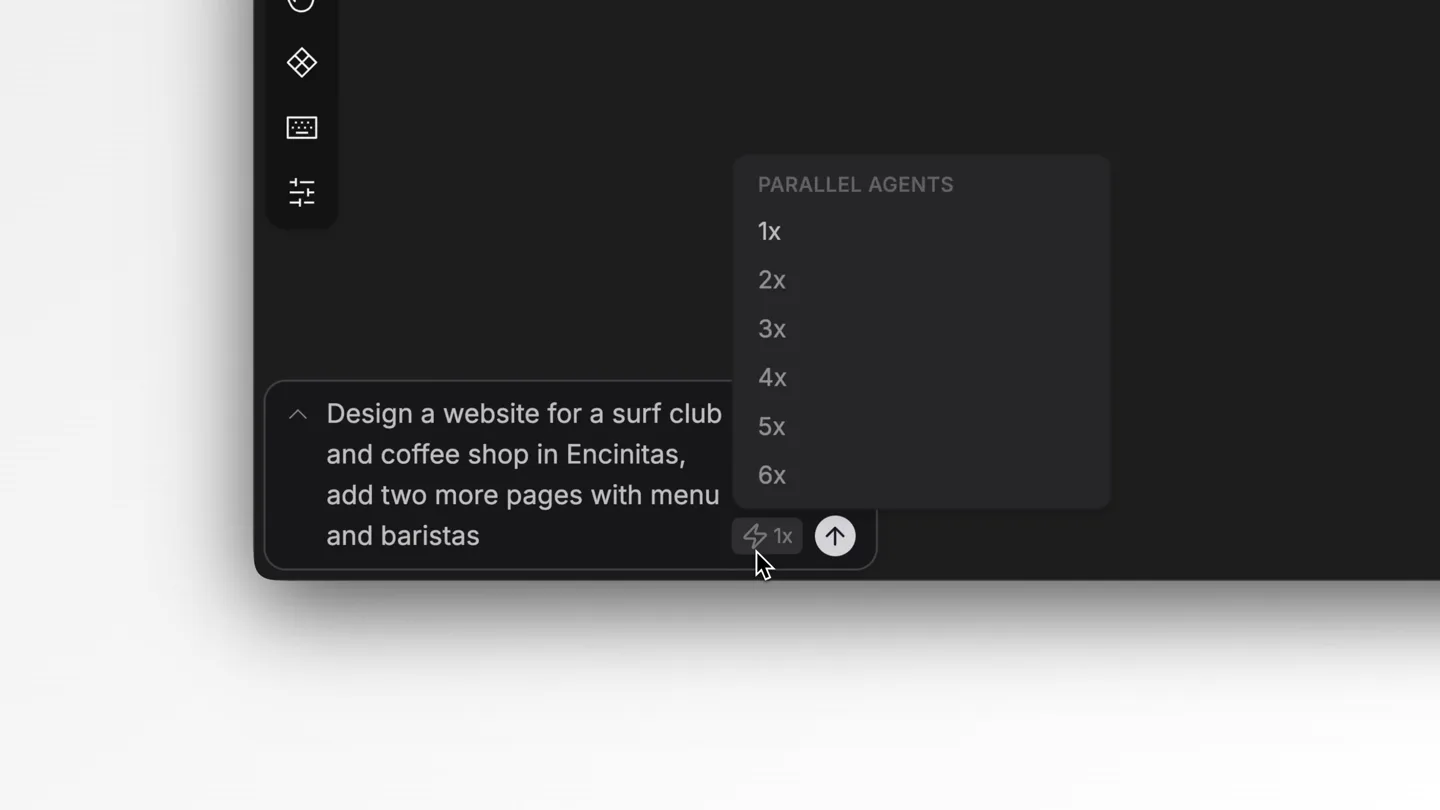
- Design a website for a surf club and coffee shop in Encinitas, add two more pages with menu and baristas
- Camera
- Static, close-up on a text input field within a UI, then a quick zoom out to reveal a multi-panel design interface.
- Motion
- Text typing animation, rapid UI element generation, and a quick, energetic camera zoom-out.
Product Reveal
SWARM Mode: Autonomous Design Agency
“(No spoken dialogue — Orchestral synth elements intensify, with high-energy audio transitions and sub-bass drops accompanying visual reveals.)”
- On screen
- Homepage, Menu Page, Baristas Page, WHERE WAVES MEET ESPRESSO, OUR MENU, MEET THE CREW, BORN FROM SALT AIR & FRESH ROASTS, Fuel Your Passion, Boards & Gear, Learn to Ride, Ready to Ride the Wave?, NOW OPEN, SIGNATURE SIPS, COME SAY HI, Ember AI, Echo AI, Breeze AI, Hex AI, Cosmo AI, Sage AI, Coral AI, Fern AI, Reef AI
- Camera
- Dynamic camera pans and zooms across a multi-panel design interface, highlighting different AI agents and their contributions.
- Motion
- Rapid content generation, multi-agent collaboration visualization, and smooth, guided camera movements to showcase parallel design processes.
Feature Teaser
Mobile App Design & Full Project Overview
“(No spoken dialogue — Audio track maintains high energy, with a sense of completion and satisfaction as the design project comes together.)”
- On screen
- MEET THE CREW, SHORE, MENU, RENTALS, CHECKOUT, Sage AI, Flare AI, Orchid AI, Nova AI, Drift AI, Mirage AI, Coral AI
- Camera
- Sweeping camera movements across multiple design panels, including mobile app interfaces, demonstrating the breadth of the AI's capabilities.
- Motion
- Seamless transitions between different design views, highlighting the AI's ability to generate diverse assets concurrently.
Call to Action
Download Now: Your Autonomous Design Agency
“(No spoken dialogue — Final impactful sub-bass drop and a concluding synth flourish, signaling the end of the presentation and a clear call to action.)”
- On screen
- Autonomous Design Agency, Download Today, pencil.dev
- Camera
- Static, centered text on a black background, with a subtle fade-in/out for each line of text.
- Motion
- Clean, minimalist text reveals with a focus on clear messaging and a strong call to action.
Motion design primitives
Synthesizable in Remotion · key components of the ai-swarm-code-gen-launch template.
MultiAgentUIReveal
Multiple distinct UI panels or content blocks appear and populate simultaneously, each associated with a named AI agent, demonstrating parallel work streams.
+ Code construction recipe
Utilize `spring()` for individual panel and content element `opacity` and `scale` animations. Position elements using `absolute` positioning and `transform` properties. Use `Sequence` and `delay` to stagger agent name reveals and content population within each panel.
DynamicCameraPanZoom
The camera smoothly pans and zooms across a large, interconnected canvas of UI elements, focusing on specific areas as they are being generated or refined by AI agents.
+ Code construction recipe
Implement `interpolate()` for `translateX`, `translateY`, and `scale` properties of a parent container holding all UI elements. Define keyframes for camera positions and zoom levels to guide the viewer's eye through the evolving design.
RapidTextGeneration
Text appears as if being typed out quickly, often followed by a rapid increase in a 'speed multiplier' indicator, signifying accelerated AI processing.
+ Code construction recipe
Use `Sequence` and `Character` component to animate text character by character. Control typing speed with `durationInFrames` and `delay`. Animate a numerical `speed` indicator using `interpolate()` with an `easeOut` curve.
Style DNA & aesthetic system
Visual aesthetic
Typography
Motion
Special effects
Pacing & rhythm
Conceptual story rhythm
- 1
The Prompt
Purpose. Introduce the user's initial input and the product's immediate response, setting up the core problem it solves.
Execution. A close-up on a text input field, showing a user typing a design request, followed by a quick visual indication of AI processing speed.
- 2
Parallel Creation
Purpose. Demonstrate the core innovation: multiple AI agents working simultaneously on different aspects of a design project.
Execution. A wide shot revealing multiple UI panels, each being populated with design elements by distinct, named AI agents, with dynamic camera movements highlighting their parallel progress.
- 3
Comprehensive Output
Purpose. Showcase the breadth and completeness of the AI's design capabilities, from web pages to mobile apps and social media assets.
Execution. A montage of various completed design outputs (web pages, social media posts, mobile app screens) seamlessly transitioning, emphasizing the AI's versatility.
- 4
The Promise
Purpose. Conclude with the product's overarching value proposition and a clear call to action.
Execution. Minimalist text screens with key messages like 'Autonomous Design Agency' and 'Download Today', culminating in the product's URL.
Remix in Animatiq Studio
Master remix prompt · agent-ready
Sample remix
Objective
An AI-powered code generation tool that creates full-stack applications from natural language prompts.How the recipe adapts
The dark mode UI will feature terminal windows and IDE-like interfaces. Rapid text generation will show code being written line by line. Multi-panel layouts will display different files (e.g., frontend, backend, database schema) being generated simultaneously by AI agents named 'Syntax', 'Logic', and 'Deploy'. Camera pans will highlight code completion, error checking, and deployment progress. The call to action will be 'Build Your App Today' with the tool's URL.Remix blueprint · ai-swarm-code-gen-launch
Scene durations (4 scenes, 20s)
Key Remotion components
Related Creative Tools Product Launches
Explore all Creative Tools launches →
Anthropic Labs launches Claude Design, which turns conversation into prototypes, slides and one-pagers, powered by Claude Opus 4.7.

A vibe design partner with an AI-native canvas for turning ideas into UI.

Your work tools in Claude are now available on mobile. Explore Figma designs, create Canva slides, check Amplitude dashboards, all from your phone. Give it a try: