
Alex Barashkov · Launch Video Breakdown: Hook, Pacing & Motion Design
Get beautiful text animations. We built a hand-crafted collection of text animations and wrapped them as a SKILL for your AI agent. Use it with Remotion, Motion, GSAP, WAAPI, or any animation libra…
Scene-by-scene timeline & spoken transcript
The Hook
Introducing AI-Crafted Text Animations
“(No spoken dialogue — A sustained, evolving synth pad and subtle percussive elements build. A prominent riser effect starts around 0:03, culminating in a significant sub-bass drop/impact at 0:05.)”
- On screen
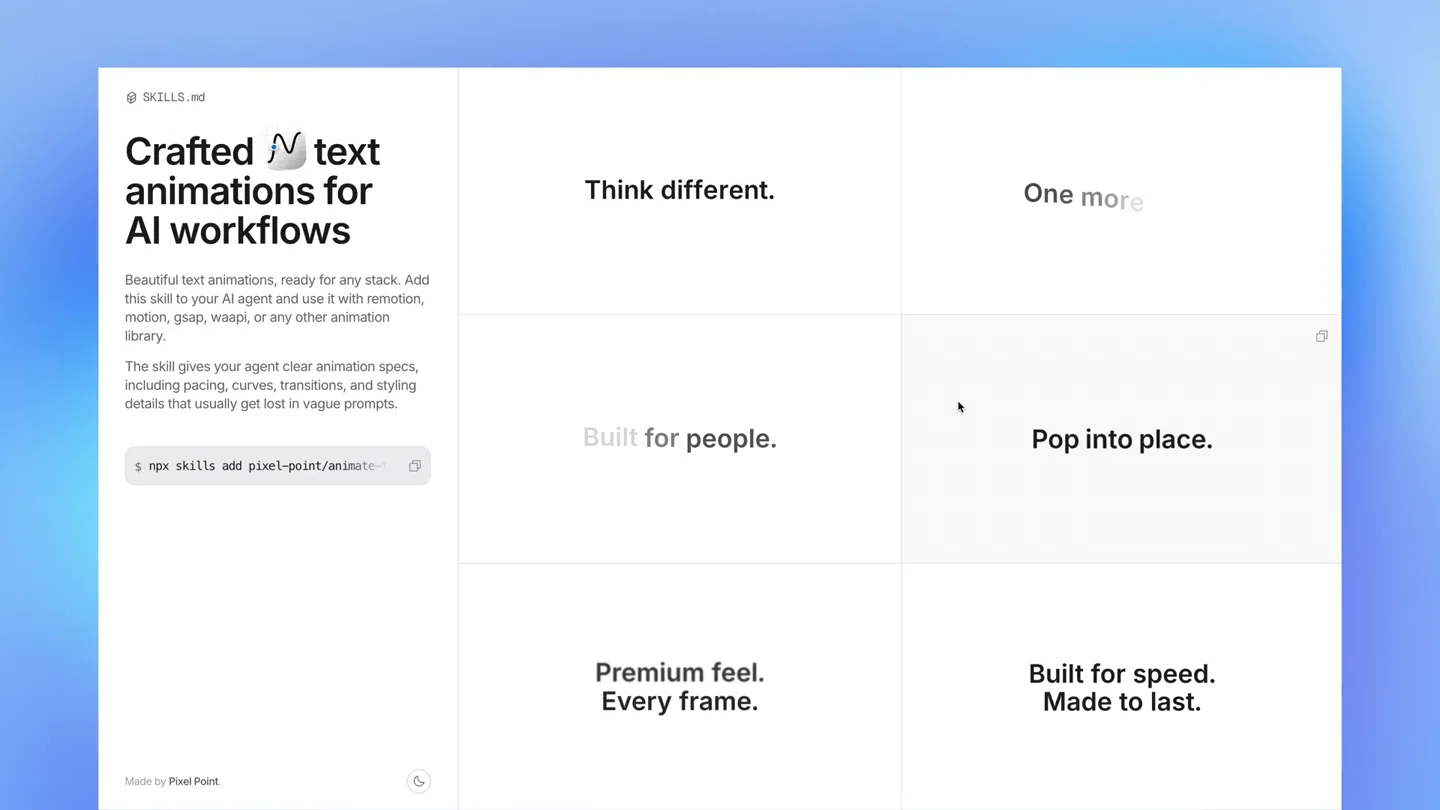
- SKILLS.md Crafted N text animations for AI workflows Beautiful text animations, ready for any stack. Add this skill to your AI agent and use it with remotion, motion, gsap, waapi, or any other animation library. The skill gives your agent clear animation specs, including pacing, curves, transitions, and styling details that usually get lost in vague prompts. $ npx skills add pixel-point/animate- Made by Pixel Point. Motion with intent. Fast and fluid. Designed for focus. Smooth by default. Quiet motion. Strong hierarchy. Think different. Do more.
- Camera
- Static, wide shot of a UI grid. The camera remains fixed, presenting a clear, organized view of the product's interface.
- Motion
- Rapid, sequential text reveals within a grid layout. Each text block appears with a subtle, quick fade-in and scale-up, creating a dynamic, information-dense introduction.
Product Reveal
Showcasing Animation Principles
“(No spoken dialogue — A rhythmic, driving synth arpeggio or sequence emerges, accompanied by a deep sub-bass line and crisp electronic percussion.)”
- On screen
- SKILLS.md Crafted N text animations for AI workflows Beautiful text animations, ready for any stack. Add this skill to your AI agent and use it with remotion, motion, gsap, waapi, or any other animation library. The skill gives your agent clear animation specs, including pacing, curves, transitions, and styling details that usually get lost in vague prompts. $ npx skills add pixel-point/animate- Made by Pixel Point. Quiet motion. Strong hierarchy. Clear ideas. Clean motion. Write. Pause. Co Welcome to motion. Soft and precise. Fade through content.
- Camera
- Static, wide shot of the UI grid. The camera maintains its fixed perspective, allowing the focus to remain on the evolving text content.
- Motion
- Continuous, rapid-fire text animations. New phrases appear and old ones fade or blur out, demonstrating a variety of subtle, elegant motion principles like 'Fade through content' and 'Soft and precise'.
Feature Teaser
Refined Motion for AI Agents
“(No spoken dialogue — Another subtle riser is heard around 0:09, leading to a final impactful sub-bass hit and a sustained synth chord at 0:11 before fading out.)”
- On screen
- SKILLS.md Crafted N text animations for AI workflows Beautiful text animations, ready for any stack. Add this skill to your AI agent and use it with remotion, motion, gsap, waapi, or any other animation library. The skill gives your agent clear animation specs, including pacing, curves, transitions, and styling details that usually get lost in vague prompts. $ npx skills add pixel-point/animate- Made by Pixel Point. Detail emerges. Stage Signal Build the rhythm. Drop into place Then softly recedes. Let Header Words push left. Move with Words settle lower Vector Words push left. Move with Intent. Words settle lower
- Camera
- Static, wide shot of the UI grid. The camera remains locked, emphasizing the dynamic text changes within the structured interface.
- Motion
- Advanced text animation demonstrations. Phrases like 'Detail emerges' and 'Words push left' showcase more complex, coordinated movements, highlighting the granular control offered by the product.
Motion design primitives
Synthesizable in Remotion · key components of the grid-text-reveal-fast-cut template.
GridTextPopIn
Text elements appear within a grid cell with a quick fade-in and a subtle, elastic scale-up, giving a 'pop' effect. They then quickly fade out or blur to make way for new content.
+ Code construction recipe
Use `interpolate` for opacity from 0 to 1 and `scale` from 0.9 to 1.05 then back to 1.0, with a `spring` or `easeOutBack` easing function for the scale. Manage visibility with `Sequence` and `AbsoluteFill` for precise timing within grid cells.
DynamicTextBlurFade
Text transitions by blurring out and fading simultaneously, or new text blurs in before resolving clearly. This creates a soft, transient effect for content changes.
+ Code construction recipe
Apply an SVG `filter` for `blur` (e.g., `feGaussianBlur`) and `interpolate` its `stdDeviation` from a high value to 0, while simultaneously `interpolate` opacity from 0 to 1. Use `AbsoluteFill` for layering and `spring` for smooth blur transitions.
SubtleTextShift
Text elements subtly shift position (e.g., push left, settle lower) while fading or changing opacity, indicating a gentle re-arrangement or emphasis.
+ Code construction recipe
Utilize `interpolate` for `translateX` or `translateY` properties over a small range (e.g., -10px to 0px) combined with `opacity` interpolation. Employ `easeOutCubic` or `easeInOutQuad` for smooth, understated movement.
Style DNA & aesthetic system
Visual aesthetic
Typography
Motion
Special effects
Pacing & rhythm
Conceptual story rhythm
- 1
The Dynamic Grid Introduction
Purpose. Immediately showcase the product's core capability: generating diverse text animations.
Execution. A static UI grid rapidly populates with various animated text snippets, each demonstrating a different motion principle, synchronized with the audio's build-up.
- 2
Principles in Motion
Purpose. Elaborate on the quality and precision of the animations, emphasizing key design principles.
Execution. The grid continues to animate, with text phrases describing motion qualities ('Smooth by default', 'Quiet motion') appearing and disappearing, reinforcing the product's value proposition.
- 3
Granular Control & Refinement
Purpose. Highlight the advanced capabilities and the depth of control offered by the AI agent's 'skill'.
Execution. More specific and technical animation descriptions ('Focus shifts smoothly', 'Zooming between states') are showcased, demonstrating the nuanced output possible, culminating with the final audio impact.
- 4
Call to Action / Fade Out
Purpose. Reinforce the product's name and provide a clear, actionable next step.
Execution. The main product description and the 'npx skills add' command remain prominent, while the grid animations subtly fade, leaving a lasting impression of the product's utility.
Remix in Animatiq Studio
Master remix prompt · agent-ready
Sample remix
Objective
Launch a new API gateway product called 'NexusFlow' that simplifies microservice orchestration.How the recipe adapts
The 'NexusFlow' launch video would feature a similar grid-based UI. Instead of text animation principles, the grid cells would rapidly display key features like 'Seamless Routing', 'Real-time Monitoring', 'Scalable Load Balancing', and 'Secure Endpoints'. The 'npx skills add' command would be replaced with a 'npm install nexusflow' or a 'Get Started' button. The overall pacing and electronic score would be retained to convey efficiency and power, with text appearing and disappearing to highlight different benefits of the API gateway.Remix blueprint · grid-text-reveal-fast-cut
Scene durations (3 scenes, 14s)
Key Remotion components
Related Creative Tools Product Launches
Explore all Creative Tools launches →
Anthropic Labs launches Claude Design, which turns conversation into prototypes, slides and one-pagers, powered by Claude Opus 4.7.

A vibe design partner with an AI-native canvas for turning ideas into UI.

Your work tools in Claude are now available on mobile. Explore Figma designs, create Canva slides, check Amplitude dashboards, all from your phone. Give it a try: