
Suhail Kakar · Launch Video Breakdown: Hook, Pacing & Motion Design
introducing polymarket cli - the fastest way for ai agents to access prediction markets built with rust. your agent can query markets, place trades, and pull data - all from the terminal fast, ligh…
Scene-by-scene timeline & spoken transcript
The Hook
Terminal Command Entry
“(No spoken dialogue — High-energy audio riser/sweep culminating in a sub-bass drop/impact.)”
- On screen
- suhail@macbook-pm ~ % poly
- Camera
- Static, close-up on a terminal window, slightly angled perspective.
- Motion
- Text typing animation, cursor blinking.
Product Reveal
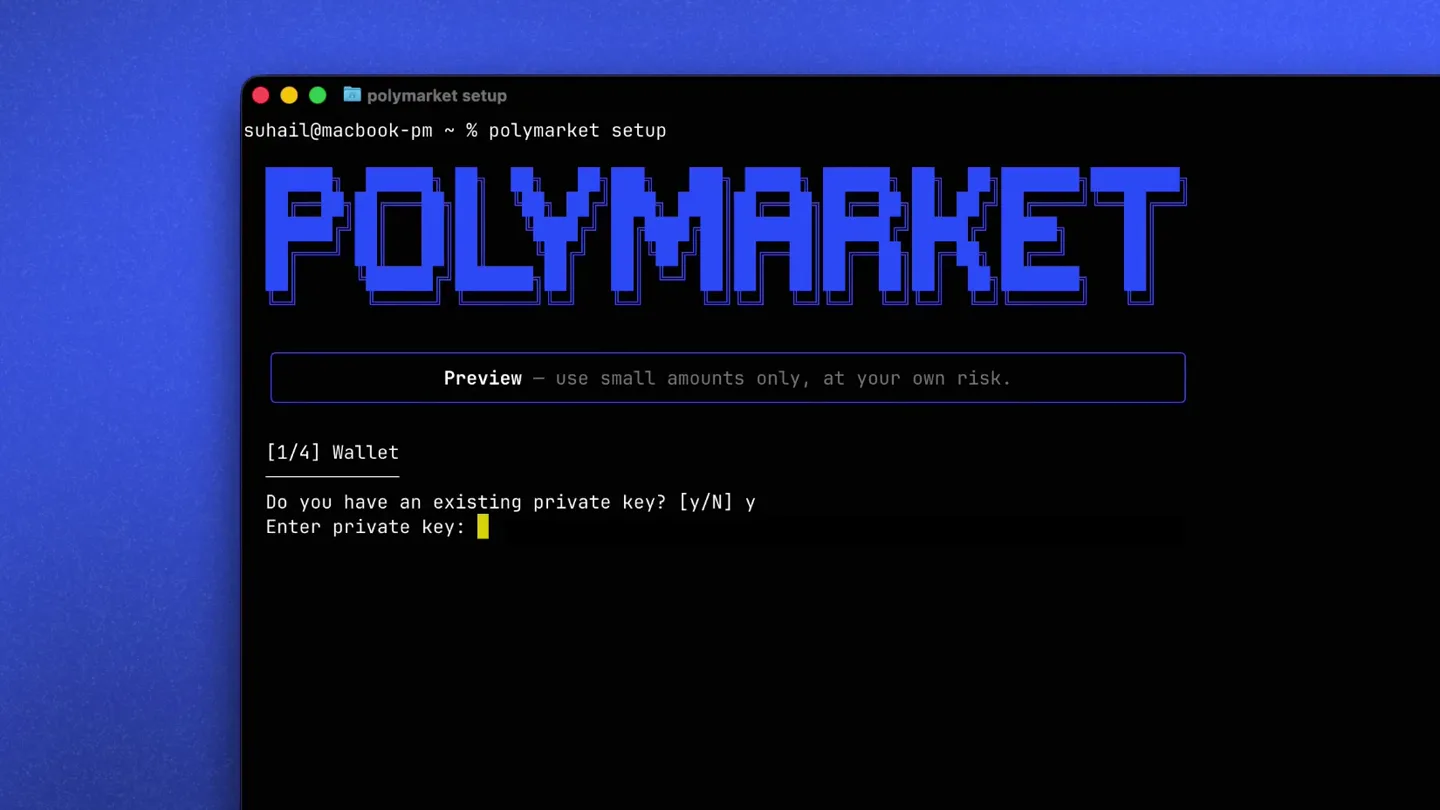
Polymarket CLI Setup
“(No spoken dialogue — Driving, rhythmic electronic score with sub-bass pulse.)”
- On screen
- polymarket setup suhail@macbook-pm ~ % polymarket setup POLYMARKET Preview - use small amounts only, at your own risk. [1/4] Wallet Do you have an existing private key? [Y/N] y Enter private key:
- Camera
- Static, close-up on the terminal window.
- Motion
- Rapid text output, simulated user input, large pixelated text reveal.
Feature Teaser
Wallet Configuration & Setup Complete
“(No spoken dialogue — Driving, rhythmic electronic score with sub-bass pulse.)”
- On screen
- ✓ Wallet imported Address: 0xf5E61a6cD068324Ac1A6dCAB0F09dcA98164284a Config: /Users/suhail/.config/polymarket/config.json [2/4] Proxy Wallet ✓ Proxy wallet derived Proxy: 0xAc43116e4C7891773AD9eF44CcC2332F39860697 Deposit USDC to this address to start trading. [3/4] Fund Wallet ○ Deposit USDC to your wallet to start trading Run: polymarket bridge deposit 0xac43116e4c7891773ad9ef44ccc2332f39860697 Or transfer USDC directly on Polygon [4/4] Approve Contracts Run 'polymarket approve set' to approve contracts for trading. Or 'polymarket approve check' to see current approval status. ✓ Setup complete! You're ready to go. Next steps: polymarket shell Interactive mode polymarket markets list Browse markets polymarket clob book <token> View order book suhail@macbook-pm ~ %
- Camera
- Static, close-up on the terminal window.
- Motion
- Instantaneous text reveal, simulated command line output.
Feature Teaser
Market Listing & Order Placement
“(No spoken dialogue — Second, more intense audio riser builds.)”
- On screen
- Question Will Trump deport less than 250,000? Will Trump deport 250,000-500,000 people? Will Trump deport 500,000-750,000 people? Will Trump deport 750,000-1,000,000 people? Will Trump deport 1,000,000-1,250,000 people? Will Trump deport 1,250,000-1,500,000 people? Will Trump deport 1,500,000-1,750,000 people? Will Trump deport 1,750,000-2,000,000 people? Will Trump deport 2,000,000 or more people? Will Trump deport 750,000 or more people in 2025? Will GTA 6 cost 100+? Rojas guilty in Texas illegal abortion case? Senator Eichorn guilty of soliciting a child? BitBoy convicted? Will the U.S. collect less than $100B in revenue in 2025? Will the U.S. collect between $100B and $200B in revenue in... Will the U.S. collect between $200B and $500B in revenue in... Will the U.S. collect between $500B and $1T in revenue in 2... Will the U.S. collect between $1T and $2T in revenue in 202... Will the U.S. collect more than $2T in revenue in 2025? Will tariffs generate >$250B in 2025? Russia-Ukraine Ceasefire before GTA VI? New Rihanna Album before GTA VI? New Playboi Carti Album before GTA VI? Will Jesus Christ return before GTA VI? Price (Yes) 4.85¢ 92.15¢ 2.55¢ 0.45¢ 0.55¢ 0.35¢ 0.20¢ 0.75¢ 0.50¢ 1.60¢ 0.55¢ 1.45¢ 1.55¢ 30.90¢ 96.80¢ 1.50¢ 1.35¢ 0.20¢ 0.15¢ 0.15¢ 0.60¢ 57.50¢ 52.00¢ 55.50¢ 48.50¢ Volume $1.2M $7.5M $534.8K $524.1K $521.5K $479.0K $458.3K $398.9K $402.5K $759.8K $5.9M $58.4K $26.2K $24.4K $1.8M $1.5M $928.0K $2.6M $760.4K $672.5K $1.3M $1.3M $640.3K $675.6K $9.5M Liquidity $18.1K $7.2K $6.1K $8.9K $17.2K $12.5K $18.1K $20.5K $14.8K $6.3K $126.5K $3.4K $1.7K $457.85 $40.8K $30.1K $28.6K $31.2K $43.0K $65.5K $19.9K $51.3K $40.8K $23.2K $818.4K Status Active Active Active Active Active Active Active Active Active Active Active Active Active Active Active Active Active Active Active Active Active Active Active Active Active suhail@macbook-pm ~ %
- Camera
- Static, close-up on the terminal window.
- Motion
- Instantaneous text reveal, simulated command line output, cursor blinking.
Call to Action
Trade Execution Confirmation
“(No spoken dialogue — Final sub-bass impact.)”
- On screen
- polymarket clob market-order --token 725206963305360077946681862561628420801967580803171010889009730587559066 --side buy --amount 1 Order ID: 0x244e2faaF402d8923541b511c4d60b758127b5796c13550f1fc5131be3662d1 Status: MATCHED Success: true Making: 0.999999 Taking: 5.555554 suhail@macbook-pm ~ %
- Camera
- Static, close-up on the terminal window.
- Motion
- Instantaneous text reveal, simulated command line output, cursor blinking.
Motion design primitives
Synthesizable in Remotion · key components of the cli-terminal-fast-cut template.
TerminalTypewriterEffect
Text appears character by character, simulating real-time typing in a terminal, often accompanied by a blinking cursor. This creates a sense of live interaction and command execution.
+ Code construction recipe
Use `interpolate` to reveal characters of a string over time. A `spring` animation can be used for the blinking cursor's opacity. Implement a `Sequence` component to chain typing and cursor animations.
InstantTextReveal
Large blocks of text or entire command outputs appear instantly on screen, mimicking rapid system responses or fast-scrolling terminal output.
+ Code construction recipe
Render text components with `opacity: 1` at specific `AbsoluteFill` or `AbsolutePosition` frames. Use `delay` in `Sequence` to control when these blocks appear relative to other animations.
PixelatedTextPop
Prominent text, like 'POLYMARKET', appears with a distinct pixelated, retro-tech aesthetic, often scaling or fading in quickly.
+ Code construction recipe
Apply a custom font with a pixelated style. Use `spring` for `scale` and `opacity` properties to make the text pop into view. Consider a `filter: blur()` that resolves to `none` for a subtle reveal effect.
Style DNA & aesthetic system
Visual aesthetic
Typography
Motion
Special effects
Pacing & rhythm
Conceptual story rhythm
- 1
The Command Line Hook
Purpose. Immediately establishes the developer-centric nature of the product and its terminal interface.
Execution. A close-up on a terminal window with a user typing a command, followed by a rapid, impactful reveal of the product name.
- 2
Seamless Setup & Integration
Purpose. Demonstrates the ease and speed of setting up the CLI tool, highlighting key steps like wallet import and contract approval.
Execution. Rapid display of terminal output showing successful configuration steps, with checkmarks and clear instructions.
- 3
Market Access & Data Query
Purpose. Showcases the core functionality: querying prediction markets and accessing relevant data.
Execution. A full-screen terminal display of various market questions, prices, volumes, and liquidity, simulating a 'browse markets' command.
- 4
Automated Trading & Confirmation
Purpose. Illustrates the agent's ability to place trades and receive instant confirmation, emphasizing speed and automation.
Execution. A command line entry for placing an order, followed by immediate output confirming the trade status, order ID, and success.
Remix in Animatiq Studio
Master remix prompt · agent-ready
Sample remix
Objective
Launch a new CLI tool for managing cloud infrastructure, built with Go.How the recipe adapts
The video would adapt by replacing 'polymarket' with the new product name, for example, 'cloudctl'. The terminal commands would reflect cloud management tasks like 'cloudctl deploy app-name', 'cloudctl list instances', and 'cloudctl scale service-id'. The pixelated text would feature 'CLOUDCTL'. The overall dark terminal theme and rapid information delivery would remain consistent, showcasing the speed and efficiency of cloud operations via the command line.Remix blueprint · cli-terminal-fast-cut
Scene durations (5 scenes, 11.6s)
Key Remotion components
Related Developer Tools Product Launches
Explore all Developer Tools launches →
xAI opens voice cloning on its API: build a custom voice in about two minutes or pick from 80+ voices in 28 languages.

Claude can now operate your Mac, opening apps, browsing and filling spreadsheets, as a research preview in Cowork and Claude Code.

Agentic CLI for coding, building apps, and automating workflows.