
Daily Dose of Data Science · Launch Video Breakdown: Hook, Pacing & Motion Design
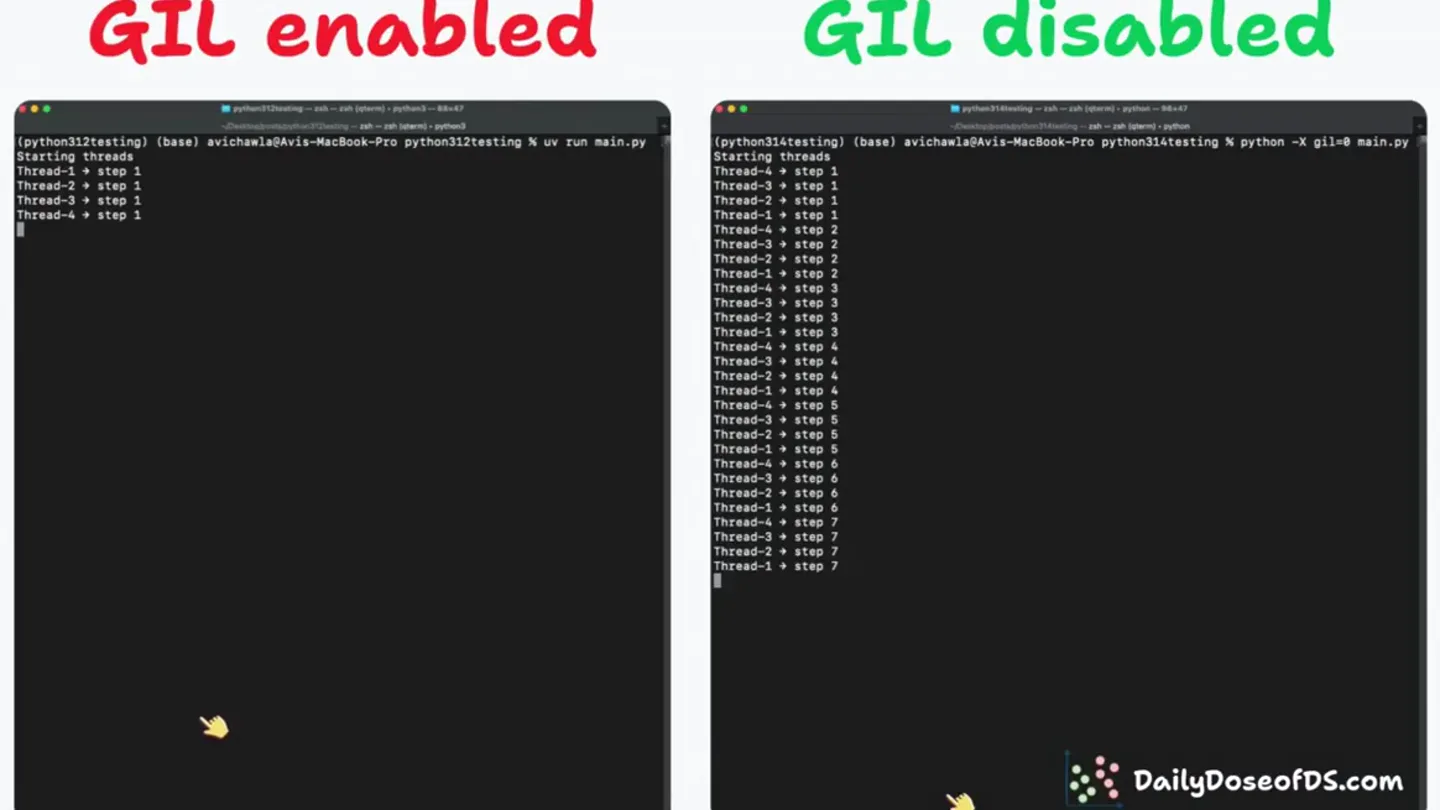
Finally, Python 3.14 lets you disable GIL! It's a big deal because earlier, even if you wrote multi-threaded code, Python could only run one thread at a time, giving no performance benefit. But now…
Scene-by-scene timeline & spoken transcript
The Hook
GIL Enabled vs. Disabled Comparison
“(No spoken dialogue — silent video with ambient visual rhythm.)”
- On screen
- GIL enabled, GIL disabled, (python312testing) (base) avichawla@Avis-MacBook-Pro python312testing % uv run main.py Starting threads Thread-1 > step 1 Thread-3 > step 1 Thread-2 > step 1 Thread-4 > step 1 Thread-3 > step 2 Thread-1 > step 2 Thread-4 > step 2 Thread-2 > step 2 (python314testing) (base) avichawla@Avis-MacBook-Pro python314testing % python -X gil=0 main.py Starting threads Thread-4 > step 1 Thread-3 > step 1 Thread-2 > step 1 Thread-1 > step 1 Thread-4 > step 2 Thread-3 > step 2 Thread-2 > step 2 Thread-1 > step 2 Thread-4 > step 3 Thread-3 > step 3 Thread-2 > step 3 Thread-1 > step 3 Thread-4 > step 4 Thread-3 > step 4 Thread-2 > step 4 Thread-1 > step 4 Total time: 2.93 seconds Done. DailyDoseofDS.com
- Camera
- Static, wide shot of two terminal windows side-by-side.
- Motion
- Real-time terminal output simulation, text typing animation.
Problem Agitation
GIL Enabled Performance Bottleneck
“(No spoken dialogue — silent video with ambient visual rhythm.)”
- On screen
- GIL enabled, GIL disabled, (python312testing) (base) avichawla@Avis-MacBook-Pro python312testing % uv run main.py Starting threads Thread-1 > step 1 Thread-3 > step 1 Thread-2 > step 1 Thread-4 > step 1 Thread-3 > step 2 Thread-1 > step 2 Thread-4 > step 2 Thread-2 > step 2 Thread-3 > step 3 Thread-1 > step 3 Thread-4 > step 3 Thread-2 > step 3 Thread-3 > step 4 Thread-1 > step 4 Thread-4 > step 4 Thread-2 > step 4 Thread-3 > step 5 Thread-1 > step 5 Thread-4 > step 5 Thread-2 > step 5 Thread-3 > step 6 Thread-1 > step 6 Thread-4 > step 6 Thread-2 > step 6 Thread-3 > step 7 Thread-1 > step 7 Thread-4 > step 7 Thread-2 > step 7 Thread-3 > step 8 Thread-1 > step 8 Thread-4 > step 8 Thread-2 > step 8 Thread-3 > step 9 Thread-1 > step 9 Thread-4 > step 9 Thread-2 > step 9 Total time: 12.15 seconds Done. (python314testing) (base) avichawla@Avis-MacBook-Pro python314testing % python -X gil=0 main.py Starting threads Thread-4 > step 1 Thread-3 > step 1 Thread-2 > step 1 Thread-1 > step 1 Thread-4 > step 2 Thread-3 > step 2 Thread-2 > step 2 Thread-1 > step 2 Thread-4 > step 3 Thread-3 > step 3 Thread-2 > step 3 Thread-1 > step 3 Thread-4 > step 4 Thread-3 > step 4 Thread-2 > step 4 Thread-1 > step 4 Total time: 2.93 seconds Done. DailyDoseofDS.com
- Camera
- Static, wide shot of two terminal windows side-by-side.
- Motion
- Accelerated terminal output, highlighting the slow progression of 'GIL enabled' threads versus the rapid completion of 'GIL disabled'.
Product Reveal
Performance Difference Highlighted
“(No spoken dialogue — silent video with ambient visual rhythm.)”
- On screen
- GIL enabled, GIL disabled, Total time: 12.15 seconds, Total time: 2.93 seconds, DailyDoseofDS.com
- Camera
- Static, wide shot of two terminal windows side-by-side.
- Motion
- Highlighting of final execution times with a yellow cursor, emphasizing the stark performance contrast.
Call to Action
Brand Reinforcement
“(No spoken dialogue — silent video with ambient visual rhythm.)”
- On screen
- GIL enabled, GIL disabled, Total time: 12.15 seconds, Total time: 2.93 seconds, DailyDoseofDS.com
- Camera
- Static, wide shot of two terminal windows side-by-side.
- Motion
- Sustained display of results and brand logo, allowing for comprehension and brand recall.
Motion design primitives
Synthesizable in Remotion · key components of the dual-terminal-performance-showcase template.
DualTerminalRaceSplit
Two side-by-side terminal windows display concurrent processes, one significantly slower than the other, visually demonstrating a performance bottleneck and its solution.
+ Code construction recipe
Use two <Absolute> components for terminal windows. Implement a <Sequence> for each terminal's text output, with varying frame durations for typing animation to simulate speed differences. Use <interpolate> for cursor blinking and text appearance. Highlight final time using a <Spring> animation for a bounding box or text color change.
TypingCursorHighlight
A blinking cursor animates text input, followed by a highlight effect on specific output lines, drawing attention to key data points like execution times.
+ Code construction recipe
Create a custom <Text> component that accepts a script array. Animate character by character using <interpolate> and a cursor element with <spring> for blinking. Apply a CSS filter or <LinearGradient> for the highlight effect on specific text segments, triggered by a sequence.
PerformanceMetricReveal
Final performance metrics (e.g., 'Total time: X seconds') are revealed and highlighted, contrasting the 'before' and 'after' states clearly.
+ Code construction recipe
Render the 'Total time' text using a <Text> component. Use <interpolate> to animate a background color or a border around the text, drawing attention to the numerical value. A slight scale or bounce effect with <spring> can emphasize the reveal.
Style DNA & aesthetic system
Visual aesthetic
Typography
Motion
Special effects
Pacing & rhythm
Conceptual story rhythm
- 1
The Setup
Purpose. Introduce the core comparison: GIL enabled vs. GIL disabled.
Execution. Two identical terminal windows appear, labeled 'GIL enabled' and 'GIL disabled', ready for execution.
- 2
The Race
Purpose. Demonstrate the performance disparity in real-time.
Execution. Both terminals run a multi-threaded Python script, with the 'GIL disabled' side completing significantly faster, showing rapid thread progression.
- 3
The Reveal
Purpose. Quantify the performance improvement.
Execution. The final execution times are displayed and highlighted in both terminals, clearly showing the 'GIL disabled' version's superior speed.
- 4
The Takeaway
Purpose. Reinforce the breakthrough and brand.
Execution. The performance difference remains on screen, with the 'DailyDoseofDS.com' logo visible, solidifying the message and source.
Remix in Animatiq Studio
Master remix prompt · agent-ready
Sample remix
Objective
Demonstrate the speed improvement of a new Rust-based CLI tool compared to its Python equivalent for processing large datasets.How the recipe adapts
The DualTerminalRaceSplit component would be adapted to show 'Python CLI' on the left and 'Rust CLI' on the right. The Python terminal would display slower processing logs, while the Rust terminal would rapidly complete its tasks. The TypingCursorHighlight would draw attention to the 'Processing complete in X seconds' output, with the Rust version showing a much lower time. The PerformanceMetricReveal would then highlight these final times, clearly demonstrating the Rust tool's efficiency. The color palette would remain dark with contrasting text, and the brand logo for the new CLI tool would replace DailyDoseofDS.com.Remix blueprint · dual-terminal-performance-showcase
Scene durations (4 scenes, 21.6s)
Key Remotion components
Related Developer Tools Product Launches
Explore all Developer Tools launches →
xAI opens voice cloning on its API: build a custom voice in about two minutes or pick from 80+ voices in 28 languages.

Claude can now operate your Mac, opening apps, browsing and filling spreadsheets, as a research preview in Cowork and Claude Code.

Agentic CLI for coding, building apps, and automating workflows.