
Seb ⚛️ ThisWeekInReact.com · Launch Video Breakdown: Hook, Pacing & Motion Design
React: we have Concurrent Features GitHub:
Scene-by-scene timeline & spoken transcript
The Hook
Code Editor Initial State & Cursor Activity
“(No spoken dialogue — The audio track features a slow, evolving ambient electronic score with sustained synth pads and a deep sub-bass drone.)”
- On screen
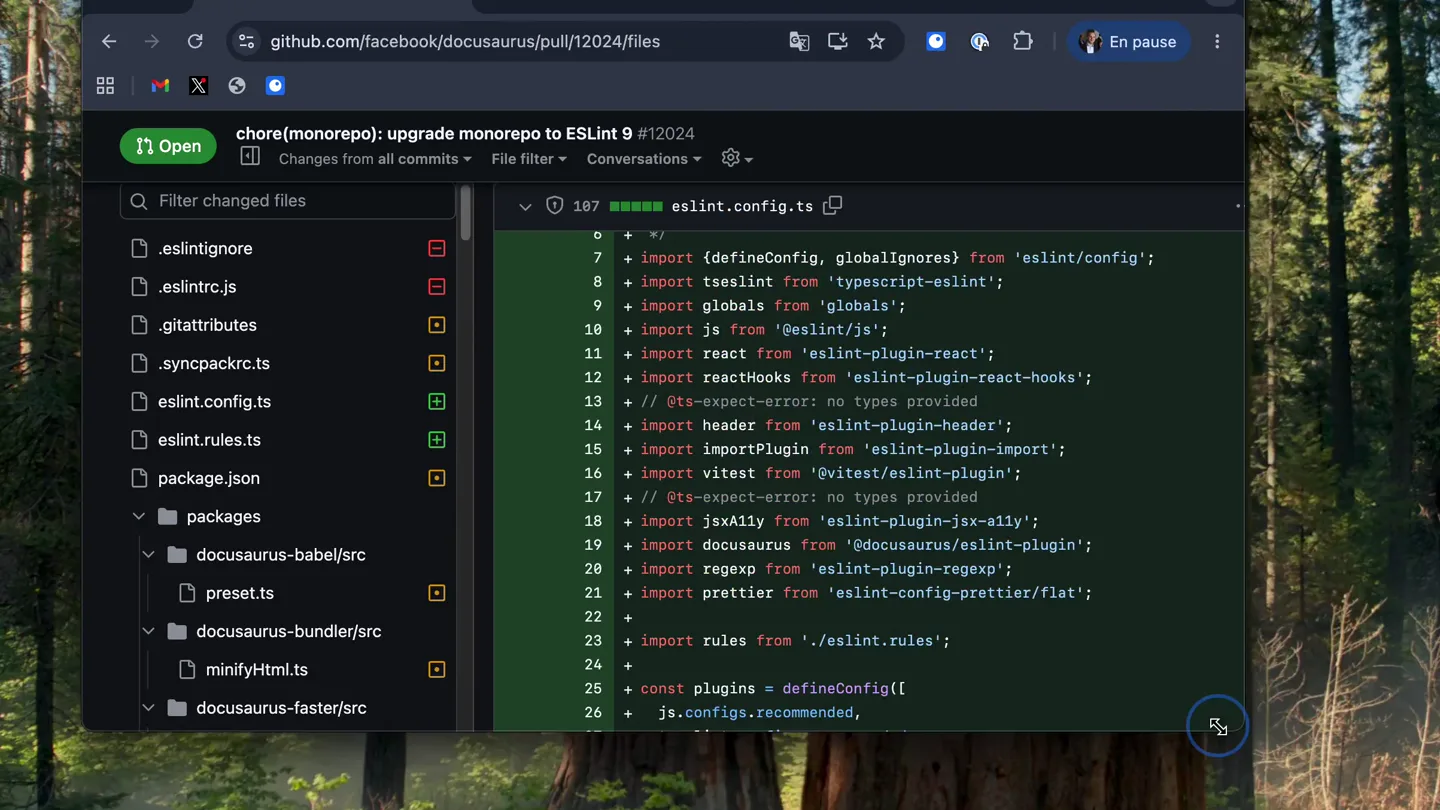
- chore(monorepo): upgrade monorepo to ESLint 9 #12024 Open Changes from all commits File filter Conversations eslint.config.ts .eslintignore .eslintrc.js .gitattributes .syncpackrc.cjs eslint.config.ts eslint.rules.ts package.json docusaurus docusaurus-babel/src preset.ts docusaurus-bundle/src minifyHtml.ts docusaurus-faster/src index.ts docusaurus-mdx-loader/src tests import {defineConfig, globalIgnores} from 'eslint/config'; import tseslint from 'typescript-eslint'; import globals from 'globals'; import js from '@eslint/js'; import react from 'eslint-plugin-react'; import reactHooks from 'eslint-plugin-react-hooks'; // @ts-expect-error: no types provided import header from 'eslint-plugin-header'; import importPlugin from 'eslint-plugin-import'; import vitest from 'vitest/eslint-plugin'; // @ts-expect-error: no types provided import jsxAlly from 'eslint-plugin-jsx-a11y'; import docusaurus from '@docusaurus/eslint-plugin'; import regexp from 'eslint-plugin-regexp'; import prettier from 'eslint-config-prettier/flat'; + import rules from './.eslint.rules'; + const plugins = defineConfig([ js.configs.recommended, tseslint.configs.recommended, react.configs.flat.recommended, reactHooks.configs.flat.recommended, importPlugin.flatConfigs.recommended, vitest.configs.recommended, jsxAlly.flatConfigs.recommended, docusaurus.flatConfigs.recommended, regexp.configs.recommended, prettier.configs.flat, ]);
- Camera
- Static, wide shot of a code editor (VS Code) with a file tree and code pane, framed against a blurred forest background.
- Motion
- Subtle cursor movement, text selection, and scrolling within the code editor, simulating developer interaction.
Problem Agitation
Code Refactoring & Error Introduction
“(No spoken dialogue — The ambient electronic score continues, maintaining a low-key, atmospheric presence.)”
- On screen
- chore(monorepo): upgrade monorepo to ESLint 9 #12024 Open Changes from all commits File filter Conversations eslint.config.ts .eslintignore .eslintrc.js .gitattributes .syncpackrc.cjs eslint.config.ts eslint.rules.ts package.json docusaurus docusaurus-babel/src preset.ts docusaurus-bundle/src minifyHtml.ts docusaurus-faster/src index.ts docusaurus-mdx-loader/src tests import {defineConfig, globalIgnores} from 'eslint/config'; import tseslint from 'typescript-eslint'; import globals from 'globals'; import js from '@eslint/js'; import react from 'eslint-plugin-react'; import reactHooks from 'eslint-plugin-react-hooks'; // @ts-expect-error: no types provided import header from 'eslint-plugin-header'; import importPlugin from 'eslint-plugin-import'; import vitest from 'vitest/eslint-plugin'; // @ts-expect-error: no types provided import jsxAlly from 'eslint-plugin-jsx-a11y'; import docusaurus from '@docusaurus/eslint-plugin'; import regexp from 'eslint-plugin-regexp'; import prettier from 'eslint-config-prettier/flat'; + import rules from './.eslint.rules'; + const plugins = defineConfig([ js.configs.recommended, tseslint.configs.recommended, react.configs.flat.recommended, reactHooks.configs.flat.recommended, importPlugin.flatConfigs.recommended, vitest.configs.recommended, jsxAlly.flatConfigs.recommended, docusaurus.flatConfigs.recommended, regexp.configs.recommended, prettier.configs.flat, ]); Check warning on line 33 in eslint.config.ts GitHub Actions / Lint Autofix
- Camera
- The camera remains static, focusing on the code editor.
- Motion
- Text deletion and insertion, followed by the appearance of a warning message and a 'Lint Autofix' button, simulating a code error and potential solution.
Product Reveal
Autofix Execution & Resolution
“(No spoken dialogue — The deep sub-bass drone continues, building a subtle tension.)”
- On screen
- chore(monorepo): upgrade monorepo to ESLint 9 #12024 Open Changes from all commits File filter Conversations eslint.config.ts .eslintignore .eslintrc.js .gitattributes .syncpackrc.cjs eslint.config.ts eslint.rules.ts package.json docusaurus docusaurus-babel/src preset.ts docusaurus-bundle/src minifyHtml.ts docusaurus-faster/src index.ts docusaurus-mdx-loader/src tests import {defineConfig, globalIgnores} from 'eslint/config'; import tseslint from 'typescript-eslint'; import globals from 'globals'; import js from '@eslint/js'; import react from 'eslint-plugin-react'; import reactHooks from 'eslint-plugin-react-hooks'; // @ts-expect-error: no types provided import header from 'eslint-plugin-header'; import importPlugin from 'eslint-plugin-import'; import vitest from 'vitest/eslint-plugin'; // @ts-expect-error: no types provided import jsxAlly from 'eslint-plugin-jsx-a11y'; import docusaurus from '@docusaurus/eslint-plugin'; import regexp from 'eslint-plugin-regexp'; import prettier from 'eslint-config-prettier/flat'; + import rules from './.eslint.rules'; + const plugins = defineConfig([ js.configs.recommended, tseslint.configs.recommended, react.configs.flat.recommended, reactHooks.configs.flat.recommended, importPlugin.flatConfigs.recommended, vitest.configs.recommended, jsxAlly.flatConfigs.recommended, docusaurus.flatConfigs.recommended, regexp.configs.recommended, prettier.configs.flat, ]); Check warning on line 33 in eslint.config.ts GitHub Actions / Lint Autofix
- Camera
- Static shot of the code editor.
- Motion
- The 'Lint Autofix' button is clicked, and the code automatically updates, resolving the warning. This demonstrates the product's core functionality.
Call to Action
Clean Code & Product Value
“(No spoken dialogue — The ambient electronic score fades out slowly, leaving a lingering atmospheric presence.)”
- On screen
- chore(monorepo): upgrade monorepo to ESLint 9 #12024 Open Changes from all commits File filter Conversations eslint.config.ts .eslintignore .eslintrc.js .gitattributes .syncpackrc.cjs eslint.config.ts eslint.rules.ts package.json docusaurus docusaurus-babel/src preset.ts docusaurus-bundle/src minifyHtml.ts docusaurus-faster/src index.ts docusaurus-mdx-loader/src tests import {defineConfig, globalIgnores} from 'eslint/config'; import tseslint from 'typescript-eslint'; import globals from 'globals'; import js from '@eslint/js'; import react from 'eslint-plugin-react'; import reactHooks from 'eslint-plugin-react-hooks'; // @ts-expect-error: no types provided import header from 'eslint-plugin-header'; import importPlugin from 'eslint-plugin-import'; import vitest from 'vitest/eslint-plugin'; // @ts-expect-error: no types provided import jsxAlly from 'eslint-plugin-jsx-a11y'; import docusaurus from '@docusaurus/eslint-plugin'; import regexp from 'eslint-plugin-regexp'; import prettier from 'eslint-config-prettier/flat'; + import rules from './.eslint.rules'; + const plugins = defineConfig([ js.configs.recommended, tseslint.configs.recommended, react.configs.flat.recommended, reactHooks.configs.flat.recommended, importPlugin.flatConfigs.recommended, vitest.configs.recommended, jsxAlly.flatConfigs.recommended, docusaurus.flatConfigs.recommended, regexp.configs.recommended, prettier.configs.flat, ]);
- Camera
- The camera remains static, showcasing the final, clean state of the code.
- Motion
- The absence of errors and the clean code state emphasize the product's effectiveness and value proposition.
Motion design primitives
Synthesizable in Remotion · key components of the developer-tool-autofix-demo template.
CodeEditorInteraction
Simulates realistic developer interaction within a code editor, including cursor movement, text selection, scrolling, and typing/deletion of code.
+ Code construction recipe
Utilize Remotion's <Sequence> and <AbsoluteFill> for layout. Implement cursor movement with `interpolate` on `x` and `y` coordinates. Text changes can be achieved by rendering different text content over time or using a custom text component that animates character by character. Scrolling can be simulated by animating the `scrollTop` property of a scrollable container.
DynamicWarningDisplay
A warning message and an interactive button appear and disappear, indicating a problem and a solution within the UI.
+ Code construction recipe
Use `spring` or `interpolate` with `opacity` and `translateY` for the warning message and button to animate their entrance and exit. The button's click state can be simulated by changing its visual style (e.g., background color) for a brief moment using `useCurrentFrame` and `spring`.
AutomatedCodeRefactor
Code lines are automatically added, removed, or modified, demonstrating an automated refactoring or linting process.
+ Code construction recipe
This can be achieved by rendering different versions of the code content at specific frames. For a smoother animation, consider using a custom component that diffs two code blocks and animates the changes (e.g., fading in new lines, fading out removed lines, or highlighting changed lines) using `interpolate` for `opacity` and `color`.
Style DNA & aesthetic system
Visual aesthetic
Typography
Motion
Special effects
Pacing & rhythm
Conceptual story rhythm
- 1
The Setup
Purpose. Introduce the familiar developer environment and the initial state of the code.
Execution. Static shot of a VS Code editor with a file tree and code, cursor moving subtly.
- 2
The Problem
Purpose. Demonstrate a common coding issue (e.g., linting error, refactoring need).
Execution. Code changes are made, leading to a visible warning message and a 'Lint Autofix' button appearing.
- 3
The Solution
Purpose. Showcase the product's ability to resolve the problem efficiently.
Execution. The 'Lint Autofix' button is clicked, and the code automatically corrects itself, removing the warning.
- 4
The Resolution
Purpose. Highlight the benefit of using the product – clean, error-free code.
Execution. The final state of the code is clean, with no warnings, emphasizing the product's value.
Remix in Animatiq Studio
Master remix prompt · agent-ready
Sample remix
Objective
Demonstrate a new AI-powered data analytics platform that automates report generation.How the recipe adapts
The video would open with a static shot of the analytics platform's dashboard, showing raw, unorganized data. A cursor would navigate to an 'Automate Report' button. Upon clicking, the 'AutomatedCodeRefactor' primitive would be adapted to show data points dynamically organizing, charts generating, and insights appearing in real-time. The 'DynamicWarningDisplay' primitive could be used to show a 'Data Anomaly Detected' message, which then resolves automatically, demonstrating the AI's error-correction capabilities. The ambient electronic score would build tension during the data processing and resolve into a calm, confident tone as the final report is presented.Remix blueprint · developer-tool-autofix-demo
Scene durations (4 scenes, 30.3s)
Key Remotion components
Related Developer Tools Product Launches
Explore all Developer Tools launches →
xAI opens voice cloning on its API: build a custom voice in about two minutes or pick from 80+ voices in 28 languages.

Claude can now operate your Mac, opening apps, browsing and filling spreadsheets, as a research preview in Cowork and Claude Code.

Agentic CLI for coding, building apps, and automating workflows.