
Aiden Bai · Launch Video Breakdown: Hook, Pacing & Motion Design
Introducing React Doctor for Performance Fix slow React code and make it fast npx react-doctor@latest
Scene-by-scene timeline & spoken transcript
The Hook
Problem Identification: Slow React App
“(No spoken dialogue — The audio features a sustained, evolving pad sound, building tension.)”
- On screen
- Slow React app?
- Camera
- Static, centered text on a black background.
- Motion
- Typewriter text animation with a blinking cursor.
Problem Agitation
Diagnosing Performance Issues
“(No spoken dialogue — A distinct riser starts, peaking with a significant sub-bass drop/impact.)”
- On screen
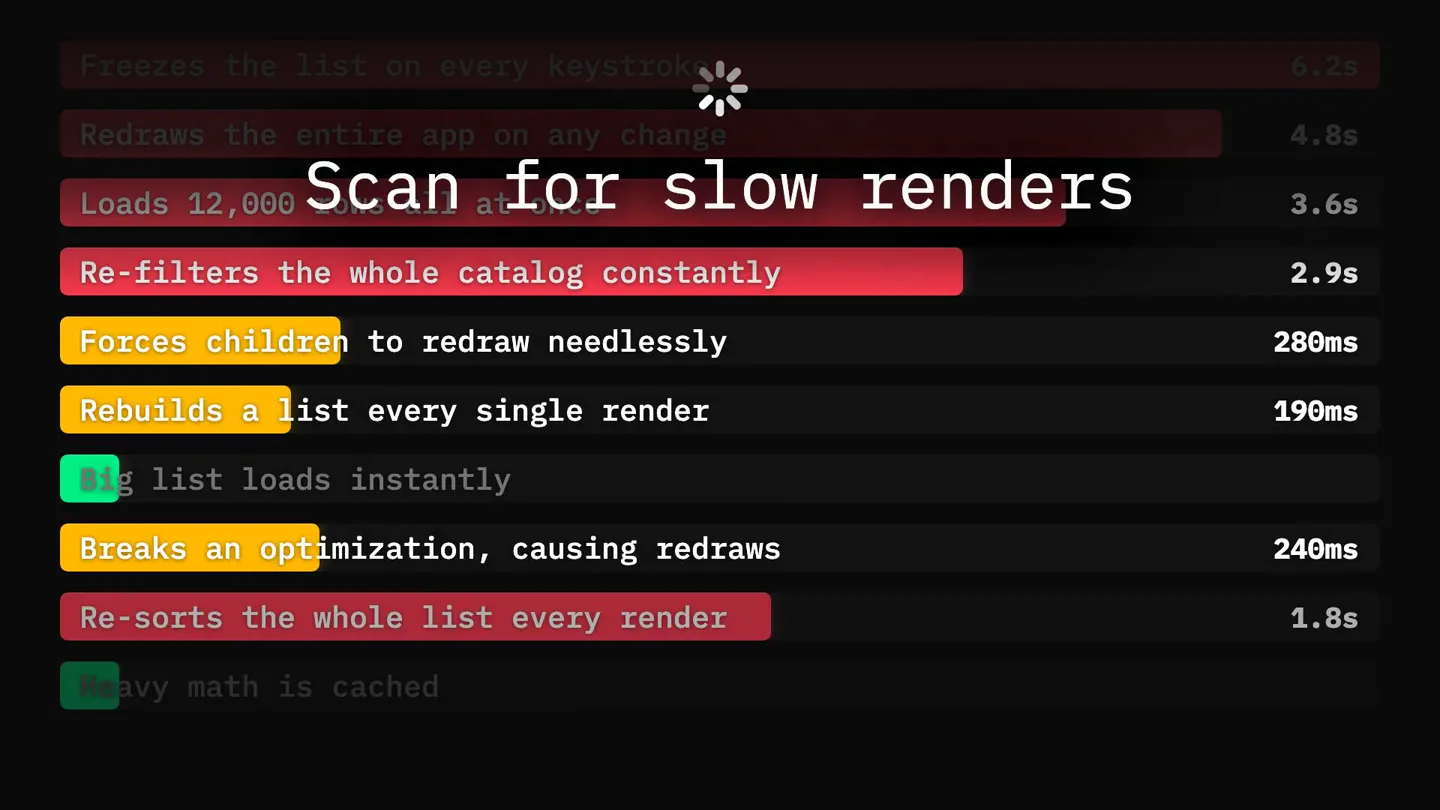
- Scan for slow renders
- Camera
- Static, zoomed-in view of a terminal-like interface, scrolling rapidly upwards.
- Motion
- Fast vertical scroll animation, highlighting problematic code lines in red and yellow, with a central overlay text.
Product Reveal
Initial Performance Score & AI Introduction
“(No spoken dialogue — A rhythmic, pulsing synth bass line and a high-frequency arpeggiated synth melody begin.)”
- On screen
- 9 / 100 Extremely slow Claude Code Opus 4.6 • Claude API /Users/you/my-app > Make React Fast
- Camera
- Static, full-screen terminal interface.
- Motion
- Progress bar animation showing a low score, with a sad emoji. Text appears, simulating a command-line interface.
Feature Teaser
Fixing Issues in Progress
“(No spoken dialogue — Another riser begins, culminating in a powerful sub-bass drop/impact.)”
- On screen
- 9 / 100 Extremely slow Claude Code Opus 4.6 • Claude API /Users/you/my-app > Make React Fast : Fixing issues...
- Camera
- Static, full-screen terminal interface.
- Motion
- Text 'Fixing issues...' appears, and the list of issues begins to change color from red/yellow to green, indicating resolution.
Call to Action
Achieving Optimal Performance
“(No spoken dialogue — A bright, sustained synth chord and a subtle sweep effect accompany the final resolution.)”
- On screen
- 100 / 100 Fast https://react.doctor
- Camera
- Static, full-screen terminal interface, then transitions to a simplified score display.
- Motion
- Progress bar rapidly fills to 100, emoji changes to happy, and confetti bursts. The final screen displays the product URL.
Motion design primitives
Synthesizable in Remotion · key components of the terminal-dev-tool-launch template.
TypewriterCursorText
Text appears character by character, simulating typing, accompanied by a blinking vertical cursor at the end of the current text string.
+ Code construction recipe
Use `interpolate` to reveal text characters based on time. A `spring` animation can control the opacity and scale of a `Rectangle` component for the blinking cursor.
ScrollingTerminalLog
A list of text entries scrolls rapidly upwards, with specific lines highlighted in different colors (red for errors, yellow for warnings, green for resolved).
+ Code construction recipe
Implement a `Sequence` of `Text` components within a `Scroll` component. Use `interpolate` on the `translateY` property for the scrolling effect. Conditional styling based on data can change text and background colors for highlights.
DynamicProgressBarEmoji
A horizontal progress bar fills from left to right, displaying a numerical score and a descriptive text (e.g., 'Extremely slow', 'Fast'). An emoji icon changes its expression based on the score.
+ Code construction recipe
Use `interpolate` to animate the `width` of a `Rectangle` component for the progress bar. Conditional rendering or `interpolate` on `opacity` can switch between different SVG emoji components based on the score range. Text updates dynamically with the score.
Style DNA & aesthetic system
Visual aesthetic
Typography
Motion
Special effects
Pacing & rhythm
Conceptual story rhythm
- 1
The Pain Point
Purpose. Immediately identifies and articulates the core problem faced by the target audience (slow React apps).
Execution. Typewriter animation of 'Slow React app?' on a black screen, creating a direct, relatable question.
- 2
The Diagnosis
Purpose. Visually demonstrates the process of identifying specific performance bottlenecks, agitating the problem.
Execution. Rapidly scrolling terminal log with highlighted problematic code lines, overlaid with 'Scan for slow renders'.
- 3
The Solution in Action
Purpose. Introduces the product as the solution, showing it actively fixing the identified problems and improving performance.
Execution. Terminal interface showing 'Make React Fast' command, 'Fixing issues...' text, and a progress bar increasing from 'Extremely slow' to 'Fast', with issues changing from red to green.
- 4
The Triumph & Call to Action
Purpose. Celebrates the successful resolution of the problem and directs the user to the product.
Execution. Progress bar reaching 100% with a happy emoji, confetti explosion, and the product URL displayed prominently.
Remix in Animatiq Studio
Master remix prompt · agent-ready
Sample remix
Objective
A new CLI tool called 'SecureScan' that quickly identifies and fixes security vulnerabilities in Node.js applications.How the recipe adapts
The opening would feature 'Vulnerable Node.js app?' typed out. The problem agitation scene would show a fast-scrolling terminal log highlighting security flaws in red, with 'Scan for vulnerabilities' text. The product reveal would show 'SecureScan' running, fixing issues, and a progress bar moving from 'High Risk' to 'Secure', with a changing emoji. The call to action would be 'https://securescan.dev' with a confetti burst.Remix blueprint · terminal-dev-tool-launch
Scene durations (5 scenes, 13.6s)
Key Remotion components
Related Developer Tools Product Launches
Explore all Developer Tools launches →
xAI opens voice cloning on its API: build a custom voice in about two minutes or pick from 80+ voices in 28 languages.

Claude can now operate your Mac, opening apps, browsing and filling spreadsheets, as a research preview in Cowork and Claude Code.

Agentic CLI for coding, building apps, and automating workflows.