
Reflect · Launch Video Breakdown: Hook, Pacing & Motion Design
Open source, free on Mac, iPhone and iPad. Every note is a plain Markdown file your AI agents can read.
Scene-by-scene timeline & spoken transcript
The Hook
The Problem with Notes
“(No spoken dialogue — A sustained, evolving synth pad creates an atmospheric drone. A high-pitched, arpeggiated synth melody enters, establishing movement.)”
- On screen
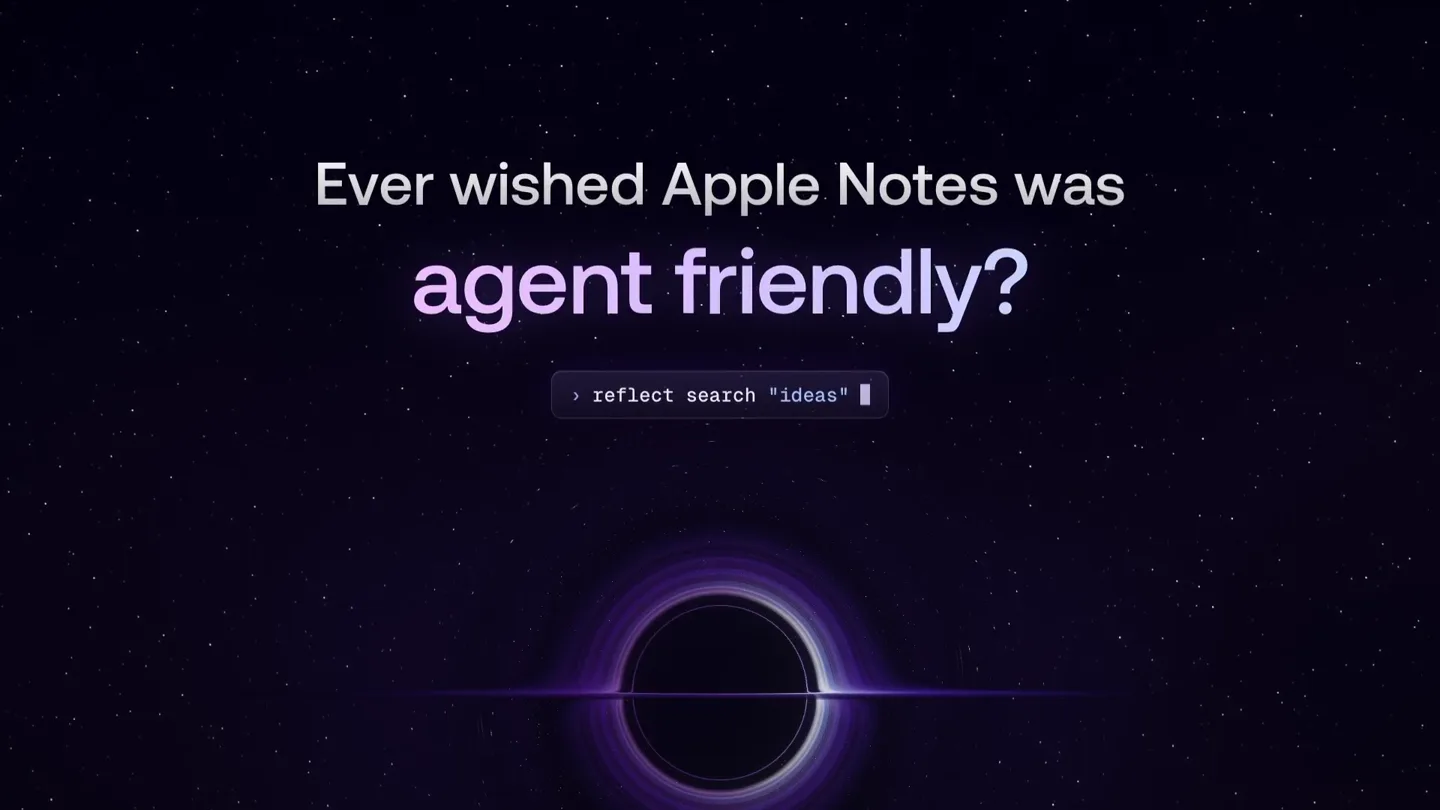
- Ever wished Apple Notes was easy to search open source? </> MIT License beautiful?
- Camera
- Static wide shot of a stylized black hole, with text appearing and disappearing over it.
- Motion
- Text fade-in/fade-out, scale animation on the black hole accretion disk.
Product Reveal
Introducing Reflect Open
“(No spoken dialogue — The arpeggiated synth melody continues, building slightly in intensity.)”
- On screen
- Introducing Reflect Open
- Camera
- Dynamic camera movement, orbiting around the black hole, revealing more of its accretion disk.
- Motion
- Camera orbit, text fade-in, logo reveal with subtle glow.
Feature Teaser
Core Features & Benefits
“(No spoken dialogue — A rhythmic, almost percussive synth element is introduced, adding a gentle pulse. The overall sound design is clean, spacious, and evokes wonder and progression.)”
- On screen
- Your notes. Beautifully simple. Everything, connected. Backlinks do the organizing. Tasks, right where you write them. Talk it through. Reflect Open writes it down. Search everything. Instantly. Plain Markdown files. Ready for your agents. Mac and iPhone. Always in sync.
- Camera
- Static shots of the Reflect Open UI on Mac and iPhone, with subtle UI element animations. Occasional camera pan or zoom to highlight specific features.
- Motion
- UI element highlight, text typing animation, screen transitions, device mockups.
Call to Action
Open Source & Availability
“(No spoken dialogue — A high-energy riser and sweep effect occurs at 00:45, building tension, followed by a subtle sub-bass drop/impact at 00:47, leading into a more expansive, sustained synth pad outro.)”
- On screen
- Open source. MIT licensed. 1,109 commits since June 982 pull requests GITHUB.COM/TEAM-REFLECT/REFLECT-OPEN Reflect Open Open source. For Mac and iPhone.
- Camera
- Dynamic camera movement, orbiting the black hole, revealing a 3D bar chart. Final shot is a static display of the logo and tagline.
- Motion
- 3D data visualization, text reveal, logo animation, final product shot.
Motion design primitives
Synthesizable in Remotion · key components of the cosmic-data-stream-launch template.
AccretionDiskReveal
A stylized black hole accretion disk expands and contracts, with glowing purple and white bands, often serving as a background element for text or product reveals.
+ Code construction recipe
Utilize a Remotion <AbsoluteFill> with a Canvas or SVG component. Implement a custom shader or a series of animated SVG paths with radial gradients and blur effects. Animate scale and rotation properties of the disk elements, potentially using `interpolate` for smooth transitions and `spring` for subtle bounces.
DynamicFeatureHighlight
On-screen UI elements animate to draw attention to specific features, such as text typing, dropdown menus expanding, or search results appearing.
+ Code construction recipe
Overlay transparent video or image sequences of the UI. Use Remotion's `Sequence` and `AbsoluteFill` to layer UI elements. Animate `opacity`, `transform` (translate, scale), and `text-shadow` for highlights. For typing effects, use `splitChars` and `spring` for individual character reveals.
DataBarChartReveal
A 3D bar chart emerges from a flat plane, with bars growing to represent data points, set against the cosmic background.
+ Code construction recipe
Create a 3D scene using a library like `three.js` within a Remotion Canvas component. Animate the `y` scale of individual bar geometries from zero to their target height. Use `interpolate` with an `easeOutCubic` curve for a smooth, impactful growth. Position the camera to orbit or pan around the emerging chart.
Style DNA & aesthetic system
Visual aesthetic
Typography
Motion
Special effects
Pacing & rhythm
Conceptual story rhythm
- 1
The Existential Question
Purpose. Agitate common pain points with existing note-taking solutions, creating immediate relatability.
Execution. Questions appear over a cosmic black hole, each highlighting a deficiency, with the black hole's accretion disk subtly reacting.
- 2
The Cosmic Solution
Purpose. Introduce the product as the answer to these problems, positioning it as a superior, innovative alternative.
Execution. The product name and logo emerge from the cosmic background, accompanied by dynamic camera movement around the black hole.
- 3
Feature Deep Dive
Purpose. Demonstrate key functionalities and benefits through direct UI interaction and clear visual explanations.
Execution. Clean UI walkthroughs on Mac and iPhone, with animated highlights and text overlays explaining each feature.
- 4
The Open Future
Purpose. Reinforce the product's unique selling propositions (open source, AI readiness) and provide a clear call to action.
Execution. Data visualizations of open-source activity, followed by a final product shot with tagline and download information.
Remix in Animatiq Studio
Master remix prompt · agent-ready
Sample remix
Objective
Launch 'AetherFlow', a decentralized data streaming platform.How the recipe adapts
The AccretionDiskReveal primitive will be re-imagined as a 'Cosmic Data Stream' where glowing blue and purple data particles flow into a central, interconnected network of nodes, replacing the black hole. The DynamicFeatureHighlight will showcase AetherFlow's real-time data visualization dashboard, with animated data packets moving between nodes and search queries highlighting specific data streams. The DataBarChartReveal will be used to visualize network uptime, data throughput, and node participation, with bars growing from the 'Cosmic Data Stream' background. Typography will remain a clean sans-serif, and the overall dark, ethereal aesthetic will be maintained with blue and purple as primary accent colors.Remix blueprint · cosmic-data-stream-launch
Scene durations (4 scenes, 52s)
Key Remotion components
Related Productivity Product Launches
Explore all Productivity launches →
Don't type, just speak. Flawless voice-to-text across every app at 240 WPM.

Notion positions itself as the backbone of your dock — a brand film of the Notion icon among everyday apps, ending on “Works with everything.”
Shotbase is a Mac app that combines screenshot, screen recording, trim, annotate, and share so you don't export between four tools.