
Rork · Launch Video Breakdown: Hook, Pacing & Motion Design
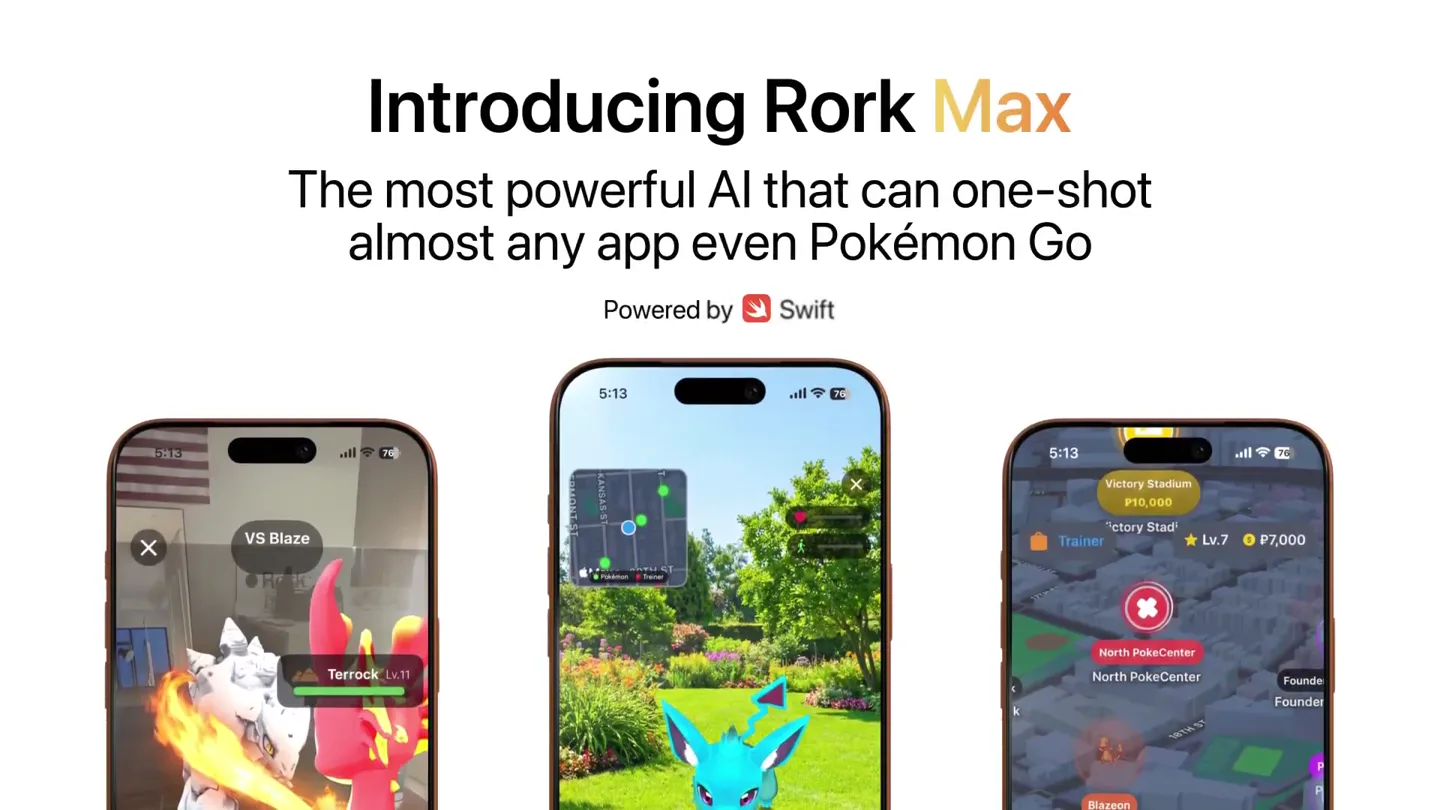
Introducing Rork Max AI that one-shots almost any app for iPhone, Watch, iPad, TV & Vision Pro. Even Pokémon Go with AR & 3D. Max is a website that replaces Xcode. Install on device in 1 clic…
Scene-by-scene timeline & spoken transcript
The Hook
AI Power & Cross-Device Capability
“(No spoken dialogue — rapid-fire percussive build-up, dramatic sub-bass drop/impact)”
- On screen
- Introducing Rork Max The most powerful AI that can one-shot almost any app even Pokémon Go
- Camera
- Static wide shot of three iPhones displaying different app interfaces, then a quick cut to a centered product logo.
- Motion
- Rapid cuts, product reveal with a subtle zoom-in on the logo, showcasing diverse app examples simultaneously.
Product Reveal
Multi-Device App Showcase
“(No spoken dialogue — driving, percussive electronic beat with sub-bass and rhythmic synth elements)”
- On screen
- 3D action running game for iPhone Flight tracker with 3D map for iPhone Habit tracker with widgets for iPhone Tamagochi with Live Activities for iPhone Doom-like 3D game for Watch Miro style notebook app for iPad AR Furniture Planner for iPad Tinder for movies for TV VR basketball for Vision Pro
- Camera
- Each device (iPhone, Watch, iPad, TV, Vision Pro) is presented centrally, then quickly replaced by the next, often with a slight zoom or pan to highlight the app.
- Motion
- Fast-paced sequential display of various apps on different Apple devices, utilizing quick transitions and device-specific framing. Each app is introduced with a descriptive text overlay.
Feature Teaser
Simplified Development Workflow
“(No spoken dialogue — high-energy riser, distinct synth melody with a 'plucked' quality, impactful sub-bass hit)”
- On screen
- One click to install apps on your device Two clicks to ship to the App Store
- Camera
- A split-screen view showing a web-based IDE on the left and an iPhone on the right. The camera focuses on the 'Publish' button and then the app installing on the phone, followed by a similar focus on the 'Publish' button for App Store submission.
- Motion
- Demonstrative screen recordings with UI highlights, emphasizing ease of use through visual cues like button clicks and app installation progress. Text overlays reinforce the 'one-click' and 'two-click' value propositions.
Call to Action
Comprehensive Platform & CTA
“(No spoken dialogue — driving electronic beat continues, fading out with a final impactful sub-bass hit)”
- On screen
- For any device AR & LiDAR 3D Games NFC Screen Time HealthKit HomeKit Camera & Vision AI iMessage Apps Widgets Dynamic Island Siri Actions Animations Background Tasks Start the next App Store hit with Rork Max rork.com/max
- Camera
- A grid of feature cards animates into view, highlighting various capabilities. This transitions to a full-screen call to action with the product name, then a final shot of the website URL.
- Motion
- Modular grid animation for feature presentation, followed by a bold, centered text reveal for the call to action and a clean, minimalist display of the URL. Elements appear with subtle fades and scale animations.
Motion design primitives
Synthesizable in Remotion · key components of the fast-cut-tech-launch template.
DeviceAppCarousel
A sequence of different Apple devices (iPhone, Watch, iPad, TV, Vision Pro) appears centrally, each showcasing a unique application. The devices transition quickly, often with a slight zoom or pan, accompanied by a descriptive text overlay.
+ Code construction recipe
Use a `Sequence` component to orchestrate `AbsoluteFill` or `AbsolutePosition` components for each device. Animate `scale` and `x`/`y` properties with `spring()` for device transitions. Text overlays can use `interpolate()` for fade-in/out synchronized with device changes.
ClickToInstallFlow
A split-screen view demonstrates a web-based IDE and a target device. UI elements like 'Publish' buttons are highlighted, and an app installation process is visually simulated on the device, followed by a similar sequence for App Store submission.
+ Code construction recipe
Employ `AbsoluteFill` with `clipPath` or `maskImage` for the split-screen effect. Use `spring()` or `tween()` for button highlights and progress bar animations. Screen recordings can be `Video` components, with `AbsolutePosition` overlays for UI emphasis.
FeatureGridReveal
A dynamic grid of feature cards, each with an icon and text, animates into view. Individual cards may pop or slide into place, creating a comprehensive overview of product capabilities.
+ Code construction recipe
Utilize `Grid` or `Flex` components for layout. Each feature card can be a `View` with `scale` and `opacity` animated using `spring()` or `tween()` with staggered delays for a 'pop-in' effect. Icons and text are `Image` and `Text` components respectively.
Style DNA & aesthetic system
Visual aesthetic
Typography
Motion
Special effects
Pacing & rhythm
Conceptual story rhythm
- 1
The Grand Introduction
Purpose. Immediately establish the product's core value proposition and its broad applicability, capturing attention with a bold claim.
Execution. Large, impactful text introducing 'Rork Max AI' and its 'one-shot' capability, juxtaposed with diverse app examples on iPhones, followed by a clean logo reveal.
- 2
The Ecosystem Showcase
Purpose. Demonstrate the product's versatility and compatibility across the entire Apple ecosystem, highlighting its ability to create diverse applications.
Execution. A rapid-fire montage of different apps running on iPhone, Apple Watch, iPad, Apple TV, and Apple Vision Pro, each with a concise descriptive text.
- 3
The Developer Empowerment
Purpose. Illustrate the ease and efficiency of the development process, emphasizing the 'one-click' and 'two-click' benefits for developers.
Execution. Screen recordings showing the web-based IDE, highlighting the 'Publish' button for device installation and App Store submission, with clear text overlays.
- 4
The Feature Matrix & Call to Action
Purpose. Summarize the extensive capabilities of the platform and provide a clear directive for engagement.
Execution. An animated grid of feature cards, followed by a bold, full-screen call to action with the product name and a final display of the website URL.
Remix in Animatiq Studio
Master remix prompt · agent-ready
Sample remix
Objective
Launch 'AetherFlow', an AI-powered data visualization platform that simplifies complex data analysis and report generation.How the recipe adapts
The 'DeviceAppCarousel' primitive will be adapted to 'DashboardInsightCarousel', showcasing various interactive data dashboards and charts on a single monitor or tablet. The 'ClickToInstallFlow' becomes 'InsightToShareFlow', demonstrating one-click data query execution and two-click report sharing. The 'FeatureGridReveal' will highlight AI capabilities like 'Predictive Analytics', 'Real-time Streaming', and 'Customizable Dashboards'. The color palette will shift to blues and greens, maintaining the high-contrast text and clean layouts.Remix blueprint · fast-cut-tech-launch
Scene durations (4 scenes, 60s)
Key Remotion components
Related Developer Tools Product Launches
Explore all Developer Tools launches →
xAI opens voice cloning on its API: build a custom voice in about two minutes or pick from 80+ voices in 28 languages.

Claude can now operate your Mac, opening apps, browsing and filling spreadsheets, as a research preview in Cowork and Claude Code.

Agentic CLI for coding, building apps, and automating workflows.