
Brett Lindenberg · Launch Video Breakdown: Hook, Pacing & Motion Design
Excited to launch a brand new personal product today: https://t.co/ij8nNCc2Oz 🎉 ScreenAsk makes it easy to collect screen recordings from your customers by simply sending a link or embedding our widget. No accounts, no downloads. Just instantly see what your customers see! https://t.co/nrCfs3QiJj
Scene-by-scene timeline & spoken transcript
The Hook
Initiating Screen Recording Request
“(No spoken dialogue — The audio track begins with a sustained, evolving pad sound, creating an atmospheric and slightly mysterious mood. At 00:03, a subtle, high-frequency riser begins to build, culminating in a soft, percussive impact at 00:04.)”
- On screen
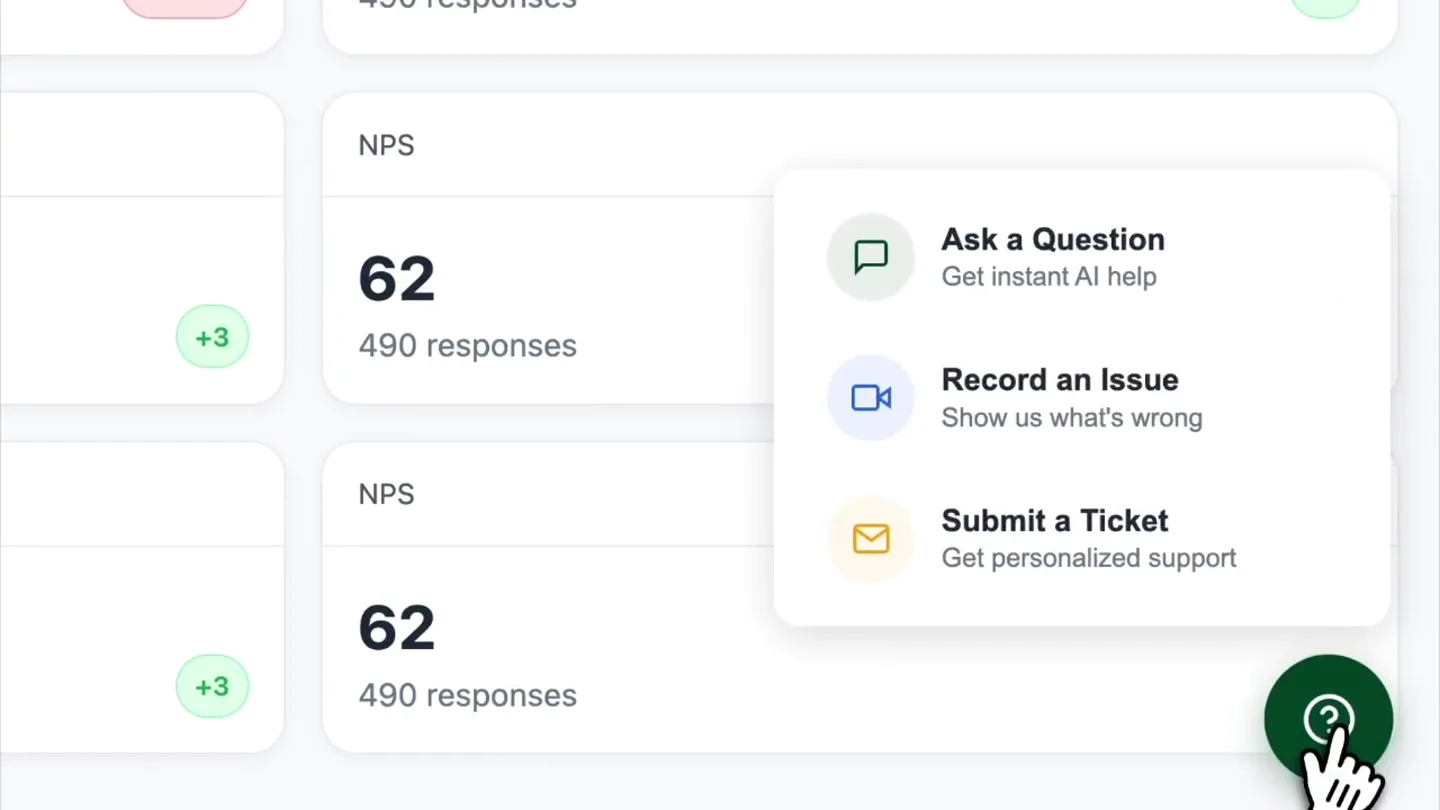
- AcmeCloud, Dashboard, Uploads, Analytics, MANAGE, Projects, Settings, Search projects, people, anything..., Share, Sync, New Project, Monthly Recurring Revenue, $128,940, +1,284 this week, +4.2%, Active Users, 2,784, +132 vs yesterday, +5.0%, Churn Rate, 2.3%, -0.3% vs last month, -11.5%, NPS, 62, 490 responses, +3, Ask a Question, Get instant AI help, Record an Issue, Show us what's wrong, Submit a Ticket, Get personalized support
- Camera
- Static wide shot of a dashboard UI, followed by a subtle zoom-in on the bottom right corner, then a static shot of a modal menu.
- Motion
- Mouse cursor interaction, modal pop-up, highlight on hover, click animation.
Product Reveal
Screen Recording Countdown
“(No spoken dialogue — A rhythmic, arpeggiated synth pattern establishes a perceived tempo of 120 BPM. A low-frequency sub-bass element underpins the music, providing depth.)”
- On screen
- Please Record Your Screen, Requested by ScreenAsk Team, Please record your screen and show us the issue., Continue →, Recording starts in..., 2, Keep this tab open!, Closing this tab will end your recording. You can switch tabs, but make sure to leave this one open.
- Camera
- Static shot of a central modal, followed by a quick cut to a countdown within the modal.
- Motion
- Modal transition, button click animation, countdown timer, text highlight.
Feature Teaser
Simulated Recording & Submission
“(No spoken dialogue — At 00:08, a more prominent, sweeping riser effect starts, intensifying towards a significant sub-bass drop and impact at 00:09.)”
- On screen
- AcmeCloud, Dashboard, Uploads, Analytics, MANAGE, Projects, Settings, Search projects, people, anything..., Share, Sync, New Project, Monthly Recurring Revenue, $128,940, +1,284 this week, +4.2%, Active Users, 2,784, +132 vs yesterday, +5.0%, Churn Rate, 2.3%, -0.3% vs last month, -11.5%, NPS, 62, 490 responses, +3, Recording, 00:00, 00:03, 00:05, 00:08
- Camera
- Static wide shot of the dashboard UI with a recording indicator, followed by mouse interaction navigating the sidebar.
- Motion
- Recording timer animation, mouse hover and click, quick cut to submission modal.
Call to Action
Confirmation and Completion
“(No spoken dialogue — This impact is accompanied by a bright, shimmering synth chord that sustains and slowly fades out, leaving a lingering atmospheric tail.)”
- On screen
- Your name (optional), Submit Recording, Record Again, Uploading..., 0%, 100%, Thank You!, Your recording has been sent to ScreenAsk Team, Recording submitted at: 6:35 AM, Duration: 9 seconds
- Camera
- Quick cut to a blurred background with a central submission modal, then a static shot of an uploading modal, finally a static shot of a success confirmation modal.
- Motion
- Modal pop-up, blur effect, progress bar animation, confetti burst.
Motion design primitives
Synthesizable in Remotion · key components of the saas-workflow-showcase template.
InteractiveModalFlow
A series of UI modals appear and transition, driven by simulated mouse clicks and user input, guiding the viewer through a workflow.
+ Code construction recipe
Use `Sequence` and `AbsoluteFill` for modal overlays. Animate `opacity` and `scale` with `spring` for pop-in/pop-out. Implement `interpolate` for progress bars and countdowns. Use `useCurrentFrame` to synchronize mouse cursor movement and clicks.
DashboardInteractionSim
A mouse cursor navigates a dashboard UI, hovering over elements and clicking, simulating real-time user interaction.
+ Code construction recipe
Pre-render dashboard UI as a static image or `AbsoluteFill` component. Animate a custom SVG mouse cursor using `interpolate` for `x` and `y` coordinates. Use `Sequence` to time hover states (e.g., background color changes) and click animations (e.g., button press).
ConfettiBurstEffect
Small, colorful shapes burst outwards from a central point, then gently fall, signifying a successful action or celebration.
+ Code construction recipe
Utilize a `Canvas` component or a series of small `AbsoluteFill` `Rect` components. Animate `x`, `y`, `opacity`, and `rotation` for each confetti piece using `spring` or `interpolate` with random initial velocities and gravity-like deceleration. Vary colors and sizes for visual interest.
Style DNA & aesthetic system
Visual aesthetic
Typography
Motion
Special effects
Pacing & rhythm
Conceptual story rhythm
- 1
Problem Identification
Purpose. Show a user encountering a need for support within a familiar dashboard environment.
Execution. Mouse cursor navigates to a help icon, triggering a support menu pop-up.
- 2
Solution Introduction
Purpose. Introduce ScreenAsk as the direct solution for recording issues.
Execution. User selects 'Record an Issue', leading to the 'Please Record Your Screen' modal and a countdown.
- 3
Seamless Experience
Purpose. Demonstrate the ease and speed of the recording process.
Execution. A quick simulated screen recording, followed by an immediate submission flow.
- 4
Positive Outcome
Purpose. Reinforce the value proposition with a clear, positive confirmation.
Execution. Uploading animation leading to a 'Thank You!' message with celebratory confetti.
Remix in Animatiq Studio
Master remix prompt · agent-ready
Sample remix
Objective
Demonstrate a new project management tool's task creation and assignment workflow.How the recipe adapts
The video would start with a user navigating a project dashboard, clicking a 'New Task' button. A modal would pop up for task details, followed by a quick simulated typing and selection of an assignee. A progress bar would show the task being saved, culminating in a 'Task Created!' confirmation with confetti.Remix blueprint · saas-workflow-showcase
Scene durations (4 scenes, 14.5s)
Key Remotion components
Related Developer Tools Product Launches
Explore all Developer Tools launches →
xAI opens voice cloning on its API: build a custom voice in about two minutes or pick from 80+ voices in 28 languages.

Claude can now operate your Mac, opening apps, browsing and filling spreadsheets, as a research preview in Cowork and Claude Code.

Agentic CLI for coding, building apps, and automating workflows.