
Daniel Ch · Launch Video Breakdown: Hook, Pacing & Motion Design
🚨 INTRODUCING: @claudeai just got a huge upgrade today Claude Opus 4.6 can now build iOS/Android apps And help you PUBLISH them on the iOS/Apple + Google/Play app stores We just launched Shipper a…
Scene-by-scene timeline & spoken transcript
The Hook
AI App Building Capability Reveal
“(No spoken dialogue — The track begins with a sustained, low-frequency drone and subtle electronic textures.)”
- On screen
- Claude can now build mobile apps
- Camera
- Static, centered text on a solid background.
- Motion
- Simple text fade-in.
Product Reveal
AI-Powered App Generation Workflow
“(No spoken dialogue — A high-energy riser builds from [0:04] to [0:05], culminating in a sub-bass drop/impact at [0:05]. This pattern repeats with a riser from [0:09] to [0:10] and a sub-bass drop at [0:10].)”
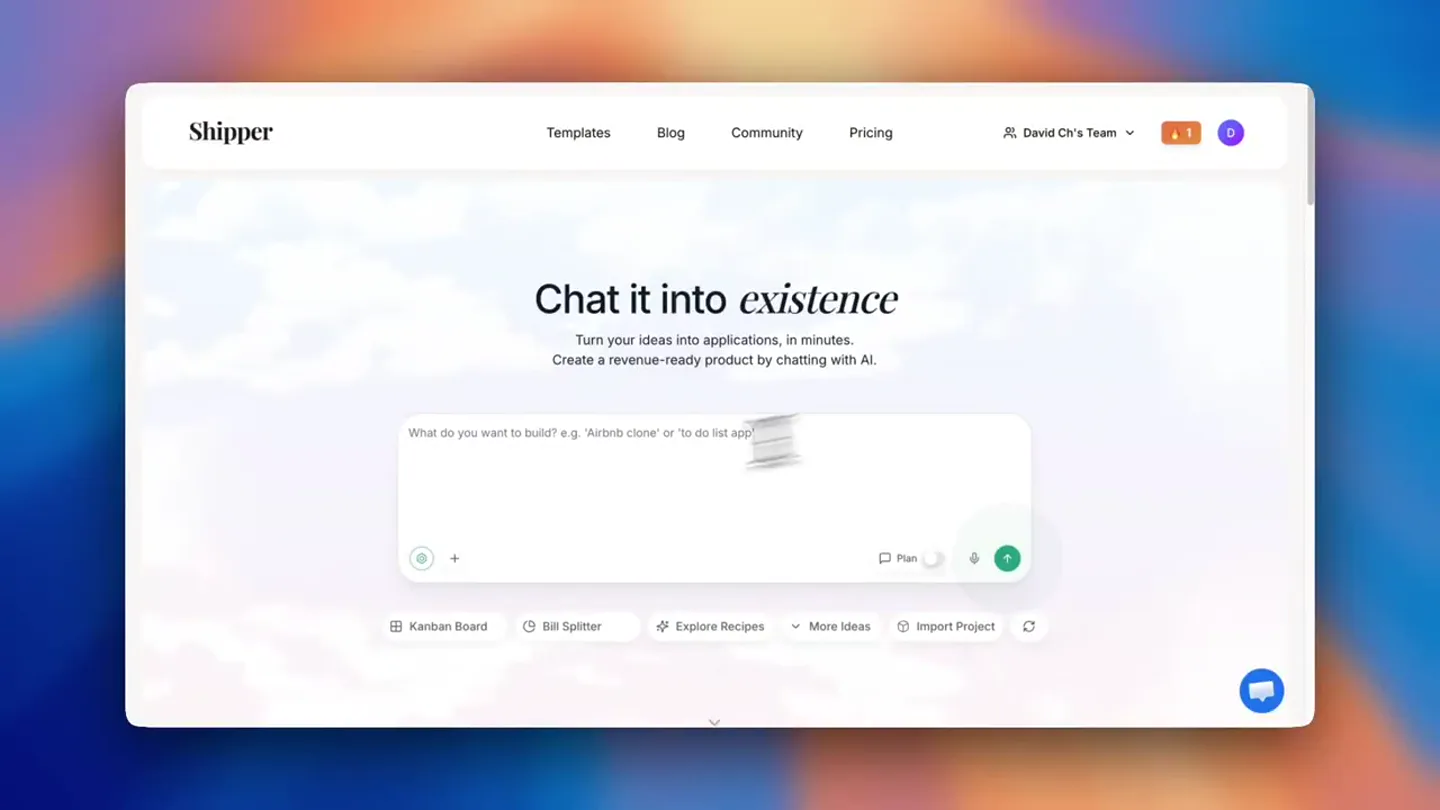
- On screen
- Chat it into existence Turn your ideas into applications, in minutes. Create a revenue-ready product by chatting with AI. Hi Claude. Let's build a iOS native app for learning French - like Duolingo! Olympia Advisor Publish Streak saved! 2 days and counting You've built today. Keep up the great work! SNEAK PEEK: An army of AI agents is building your project. Watch as components pop up below. 1 by 1. Hang tight for the final version! Running manageTodos Completed manageTodos Complete Let me build all the files for this French learning app. Editing | src/contexts/lessons.tsx + 1 edit made Created: src/contexts/AppContent.tsx Lesson data with French vocabulary, questions, and user progress types Updating src/contexts/AppContent.tsx In Progress... Describe what you want to build... Visual Edit Plan Rendering components... Rendering 1 component... Loading dependencies Configuring environment Building project Initializing workspace AppContext Wireframe (Provider/State) This component manages global application state (Lessons, Progress, Hearts, XP). User Progress State XP: 1250 Level: 13 Hearts: 3/5 Lessons Completed: 45 Lessons State (Initial Lessons) Lesson 1: Basics Completed Lesson 2: Greetings Ready Lesson 3: Food Locked State includes lesson completion status and lock status. Context Functions (API) completeLesson(id, xp, words) Decrement the user's current heart count (min 0). Updates progress (XP, words, level) and unlocks the next lesson. loseHeart() resetHearts() Resets the user's heart count back to the maximum (5). Simulate Heart Decay modes, and progress stats Created: app/tabs/leaderboard.tsx Leaderboard tab with league system and rankings Created: app/tabs/profile.tsx Profile tab with stats, achievements, course progress, and settings Created: app/lessons/[id].tsx Lesson screen with word preview phrase and interactive quiz with answer feedback Created: app/result.tsx Result screen with earned score display, XP earned, and pass/fail states Now let me update the todos and finalize everything. Finalizing changes Completed manageTodos Complete Finalizing changes... In Progress... Your dynamic ranking based on XP earned Medal system for top 3 Profile Tab - Complete with: Level badge and XP display Course completion progress bar 6 unlockable achievements Settings menu Content 6 lessons covering Basics, Phrases, Food, Animals, Numbers, and Family - each with 5 vocabulary words and 5 quiz questions. Live Preview Preview URL preview-m-339dc8f1-38cd-4ed0-8169-25ed... Advisor Suggestions Enable persistent storage Design custom graphics French 3 5 3 day streak! Keep it going! Daily Goal 1050 XP TOTAL XP HEARTS LEVEL Your Learning Path Complete lessons to unlock the next one Basics 1 Greetings & Introductions +15 XP Basics 2 Food 1 NEW WORD Bonjour bon-ZHOOR Hello NEW WORD Au revoir oh-vuh-RWAHR Goodbye Translate to French: "Thank you" Merci Bonjour Oui Non Expo Go Preview app for testing on your phone Get the App Open your camera app & scan Point your phone's camera at the QR code below. It will open in Expo Go automatically.
- Camera
- Zoom-in and pan across a desktop UI, simulating user interaction and AI generation.
- Motion
- Rapid UI element reveals, text typing animation, and smooth camera pans with subtle depth of field.
Feature Teaser
Live Mobile App Experience
“(No spoken dialogue — A more extended riser begins at [0:14] and peaks at [0:15] with another sub-bass impact. The soundscape then transitions to a more rhythmic, pulsing electronic beat with a prominent sub-bass line and shimmering synth pads, establishing a consistent tempo. Another high-energy riser occurs from [0:20] to [0:21], followed by a sub-bass drop at [0:21].)”
- On screen
- 09:41 French 3 5 3 day streak! Keep it going! Daily Goal 1050 XP TOTAL XP HEARTS LEVEL Your Learning Path Complete lessons to unlock the next one Basics 1 Greetings & Introductions +15 XP Basics 2 Food 1 Learn Practice Leaderboard Profile French Learner Joined 3 days ago Level 1 - 0 XP French Course 0 of 6 lessons completed Achievements First Lesson On Fire Word Collector Dedicated Champion Master Settings 3/5 words NEW WORD Oui Yes Next Word QUESTION 2 OF 5 What does "Au revoir" mean? Hello Please Goodbye Sorry QUESTION 5 OF 5 What does "Non" mean? Yes No Maybe Hello 12 TOTAL XP 4 HEARTS 1 LEVEL B Complete Common Phrases +15 XP Practice Strengthen your skills Words Lessons Total XP Streak Vocabulary Flashcards Tap a card to flip it Bonjour bon-ZHOOR Merci mer-SEE Yes No Goodbye S'il vous plaît seel voo-PLEH Excusez-moi eks-koo-ZAY mwah
- Camera
- Close-up on a mobile phone screen, showcasing app functionality with simulated taps and swipes.
- Motion
- Smooth screen transitions, interactive UI elements highlighting, and subtle haptic feedback simulation.
Call to Action
Publishing to App Stores
“(No spoken dialogue — A final, intense riser builds from [0:39] to [0:40], leading to a powerful sub-bass impact at [0:40] and a sustained, resonant decay.)”
- On screen
- (No on-screen text)
- Camera
- Rapid zoom-out from the mobile screen to a wider shot, then a quick cut to a black screen.
- Motion
- Fast zoom, hard cut, and a final impactful sound design cue.
Motion design primitives
Synthesizable in Remotion · key components of the ai-product-workflow-showcase template.
TypewriterReveal
Text appears character by character, simulating a typing effect, often accompanied by a blinking cursor. This is used for user input or AI generation feedback.
+ Code construction recipe
Use `Sequence` and `spring` for character opacity and position. Implement a blinking cursor with `interpolate` for opacity, toggling between 0 and 1.
UIZoomPan
The camera smoothly zooms into specific UI elements or pans across a desktop interface, highlighting key interactions or generated content.
+ Code construction recipe
Utilize `AbsoluteFill` with `scale` and `translate` properties, animated with `spring` or `interpolate` for smooth camera movements. Apply a subtle `blur` filter to background elements for depth.
MobileScreenInteraction
Simulates user interaction within a mobile app, including taps, swipes, and screen transitions, often with visual feedback like highlighted buttons.
+ Code construction recipe
Employ `AbsoluteFill` for the phone frame and `Image` or `Video` for screen content. Animate `opacity` and `scale` for tap feedback, and `translateX` for swipe transitions, using `spring` for natural motion.
Style DNA & aesthetic system
Visual aesthetic
Typography
Motion
Special effects
Pacing & rhythm
Conceptual story rhythm
- 1
The Promise
Purpose. Immediately establishes the core, groundbreaking capability of the product.
Execution. A simple, elegant text card stating the product's new power, setting a high expectation.
- 2
The Demonstration
Purpose. Visually walks the user through the product's workflow, showing how the promise is delivered.
Execution. Detailed screen recording of the AI generating an app, with UI elements highlighting progress and key features.
- 3
The Experience
Purpose. Showcases the end-user experience of the generated product, validating the AI's output.
Execution. A mobile phone mockup displaying the fully functional, interactive app, demonstrating its features.
- 4
The Impact
Purpose. Reinforces the product's value proposition and calls the viewer to action.
Execution. A quick, impactful transition to a final screen or a black screen, leaving a lasting impression.
Remix in Animatiq Studio
Master remix prompt · agent-ready
Sample remix
Objective
Launch an AI-powered video editing software that generates short-form content from long-form videos.How the recipe adapts
The initial text card would state 'AI can now edit your videos'. The demonstration phase would show a user uploading a long video, typing a prompt like 'Create 3 short clips about product features', and then the UI animating the AI processing and generating timeline edits. The experience phase would showcase the generated short videos playing within a mobile phone mockup, highlighting auto-generated captions and transitions. The call to action would be a quick cut to a brand logo with a powerful sound effect.Remix blueprint · ai-product-workflow-showcase
Scene durations (4 scenes, 44.6s)
Key Remotion components
Related Creative Tools Product Launches
Explore all Creative Tools launches →
Anthropic Labs launches Claude Design, which turns conversation into prototypes, slides and one-pagers, powered by Claude Opus 4.7.

A vibe design partner with an AI-native canvas for turning ideas into UI.

Your work tools in Claude are now available on mobile. Explore Figma designs, create Canva slides, check Amplitude dashboards, all from your phone. Give it a try: