
Spline · Launch Video Breakdown: Hook, Pacing & Motion Design
Spline Hana V2 adds MCP generation, PBR GLB/GLTF import, SVG/PDF export, a WebGPU canvas, and better vector editing.
Scene-by-scene timeline & spoken transcript
The Hook
AI-Powered Design Canvas Introduction
“(No spoken dialogue — Prominent riser leading to sub-bass drop/impact at 0:01, establishing a high-energy electronic beat.)”
- On screen
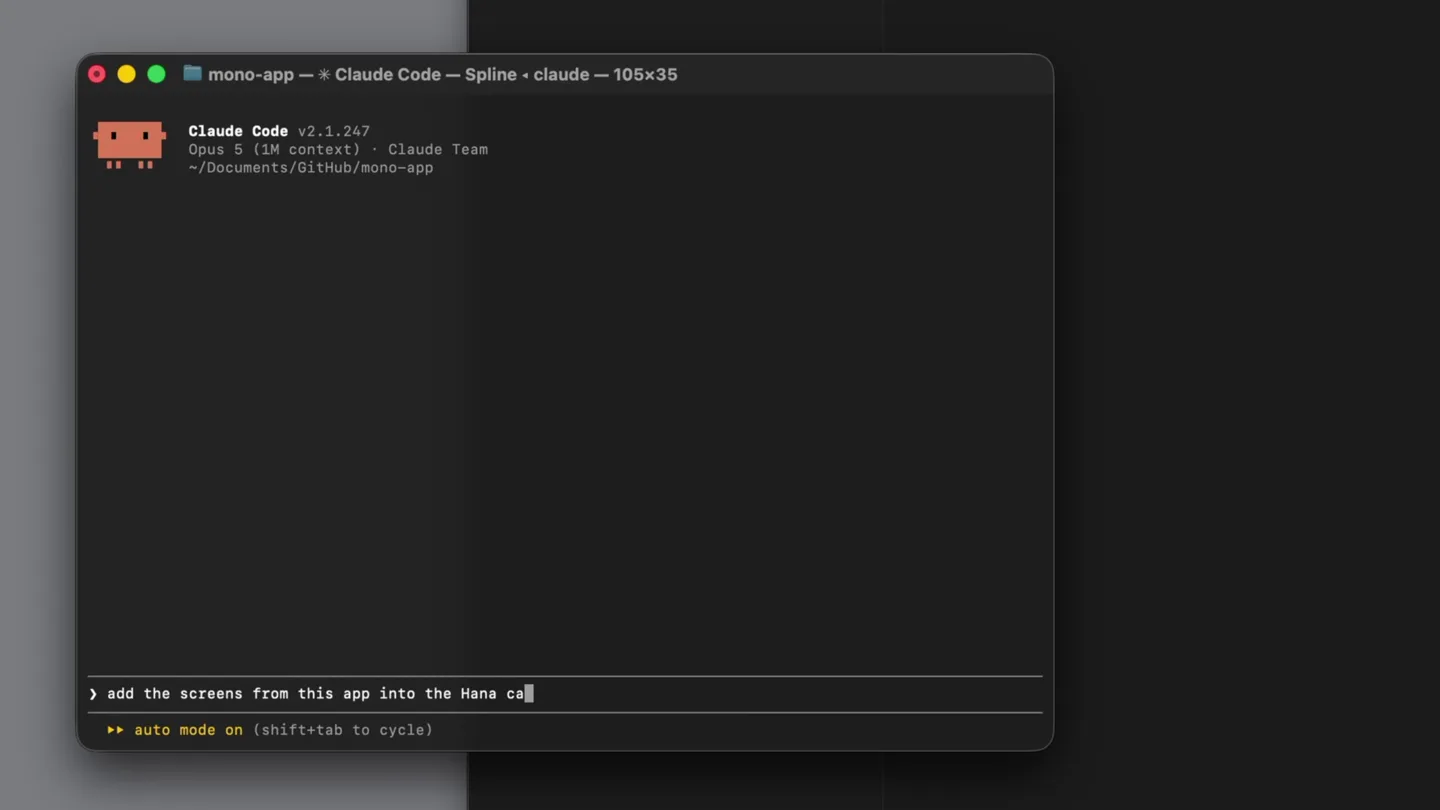
- Connect with Hana via MCP
- Camera
- Static text on black, then a quick zoom-out to reveal a terminal window and a partial UI, followed by a rapid pan to a full UI view.
- Motion
- Rapid text reveal, quick camera pan and zoom, UI elements animating into view with a 'snap' effect.
Product Reveal
GLB/GLTF Import & PBR Rendering
“(No spoken dialogue — Driving electronic beat continues with pizzicato synth melodies.)”
- On screen
- headphones.glb, Create a, SONAR, MOSS, AQUA VIRIDIS, Triceratops horridus
- Camera
- Close-up on a text input field, then a rapid sequence of UI views showcasing 3D models (headphones, character, dinosaur skeleton) within the design canvas. Camera subtly pans and zooms to highlight details.
- Motion
- Fast cuts between different 3D models, UI elements appearing and disappearing with quick transitions, subtle camera movements to emphasize product features.
Feature Teaser
Agent-Driven UI Generation & Vector Editing
“(No spoken dialogue — Electronic beat maintains energy, leading into a significant riser at 0:21-0:22.)”
- On screen
- Build with agents, Fintech Site 1: Generating..., Fintech Site 2: Generating..., Fintech Site 3: Generating..., Fintech Site 4: Generating..., Money, at rest., Payments infrastructure in three lines of code., Spend less time on spend., Wealth, composed., Music App, create a minimalist style music app with 3 different music playing, Golden Hour, Vermillion Sky, Static Bloom, Pause button 2
- Camera
- Rapid cuts showcasing multiple generated UI screens side-by-side, followed by a detailed view of vector editing on a 'pause' icon. Camera moves dynamically across the generated UIs.
- Motion
- Split-screen UI generation reveal, rapid UI element manipulation, precise vector path editing highlighted with a glowing effect.
Call to Action
Comprehensive Feature Showcase & Brand Reveal
“(No spoken dialogue — Powerful sub-bass drop/impact at 0:22, driving electronic beat continues, concluding with a final sub-bass impact at 0:35.)”
- On screen
- San Francisco, Rome, Tokyo, AI Agents, New UI, Improved Measure Tool, Components, spline.desig
- Camera
- Dynamic grid of diverse UI designs, followed by a sequence of feature callouts (buttons animating into view). Concludes with a full-screen brand logo and website URL.
- Motion
- Grid layout reveal with individual UI cards animating in, 'pop-up' text callouts for features, and a clean logo reveal with a subtle glow.
Motion design primitives
Synthesizable in Remotion · key components of the spline-hana-v2-remix template.
RapidUISnap
UI elements or entire screens quickly snap into their final position with a slight overshoot, giving a responsive and immediate feel. Often combined with a quick fade-in or scale-up.
+ Code construction recipe
Use `spring()` for position and scale with a low damping ratio for the overshoot. Combine with `interpolate()` for opacity from 0 to 1 over a very short duration (e.g., 5 frames).
DynamicGridReveal
Multiple UI cards or elements are revealed in a staggered grid pattern, often with a subtle rotation or depth effect, creating a sense of expansive capability.
+ Code construction recipe
Implement a `map()` function over an array of UI data. Each item's animation (scale, opacity, slight rotation on Y-axis) is delayed based on its index in the grid, using `delay()` and `spring()` for a staggered entrance.
FeatureCalloutPop
Key feature text or icons animate into view with a quick pop-up effect, often accompanied by a subtle glow or highlight, drawing immediate attention.
+ Code construction recipe
Animate `scale` from 0 to 1.1 then back to 1 using `spring()` with a high stiffness. Add a `box-shadow` or `filter: drop-shadow()` that animates opacity or spread for the glow effect.
Style DNA & aesthetic system
Visual aesthetic
Typography
Motion
Special effects
Pacing & rhythm
Conceptual story rhythm
- 1
The Visionary Hook
Purpose. Immediately grab attention and establish the product's core innovation: AI-powered design.
Execution. Rapid text reveal, quick transition from a terminal interface to a full, dynamic UI canvas, setting a fast, tech-forward tone.
- 2
Feature Powerhouse
Purpose. Showcase key, high-impact features like 3D import and AI generation in rapid succession.
Execution. Fast cuts between diverse 3D models and agent-generated UI screens, demonstrating versatility and power without lingering.
- 3
Precision & Control
Purpose. Highlight the granular control and advanced editing capabilities within the tool.
Execution. Close-ups on vector editing, precise UI adjustments, and interactive elements, emphasizing the tool's depth for creators.
- 4
The Grand Finale
Purpose. Reinforce the product's comprehensive capabilities and provide a clear call to action.
Execution. A montage of diverse, high-quality UI examples, followed by a clean brand reveal and website URL, leaving a lasting impression of capability and accessibility.
Remix in Animatiq Studio
Master remix prompt · agent-ready
Sample remix
Objective
Launch video for 'QuantumFlow', a new AI-powered data visualization platform.How the recipe adapts
The RapidUISnap primitive would be used for data dashboards and chart elements appearing instantly. DynamicGridReveal would showcase multiple generated data reports. FeatureCalloutPop would highlight 'Predictive Analytics' and 'Real-time Collaboration' buttons. The dark-mode aesthetic would be adapted to a deep blue and black palette, with glowing lines emphasizing data flow. The fast cuts would synchronize with a similar electronic track, showcasing complex visualizations in quick, digestible bursts.Remix blueprint · spline-hana-v2-remix
Scene durations (4 scenes, 38.4s)
Key Remotion components
Related Creative Tools Product Launches
Explore all Creative Tools launches →
Anthropic Labs launches Claude Design, which turns conversation into prototypes, slides and one-pagers, powered by Claude Opus 4.7.

A vibe design partner with an AI-native canvas for turning ideas into UI.

We heard you wanted to use Codex rate limit resets on your own time. Starting today, we’re rolling out the ability to save rate limit resets to use later. We’re starting Go, Plus, Pro, and Business