
Pablo Stanley · Launch Video Breakdown: Hook, Pacing & Motion Design
A tool for wireframing stuff — and then sending it to an agent to build.
Scene-by-scene timeline & spoken transcript
The Hook
Effortless Wireframing & Component Assembly
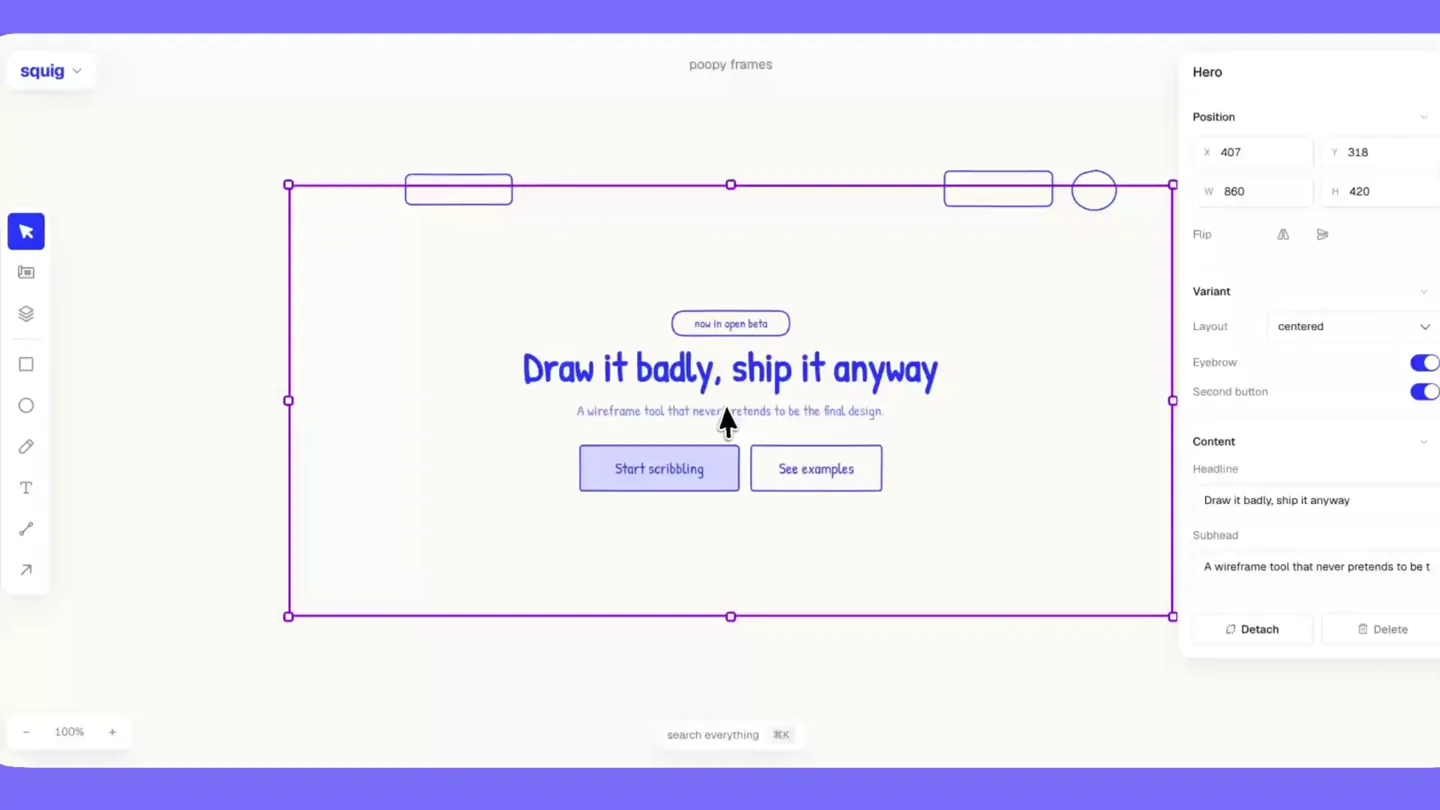
“(No spoken dialogue — The audio track features a sustained, high-pitched string-like synth, followed by a rapid, ascending arpeggiated synth sequence, building anticipation.)”
- On screen
- squig, poopy frames, shape, Position, X, Y, W, H, Flip, Fill, Tone, Outline, Pen, Dashed, Delete, now in open beta, Draw it badly, ship it anyway, A wireframe tool that never pretends to be the final design., Start scribbling, See examples, Page, Paper, Shade, Dot grid, Ink, Palette, Internet blue, Font, Aa, saved with this drawing — a new file starts from whatever you set last., View, Context menu, quick controls float above the selection, Fit, Select all, Card, Variant, Image, Header, Footer, Actions menu, Content, Card title, Detach, Hero, Layout, split-image, Eyebrow, Second button, Headline, Subhead, search everything, ay diosito, butt, Buttons, Click me, Button, Icon button, Publish, Button group, Split button, Floating action button, Chip, Chip group, how click the canvas to drop it, Let's do it, Pricing block, Marketing, Screens, Pricing table, it go chouse lesu — ettsn wne or onag it out, Pick a plan, any plan, Yearly (two months fre..., Doodle, $0, per month-ish, Sketch, $12, most popular, Masterpiece, $49, Choose, Take my money, Tiers, Highlighted, Billing toggle, find a block..., CTA block, Feature grid, Feature one, Feature list, Testimoniship, Lodu dcuu, 67 to choose from — click one or drag it out
Product Reveal
Dynamic Theming & Style Customization
“(No spoken dialogue — A distinct 'riser' effect is heard, leading into a more complex, layered synth melody with various 'sweeps' and 'whooshes' transitioning musical phrases.)”
- On screen
- squig, poopy frames, Page, Paper, Shade, Dot grid, Ink, Palette, Internet blue, Font, Riso red, Terminal green, Purple drizzle, Dirty blond, Hipster black, saved with this drawing — a new file starts from whatever you set last., View, Context menu, quick controls float above the selection, Fit, Select all, Changos!!!, Draw it badly, ship it anyway, A wireframe tool that never pretends to be the final design., Start scribbling, ay diosito, Card title, search everything, B, I, U
Call to Action
Call to Action: Visit squig.sh
“(No spoken dialogue — The audio track maintains a continuous motion and evolving complexity, with a clear, driving tempo of 120 BPM, featuring pizzicato synths and sustained synth pads.)”
- On screen
- squig.sh
Motion design primitives
Synthesizable in Remotion · key components of the squig-inspired-ui-launch template.
InteractiveUIReveal
UI elements and components animate into view with a subtle bounce or spring effect, often accompanied by a cursor interaction that simulates user input and design actions.
+ Code construction recipe
Utilize `spring()` for position and scale animations, `interpolate()` for opacity and color changes, and `Sequence` to orchestrate cursor movements and UI element reveals. SVG path animations can simulate drawing.
DynamicPaletteShift
The entire UI's color scheme (background, outlines, text) rapidly changes, demonstrating the product's theming capabilities with a quick, almost instantaneous transition.
+ Code construction recipe
Implement `interpolate()` on color properties for background, border, and text elements, triggered by a `Sequence` or `AbsoluteFill` component. Use `useCurrentFrame()` to synchronize color changes with specific frames.
ComponentDragAndDrop
Pre-designed UI components (e.g., cards, buttons, pricing blocks) are shown being dragged from a sidebar and dropped onto the main canvas, snapping into place with a smooth, responsive animation.
+ Code construction recipe
Combine `spring()` for the drag-and-drop motion and snap-to-grid behavior. Use `AbsoluteFill` and `AbsolutePosition` for precise placement, and `interpolate()` for opacity during the drag state.
Style DNA & aesthetic system
Visual aesthetic
Typography
Motion
Special effects
Pacing & rhythm
Conceptual story rhythm
- 1
Introduction to the Canvas
Purpose. Introduce the core interface and the product's unique 'draw it badly' philosophy.
Execution. The video opens with a clean, empty canvas, gradually revealing UI elements and the main headline, demonstrating basic component placement and interaction.
- 2
Feature Demonstration Blitz
Purpose. Showcase the breadth of components and customization options rapidly.
Execution. A rapid sequence of component dragging, dropping, and customization (e.g., adding cards, pricing blocks, drawing elements) with quick UI panel interactions.
- 3
Dynamic Theming Highlight
Purpose. Emphasize the product's flexibility in visual styling.
Execution. A dramatic, quick shift in the entire UI's color palette and font styles, demonstrating the ease of changing the aesthetic.
- 4
Call to Action
Purpose. Direct viewers to the product's website.
Execution. A full-screen display of the product's URL, accompanied by the continuing energetic audio track.
Remix in Animatiq Studio
Master remix prompt · agent-ready
Sample remix
Objective
A new collaborative coding environment called 'CodeFlow' needs a launch video.How the recipe adapts
The 'InteractiveUIReveal' primitive would show code blocks and syntax highlighting appearing with a springy animation, simulating real-time coding. 'DynamicPaletteShift' could represent switching between light/dark themes or different project environments. 'ComponentDragAndDrop' would be adapted to show dragging and dropping pre-built code snippets or microservices into a project, with the cursor simulating a developer's interaction. The hand-drawn aesthetic would be applied to UI elements like buttons and input fields within the IDE, giving it a friendly, approachable feel despite being a technical tool. The fast cuts and energetic audio would emphasize the speed and efficiency of collaborative coding.Remix blueprint · squig-inspired-ui-launch
Scene durations (3 scenes, 66s)
Key Remotion components
Related Creative Tools Product Launches
Explore all Creative Tools launches →
Anthropic Labs launches Claude Design, which turns conversation into prototypes, slides and one-pagers, powered by Claude Opus 4.7.

A vibe design partner with an AI-native canvas for turning ideas into UI.

Your work tools in Claude are now available on mobile. Explore Figma designs, create Canva slides, check Amplitude dashboards, all from your phone. Give it a try: