
Max Weinbach · Launch Video Breakdown: Hook, Pacing & Motion Design
This is why it sucks and AI replacing UI and apps makes no sense The order flow of using the Starbucks app (19 seconds) vs ChatGPT (103 seconds)
Scene-by-scene timeline & spoken transcript
The Hook
Initial App Scroll & Impact
“(No spoken dialogue — Sustained, evolving pad sound, high-frequency riser builds to a significant sub-bass drop/impact.)”
- On screen
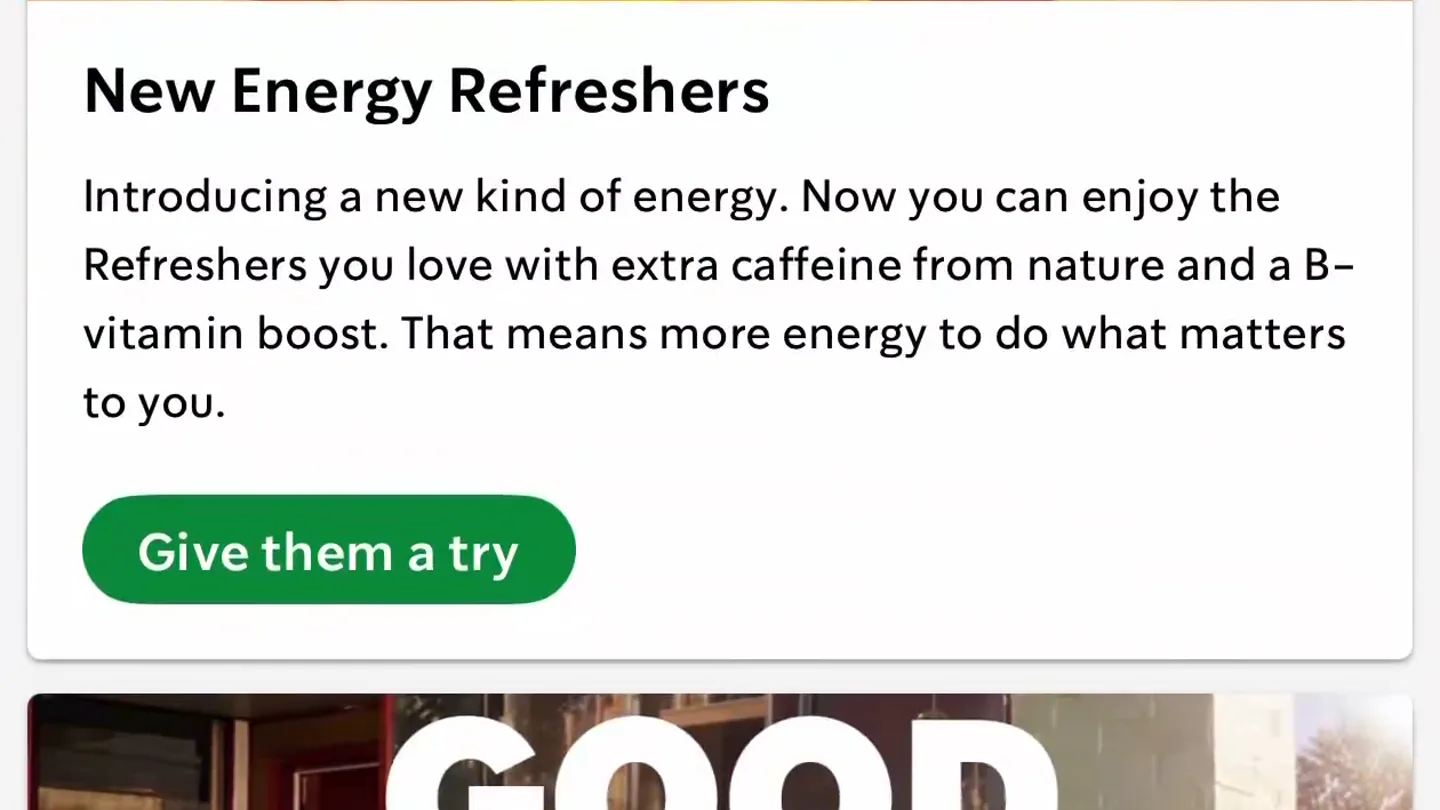
- 1:39 Keep the day going strong, Max Inbox Stores Star balance 0 GREEN STATUS New Energy Refreshers Introducing a new kind of energy. Now you can enjoy the Refreshers you love with extra caffeine from nature and a B- vitamin boost. That means more energy to do what matters to you. Give them a try Scan in store GOOD AFTERNOON Your afternoon reset Home Scan Order Gift Rewards
- Camera
- Static screen recording of a mobile app, with a rapid vertical scroll revealing more content.
- Motion
- Rapid vertical scroll, screen wipe transition.
Problem Agitation
Navigating Product Categories
“(No spoken dialogue — Rhythmic, arpeggiated synth pattern establishes a driving, high-energy feel. High-frequency sweep/riser leads into a pronounced sub-bass impact.)”
- On screen
- 1:39 < Drinks (194) Refreshe Protein Beverages Vanilla Protein Latte Iced Sugar-Free Vanill. Protein Latte Hot Coffee Blonde Roast - Starbucks® Sunsera Caffè Americano For item availability Choose a store Home Scan Order Gift Rewards Energy Refreshers (9) Strawberry Açaí Lemonade Energy Refresher Mango Strawberry Lemonade Energy Refresher Mango Dragonfruit Lemonade Energy Refresher Pink Energy Drink
- Camera
- Screen recording with horizontal and vertical swipes, simulating user interaction to find a product category.
- Motion
- Horizontal and vertical screen swipes, rapid content loading.
Product Reveal
Product Selection & Customization
“(No spoken dialogue — Arpeggiated synth continues, joined by layered electronic elements and a bright, percussive synth melody. Final powerful sub-bass drop/impact.)”
- On screen
- 1:39 < Energy Refreshers (9) < Energy Refreshers (9) Strawberry Açaí Lemonade Energy Refresher Mango Strawberry Lemonade Energy Refresher Mango Dragonfruit Lemonade Energy Refresher Pink Energy Drink 1:39 < Energy Refreshers (9) Mango Strawberry Lemonade Energy Refresher 180 calories Add to order 1:39 Mango Strawberry Lemonade Energy Refresher 180 calories Choose a store to see availability Size Options Tall 12 fl oz Grande 16 fl oz Venti 24 fl oz Trenta 30 fl oz Add to order For item availability Choose a store 1
- Camera
- Screen recording showing a modal pop-up, product detail view, and selection of size options.
- Motion
- Modal overlay, tap interactions, content expansion.
Call to Action
Store Selection & Order Review
“(No spoken dialogue — Brief, sustained synth chord fades out.)”
- On screen
- 1:39 Choose a store NORTH AMERICA Maps Legal Filter Nearby Previous Favorites No stores found Try searching another area or zooming in or out to get a better look. You can change location permissions in the Settings app to search the area around you more easily. 1:39 Choose a store NORTH AMERICA Maps Legal Filter Nearby Previous Favorites Westport Saugatuck River 1 Parker Harding Plz, Westport 2.3 mi · Open 5:00 AM-8:00 PM In store Westport, Post Road East 1000 Post Rd E, Westport 2.3 mi · Open 5:00 AM-8:00 PM In store Drive-thru Norwalk, Dansk Plaza 56 Westport Ave, Norwalk 2.8 mi · Open 5:00 AM-8:00 PM In store 1:39 Choose a store Maps Legal Filter Westport Saugatuck River 1 Parker Harding Plz, Westport 2.3 mi · Open 5:00 AM-8:00 PM In store Order here Westport, Post Road East 1000 Post Rd E, Westport 2.3 mi · Open 5:00 AM-8:00 PM In store Drive-thru Norwalk, Dansk Plaza 56 Westport Ave, Norwalk 2.8 mi · Open 5:00 AM-8:00 PM In store 1:39 Mango Strawberry Lemonade Energy Refresher 180 calories Choose a store to see availability Size options Tall 12 fl oz Grande 16 fl oz Venti 24 fl oz Trenta 30 fl oz What's Included Juice Options Lemonade Add-ins Pickup store Westport Saugatuck River · 2.3 mi Add to order 1 1:39 Review order (1) Store Westport Saugatuck River 2.3 mi Pickup method In store Pickup time Loading... Mango Strawberry Lemonade Energy Refresher 180 Calories Continue 1:39 Review order (1) Store New! Discover store pickup options Pickup method In store Pickup time 3-6 mins or schedule Mango Strawberry Lemonade Energy Refresher Grande 16 fl oz 180 calories 200 item $6.25 $6.25 YOU MAY ALSO LIKE Crispy Grilled Cheese on Sourdough Tomato & Mozzarella Focacci Ham & Swiss Checkout $6.71 Subtotal $6.25
- Camera
- Screen recording showing map interaction, store selection, and final order review with dynamic pricing updates.
- Motion
- Map pan and zoom, list item selection, dynamic content update, button tap.
Motion design primitives
Synthesizable in Remotion · key components of the rapid-ui-flow-showcase template.
RapidScrollReveal
A mobile screen rapidly scrolls vertically, revealing new content sections with a slight bounce at the end of the scroll.
+ Code construction recipe
Use `interpolate` for `translateY` with a `spring` easing function. Implement `overflow: hidden` on the container and animate the `scrollTop` property or the `transform: translateY` of the content.
ModalProductFocus
A product image and details smoothly slide up from the bottom or fade in as a modal overlay, drawing immediate attention to the selected item.
+ Code construction recipe
Employ `interpolate` for `opacity` and `translateY` with an `easeOutCubic` curve. Use a `div` with `position: fixed` and `z-index` for the overlay, animating its `transform` property.
InteractiveMapZoom
A map interface dynamically zooms and pans to highlight a specific location, followed by a list of relevant results appearing below.
+ Code construction recipe
Utilize `interpolate` for `scale` and `translateX`/`translateY` on the map image or SVG. Combine with a `stagger` effect for the list items sliding in from the bottom using `translateY` and `opacity`.
Style DNA & aesthetic system
Visual aesthetic
Typography
Motion
Special effects
Pacing & rhythm
Conceptual story rhythm
- 1
Initial Engagement
Purpose. Hook the viewer with a rapid overview of the app's main screen and a quick scroll.
Execution. Fast vertical scroll on the Starbucks app home screen, immediately followed by a sub-bass impact.
- 2
Product Discovery
Purpose. Demonstrate the ease of navigating categories to find a specific product.
Execution. Quick horizontal and vertical swipes through app menus, landing on 'Energy Refreshers'.
- 3
Customization & Selection
Purpose. Show the process of selecting a product, viewing details, and choosing options.
Execution. Tapping a product, modal pop-up with details, selecting a size (Grande).
- 4
Order Completion
Purpose. Illustrate the final steps of store selection and order review, highlighting efficiency.
Execution. Map interaction to choose a store, final order summary with pickup details and checkout button.
Remix in Animatiq Studio
Master remix prompt · agent-ready
Sample remix
Objective
Launch a new AI-powered task management app called 'FlowState'.How the recipe adapts
The video would open with a rapid scroll through FlowState's main dashboard, showcasing various project cards. A modal pop-up would then highlight the 'AI-powered prioritization' feature, demonstrating a task being automatically reordered. Next, a quick tap would reveal a project's sub-tasks, with each task item animating in sequentially. The final sequence would show selecting a team member for a task from a dynamically loaded list, culminating in a 'Share & Collaborate' button tap, all synchronized with the electronic score and sub-bass impacts.Remix blueprint · rapid-ui-flow-showcase
Scene durations (4 scenes, 19s)
Key Remotion components
Related Creative Tools Product Launches
Explore all Creative Tools launches →
Anthropic Labs launches Claude Design, which turns conversation into prototypes, slides and one-pagers, powered by Claude Opus 4.7.

A vibe design partner with an AI-native canvas for turning ideas into UI.

Your work tools in Claude are now available on mobile. Explore Figma designs, create Canva slides, check Amplitude dashboards, all from your phone. Give it a try: