
Superset · Launch Video Breakdown: Hook, Pacing & Motion Design
Click any element in the in-app browser and chat with it. Works with any agent.
Scene-by-scene timeline & spoken transcript
The Hook
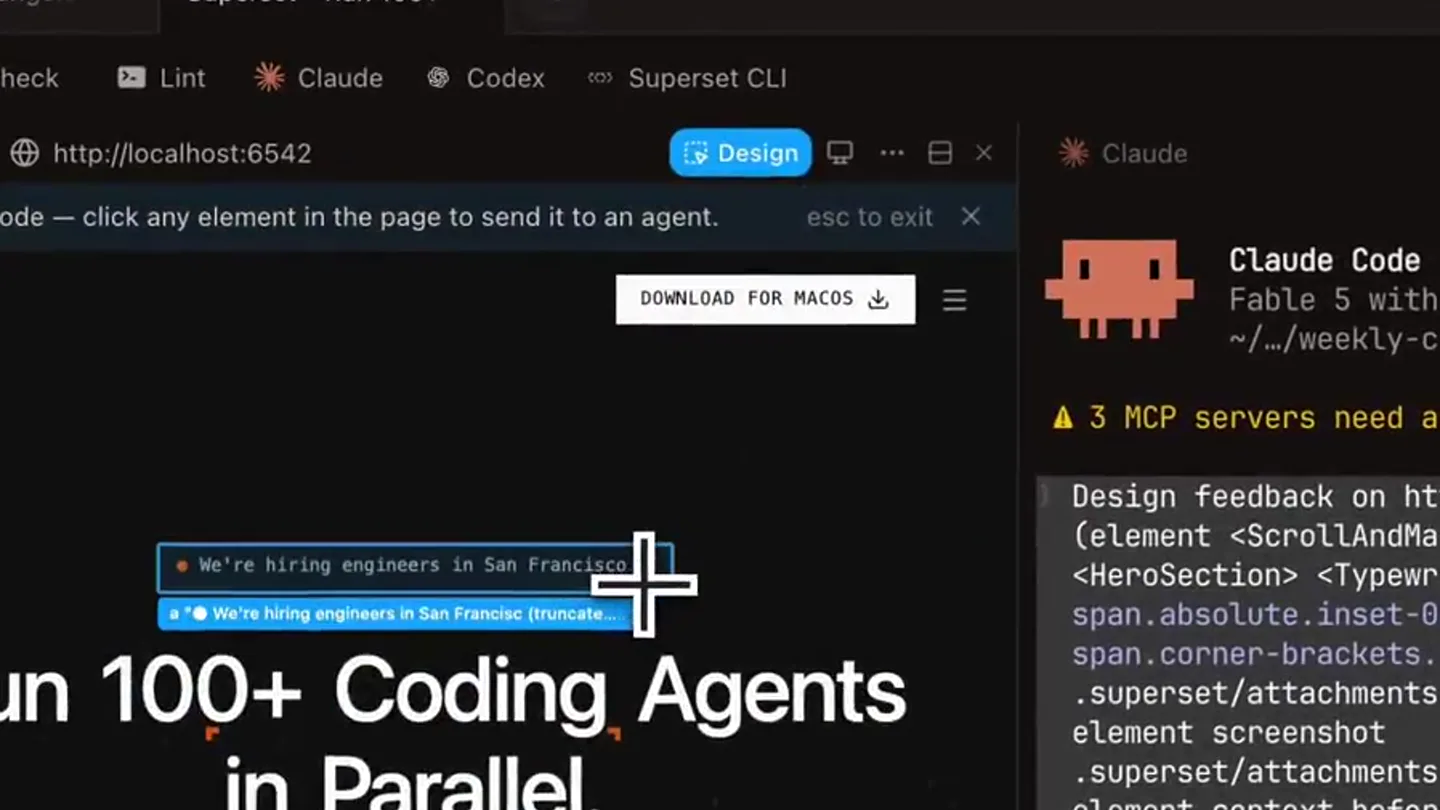
Interactive Element Selection
“(No spoken dialogue — Silent video with ambient UI sounds implied by interaction.)”
- On screen
- SUPERSET Run 100+ Coding Agents in Parallel. Claude Code, Codex, or any CLI agent, each in its own isolated workspace. Spend your time shipping, not waiting. Download for macOS View on GitHub Design mode - click any element in the in-app browser to send it to an agent. Claude Code v2.1.241 Fable 5 with high effort. Claude Max ~/weekly-changelog-2020-08-24-04-23-47 3 MCP servers need authentication - run /mcp Design feedback on http://localhost:6542/ Make this slick (element <ScrollAndMaybeFocusRender> <SegmentViewMode> <HeroSection> <TypewriterText> <span> In Parallel.</span>, selector span.absolute.inset-0.span.corner-brackets.px-[0].2xl.nth-of-type(2)). Read .superset/attachments/design-178759192904-2d4a1.md and the element screenshot .superset/attachments/design-178759192904-2d4a1.png for full element context before making changes, then verify your change in the live browser pane (see the context file's live page section). I'll read the design context files first. Read 2 files Interrupted - What should Claude do instead? We're hiring engineers in San Francisco
- Camera
- Static wide shot of a desktop UI, focusing on a browser window and a code editor. Slight zoom-in on the browser.
- Motion
- Mouse cursor interaction, element highlighting, text input animation, UI overlay reveal.
Product Reveal
Agent Interaction & Live Edit
“(No spoken dialogue — Silent video with ambient UI sounds implied by interaction.)”
- On screen
- SUPERSET Run 100+ Coding Agents in Parallel. Claude Code, Codex, or any CLI agent, each in its own isolated workspace. Spend your time shipping, not waiting. Download for macOS View on GitHub Element captured — describe the change, or press esc to pick again. LinkComponent Describe the change... claude - 5920f5 Design mode - click any element in the page to send it to an agent. Claude Code v2.1.241 Fable 5 with high effort. Claude Max ~/weekly-changelog-2020-08-24-04-23-47 3 MCP servers need authentication - run /mcp Design feedback on http://localhost:6542/ Make this slick (element <ScrollAndMaybeFocusRender> <SegmentViewMode> <HeroSection> <TypewriterText> <span> In Parallel.</span>, selector span.absolute.inset-0.span.corner-brackets.px-[0].2xl.nth-of-type(2)). Read .superset/attachments/design-178759192904-2d4a1.md and the element screenshot .superset/attachments/design-178759192904-2d4a1.png for full element context before making changes, then verify your change in the live browser pane (see the context file's live page section). I'll read the design context files first. Read 2 files Interrupted - What should Claude do instead? We're hiring engineers in San Francisco
- Camera
- Slight pan and zoom to follow the mouse cursor and the emerging chat interface.
- Motion
- Typewriter effect for text input, dynamic UI resizing, focus state changes, and a subtle glow on selected elements.
Feature Teaser
Agent Response & Contextual Awareness
“(No spoken dialogue — Silent video with ambient UI sounds implied by interaction.)”
- On screen
- SUPERSET Run 100+ Coding Agents in Parallel. Claude Code, Codex, or any CLI agent, each in its own isolated workspace. Spend your time shipping, not waiting. Download for macOS View on GitHub Element captured — describe the change, or press esc to pick again. LinkComponent make this claude - 5920f5 Design mode - click any element in the page to send it to an agent. Claude Code v2.1.241 Fable 5 with high effort. Claude Max ~/weekly-changelog-2020-08-24-04-23-47 3 MCP servers need authentication - run /mcp Design feedback on http://localhost:6542/ Make this slick (element <ScrollAndMaybeFocusRender> <SegmentViewMode> <HeroSection> <TypewriterText> <span> In Parallel.</span>, selector span.absolute.inset-0.span.corner-brackets.px-[0].2xl.nth-of-type(2)). Read .superset/attachments/design-178759192904-2d4a1.md and the element screenshot .superset/attachments/design-178759192904-2d4a1.png for full element context before making changes, then verify your change in the live browser pane (see the context file's live page section). I'll read the design context files first. Read 2 files Interrupted - What should Claude do instead? We're hiring engineers in San Francisco Considering: Tip: Run /install-slack-app to use Claude in Slack
- Camera
- Slight zoom out, then a subtle re-framing to show the full UI context including the agent's response.
- Motion
- Smooth UI transitions, text appearing as if typed, and a subtle pulsing highlight on the agent's response.
Call to Action
Seamless Agent Integration
“(No spoken dialogue — Silent video with ambient UI sounds implied by interaction.)”
- On screen
- SUPERSET Run 100+ Coding Agents in Parallel. Claude Code, Codex, or any CLI agent, each in its own isolated workspace. Spend your time shipping, not waiting. Download for macOS View on GitHub Element captured — describe the change, or press esc to pick again. LinkComponent make this claude - 5920f5 Design mode - click any element in the page to send it to an agent. Claude Code v2.1.241 Fable 5 with high effort. Claude Max ~/weekly-changelog-2020-08-24-04-23-47 3 MCP servers need authentication - run /mcp Design feedback on http://localhost:6542/ Make this slick (element <ScrollAndMaybeFocusRender> <SegmentViewMode> <HeroSection> <TypewriterText> <span> In Parallel.</span>, selector span.absolute.inset-0.span.corner-brackets.px-[0].2xl.nth-of-type(2)). Read .superset/attachments/design-178759192904-2d4a1.md and the element screenshot .superset/attachments/design-178759192904-2d4a1.png for full element context before making changes, then verify your change in the live browser pane (see the context file's live page section). I'll read the design context files first. Read 2 files Interrupted - What should Claude do instead? We're hiring engineers in San Francisco
- Camera
- Final subtle zoom and pan to center the main product interaction area, holding steady.
- Motion
- Consistent UI element highlighting, smooth text input, and a clean, responsive interface demonstration.
Motion design primitives
Synthesizable in Remotion · key components of the interactive-ui-agent-flow template.
InteractiveElementHighlight
A rectangular outline with rounded corners appears and expands around a clicked UI element, accompanied by a subtle glow. The highlight then fades as a new UI element (like a chat bubble) appears.
+ Code construction recipe
Use `interpolate` for `opacity`, `scale`, and `border-radius` properties. Implement a `spring` animation for the initial expansion. Apply an `SVG filter` for the glow effect. Trigger on mouse click events.
TypewriterChatInput
Text appears character by character within an input field or chat bubble, simulating real-time typing. The cursor blinks at the end of the typed text.
+ Code construction recipe
Utilize `interpolate` on `text.length` to reveal characters sequentially. Implement a `looping opacity` animation for the blinking cursor. Ensure smooth easing for character reveal.
ContextualChatOverlay
A small, dark-themed chat bubble or input field smoothly slides up from the bottom of the screen, positioned contextually near the selected UI element. It includes an agent icon and input area.
+ Code construction recipe
Employ `spring` animation for `translateY` to slide the component into view. Use `opacity` interpolation for a fade-in effect. Position dynamically based on the coordinates of the highlighted element.
Style DNA & aesthetic system
Visual aesthetic
Typography
Motion
Special effects
Pacing & rhythm
Conceptual story rhythm
- 1
Identify & Select
Purpose. Introduce the core interaction: selecting any UI element.
Execution. Mouse cursor hovers, clicks, and a highlight box appears around a specific text element.
- 2
Prompt & Interact
Purpose. Show how to initiate a conversation with an AI agent about the selected element.
Execution. A chat input field emerges, and text is typed in, demonstrating the prompt.
- 3
Agent Responds
Purpose. Illustrate the AI agent's contextual understanding and response.
Execution. The agent's response appears in the chat, providing relevant information or suggestions.
- 4
Seamless Workflow
Purpose. Conclude by showing the integrated nature of the tool within a developer's environment.
Execution. The UI remains stable, showcasing the continuous interaction flow without disruption.
Remix in Animatiq Studio
Master remix prompt · agent-ready
Sample remix
Objective
Demonstrate an AI design assistant that can modify specific UI components in a Figma-like interface by natural language commands.How the recipe adapts
The InteractiveElementHighlight primitive would be adapted to highlight design components (buttons, text blocks) in a design canvas. The TypewriterChatInput would be used for the user typing design commands into a floating chat window. The ContextualChatOverlay would display the AI's suggestions or modifications, appearing adjacent to the selected design component.Remix blueprint · interactive-ui-agent-flow
Scene durations (4 scenes, 11s)
Key Remotion components
Related Creative Tools Product Launches
Explore all Creative Tools launches →
A vibe design partner with an AI-native canvas for turning ideas into UI.

We heard you wanted to use Codex rate limit resets on your own time. Starting today, we’re rolling out the ability to save rate limit resets to use later. We’re starting Go, Plus, Pro, and Business

There's a hidden tax on every knowledge worker in the world, and nobody talks about it: The design tax. You're a strategist, a sales lead, a marketer. You were hired for what you know. But every me…