
TailMotion · Launch Video Breakdown: Hook, Pacing & Motion Design
tm-view-morph in TailMotion v0.7.0 smoothly resizes containers and crossfades UI states, like the Dynamic Island.
Scene-by-scene timeline & spoken transcript
The Hook
Dynamic Island-like UI Morph
“(No spoken dialogue — silent video with ambient visual focus.)”
- On screen
- STRUCTURED RECIPE One surface, continuous state Keep each view mounted, move one state attribute, and let the container reshape around the next interface without a motion runtime. Markup Copy <div class="tm-view-morph rounded-full bg-black" style=" --tm-view-width: 284px; --tm-view-height: 64px; " > <div data-tm-panel aria-hidden="true">Idle</div> <div data-tm-panel aria-hidden="true">Call</div> <div data-tm-panel data-tm-active>Timer</div> </div> STATE STAYS YOURS JavaScript chooses the active panel and its dimensions. TailMotion only handles the interruptible resize, outgoing blur and incoming cross-fade. ACTIVE VIEW Idle Call Timer
- Camera
- Static, top-down perspective on a UI demonstration with code editor.
- Motion
- Smooth container resizing and content crossfade, mimicking a dynamic island UI. Mouse cursor interaction.
Product Reveal
Seamless State Transitions
“(No spoken dialogue — silent video with ambient visual focus.)”
- On screen
- STRUCTURED RECIPE One surface, continuous state Keep each view mounted, move one state attribute, and let the container reshape around the next interface without a motion runtime. Markup Copy <div class="tm-view-morph rounded-full bg-black" style=" --tm-view-width: 284px; --tm-view-height: 64px; " > <div data-tm-panel aria-hidden="true">Idle</div> <div data-tm-panel aria-hidden="true">Call</div> <div data-tm-panel data-tm-active>Timer</div> </div> STATE STAYS YOURS JavaScript chooses the active panel and its dimensions. TailMotion only handles the interruptible resize, outgoing blur and incoming cross-fade. Incoming call Design review 00:24 ACTIVE VIEW Idle Call Timer
- Camera
- Static, top-down perspective on a UI demonstration with code editor.
- Motion
- Interactive UI elements demonstrating state changes with fluid resizing and content morphing. Focus on 'Call' state.
Feature Teaser
Effortless UI Reshaping
“(No spoken dialogue — silent video with ambient visual focus.)”
- On screen
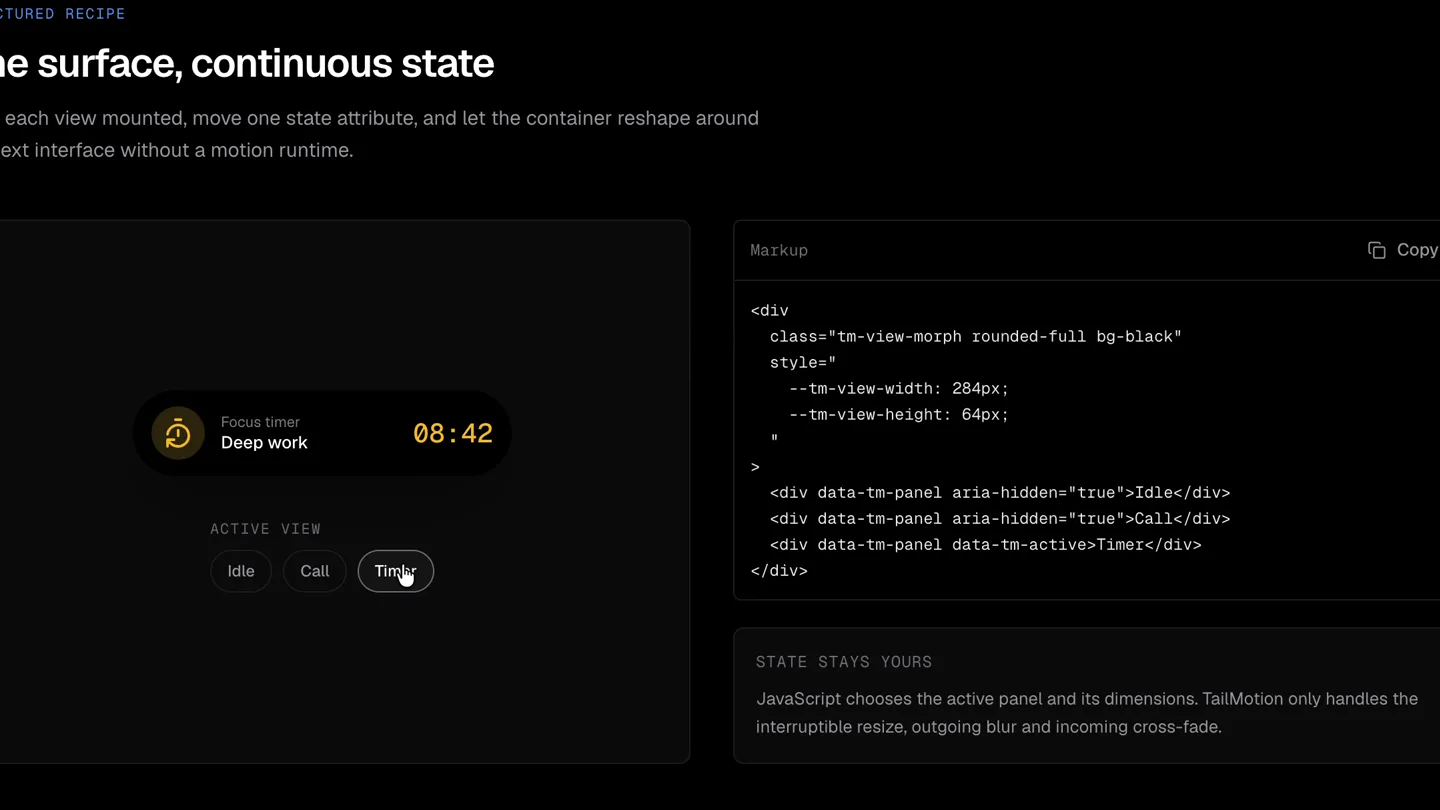
- STRUCTURED RECIPE One surface, continuous state Keep each view mounted, move one state attribute, and let the container reshape around the next interface without a motion runtime. Markup Copy <div class="tm-view-morph rounded-full bg-black" style=" --tm-view-width: 284px; --tm-view-height: 64px; " > <div data-tm-panel aria-hidden="true">Idle</div> <div data-tm-panel aria-hidden="true">Call</div> <div data-tm-panel data-tm-active>Timer</div> </div> STATE STAYS YOURS JavaScript chooses the active panel and its dimensions. TailMotion only handles the interruptible resize, outgoing blur and incoming cross-fade. Focus timer Deep work 08:42 ACTIVE VIEW Idle Call Timer
- Camera
- Static, top-down perspective on a UI demonstration with code editor.
- Motion
- The UI container smoothly transitions to a 'Timer' state, showcasing dynamic content updates and resizing.
Call to Action
TailMotion's Core Value
“(No spoken dialogue — silent video with ambient visual focus.)”
- On screen
- STRUCTURED RECIPE One surface, continuous state Keep each view mounted, move one state attribute, and let the container reshape around the next interface without a motion runtime. Markup Copy <div class="tm-view-morph rounded-full bg-black" style=" --tm-view-width: 284px; --tm-view-height: 64px; " > <div data-tm-panel aria-hidden="true">Idle</div> <div data-tm-panel aria-hidden="true">Call</div> <div data-tm-panel data-tm-active>Timer</div> </div> STATE STAYS YOURS JavaScript chooses the active panel and its dimensions. TailMotion only handles the interruptible resize, outgoing blur and incoming cross-fade. Incoming call Design review 00:24 ACTIVE VIEW Idle Call Timer
- Camera
- Static, top-down perspective on a UI demonstration with code editor.
- Motion
- Rapid cycling through UI states ('Idle', 'Call', 'Timer') to emphasize the fluidity and responsiveness of TailMotion's 'tm-view-morph' feature.
Motion design primitives
Synthesizable in Remotion · key components of the dynamic-data-morph-ui template.
DynamicIslandMorph
A container smoothly resizes and reshapes its rounded corners while its internal content crossfades between different UI states (e.g., 'Idle', 'Call', 'Timer').
+ Code construction recipe
Utilize `interpolate` for width, height, and border-radius transitions. Implement `spring` for a natural, bouncy feel on resize. Use `AbsoluteFill` with `interpolate` for opacity to achieve crossfading of internal content. CSS variables for dynamic dimensions.
ContentCrossfade
As the container morphs, the old content blurs out and fades away while new content blurs in and fades up, creating a seamless transition between UI states.
+ Code construction recipe
Employ `interpolate` for `opacity` and `filter: blur()` on child components. Use `Sequence` to manage the timing of the outgoing blur/fade and incoming blur/fade, ensuring they overlap for a smooth crossfade effect.
InteractiveCursorHighlight
A mouse cursor moves and clicks on interactive UI elements, triggering the `DynamicIslandMorph` and `ContentCrossfade` animations, providing a clear demonstration of user interaction.
+ Code construction recipe
Animate a cursor SVG or image using `interpolate` for `transform: translate()` to simulate mouse movement. Use `Sequence` to time cursor clicks with the start of the UI state transitions.
Style DNA & aesthetic system
Visual aesthetic
Typography
Motion
Special effects
Pacing & rhythm
Conceptual story rhythm
- 1
The Problem/Opportunity
Purpose. Introduce the challenge of creating fluid, interruptible UI transitions without complex runtime management.
Execution. The initial static screen with the 'One surface, continuous state' headline and explanatory text.
- 2
The TailMotion Solution
Purpose. Demonstrate TailMotion's core capability: seamless container resizing and content crossfading.
Execution. The first interaction, showing the 'Idle' state morphing into the 'Call' state with smooth animation.
- 3
Feature Expansion
Purpose. Showcase the versatility and robustness of the 'tm-view-morph' across different UI states.
Execution. The transition from 'Call' to 'Timer' state, highlighting the consistent fluid motion.
- 4
Reinforce Value
Purpose. Emphasize the ease and power of TailMotion by rapidly cycling through states.
Execution. The quick succession of transitions between 'Idle', 'Call', and 'Timer' states at the end.
Remix in Animatiq Studio
Master remix prompt · agent-ready
Sample remix
Objective
A data analytics platform that allows users to seamlessly switch between different chart types (e.g., bar, line, pie) for the same dataset.How the recipe adapts
The 'DynamicIslandMorph' primitive would be adapted to resize and reshape a data visualization container. 'ContentCrossfade' would transition between a bar chart, a line graph, and a pie chart, with data points smoothly interpolating or fading. The 'InteractiveCursorHighlight' would click on 'Bar', 'Line', 'Pie' buttons, triggering the data view changes. The code editor would display React components for these data visualizations.Remix blueprint · dynamic-data-morph-ui
Scene durations (4 scenes, 7.2s)
Key Remotion components
Related Creative Tools Product Launches
Explore all Creative Tools launches →
A vibe design partner with an AI-native canvas for turning ideas into UI.

We heard you wanted to use Codex rate limit resets on your own time. Starting today, we’re rolling out the ability to save rate limit resets to use later. We’re starting Go, Plus, Pro, and Business

There's a hidden tax on every knowledge worker in the world, and nobody talks about it: The design tax. You're a strategist, a sales lead, a marketer. You were hired for what you know. But every me…