
konstantinpaulus · Launch Video Breakdown: Hook, Pacing & Motion Design
Launching text-to-lottie v1.0.0 (stable) A framework for generating production ready Lottie animations with Claude Code and Codex. What’s new: - Multi-project, multi-scene support - Drag-and-drop L…
Scene-by-scene timeline & spoken transcript
The Hook
Text-to-Lottie Interface Reveal
“(No spoken dialogue — ambient visual with mouse interaction sounds implied.)”
- On screen
- Text-to-Lottie v1.0.0 (stable) Diffusion Studio Main Project Cairo, Egypt Athens, Greece Washington, USA London, UK Stockholm, Sweden Bern, Switzerland Text color Background Dist color Export Worked for 1m 37s Done. I updated (1) public/projects/main-project/scene-3/lottie.json (line 1): the post-grab motion now starts at frame 30 instead of frame 35, and the composition is trimmed from 150 to 145 frames. I reloaded the in-app browser at http://127.0.0.1:3030/main-project/scene-3; the player mounted with a canvas. JSON sanity check passes with no keyframes past the new out point. npm run build is currently blocked by existing @kobalte/core declaration errors in node_modules, unrelated to this scene edit. Web preview Website Open in
- Camera
- Static, slightly zoomed-in view of a desktop application window, focusing on the main content area and a sidebar.
- Motion
- Mouse cursor interaction, text selection, and drag-and-drop simulation within a UI.
Product Reveal
Dynamic Lottie Scene Generation
“(No spoken dialogue — ambient visual with mouse interaction sounds implied.)”
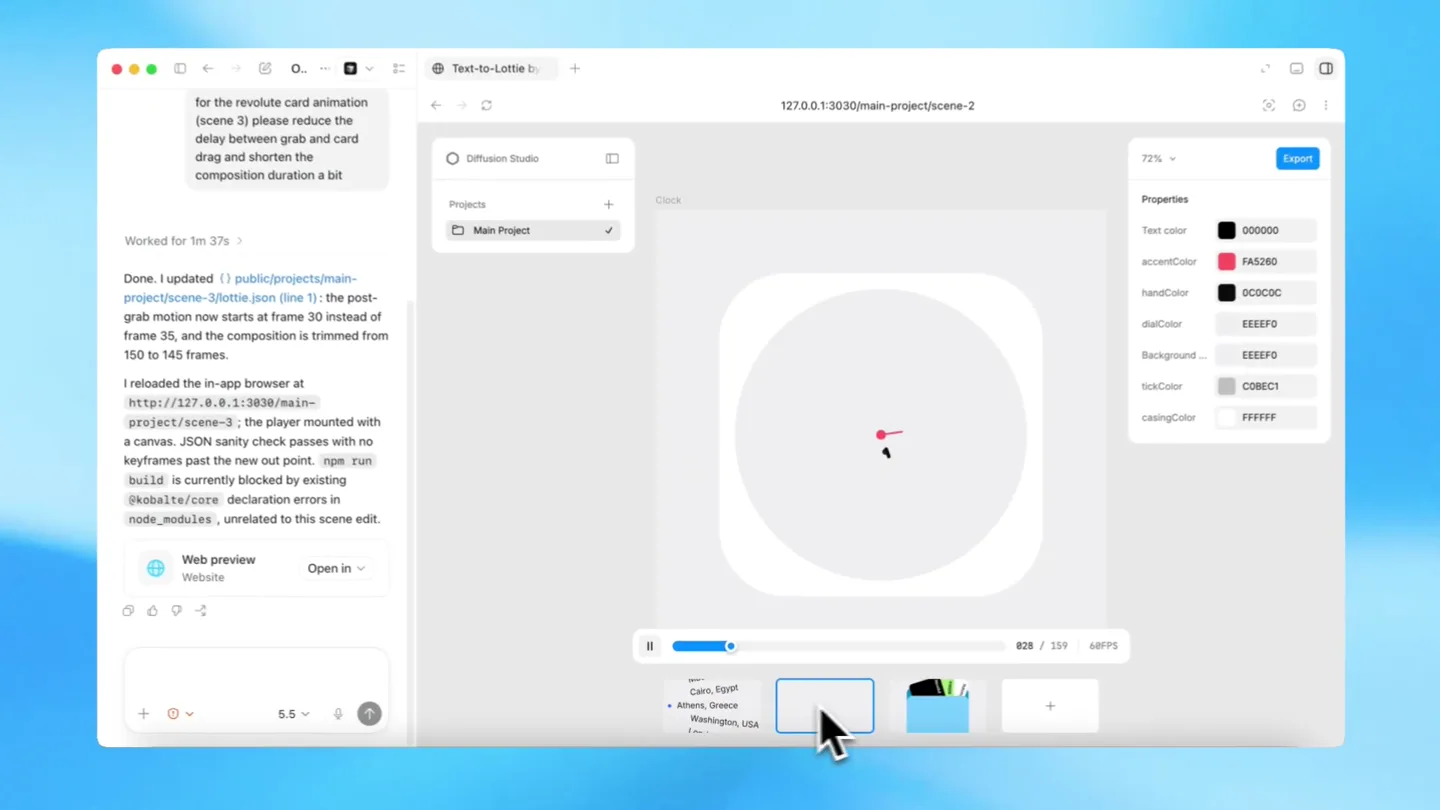
- On screen
- Text-to-Lottie v1.0.0 (stable) Diffusion Studio Main Project Clock Text color accentColor handColor dialColor Background tickColor casingColor Export Worked for 1m 37s Done. I updated (1) public/projects/main-project/scene-3/lottie.json (line 1): the post-grab motion now starts at frame 30 instead of frame 35, and the composition is trimmed from 150 to 145 frames. I reloaded the in-app browser at http://127.0.0.1:3030/main-project/scene-3; the player mounted with a canvas. JSON sanity check passes with no keyframes past the new out point. npm run build is currently blocked by existing @kobalte/core declaration errors in node_modules, unrelated to this scene edit. Web preview Website Open in
- Camera
- Static, slightly zoomed-in view, maintaining focus on the application's central canvas as content changes.
- Motion
- Instantaneous scene transition, revealing a new Lottie animation (a clock) with dynamic property adjustments.
Feature Teaser
Multi-Scene Drag-and-Drop
“(No spoken dialogue — ambient visual with mouse interaction sounds implied.)”
- On screen
- (No on-screen text)
- Camera
- Static, slightly zoomed-in view, maintaining focus on the application's central canvas and the bottom timeline.
- Motion
- Mouse cursor dragging a scene thumbnail, implying multi-scene management and reordering capabilities.
Call to Action
Production-Ready Lottie Output
“(No spoken dialogue — ambient visual with mouse interaction sounds implied.)”
- On screen
- Text-to-Lottie v1.0.0 (stable) Diffusion Studio Main Project Revolut Card Grab Background Export Worked for 1m 37s Done. I updated (1) public/projects/main-project/scene-3/lottie.json (line 1): the post-grab motion now starts at frame 30 instead of frame 35, and the composition is trimmed from 150 to 145 frames. I reloaded the in-app browser at http://127.0.0.1:3030/main-project/scene-3; the player mounted with a canvas. JSON sanity check passes with no keyframes past the new out point. npm run build is currently blocked by existing @kobalte/core declaration errors in node_modules, unrelated to this scene edit. Web preview Website Open in
- Camera
- Static, slightly zoomed-in view, showcasing the final Lottie animation within the application canvas.
- Motion
- Rapid transition to a new Lottie animation (card grab), demonstrating the versatility and production readiness of the output.
Motion design primitives
Synthesizable in Remotion · key components of the macos-ui-rapid-demo template.
UIDragAndDrop
A mouse cursor interacts with UI elements, selecting text, dragging items, and triggering scene changes within a desktop application interface.
+ Code construction recipe
Utilize Remotion's <AbsoluteFill> and <Img> components for the UI background and elements. Implement mouse cursor movement with `interpolate` and `spring` for realistic acceleration/deceleration. Use `useCurrentFrame` to synchronize UI state changes (e.g., selected text, dragged item position) with the cursor's animation.
DynamicLottieCanvas
A central canvas area within the application dynamically updates to display different Lottie animations, such as a list of cities, a clock, or a card interaction.
+ Code construction recipe
Employ Remotion's <Lottie> component to render Lottie files. Use `useVideoConfig` and `useCurrentFrame` to control which Lottie animation is displayed and its playback progress. Transitions between Lottie scenes can be achieved by conditionally rendering different <Lottie> components or by cross-fading them using `interpolate` on opacity.
TimelineThumbnailInteraction
Small, rectangular thumbnails at the bottom of the screen represent different scenes, and a mouse cursor drags one of these thumbnails to reorder or select it.
+ Code construction recipe
Create a row of <Sequence> components, each containing a miniature representation of a scene (e.g., a static image or a short Lottie preview). Animate the `transform` property (translateY, translateX) of a specific thumbnail using `spring` or `interpolate` to simulate the drag action, synchronized with the `UIDragAndDrop` cursor.
Style DNA & aesthetic system
Visual aesthetic
Typography
Motion
Special effects
Pacing & rhythm
Conceptual story rhythm
- 1
The Setup
Purpose. Introduce the Text-to-Lottie application interface and its core function.
Execution. A wide shot of the application window, showing the main canvas and a sidebar with project details. Mouse cursor selects text.
- 2
Dynamic Generation
Purpose. Demonstrate the immediate visual output of the text-to-Lottie conversion.
Execution. The canvas instantly updates to display a Lottie animation (e.g., a clock) based on input, highlighting real-time feedback.
- 3
Workflow Efficiency
Purpose. Showcase advanced features like multi-scene management and drag-and-drop.
Execution. The mouse cursor interacts with scene thumbnails at the bottom, dragging and reordering them, implying ease of use for complex projects.
- 4
Production Readiness
Purpose. Conclude by emphasizing the quality and versatility of the generated Lottie animations.
Execution. A final, polished Lottie animation (card grab) is displayed, reinforcing the 'production-ready' claim.
Remix in Animatiq Studio
Master remix prompt · agent-ready
Sample remix
Objective
Launch a new AI-powered web design tool that generates full-page layouts from text prompts.How the recipe adapts
The 'UIDragAndDrop' primitive would be adapted to show a user typing a prompt into a text area, then dragging a generated component from a sidebar onto a canvas. The 'DynamicLottieCanvas' would become a 'DynamicReactComponentCanvas', instantly rendering the generated UI. The 'TimelineThumbnailInteraction' would show different generated layout variations being selected or reordered.Remix blueprint · macos-ui-rapid-demo
Scene durations (4 scenes, 7.2s)
Key Remotion components
Related Creative Tools Product Launches
Explore all Creative Tools launches →
Anthropic Labs launches Claude Design, which turns conversation into prototypes, slides and one-pagers, powered by Claude Opus 4.7.

A vibe design partner with an AI-native canvas for turning ideas into UI.

Your work tools in Claude are now available on mobile. Explore Figma designs, create Canva slides, check Amplitude dashboards, all from your phone. Give it a try: