
tldraw · Launch Video Breakdown: Hook, Pacing & Motion Design
tldraw shipped comments on the SDK and tldraw.com, researched and designed in a tldraw file.
Scene-by-scene timeline & spoken transcript
The Hook
Deep Dive into Commenting SDK
“(No spoken dialogue — ambient visual of rapid UI navigation)”
- On screen
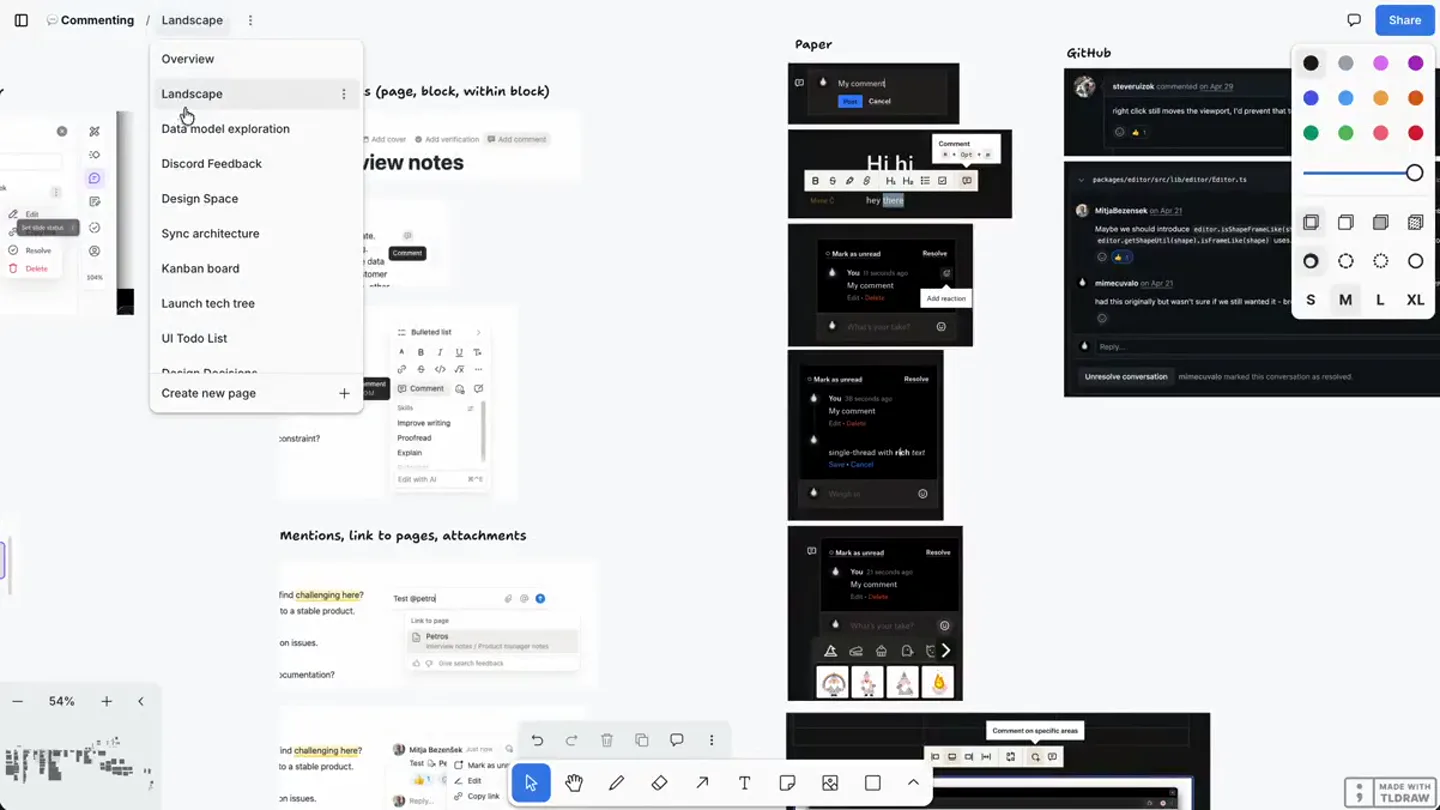
- Commenting | Overview Summary Add commenting to the tldraw SDK, with tldraw.com as the first consumer. For v1, a comment is a document-scoped store record that syncs through the file's room like any other record, but persists to a separate object-store lane so it stays out of the canvas document and .tldr exports. dotcom projects comments into Postgres so Zero can serve a cross-document view. An external, pluggable-provider path is deferred to v2. Work 1. Land the records data model: a thread record plus a comment record(?), a discriminated anchor (shape / point / page / document), and resolve as a status rather than a delete(?). 2. Object-store lane in sync core (objectTypes, per-session objectAccess) so comments sync but stay out of the document blob and exports. 3. dotcom: an R2 comment lane in the file Durable Object plus a Postgres / Zero projection for the /comments view. 4. Default canvas UI 5. Resolve the open questions: threads vs a flat model in v1, whether the lane belongs in sync-core, read/unread and mentions (per-user, so Postgres not the shared record), and a cc b c d e f g h i j k l m n o p q r s t u v w x y z :minator. Team Overview Landscape Data model exploration Discord Feedback Design Space Sync architecture Kanban board Launch tech tree UI Todo List Create new page Share S M L XL MADE WITH TLDRAW
- Camera
- Close-up on a digital whiteboard interface, rapidly navigating through a nested menu structure on the left sidebar.
- Motion
- Rapid menu traversal with instant cuts between selected menu items, creating a sense of quick exploration and information density.
Problem Agitation
Exploring Technical Architecture
“(No spoken dialogue — ambient visual of rapid UI navigation)”
- On screen
- Commenting | Discord Feedback Overview Landscape Data model exploration Discord Feedback Design Space Sync architecture Kanban board Launch tech tree UI Todo List Create new page Can a its? We want to build out a feature where users can react and comment on shapes. However, we can't trust the client to be honest about the user ID on a comment or reaction that is added to a shape. Is there a way in the tldraw sync backend to filter edits by type (e.g. added comment) and validate that the user ID of the comment is the same as the user ID that made the edit? If it is not, the backend should reject the edit and not fan it out to other connected users. ... Is there a way to get a granular diff between the current state and the diff in the message? For example, I have shape comments array in a prop. When a user leaves a comment on a shape, it appends the new comment to the array. The message sent to tldraw sync contains the entire array and not only the new comment. In order to enforce authz, I need to be able to detect in OnAfterReceiveMessage callback that the user left a comment and it is not from their user ID. Further, users shouldn't be able to delete or otherwise reorder/mutate the array of comments. They must only be able to append their own new comments, or edit their existing comments. Link Share S M L XL MADE WITH TLDRAW
- Camera
- The camera remains focused on the left sidebar, with the main canvas content changing rapidly to display different technical documents and diagrams.
- Motion
- Fast-paced content switching, simulating a user quickly reviewing various technical specifications and design documents.
Product Reveal
Design Decisions & Ideation
“(No spoken dialogue — ambient visual of rapid UI navigation)”
- On screen
- Commenting | Launch tech tree Overview Landscape Data model exploration Discord Feedback Design Space Sync architecture Kanban board Launch tech tree UI Todo List Design Decisions AI Generated Big List of Decisions Random ideas Create new page UI Create Edit Text editor Delete View resolved comment @mentioning Clustering Read/Unread Notifications Reusability/ Composability Sidebar Read V2: attachments? LAUNCH Data model Comment Threading Read/Unread Visibility Anchor Resolve V2: Kind Sync / store Decide: separate store or same? Events Notifications Comment-only mode V2: Email Bots misc click out of comment to dismiss "escape" out of comment tool back to selection tool comment pin blocking pointer events for panning focus comment composer on open? figma does it need scary modal for Share S M L XL MADE WITH TLDRAW
- Camera
- The camera continues to highlight the left navigation, with the main canvas showcasing design decisions, flowcharts, and brainstorming notes.
- Motion
- Sequential highlighting of different design phases, from technical trees to specific UI decisions and random ideas, using quick cuts.
Feature Teaser
Refining the Commenting Experience
“(No spoken dialogue — ambient visual of rapid UI navigation)”
- On screen
- Commenting | Random Ideas Overview Landscape Data model exploration Discord Feedback Design Space Sync architecture Kanban board Launch tech tree UI Todo List Design Decisions AI Generated Big List of Decisions Random Ideas Questions Design Review - 16/7 Design Review - 28/7 Create new page idea for us if we want to the comments package in ep us honest: allow users to "drop" their cursor chat bubbles on the canvas, where they'd stay pinned for some period of time (max) Hello! Hello! Hello! Bye! Questions Design Review - 16/7 Design Review - 28/7 Decision Should be: Mentions c No region No region Hint when When a sh Deleting Open qui Undo/redo Possible Sidebar fea Have it triggered through a button/opt in rather than by pressing c/creating a comment. Have a button next to the share button In early designs for things like collections it lived undernath the page menu as a floating panel. Could have comments live there? If we did away with the lefthand sidebar for nav (and have more of a general files view) then we could have the righthand sidebar that could handle comments/assets/collections Sidebar UI should be at the application level, not part of the canvas UI Allow anonymous comments on dotcom, but not anonymous mentioning Jessica Edwards test Reply... Jessica Edwards test cool workspace Jessica Edwards test Reply... Share S M L XL MADE WITH TLDRAW
- Camera
- The camera zooms out slightly to reveal more of the canvas, showcasing interactive elements like comment threads and design review notes.
- Motion
- A combination of quick cuts and subtle panning, emphasizing the collaborative and iterative nature of the design process, culminating in a view of actual comment UI.
Motion design primitives
Synthesizable in Remotion · key components of the rapid-tech-deep-dive template.
RapidMenuTraversal
A quick, almost instantaneous switch between different menu items in a sidebar navigation, giving the impression of a user rapidly clicking through options.
+ Code construction recipe
Utilize `Sequence` and `AbsoluteFill` components. Each menu state is a child of `Sequence`, with `durationInFrames` set to a very low value (e.g., 5-10 frames) and `from` property to control timing. Use `spring` for subtle, quick opacity transitions on content changes, or simply `interpolate` for instant cuts.
ContentZoomPan
The main canvas content changes and scales, sometimes with a slight pan, to bring different sections of a large document into focus.
+ Code construction recipe
Employ `AbsoluteFill` with `transform` properties (scale, translateX, translateY) animated using `spring` or `interpolate` with an `easeOutCubic` curve. The content itself can be a static image or a dynamic component that updates based on the current 'page' being viewed.
InteractiveElementHighlight
Specific UI elements, like comment bubbles or sticky notes, appear and are briefly highlighted or brought into focus, simulating user interaction or a design review.
+ Code construction recipe
Use `AbsoluteFill` for the main canvas. Overlay individual UI elements as separate components. Animate their `opacity`, `scale`, and `boxShadow` properties using `spring` for a bouncy, interactive feel when they come into view or are 'clicked'.
Style DNA & aesthetic system
Visual aesthetic
Typography
Motion
Special effects
Pacing & rhythm
Conceptual story rhythm
- 1
The Deep Dive
Purpose. Immediately immerse the viewer in the product's complexity and the depth of its development process.
Execution. Rapid-fire navigation through high-level documentation and technical summaries, showcasing the breadth of the project.
- 2
Architectural Unveiling
Purpose. Demonstrate the robust engineering and thoughtful design behind the feature.
Execution. Quick cuts to data models, sync architectures, and detailed technical specifications, highlighting the underlying systems.
- 3
Design Iteration
Purpose. Illustrate the iterative and collaborative nature of the design process, from ideation to decision-making.
Execution. Transition through Kanban boards, UI todo lists, design decisions, and brainstorming sessions, showing the evolution of ideas.
- 4
Feature Refinement
Purpose. Showcase the practical application and user-facing aspects of the new commenting feature.
Execution. Focus on specific UI elements like comment threads and design review notes, demonstrating the polished user experience.
Remix in Animatiq Studio
Master remix prompt · agent-ready
Sample remix
Objective
Launch a new AI-powered code refactoring tool called 'RefactorFlow'.How the recipe adapts
The video would open with rapid menu traversal through RefactorFlow's documentation, showing sections like 'Core Algorithms' and 'Integration APIs'. It would then cut to architectural diagrams illustrating the AI model's interaction with codebases, followed by design mockups of the refactoring suggestions UI. The final scenes would showcase interactive elements like inline code suggestions and pull request integration, all with the same fast-paced, silent, and information-dense visual style.Remix blueprint · rapid-tech-deep-dive
Scene durations (4 scenes, 22.9s)
Key Remotion components
Related Creative Tools Product Launches
Explore all Creative Tools launches →
A vibe design partner with an AI-native canvas for turning ideas into UI.

We heard you wanted to use Codex rate limit resets on your own time. Starting today, we’re rolling out the ability to save rate limit resets to use later. We’re starting Go, Plus, Pro, and Business

There's a hidden tax on every knowledge worker in the world, and nobody talks about it: The design tax. You're a strategist, a sales lead, a marketer. You were hired for what you know. But every me…