
tldraw · Launch Video Breakdown: Hook, Pacing & Motion Design
tldraw Flash animates hand-drawn ideas on the infinite canvas. Draw a shape, press record, drag to perform the motion, then trim, export, and remix.
Scene-by-scene timeline & spoken transcript
The Hook
Hand-Drawn Character Introduction
“(No spoken dialogue — High-energy audio riser builds to a subtle impact.)”
- On screen
- (No on-screen text)
- Camera
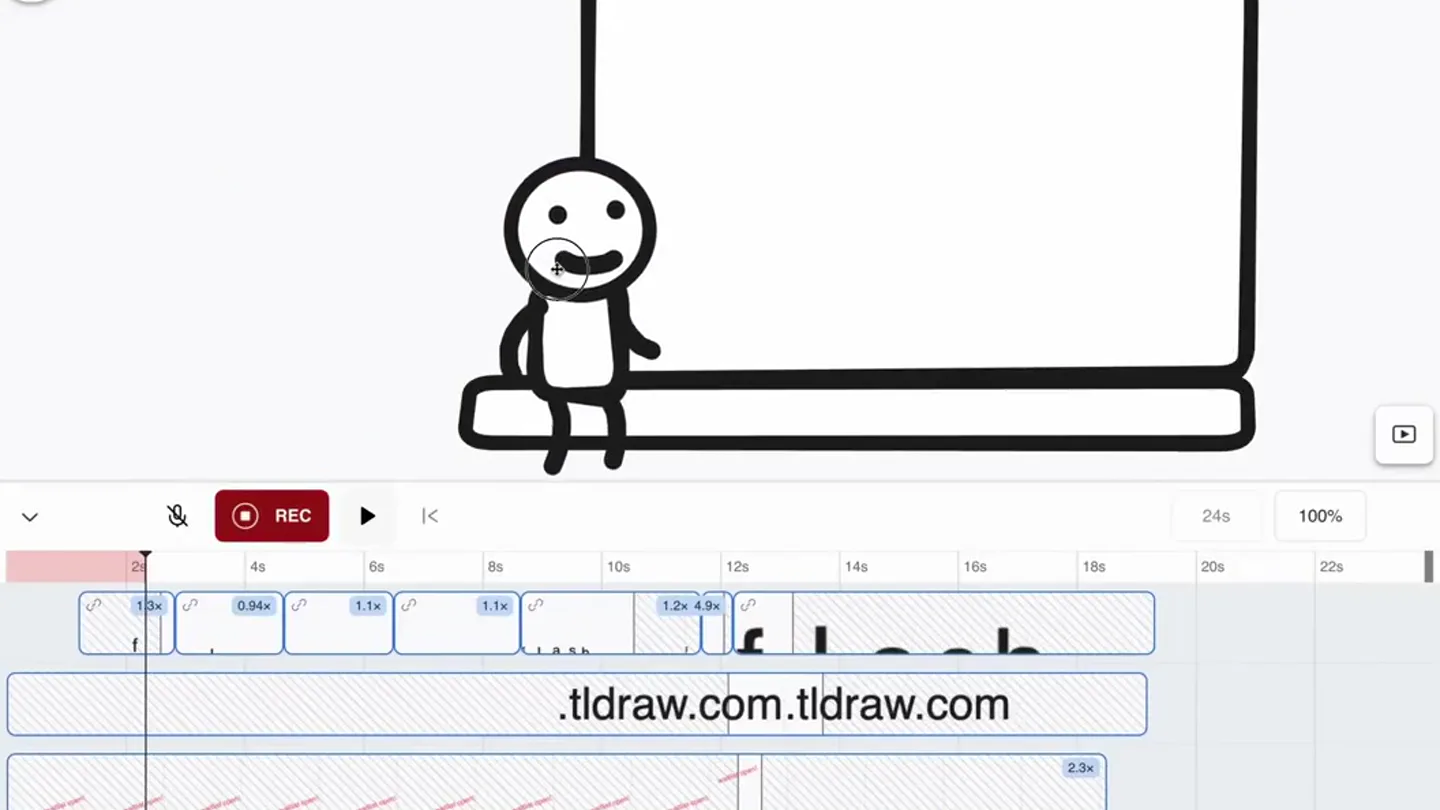
- Static wide shot, centered on a hand-drawn stick figure and a laptop outline.
- Motion
- Subtle character animation (blinking, slight arm movement) to establish a playful tone.
Product Reveal
Interactive Drawing & Animation
“(No spoken dialogue — Driving, rhythmic synth pulse with sub-bass layer.)”
- On screen
- f, fl, fla, flas
- Camera
- Static wide shot, maintaining focus on the character and laptop.
- Motion
- Character interacts with the laptop screen, drawing letters. This demonstrates the core 'draw and animate' functionality with a direct, playful interaction.
Feature Teaser
Flash Animation Completion
“(No spoken dialogue — Significant sub-bass drop/impact at 0:07, followed by sustained, evolving synth pad and rhythmic elements.)”
- On screen
- flash
- Camera
- Static wide shot.
- Motion
- The word 'flash' is completed on the screen, emphasizing the product's name and its animation capability. The character reacts with a satisfied pose.
Call to Action
Waitlist & Website Reveal
“(No spoken dialogue — Sustained, evolving synth pad and rhythmic elements continue, building energy.)”
- On screen
- flash .tldraw.com waitlist open!
- Camera
- Static wide shot.
- Motion
- Additional text appears on screen, revealing the website and a call to action for the waitlist. The character gestures towards the text, reinforcing the message.
Motion design primitives
Synthesizable in Remotion · key components of the hand-drawn-interactive-product-launch template.
HandDrawnCharacterInteraction
A simple, hand-drawn stick figure performs actions like blinking, walking, sitting, and gesturing, directly interacting with on-screen elements.
+ Code construction recipe
Utilize SVG path animations for character limbs and facial features, controlled by Remotion's 'interpolate' function for smooth, keyframe-based movement. Use 'spring' for subtle bounces or impacts.
DynamicScreenTextReveal
Hand-drawn text appears letter by letter on a screen, mimicking a real-time drawing process, then additional text elements fade or slide in.
+ Code construction recipe
Implement a sequence of 'Text' components with 'opacity' and 'transform' animations. For the drawing effect, use SVG path drawing animations (stroke-dasharray, stroke-dashoffset) or a custom shader for a 'hand-drawn' line effect.
PlayfulProductCanvas
A minimalist, hand-drawn representation of a tech product (e.g., laptop) serves as a canvas for interactive demonstrations, maintaining a clean, inviting aesthetic.
+ Code construction recipe
Render the product outline as an SVG or a simple 'View' component with a 'border' style. Nest interactive elements (like the 'DynamicScreenTextReveal' or character) within its bounds, using 'absolute' positioning.
Style DNA & aesthetic system
Visual aesthetic
Typography
Motion
Special effects
Pacing & rhythm
Conceptual story rhythm
- 1
Introduction to the Canvas
Purpose. Establish the product's environment and a friendly, approachable tone.
Execution. A static shot of a hand-drawn laptop and a stick figure, setting the stage for interaction.
- 2
Demonstrating Core Functionality
Purpose. Showcase the primary feature: animating hand-drawn ideas.
Execution. The stick figure draws letters on the laptop screen, forming the product's name.
- 3
Product Name Reveal
Purpose. Clearly state the product's name and its core promise.
Execution. The word 'flash' is completed on the screen, with the character reacting.
- 4
Call to Action
Purpose. Guide viewers on how to engage further with the product.
Execution. Website and waitlist information appear, with the character gesturing towards it.
Remix in Animatiq Studio
Master remix prompt · agent-ready
Sample remix
Objective
Launch a new AI-powered recipe app that helps users visualize meal prep steps.How the recipe adapts
A hand-drawn chef character interacts with a tablet screen. The chef draws ingredients, and the app instantly animates them into a meal prep sequence. Text appears showing 'AI-Powered Prep' and then 'Get the Beta!'. The vibrant accent color highlights the 'Get the Beta!' call to action.Remix blueprint · hand-drawn-interactive-product-launch
Scene durations (4 scenes, 13.8s)
Key Remotion components
Related Creative Tools Product Launches
Explore all Creative Tools launches →
A vibe design partner with an AI-native canvas for turning ideas into UI.

We heard you wanted to use Codex rate limit resets on your own time. Starting today, we’re rolling out the ability to save rate limit resets to use later. We’re starting Go, Plus, Pro, and Business

There's a hidden tax on every knowledge worker in the world, and nobody talks about it: The design tax. You're a strategist, a sales lead, a marketer. You were hired for what you know. But every me…