
tldraw · Launch Video Breakdown: Hook, Pacing & Motion Design
A walkthrough of what you can do with tldraw Flash: animate hand-drawn ideas on the canvas.
Scene-by-scene timeline & spoken transcript
The Hook
Introducing tldraw Flash: Animate Hand-Drawn Ideas
“Hi, I'm Steve. I'm one of the co-creators of tldraw, and today I'm going to show you Flash.”
- On screen
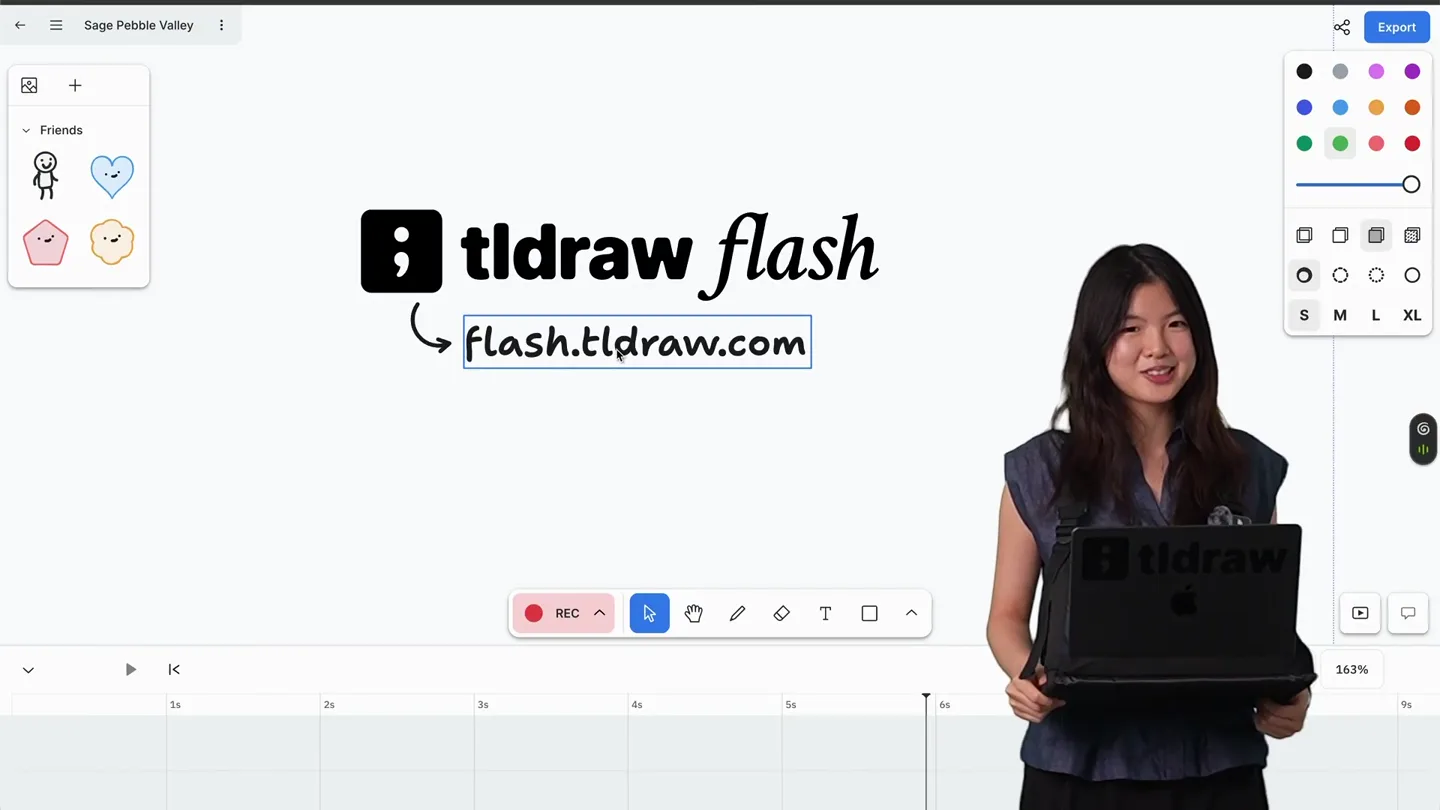
- ; tldraw flash flash.tldraw.com
- Camera
- Medium shot of the presenter, slightly off-center to the right, with the tldraw Flash interface visible on the left. The camera is static.
- Motion
- Static shot with on-screen text overlay and a live presenter. The interface shows a simple character and a cloud-like shape, along with a timeline at the bottom.
Product Reveal
Basic Animation & Character Manipulation
“Flash is a new animation platform that lets you animate hand-drawn ideas on the canvas. So let's say I have this guy, and I want to make him kick this Clob. I can just select the guy, and then I can go down to the timeline, and I can start recording. So I'll hit record, and then I'll move the guy, and then I'll move him again, and then I'll move him again. And then I'll hit stop. And now if I play it back, you can see the guy is moving. And I can also adjust the timeline. So I can make it faster or slower. And I can also add more frames. So if I want to make him kick the Clob, I can just add a new frame, and then I can move his leg up, and then I can move his leg down. And now if I play it back, you can see he's kicking the Clob.”
- On screen
- ; tldraw flash flash.tldraw.com
- Camera
- The camera remains static, focused on the presenter and the tldraw Flash interface. The interface shows the creation and manipulation of simple hand-drawn characters and a timeline.
- Motion
- Live screen recording with presenter overlay. Keyframe animation is demonstrated directly within the product interface, showing character movement, timeline adjustments, and frame-by-frame editing. Elements like 'the guy' and 'Clob' are drawn and animated on the canvas.
Feature Teaser
Advanced Timeline Controls & Character Interactions
“So that's how you can make a simple animation. But what if I want to make him kick the Clob multiple times? I can just copy and paste the frames. So I'll select these frames, and then I'll hit command C, command V. And now if I play it back, you can see he's kicking the Clob multiple times. And I can also adjust the timing of each kick. So I can make some kicks faster and some kicks slower. And I can also add more characters. So if I want to add another guy, I can just draw him, and then I can animate him as well. And I can also make them interact with each other. So if I want the first guy to kick the second guy, I can just move him over, and then I can animate him kicking the second guy.”
- On screen
- ; tldraw flash flash.tldraw.com
- Camera
- Static camera, maintaining the same framing of the presenter and the tldraw Flash interface. The interface shows more complex timeline operations and multi-character animations.
- Motion
- Continued live screen recording. The demonstration highlights advanced timeline features like copying/pasting frames, adjusting individual frame timings, and animating interactions between multiple hand-drawn characters. The motion is entirely driven by the in-product demonstration.
Call to Action
Q&A and Accessing tldraw Flash
“So that's a quick overview of Flash. Do you guys have any questions? (Audience question) Where can we access this? You can access it at flash.tldraw.com. It's currently in beta, so we're still working on it, but we'd love for you to try it out and give us feedback. (Audience question) Is it free? Yes, it's free to use. We want to make it accessible to everyone. So yeah, that's Flash. Thanks for watching!”
- On screen
- ; tldraw flash flash.tldraw.com
- Camera
- The camera remains static, focusing on the presenter and the tldraw Flash interface. The presenter engages in a brief Q&A session.
- Motion
- Static shot with presenter speaking directly to the audience (implied). The product interface remains visible, reinforcing the brand and access URL. The motion is minimal, primarily focusing on the presenter's dialogue and the static display of the product name and URL.
Motion design primitives
Synthesizable in Remotion · key components of the live-demo-screen-overlay template.
LiveScreenPresenterOverlay
A live-action presenter is composited onto a screen recording of a software interface, appearing to interact with the elements on the screen. The presenter is positioned in the lower right quadrant.
+ Code construction recipe
Use a Remotion <AbsoluteFill> for the screen recording, then overlay a <Video> component for the presenter with a chroma key effect (e.g., green screen removal using <ChromaKey> or a custom shader) and position it using CSS transforms. Ensure the presenter's video is pre-rendered with a transparent background or a solid color for keying.
InteractiveTimelineScrub
A horizontal timeline at the bottom of the screen displays keyframes as small icons. A playhead moves across this timeline, and the main canvas updates in real-time to reflect the animation state at the playhead's position.
+ Code construction recipe
Implement a custom timeline component using React. Use Remotion's `useCurrentFrame()` and `interpolate()` to synchronize the playhead's position with the video's current frame. The main canvas animation should be driven by `useVideoConfig()` and `useCurrentFrame()`, updating SVG or Canvas elements based on interpolated keyframe data.
HandDrawnCharacterAnimation
Simple, hand-drawn characters (e.g., stick figures, cloud shapes) are animated with basic movements like translation, rotation, and scaling, mimicking frame-by-frame drawing and manipulation.
+ Code construction recipe
Utilize Remotion's <Sequence> and <AbsoluteFill> components. For each character, create a series of SVG or image assets representing different poses/frames. Animate their `transform` properties (x, y, rotation, scale) using `interpolate()` or `spring()` functions across different frames. Group related character parts for hierarchical animation if needed.
Style DNA & aesthetic system
Visual aesthetic
Typography
Motion
Special effects
Pacing & rhythm
Conceptual story rhythm
- 1
Personal Introduction & Product Unveil
Purpose. Establishes credibility and immediately introduces the product and its core promise.
Execution. Presenter introduces herself with the product logo and URL prominently displayed on the screen, setting the stage for a live demo.
- 2
Core Feature Demonstration
Purpose. Shows the fundamental functionality of the product through a simple, relatable use case.
Execution. Live screen recording of the presenter drawing and animating a basic character, demonstrating keyframe creation and timeline manipulation.
- 3
Advanced Workflow Showcase
Purpose. Highlights more complex capabilities and efficiency features, demonstrating the product's depth.
Execution. The presenter demonstrates copying/pasting animation frames, adjusting timing, and animating interactions between multiple characters within the software.
- 4
Engagement & Call to Action
Purpose. Addresses common questions and directs viewers on how to access and engage with the product.
Execution. Presenter engages in a brief Q&A, reiterating the product name and URL, encouraging user adoption and feedback.
Remix in Animatiq Studio
Master remix prompt · agent-ready
Sample remix
Objective
Launch a new AI-powered code editor called 'SyntaxFlow'.How the recipe adapts
The 'LiveScreenPresenterOverlay' primitive will be used to feature the lead developer demonstrating SyntaxFlow. The 'InteractiveTimelineScrub' primitive will be adapted to show the AI's real-time code generation and refactoring suggestions appearing on the screen, with a subtle progress bar or highlight indicating AI activity. The 'HandDrawnCharacterAnimation' primitive will be replaced with 'CodeSnippetHighlightAnimation', where specific lines of code or UI elements are highlighted or animated to draw attention to AI-driven features like auto-completion or error correction. The overall aesthetic will maintain the clean, functional look, but with a slightly more futuristic color palette.Remix blueprint · live-demo-screen-overlay
Scene durations (4 scenes, 218s)
Key Remotion components
Related Creative Tools Product Launches
Explore all Creative Tools launches →
AI is already smart enough. Real-world tasks are still slow, expensive and unreliable, because we hand AI a computer built for humans, then wrap it in a heavy harness. AI doesn’t need to get smarter

Big day 🔥 🚀 Introducing Dolphin AI - an agentic AI studio for complete video production. The story of Dolphin is very interesting. It didn’t start as a product. It started as an internal tool. W

A vibe design partner with an AI-native canvas for turning ideas into UI.