
tldraw · Launch Video Breakdown: Hook, Pacing & Motion Design
The newest tldraw release makes switching pages its own undo step, so undo behaves the way you would expect.
Scene-by-scene timeline & spoken transcript
The Hook
The 'Before' Problem: Undo Inconsistency
“(No spoken dialogue — ambient visual with UI clicks and drawing sounds)”
- On screen
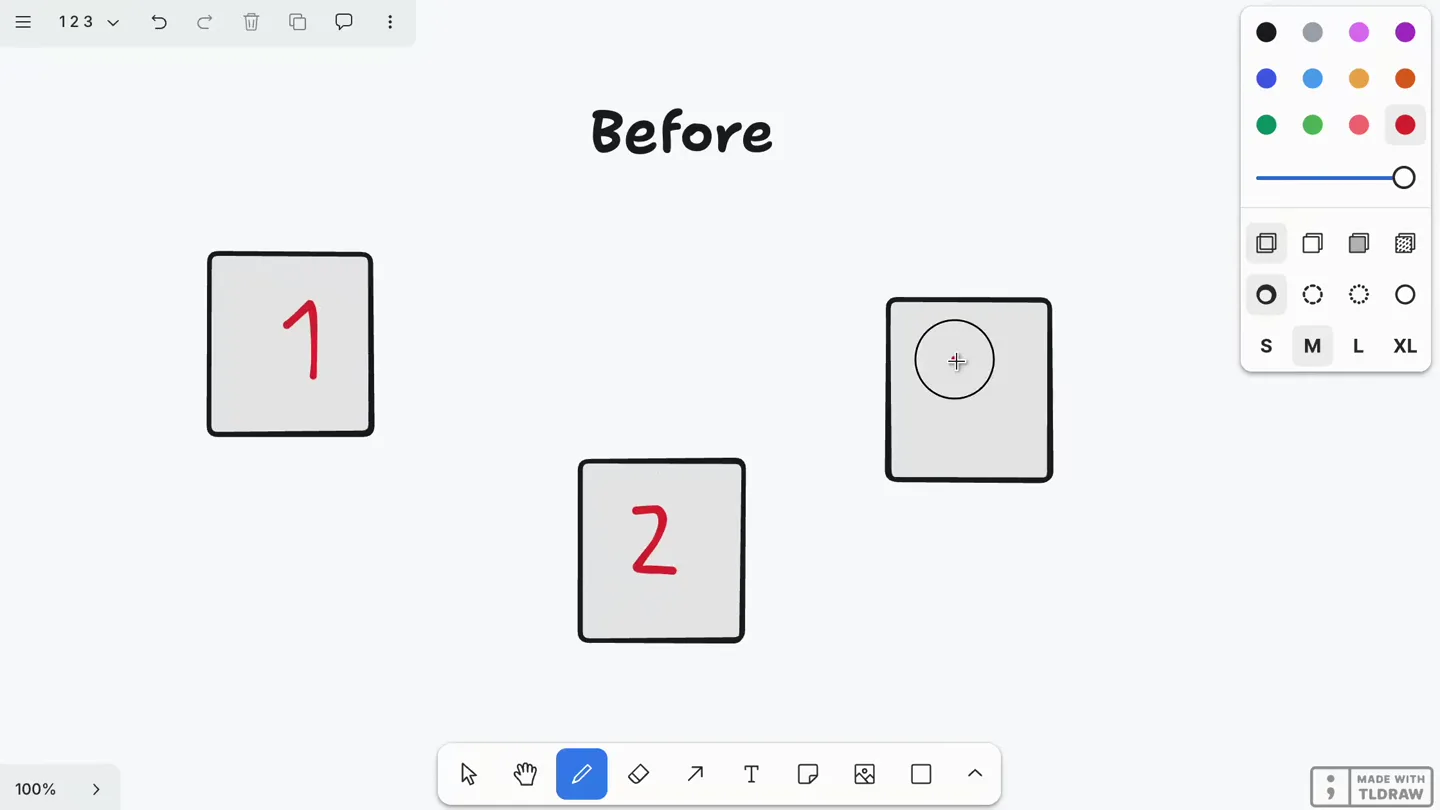
- Before 1 2 3 1 2 3 4 Create new page 100% MADE WITH TLDRAW
- Camera
- Static, wide shot of the tldraw canvas, focusing on the page elements.
- Motion
- On-screen drawing animation, UI element interaction (dropdown, button clicks), and a quick page switch.
Problem Agitation
Frustration with Undo Behavior
“(No spoken dialogue — ambient visual with UI clicks and drawing sounds)”
- On screen
- Before 1 2 3 4 ⌘ Z ? 1 2 3 Create new page 100% MADE WITH TLDRAW
- Camera
- Static, wide shot of the tldraw canvas, highlighting the undo action and its unexpected result.
- Motion
- Drawing animation, a '⌘ Z' keypress overlay, and a red question mark animation to emphasize the problem.
Product Reveal
The 'After' Solution: Intuitive Undo
“(No spoken dialogue — ambient visual with UI clicks and drawing sounds)”
- On screen
- After 1 2 3 Draw — D 1 2 3 100% MADE WITH TLDRAW
- Camera
- Static, wide shot of the tldraw canvas, demonstrating the new, improved undo behavior.
- Motion
- On-screen drawing animation, UI element interaction, and a page switch, followed by a correct undo.
Feature Teaser
Seamless Workflow with New Undo
“(No spoken dialogue — ambient visual with UI clicks and drawing sounds)”
- On screen
- After 1 2 3 4 ⌘ Z ! 1 2 3 Create new page 100% MADE WITH TLDRAW
- Camera
- Static, wide shot of the tldraw canvas, reinforcing the new undo functionality.
- Motion
- Drawing animation, a '⌘ Z' keypress overlay, and a red exclamation mark animation to signify success.
Motion design primitives
Synthesizable in Remotion · key components of the before-after-feature-reveal template.
UIInteractionHighlight
A subtle, quick highlight or outline appears around a UI element (like a button or a drawn shape) to indicate user interaction, often accompanied by a cursor animation.
+ Code construction recipe
Use `spring` for opacity and scale changes on a border or background layer. Animate `cursor` position with `interpolate` and `bezier` curves for natural movement.
HandDrawnStrokeReveal
Numbers or shapes appear on the canvas as if being drawn by hand, with a slight wobble or imperfection, mimicking a real-time drawing process.
+ Code construction recipe
Employ `SVG path drawing` animations using `stroke-dasharray` and `stroke-dashoffset` properties. Add `perlin noise` or `wiggle` effects to path points for a hand-drawn feel.
ContextualKeypressOverlay
A keyboard shortcut (e.g., '⌘ Z') appears briefly near the center of the screen, often with a subtle bounce or fade-in, to indicate a keyboard action.
+ Code construction recipe
Render a `text component` with `opacity` and `scale` animated using `spring` or `cubic-bezier` for a quick pop-in and fade-out. Position dynamically based on context.
Style DNA & aesthetic system
Visual aesthetic
Typography
Motion
Special effects
Pacing & rhythm
Conceptual story rhythm
- 1
Initial State & Problem Setup
Purpose. Establish the current, problematic behavior of the product's undo feature.
Execution. Demonstrate creating multiple pages and drawing on them, then show an undo action that doesn't revert the page switch.
- 2
Agitation & User Frustration
Purpose. Highlight the pain point caused by the inconsistent undo, making it relatable.
Execution. A red question mark appears, emphasizing the confusion and unexpected outcome of the undo.
- 3
Solution Introduction & 'After' State
Purpose. Introduce the new, improved undo behavior as the solution.
Execution. The scene transitions to 'After', showing the same actions but with the undo now correctly reverting the page switch.
- 4
Reinforcement & Benefit
Purpose. Reiterate the positive impact of the new feature on user workflow.
Execution. A red exclamation mark appears, signifying the successful and intuitive behavior of the updated undo.
Remix in Animatiq Studio
Master remix prompt · agent-ready
Sample remix
Objective
Demonstrate a new 'Smart Grouping' feature in a project management tool that automatically organizes tasks.How the recipe adapts
The 'Before' section would show a user manually dragging and dropping tasks into groups, with a red question mark appearing over a messy task list. The 'After' section would show the user clicking a 'Smart Group' button, and tasks automatically animating into organized categories, with a green exclamation mark signifying efficiency. Hand-drawn circles could highlight the manual effort versus the automated result.Remix blueprint · before-after-feature-reveal
Scene durations (4 scenes, 19.8s)
Key Remotion components
Related Creative Tools Product Launches
Explore all Creative Tools launches →
A vibe design partner with an AI-native canvas for turning ideas into UI.

We heard you wanted to use Codex rate limit resets on your own time. Starting today, we’re rolling out the ability to save rate limit resets to use later. We’re starting Go, Plus, Pro, and Business
Introducing Framer 3.0 with Agents, Branching, Community, and an all-new design.