
Sadao Tokuyama · Launch Video Breakdown: Hook, Pacing & Motion Design
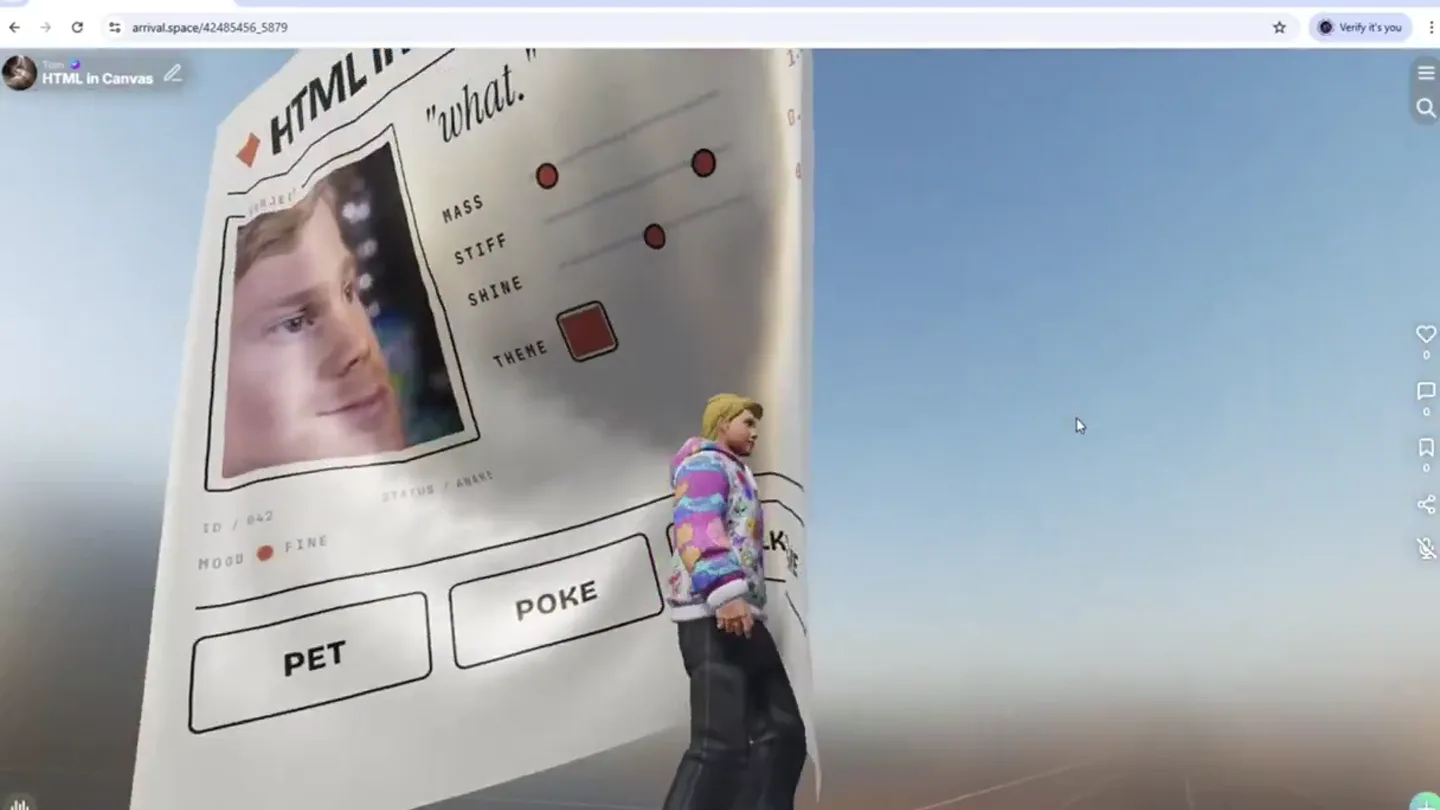
HTMLを直接3Dの質感として描画できる新機能「html-in-canvas」 複雑な操作画面をWebブラウザの標準機能でそのまま3D空間へ配置できます。 現在はChromeの試験運用機能ですが、Web3DのUI制作を劇的に効率化する可能性を秘めた期待の技術です。
Scene-by-scene timeline & spoken transcript
The Hook
Interactive 3D HTML Canvas Introduction
“(No spoken dialogue — Sustained, evolving pad sound creates an atmospheric mood, building tension with a high-frequency riser, culminating in a powerful sub-bass drop/impact.)”
- On screen
- HTML in Canvas SUBJECT "what." MASS STIFF SHINE THEME ID / 042 STATUS / AWAKE MOOD FINE PET POKE LK TO ME
- Camera
- Medium shot, slightly low angle, slowly rotating around a central 3D HTML element.
- Motion
- 3D object rotation, dynamic lighting, subtle camera orbit, HTML content rendered as a textured 3D plane.
Product Reveal
Dynamic HTML Property Manipulation
“(No spoken dialogue — Rhythmic, arpeggiated synth pattern emerges, providing forward momentum, followed by another high-energy riser and a more pronounced sub-bass impact.)”
- On screen
- HTML in Canvas SUBJECT "seriously?" MASS 1.2 STIFF 0.90 SHINE 0.50 THEME ID / 042 STATUS / AWAKE MOOD DONE PET POKE TALK TO ME
- Camera
- Continues slow orbit, with slight zoom adjustments to highlight interactive elements.
- Motion
- Real-time UI element interaction (sliders, buttons), text changes, 3D object deformation (page curl effect) in response to interaction.
Feature Teaser
Interactive Text Input and Real-time Updates
“(No spoken dialogue — Electronic textures and subtle percussive elements are layered, maintaining dynamic yet controlled energy.)”
- On screen
- HTML in Canvas EST. 2026 SUBJECT "why." MASS 1.2 STIFF 0.90 SHINE 0.65 THEME ID / 042 STATUS / AWAKE MOOD DONE PET POKE TALK TO ME Hello I am on canvas
- Camera
- Slightly closer medium shot, maintaining the orbit, focusing on the text input area.
- Motion
- Live text input rendering within the 3D HTML element, button state changes (e.g., 'TALK TO ME' button changing color), continued 3D page curl effect.
Call to Action
Final Reveal and Product Statement
“(No spoken dialogue — A final, extended riser and sweep effect begins, culminating in a powerful, sustained sub-bass impact and a bright, shimmering synth chord, signaling a climax.)”
- On screen
- HTML in Canvas SUBJECT "hi." MASS 1.2 STIFF 0.90 SHINE 0.65 THEME ID / 042 STATUS / AWAKE MOOD DONE PET POKE TALK TO ME Hello I am on canvas "fascinating."
- Camera
- Wider shot, pulling back slightly to reveal more of the 3D environment, with a final dramatic page curl.
- Motion
- Exaggerated 3D page curl, dynamic text updates, final impactful camera movement and lighting shift.
Motion design primitives
Synthesizable in Remotion · key components of the 3d-html-canvas-interactive template.
HtmlInCanvas3D
HTML content is rendered onto a flexible 3D plane, which can be manipulated and deformed in a 3D space, such as curling like a sheet of paper.
+ Code construction recipe
Utilize Remotion's `ThreeCanvas` component to render a `PlaneGeometry` with an `HTMLTexture` or `CanvasTexture` generated from a React component. Apply `ShaderMaterial` with custom vertex and fragment shaders to achieve the page curl deformation, interpolating parameters like curl amount and direction.
InteractiveUiSliders
On-screen UI elements like sliders and buttons are rendered as part of the 3D HTML, responding to user input with visual feedback and updating numerical values.
+ Code construction recipe
Within the React component rendered to the `HTMLTexture`, implement standard HTML input sliders (`<input type="range">`) and buttons. Use Remotion's `useCurrentFrame` and `interpolate` to animate the slider thumb position and button states (e.g., color change on click) based on simulated user interaction or data changes.
DynamicTextUpdate
Text content within the 3D HTML element updates dynamically, including meme-style captions and live input, appearing as if typed or changed in real-time.
+ Code construction recipe
Use a state management solution within the React component to update text content. Animate text changes using `spring` or `interpolate` for character-by-character reveals or instant swaps. Ensure the `HTMLTexture` updates efficiently to reflect these text changes on the 3D plane.
Style DNA & aesthetic system
Visual aesthetic
Typography
Motion
Special effects
Pacing & rhythm
Conceptual story rhythm
- 1
The Unveiling
Purpose. Introduce the core concept of HTML as a physical 3D object.
Execution. A large, paper-like HTML page slowly rotates into view, revealing familiar web UI elements rendered with 3D depth and texture.
- 2
Interactive Exploration
Purpose. Demonstrate the dynamic and interactive capabilities of the 3D HTML.
Execution. Sliders are manipulated, causing the 3D HTML page to deform and change properties, showcasing real-time feedback and physical simulation.
- 3
Personalized Engagement
Purpose. Highlight the ability to interact with and customize the 3D HTML content.
Execution. Text is typed directly onto the 3D page, and buttons are clicked, showing how standard web interactions translate into the 3D environment.
- 4
The Grand Finale
Purpose. Conclude with a powerful statement about the technology's potential.
Execution. A dramatic, exaggerated page curl reveals a final, impactful message, emphasizing the 'fascinating' nature of the innovation.
Remix in Animatiq Studio
Master remix prompt · agent-ready
Sample remix
Objective
Launch a new collaborative 3D modeling platform called 'ForgeFlow'.How the recipe adapts
The HtmlInCanvas3D primitive would be adapted to represent a shared 3D canvas where multiple users are simultaneously manipulating a complex model. Instead of HTML elements, the 'page' would be the 3D model itself, with user interfaces for tools and properties appearing as floating, interactive panels. The InteractiveUiSliders primitive would control model parameters like material properties or subdivision levels, with changes rippling across the shared model. DynamicTextUpdate would show user names appearing next to their cursors or chat messages floating in the 3D space. The camera would smoothly orbit the evolving model, occasionally zooming in on specific collaborative edits, maintaining the contemplative yet dynamic pacing.Remix blueprint · 3d-html-canvas-interactive
Scene durations (4 scenes, 27s)
Key Remotion components
Related Creative Tools Product Launches
Explore all Creative Tools launches →
Anthropic Labs launches Claude Design, which turns conversation into prototypes, slides and one-pagers, powered by Claude Opus 4.7.

A vibe design partner with an AI-native canvas for turning ideas into UI.

Your work tools in Claude are now available on mobile. Explore Figma designs, create Canva slides, check Amplitude dashboards, all from your phone. Give it a try: