
Dilum Sanjaya · Launch Video Breakdown: Hook, Pacing & Motion Design
Fun interactive science app ideas | Part 4 Made a turbofan jet engine airflow simulator UI Design GPT Images 2 Code Gemini 3.1 Pro More demos ↓
Scene-by-scene timeline & spoken transcript
The Hook
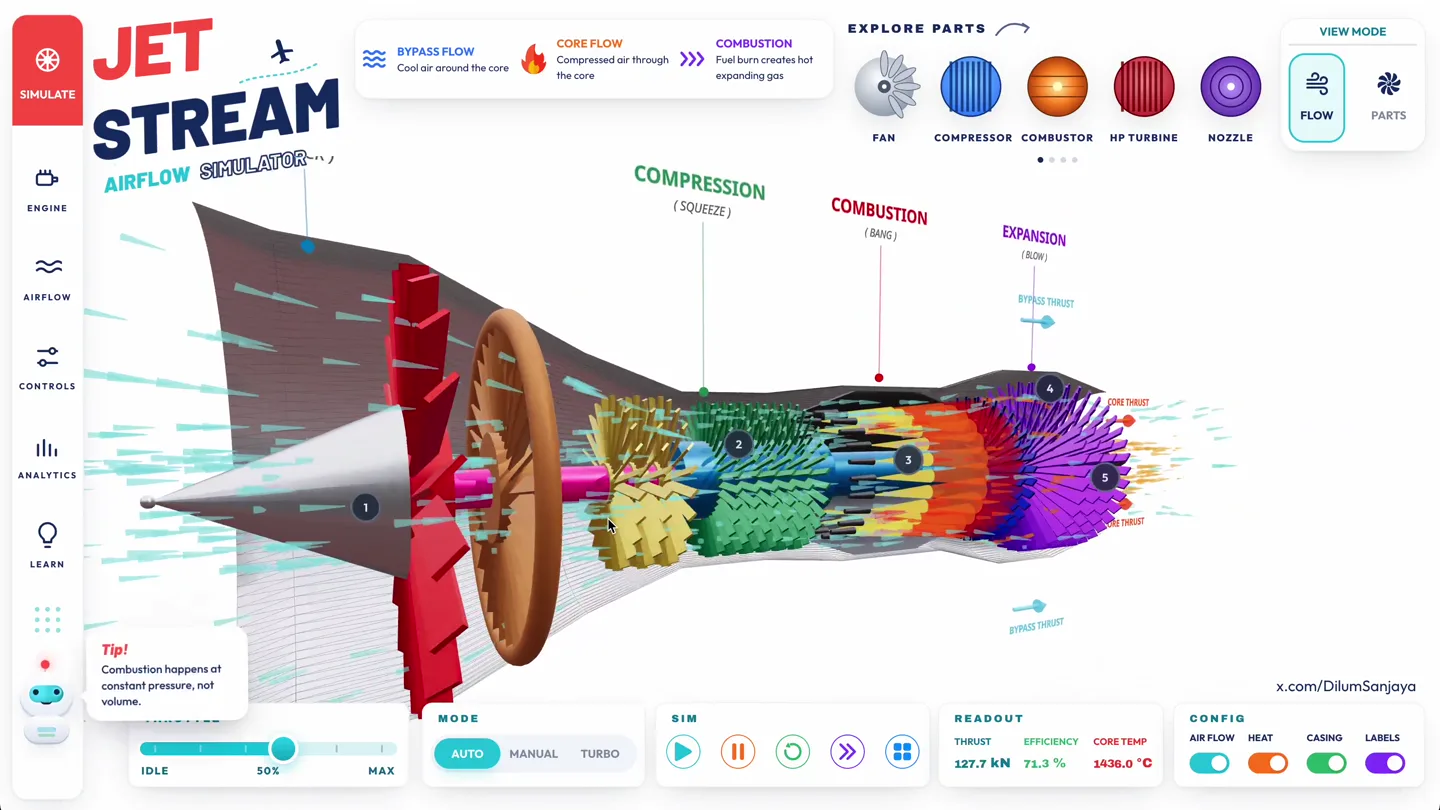
Interactive Turbofan Jet Engine Simulation
“(No spoken dialogue — The track begins with a sustained, evolving pad sound, creating an atmospheric and slightly mysterious mood.)”
- On screen
- JET STREAM AIRFLOW SIMULATOR INTAKE (SUCK) BYPASS FLOW Cool air around the core CORE FLOW Compressed air through the core COMBUSTION Fuel burn creates hot expanding gas EXPLORE PARTS VIEW MODE FAN COMPRESSOR COMBUSTOR HP TURBINE NOZZLE FLOW PARTS THROTTLE MODE SIM READOUT CONFIG IDLE 50% MAX AUTO MANUAL TURBO THRUST EFFICIENCY CORE TEMP 127.6 kN 72.5 % 1438.8 °C AIR FLOW HEAT CASING LABELS x.com/DilumSanjaya
- Camera
- Static, wide shot of the entire jet engine cross-section, with subtle internal airflow animation.
- Motion
- Subtle internal particle flow animation, UI element highlights on hover/click, and dynamic data readouts.
Product Reveal
Detailed Component Interaction and Data
“(No spoken dialogue — A subtle, high-frequency riser begins to build, leading into a significant sub-bass drop/impact at 00:08. This is followed by a driving, arpeggiated synth melody with a prominent sub-bass line and crisp, electronic percussion. Another high-energy riser starts at 00:15, culminating in a powerful sub-bass drop/impact at 00:16.)”
- On screen
- JET STREAM AIRFLOW SIMULATOR INTAKE (SUCK) BYPASS FLOW Cool air around the core CORE FLOW Compressed air through the core COMBUSTION Fuel burn creates hot expanding gas EXPLORE PARTS VIEW MODE FAN COMPRESSOR COMBUSTOR HP TURBINE NOZZLE FLOW PARTS THROTTLE MODE SIM READOUT CONFIG IDLE 50% MAX AUTO MANUAL TURBO THRUST EFFICIENCY CORE TEMP 126.8 kN 79.8 % 1438.4 °C AIR FLOW HEAT CASING LABELS x.com/DilumSanjaya Tip! Combustion happens at constant pressure, not volume. Whoa! Exhaust gas leaves the nozzle near the speed of sound. INTAKE FAN The fan ingests ambient air and splits it between the bypass duct and the engine core. DIAMETER RPM 2.85 m 3,200 COMPRESSOR STAGES Multiple axial stages squeeze the core flow to 30× ambient pressure before it reaches the combustor. STAGES RATIO 14 32:1 Heads up! Turbo mode cranks airflow – readouts will spike. COMBUSTION CHAMBER Fuel meets compressed air and burns continuously, producing high-energy gas that drives the turbine downstream. TEMP PRESSURE 1,432 °C 28 bar HP & LP TURBINE Expanding gas spins the turbine, which drives the upstream compressor and fan via the central shaft. STAGES POWER 5 110 MW
- Camera
- Subtle camera pan and zoom to highlight specific engine components, followed by a return to the wide view.
- Motion
- Interactive pop-up information cards, dynamic throttle slider animation, and synchronized data updates.
Feature Teaser
Dynamic Airflow Visualization and Component Focus
“(No spoken dialogue — A more intense, layered synth melody and rhythmic elements continue. A distinct sweep sound is heard at 00:23.)”
- On screen
- JET STREAM AIRFLOW SIMULATOR INTAKE (SUCK) BYPASS FLOW Cool air around the core CORE FLOW Compressed air through the core COMBUSTION Fuel burn creates hot expanding gas EXPLORE PARTS VIEW MODE FAN COMPRESSOR COMBUSTOR HP TURBINE NOZZLE FLOW PARTS THROTTLE MODE SIM READOUT CONFIG IDLE 50% MAX AUTO MANUAL TURBO THRUST EFFICIENCY CORE TEMP 128.8 kN 79.8 % 1440.0 °C AIR FLOW HEAT CASING LABELS x.com/DilumSanjaya Did you know? Bypass thrust gives modern jets their quiet ride. INTAKE AIR BYPASS THRUST
- Camera
- Rapid camera rotation around the engine, showcasing different angles and the bypass flow, then a quick snap back to the original view.
- Motion
- 3D model rotation, animated airflow arrows, and contextual information pop-ups appearing and disappearing.
Call to Action
Full Simulation Experience and Branding
“(No spoken dialogue — Another sub-bass impact at 00:24. The intensity builds again with a riser from 00:30, leading to a final, impactful sub-bass drop at 00:31, which then fades out with a sustained synth pad.)”
- On screen
- JET STREAM AIRFLOW SIMULATOR INTAKE (SUCK) BYPASS FLOW Cool air around the core CORE FLOW Compressed air through the core COMBUSTION Fuel burn creates hot expanding gas EXPLORE PARTS VIEW MODE FAN COMPRESSOR COMBUSTOR HP TURBINE NOZZLE FLOW PARTS THROTTLE MODE SIM READOUT CONFIG IDLE 50% MAX AUTO MANUAL TURBO THRUST EFFICIENCY CORE TEMP 127.8 kN 71.8 % 1438.6 °C AIR FLOW HEAT CASING LABELS x.com/DilumSanjaya
- Camera
- Return to the initial wide, static view, allowing the user to absorb the full interactive UI.
- Motion
- Sustained particle flow, subtle UI animations, and a clear display of the creator's handle.
Motion design primitives
Synthesizable in Remotion · key components of the interactive-3d-simulator-showcase template.
InteractiveDataOverlay
A semi-transparent information card appears on screen, pointing to a specific part of the 3D model, displaying relevant data and descriptive text. It animates in with a subtle fade and slide.
+ Code construction recipe
Use Remotion's `AbsoluteFill` for layout, `spring` for fade and slide animations of the card, and `interpolate` for line drawing from the card to the 3D model. SVG paths can be used for the connecting lines, animated with `stroke-dashoffset`.
DynamicThrottleControl
A horizontal slider UI element allows users to adjust a parameter (e.g., 'THROTTLE'), with a corresponding numerical readout updating in real-time. The slider knob moves smoothly, and the numerical value animates its change.
+ Code construction recipe
Implement with Remotion's `useCurrentFrame` and `interpolate` to link slider position to numerical values. Use `spring` for the slider knob's movement and `AnimatePresence` for smooth number transitions in the readout.
ExplodedViewRotation
The 3D model of the jet engine rotates dynamically, allowing viewers to see different components from various angles. During rotation, specific parts might slightly separate or highlight to emphasize their function.
+ Code construction recipe
Utilize a 3D library (e.g., Three.js integrated with Remotion Canvas) to render the jet engine. Animate the camera's `rotation` and `position` properties using `interpolate` or `spring` for smooth orbital movements. Individual component transforms can be animated for 'exploded' views.
Style DNA & aesthetic system
Visual aesthetic
Typography
Motion
Special effects
Pacing & rhythm
Conceptual story rhythm
- 1
Initial Overview
Purpose. Introduce the core product and its primary function.
Execution. Wide shot of the full jet engine simulation with active airflow and initial data readouts.
- 2
Component Deep Dive
Purpose. Showcase the interactive nature and detailed information available for each part.
Execution. Camera zooms and pans to individual components, triggering interactive information cards.
- 3
Dynamic Visualization
Purpose. Demonstrate the real-time simulation capabilities and visual feedback.
Execution. Engine rotation, animated airflow paths, and throttle adjustments with immediate visual and data changes.
- 4
Full Interactive Experience
Purpose. Reinforce the comprehensive and engaging nature of the application.
Execution. Return to the full view, allowing the user to see the entire system operating dynamically, with subtle UI prompts.
Remix in Animatiq Studio
Master remix prompt · agent-ready
Sample remix
Objective
Launch an interactive solar system simulator for educational purposes.How the recipe adapts
The 'InteractiveDataOverlay' primitive will be adapted for planetary information cards, detailing facts like mass, radius, and orbital period. The 'DynamicThrottleControl' will become a 'TimeWarpSlider' to control the simulation speed of planetary orbits. The 'ExplodedViewRotation' will be used to orbit around planets and zoom into their surfaces, revealing moons or atmospheric details.Remix blueprint · interactive-3d-simulator-showcase
Scene durations (4 scenes, 40s)
Key Remotion components
Related Creative Tools Product Launches
Explore all Creative Tools launches →
Anthropic Labs launches Claude Design, which turns conversation into prototypes, slides and one-pagers, powered by Claude Opus 4.7.

A vibe design partner with an AI-native canvas for turning ideas into UI.

Your work tools in Claude are now available on mobile. Explore Figma designs, create Canva slides, check Amplitude dashboards, all from your phone. Give it a try: